
Disclosure: VPNFin is reader-supported. If you buy a VPN through links on this page, we may earn a commission at no extra cost to you. This never affects our ratings — here’s our full disclosure.
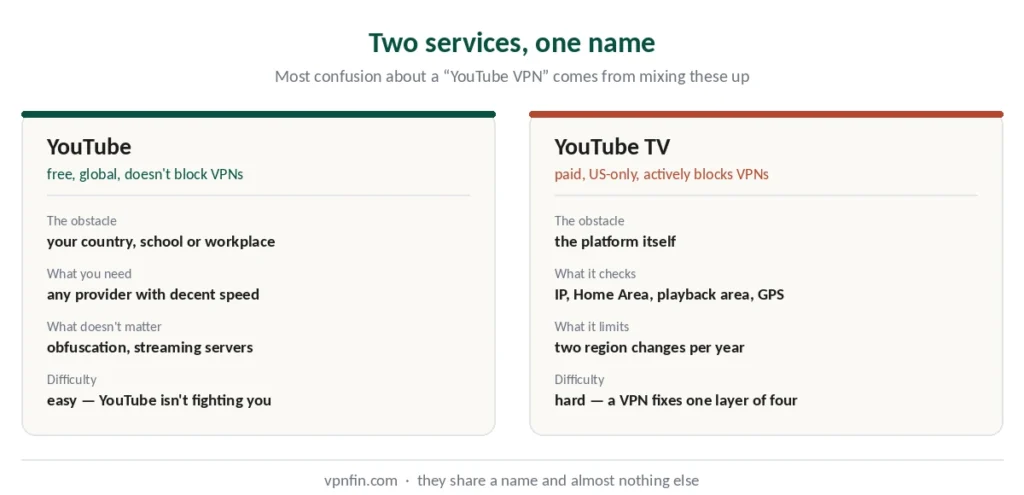
These share a name and almost nothing else.
YouTube is free and global. People want a VPN for it to reach content restricted in their country, or because a network blocks the site entirely. Our page on TunnelBear with YouTube covers regional videos, UHD speeds and why YouTube TV fails.
YouTube TV is a paid US-only television service with local channels, and its location system is one of the strictest in streaming — it checks your Home Area, your current playback location, your GPS and your IP address, all separately.
Most confusion about “YouTube VPN” comes from mixing the two. This guide covers each.
The Short Answer
For YouTube: almost any provider works. The site doesn’t block VPNs, so you’re only working around whatever network or country is doing the blocking.
For YouTube TV: far harder. It actively detects VPNs, enforces Home Area rules, and limits how often you can change regions. A VPN helps with the IP layer and nothing else. Our page on CyberGhost and YouTube covers region-locked videos, privacy and the Premium rules.
And for YouTube TV specifically: if you’re not already a subscriber, a US payment method is a separate obstacle a VPN doesn’t solve.
YouTube: The Easy Case
YouTube itself doesn’t fight VPNs. It has no commercial reason to — the service is free and ad-supported, and a viewer is a viewer.
When a VPN helps:
Your country blocks or throttles the site. Your school or workplace network blocks it — though our guide on VPN legality covers why circumventing restrictions on someone else’s network carries its own risks. Or a video is unavailable in your region because of licensing.
What to look for: speed, mainly. YouTube at 1080p needs about 5 Mbps and 4K around 20, and any provider we rank clears that comfortably — our speed guide covers where each lands.
What doesn’t matter: obfuscation, streaming-optimised servers, and most of the features providers advertise for streaming. YouTube isn’t blocking you; something between you and YouTube is.
YouTube TV: The Hard Case
Here the platform itself is the obstacle, and it checks more than most people expect.
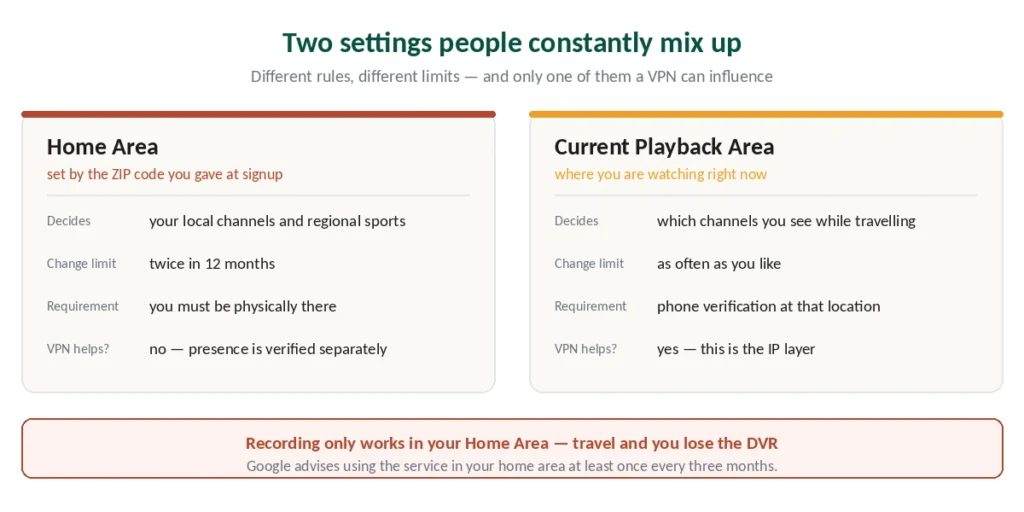
Home Area is set by the ZIP code you enter at signup. It determines which local channels and regional sports networks you get — ABC, CBS, FOX, NBC and your regional sports coverage all follow from it.
Current Playback Area is where you’re watching right now. Travel within the US and YouTube TV doesn’t just block content — it switches your local channels to those of your current city. Home Area in California, watching from New York, and you get New York’s stations instead of your own.
These are separate settings with separate rules, and conflating them is why people find the fixes confusing. We also have a separate guide to PureVPN and YouTube.
The Rules on Changing Regions
This is where YouTube TV differs from every other streaming service.
Home Area can be changed twice in 12 months. Not more. And you must be physically present in the new area to change it — a VPN does not satisfy this check.
Current Playback Area can be updated freely, but you have to verify from a phone at the location you’re claiming, and the update is temporary.
Recording only works in your Home Area. Outside it you lose DVR functionality and your home programming until you return.
Google advises frequent travellers to use YouTube TV in their home area at least once every three months to keep access to local networks.
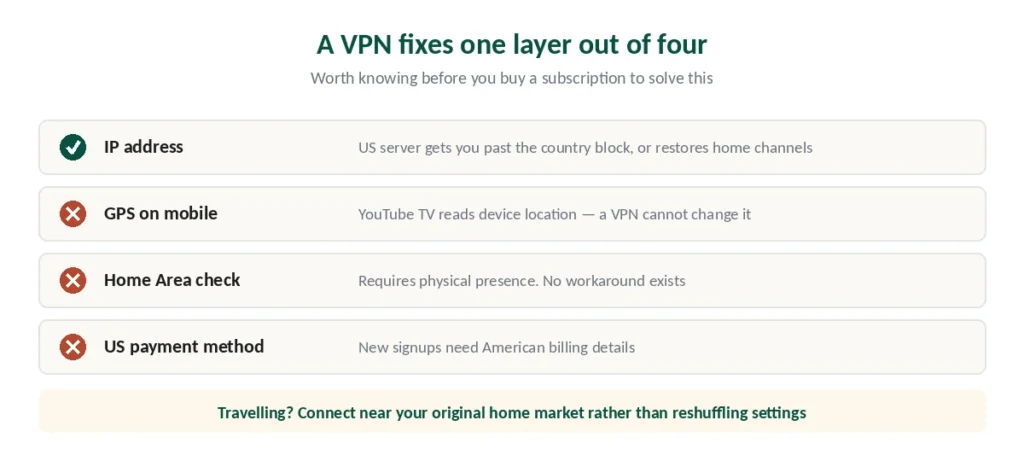
⚠️ Don’t switch settings repeatedly to match VPN servers. Published guidance is consistent on this: frequent changes create account problems, particularly around local channels and sports. If you’re travelling, connect to a server in or near your original home market rather than reshuffling the settings.
What a VPN Fixes and What It Doesn’t
It fixes the IP layer. Connecting to a US server gets you past the country block if you’re abroad, and connecting to a server in your home state can restore your home local channels while travelling within the US.
It doesn’t fix GPS. On phones and tablets, YouTube TV reads your device location alongside your IP. A VPN cannot change that — you’d need to disable location permissions for the app, and doing so may itself trigger a verification prompt.
It doesn’t fix Home Area. That check requires physical presence, full stop.
It doesn’t provide a US payment method. New signups need American billing details.
And it may breach the terms of service. Published analysis notes that account bans are not the common outcome — playback errors, location prompts and temporary blocks are — but access is not guaranteed and the account is what’s at risk.
When It Stops Working
The error is usually “VPN or proxy detected”, and it means the server’s IP address has been identified. Work through this in order.
1. Switch to a different US server, ideally in or near your home market rather than any US city.
2. Clear your browser cache or the app’s data. Stored session information keeps producing errors after you’ve fixed the IP.
3. Check location permissions on mobile. Counterintuitively, enabling location services sometimes resolves detection errors, because YouTube TV can then verify rather than guess.
4. Look for other privacy tools. iCloud Private Relay, secure DNS apps, antivirus web shields and work-profile network filters all interfere. Disable them and retest.
5. Check whether the channel is actually available in your ZIP code. Sometimes a missing local station is a carriage dispute rather than anything to do with your VPN. Our guide to ExpressVPN and YouTube covers regional videos, YouTube TV and local channels.
Which Provider to Choose
For YouTube TV, three things matter and they’re not the usual ones.
US server coverage across many cities. You need a server near your specific home market, not just “United States”. Providers covering fifteen or more US cities give you a realistic chance of matching your ZIP code’s region. Our guide to IPVanish and YouTube covers regional videos, privacy and limits.
NordVPN runs over 3,000 US servers across 15+ cities — the largest pool of the providers we rank — and posted the best speed result in independent benchmark testing.
Surfshark covers unlimited devices, which helps if the household watches on several screens, and renews cheaper than most.
ExpressVPN covers more US cities than most and includes browser extensions with location handling.
For plain YouTube, any of the five works and the choice comes down to price — our cheap VPN guide compares four-year totals.
⚠️ Test on the refund window. Every provider we rank gives at least 30 days. YouTube TV’s detection changes, and no guide — including this one — can promise it works next month.
How We Research
This guide draws on published testing and technical analysis from named sources including Cybernews, Top10VPN, Security.org and PCrisk, alongside YouTube TV’s own documented location rules and our full reviews of the providers we rank — cross-checked and verified at publication. Several sources carry affiliate relationships with providers they recommend; we used them for technical detail confirmed elsewhere rather than for rankings. Our full approach lives on the About Us page.
YouTube VPN FAQ
Home Area is set by the ZIP code you entered at signup and determines which local channels and regional sports networks you receive. Current Playback Area is where you’re watching at the moment. Travelling within the US switches your local channels to those of your current city rather than blocking them outright.
Twice in any 12-month period, and you must be physically present in the new area to make the change. A VPN does not satisfy this check. Current Playback Area can be updated more freely, but requires verification from a phone at the location you’re claiming.
Partially. It handles the IP layer — getting past the country block from abroad, or restoring your home local channels while travelling within the US. It does not change your device’s GPS, satisfy Home Area verification, or provide a US payment method. Using one may also breach YouTube TV’s terms.
The IP address you’re using has been identified and blocked. Switch to a different US server, ideally near your home market, then clear your browser cache or app data. Stored session information keeps producing the error even after the IP problem is fixed.
Only if something is blocking it — a country-level restriction, a school or workplace network, or a video unavailable in your region. YouTube itself doesn’t block VPNs, so any provider with reasonable speed works. The features providers advertise for streaming aren’t needed here.
Recording functionality only works in your Home Area. Outside it you lose DVR access and your home programming until you return. Google advises frequent travellers to use YouTube TV in their home area at least once every three months to maintain access to local networks.
The Short Version
For YouTube: any decent provider. The platform isn’t blocking you, so pick on speed and price.
For YouTube TV: understand the two location settings first. Home Area sets your local channels and changes twice a year at most, with physical presence required. Playback Area is temporary and needs phone verification.
A VPN handles the IP layer only. GPS, Home Area verification and payment method are outside what it can do — and if you’re travelling, connecting near your original home market causes fewer problems than reshuffling settings. Our page on NordVPN and YouTube covers region-locked videos and the Premium pricing rules.