
Disclosure: VPNFin is reader-supported. If you buy a VPN through links on this page, we may earn a commission at no extra cost to you. This never affects our ratings — here’s our full disclosure.
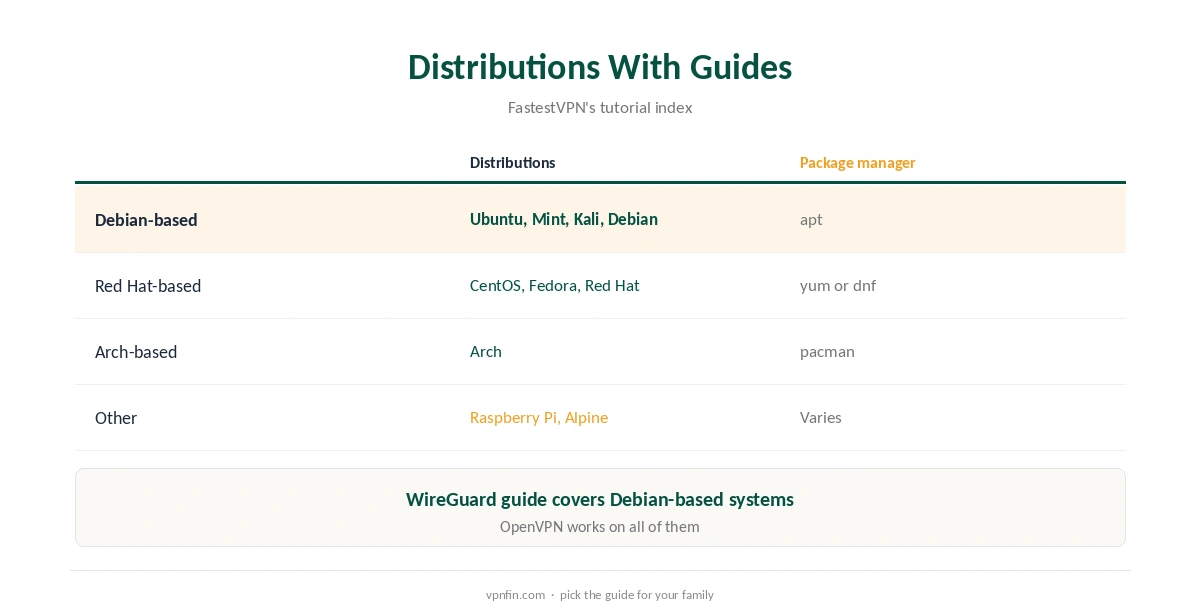
FastestVPN Linux support runs mainly through the terminal. Its support pages walk through OpenVPN on the command line, with downloadable TCP and UDP config files, and a WireGuard setup for Debian-based systems that uses a config file you request from FastestVPN’s support team. Guides cover Ubuntu, Mint, Kali, Debian, CentOS, Fedora, Red Hat, Arch, Raspberry Pi and Alpine.
This guide covers both routes, the checks and the trade-offs.
FastestVPN Linux Setup With OpenVPN
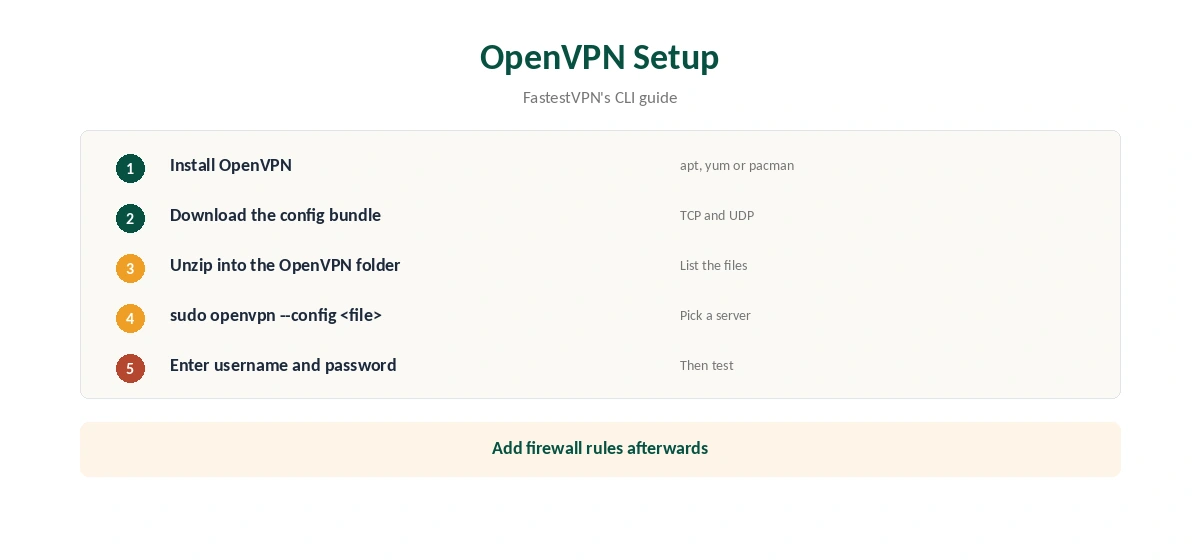
FastestVPN’s CLI guide gives the steps. Install OpenVPN with your package manager: apt on Debian and Ubuntu, yum on Fedora and CentOS, pacman on Arch and Manjaro. Download FastestVPN’s TCP and UDP config bundle from its support site and unzip it in the OpenVPN folder. Then connect with sudo openvpn and the config file for the server you want, entering your FastestVPN username and password when asked.
WireGuard on Linux
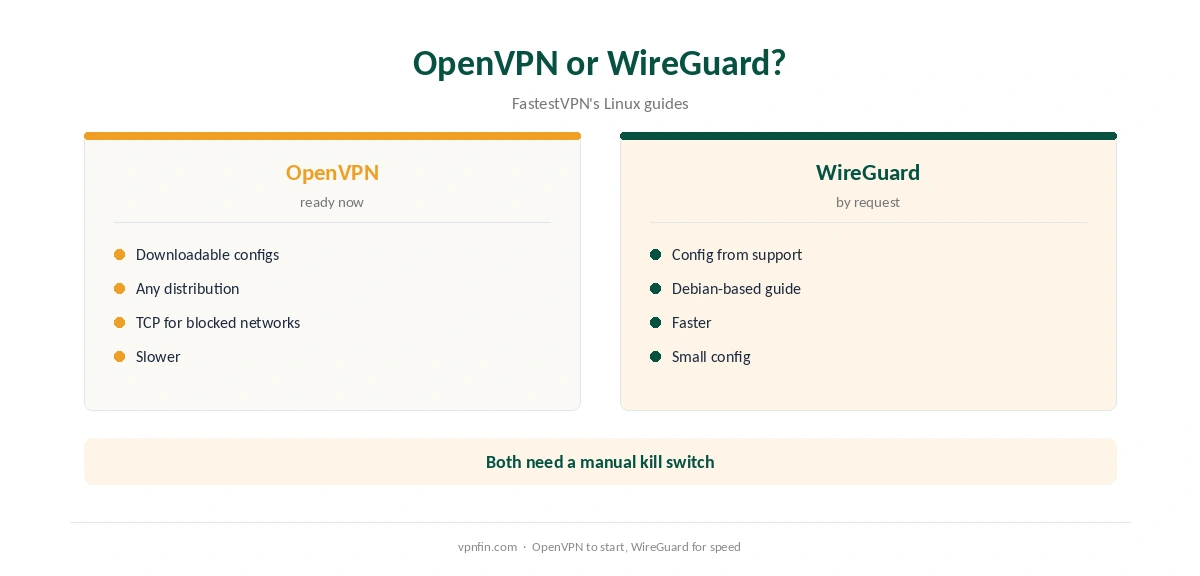
FastestVPN’s WireGuard guide, updated in mid-2026, covers Debian-based systems. Install WireGuard with apt, create a config file in the WireGuard folder, paste in the contents of the WireGuard config FastestVPN gives you and bring the interface up. If you do not have a config, the guide says to email FastestVPN’s support team for one.
The guide includes a section on losing internet access after activating WireGuard, which usually points to DNS or routing settings in the config.
Which Distributions
FastestVPN’s tutorial index lists guides for Ubuntu, Mint, Kali, Debian, CentOS, Fedora, Red Hat, Arch, Raspberry Pi and Alpine. The OpenVPN route works on any of them, since it uses the standard OpenVPN client.
Kill Switch on Manual Setups
A terminal connection has no app-level kill switch. Add firewall rules that allow traffic only through the tunnel interface, so a dropped connection does not leak. Our kill switch guide explains the idea.
Checking the Connection
After connecting, confirm the address with our VPN test page and run our DNS leak guide. Manual setups often leave DNS pointing at your provider, so check it.
Choosing TCP or UDP Files
FastestVPN’s bundle includes TCP and UDP config files. UDP is usually faster; TCP gets through networks that block UDP. Start with UDP, and switch to the TCP file for the same server if the connection fails. Our WireGuard vs OpenVPN guide explains the protocols.
Keeping Credentials Safe
OpenVPN asks for your username and password each time. To connect automatically, store them in a file readable only by root, and point the config at it. Never leave the credentials in a world-readable file, especially on shared machines.
Is FastestVPN Linux Support Enough?
For servers and power users, FastestVPN Linux support covers the essentials through standard tools. Desktop users who want a graphical app with a kill switch may prefer providers with full Linux apps, which our NordVPN Linux guide covers.
Starting at Boot
For a machine that should always be protected, run the connection as a system service. With OpenVPN, place the config and a root-only credentials file in the OpenVPN folder and enable the matching service. With WireGuard, enable the wg-quick service for your interface. Test after a reboot.
A Quick Rule
New to FastestVPN Linux? Start with the OpenVPN files, since they are ready to download. Want more speed? Ask support for a WireGuard config. Running a server? Add a firewall kill switch and start the tunnel at boot.
Testing Speed
Run a speed test with the tunnel off, then on, on the same server and at the same time of day. Compare a UDP and a TCP file, and WireGuard if you have a config. Our guide to VPN speed explains the overhead.
Quick Check
Run ip a to confirm the tunnel interface is up, then check the address in a browser or with curl against an IP echo service.
Raspberry Pi and Servers
FastestVPN lists a Raspberry Pi guide, which suits a small always-on box for downloads or a home gateway. Run the connection as a service so it restarts at boot. Our Raspberry Pi VPN guide covers the hardware side.
FastestVPN Is Not FastVPN
Namecheap sells a different product called FastVPN, with its own apps and help pages. Search results often mix the two. Check the developer or publisher name before installing, so you get FastestVPN’s client and follow its own guides.
FastestVPN’s Record
Our audit table records a single audit, by Altius IT in 2023, and our ownership table lists FastestVPN as independent and based in the Cayman Islands. It allows 10 devices, with 15 reported on its top lifetime plan, and includes port forwarding, our review notes. Our VPN audit tracker explains why audits matter.
Related Guides
Our Linux VPN guide compares providers with full Linux apps, and our guide to turning off a VPN on Linux covers stopping connections.
How We Research
This page draws on FastestVPN’s Linux CLI OpenVPN guide, its WireGuard on Linux guide, its tutorial index and our FastestVPN review and tables. We cross-checked these sources against each other, and where they conflict or something can’t be verified, we say so in the text rather than guessing. We checked time-sensitive figures, including prices in US dollars, on 7 October 2026. FastestVPN runs lifetime promotions; check the checkout. The main source we relied on is FastestVPN’s Linux WireGuard guide. Our full approach lives on the About Us page.
FastestVPN Linux FAQ
It does, through OpenVPN or WireGuard in the terminal.
On FastestVPN’s support site, as a TCP and UDP bundle.
FastestVPN’s guide says to email its support team.
Ubuntu, Mint, Kali, Debian, CentOS, Fedora, Red Hat, Arch, Raspberry Pi and Alpine.
Not on manual setups; add firewall rules.
The Verdict
FastestVPN Linux use suits people comfortable in the terminal, with OpenVPN files ready to download and WireGuard on request. Add a firewall-based kill switch and test for leaks.