
Disclosure: VPNFin is reader-supported. If you buy a VPN through links on this page, we may earn a commission at no extra cost to you. This never affects our ratings — here’s our full disclosure.
FastestVPN Chrome support comes as a proxy extension that secures your browser traffic over HTTPS, FastestVPN’s support page says. It includes an ad blocker and WebRTC leak protection, both switchable in its settings. The Chrome Web Store listing adds AES-256 encryption, P2P-optimised servers and unlimited bandwidth. It protects Chrome only; FastestVPN’s support pages describe the full apps as the way to cover the whole device.
This guide covers the setup, the features, the limits and the record.
FastestVPN Chrome Setup
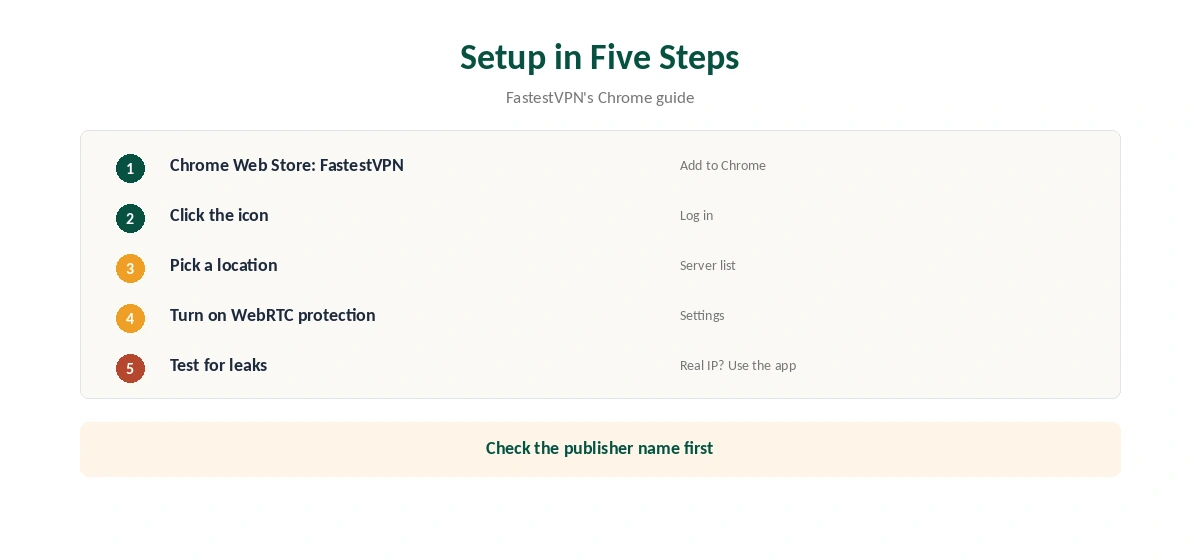
FastestVPN’s guide gives three steps. Add the extension from the Chrome Web Store. Click its icon, enter your FastestVPN username and password and log in. Pick a location from the server list, and the extension connects.
Confirm the new address with our VPN test page.
What the Extension Includes
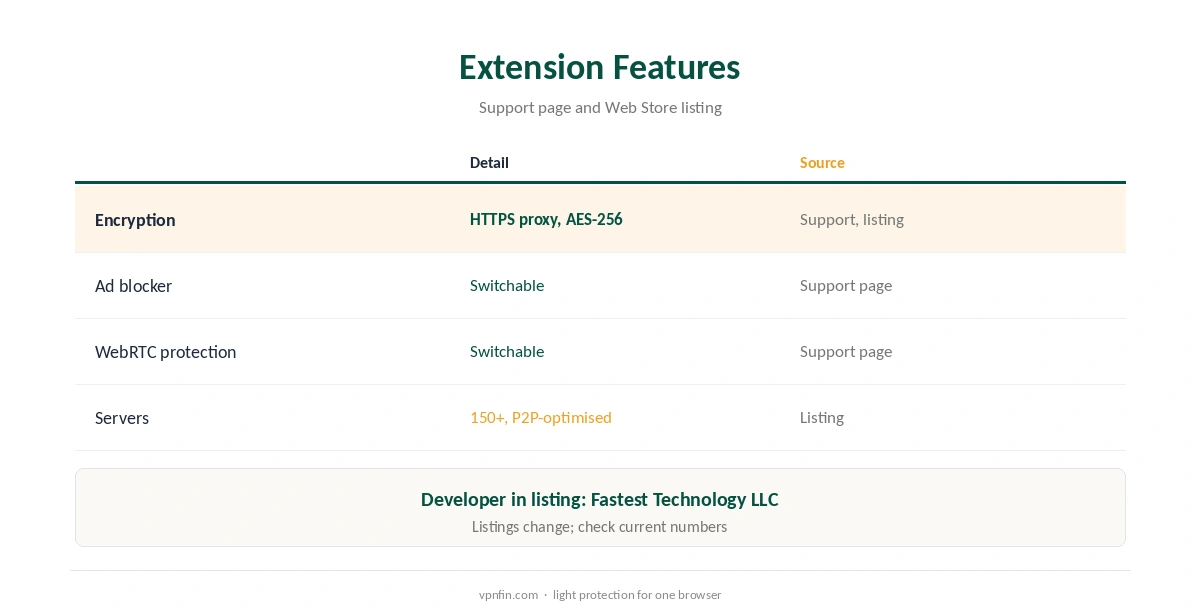
The support page lists an ad blocker and WebRTC protection, which you can switch on or off in the extension’s settings. The Web Store listing mentions more than 150 servers, P2P-optimised locations, unlimited bandwidth and unlimited server switching. Listings change, so check the current numbers in the extension.
Extension or App?
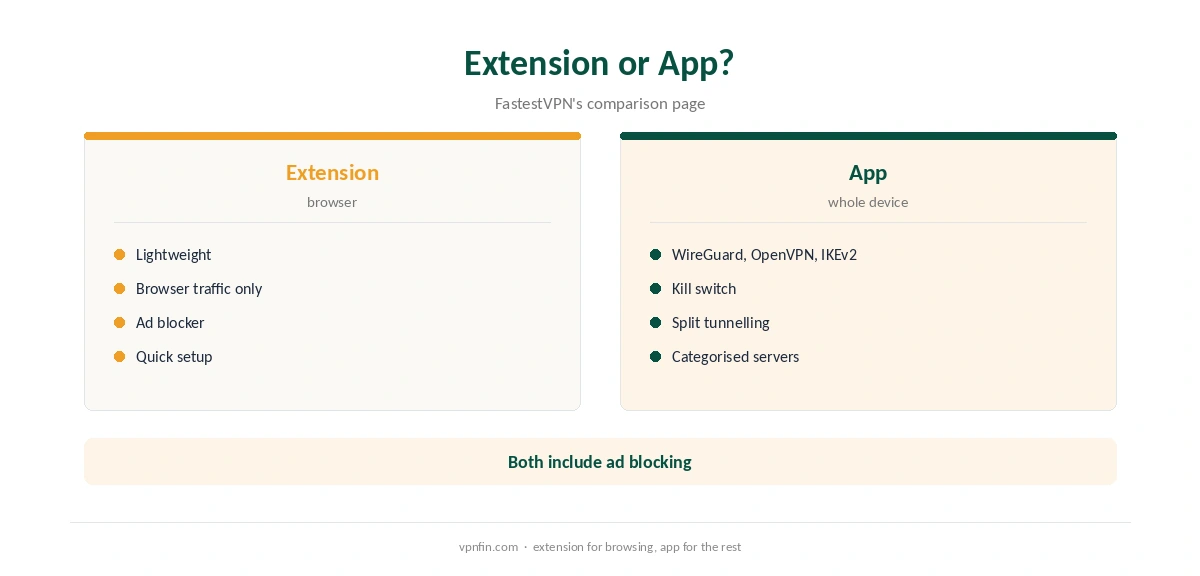
FastestVPN’s own comparison page says the extension is a lightweight version that secures only browser traffic. The apps add a choice of WireGuard, OpenVPN and IKEv2, split tunnelling, a kill switch and categorised servers. Use the extension for quick browser privacy, and the app for everything else. Our VPN vs proxy guide explains the difference.
Checking for WebRTC Leaks
Keep the WebRTC option on, then test with our WebRTC leak guide. If you still see your real address, switch to the desktop app, which handles traffic below the browser.
Other Browsers
FastestVPN’s support pages list extensions for Chrome, Firefox and Edge. Each protects only its own browser. Our NordVPN Chrome guide covers a rival extension.
FastestVPN Chrome on Public Wi-Fi
On café and hotel networks, the extension encrypts what Chrome sends, which covers most browsing risks. Email apps, updates and other browsers stay outside it. Turn it on before signing in to anything, and use the full app on laptops you take everywhere. Our public Wi-Fi guide explains the risks.
Streaming in Chrome
Browser proxies can struggle with streaming sites, which check more than your IP address. If a site shows the wrong library, clear its cookies and reload, or switch to the app. Our Netflix VPN guide covers how services detect VPNs.
Lifetime Plans
FastestVPN is known for lifetime deals, which our tables record between $23 and $40 within a year. The extension comes with the account. Our lifetime VPN guide explains the risks of paying once for years of service.
Keeping It Updated
Chrome updates extensions automatically. If FastestVPN Chrome stops connecting, check the version on Chrome’s extensions page, sign out and back in, then restart the browser. Reinstall from the Web Store if nothing else works.
A Quick Rule
Browsing on public Wi-Fi in Chrome only? The extension is enough. Torrenting, banking or other apps? Use the desktop app. Seeing your real address in a WebRTC test? Switch to the app at once. Our FastestVPN Windows guide covers the desktop app.
Comparing Extensions
For comparison, our Surfshark Chrome guide covers an extension from a provider with more audits; Surfshark shares an owner, Nord Security, with NordVPN. Check each extension’s permissions before installing, since proxy extensions can read the pages you visit.
Quick Check
After connecting, open our test page in Chrome and confirm the address changed. Then open the same page in another browser: it should still show your real address, which confirms the extension covers Chrome only.
Several Browsers
If you use Chrome at work and Firefox at home, install each browser’s extension and sign in with the same account. Settings do not carry over between them.
Who Publishes It
The Chrome Web Store listing names the developer as Fastest Technology LLC with an address in Houston, Texas, while FastestVPN describes itself as based in the Cayman Islands. Our VPN ownership guide explains why ownership details matter.
FastestVPN Is Not FastVPN
Namecheap sells a different product called FastVPN, with its own browser tools and help pages. Search results often mix the two. Check the developer or publisher name before installing, so you get FastestVPN’s client and follow its own guides.
FastestVPN’s Record
Our audit table records a single audit, by Altius IT in 2023, and our ownership table lists FastestVPN as independent and based in the Cayman Islands. It allows 10 devices, with 15 reported on its top lifetime plan, and includes port forwarding, our review notes. Our VPN audit tracker explains why audits matter.
Turning It Off
Click the extension icon and disconnect, or remove it from Chrome’s extensions page. Our guide to turning off a VPN in Chrome covers stubborn cases.
How We Research
This page draws on FastestVPN’s Chrome extension guide and app-or-extension page, the FastestVPN Proxy listing in the Chrome Web Store and our FastestVPN review and tables. We cross-checked these sources against each other, and where they conflict or something can’t be verified, we say so in the text rather than guessing. We checked time-sensitive figures, including prices in US dollars, on 7 October 2026. FastestVPN runs lifetime promotions; check the checkout. The main source we relied on is FastestVPN’s Chrome guide. Our full approach lives on the About Us page.
FastestVPN Chrome FAQ
It does, a proxy extension in the Chrome Web Store.
Its support page lists an ad blocker you can switch on or off.
It includes WebRTC protection; test it after connecting.
No. Only Chrome traffic goes through it.
No. FastVPN is Namecheap’s separate product.
The Verdict
FastestVPN Chrome support suits quick browser privacy with a built-in ad blocker and WebRTC protection. Use the full app when you need every program covered.