
Disclosure: VPNFin is reader-supported. If you buy a VPN through links on this page, we may earn a commission at no extra cost to you. This never affects our ratings — here’s our full disclosure.
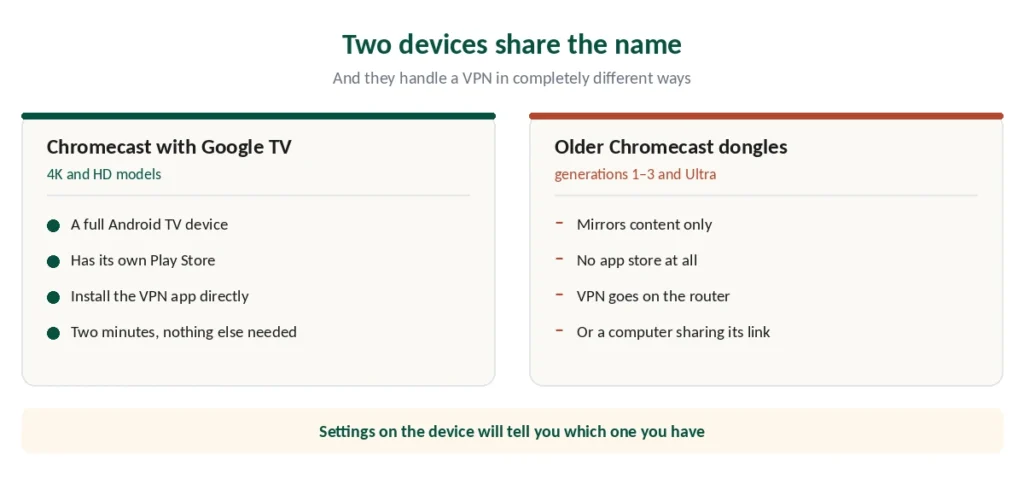
Two things share the Chromecast name, and they behave completely differently.
Chromecast with Google TV is a full Android TV device with its own interface and app store. You install a VPN on it the way you would on a phone. Our page on Surfshark on Chromecast covers the Google TV app and the router route for cast-only models.
Older Chromecast dongles — generations 1 to 3 and Chromecast Ultra — only mirror content cast from another device. No app store, no VPN app, no way to install one.
And there’s a problem that catches out owners of both: turning on a VPN often stops casting working at all. That’s the first thing to explain, because it’s the reason most people arrive here.
The Short Answer
Google TV models: install the provider’s Android TV app from the Play Store. Two minutes, done.
Older dongles: the VPN goes on your router, or on a computer sharing its connection.
If casting suddenly stops working: your phone and your Chromecast are on different networks. Fixable, and covered below.
Why Casting Breaks
This deserves explaining properly, because it looks like a fault and isn’t.
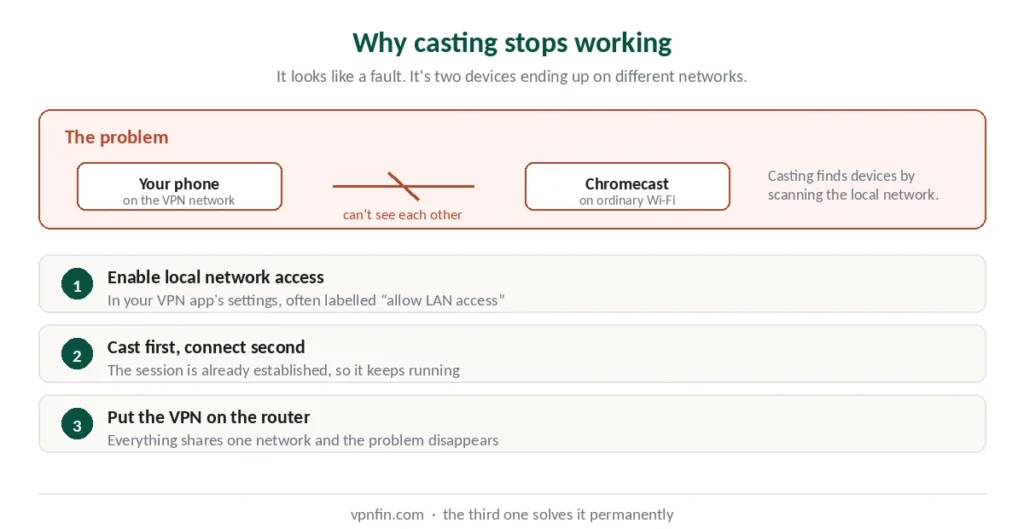
Casting requires both devices on the same network. Your phone finds the Chromecast by looking around the local network for it.
A VPN puts your phone on a different network — a virtual one, routed elsewhere. Your Chromecast stays on the ordinary Wi-Fi. They can no longer see each other, and the cast button stops finding the device.
Three ways round it:
Enable local network access in your VPN app’s settings. On Windows and Android this permits other devices on your physical network to remain reachable while the VPN is connected. Most providers include the option; it’s often labelled something like “allow LAN access.”
Cast first, then connect. Start the cast before turning the VPN on. The session is already established, so it continues.
Put the VPN on the router instead. Then everything sits on the same protected network and the problem disappears entirely — our router guide covers the three approaches.
If You Have Google TV
The straightforward case.
Open the Play Store on the device, search for your provider, install, sign in, connect. It’s an Android TV device, so anything with an Android TV app works.
If your provider isn’t listed, several offer downloadable APK files from their own sites for sideloading.
⚠️ Only from the provider’s own site. Third-party APK repositories are a common malware vector.
One thing to note: installing the VPN on the Chromecast itself protects what the Chromecast streams. It doesn’t protect what you cast from your phone, which travels separately.
If You Have an Older Dongle
Three options, in descending order of how well they work.
Router. The VPN covers everything on the network including the Chromecast, and casting works normally because both devices sit on the same protected connection. This is the proper solution. We also have a separate guide to PureVPN on Chromecast.
Virtual hotspot from a computer. Connect your PC to the VPN, share that connection over Wi-Fi, and connect the Chromecast to it. Works well, but the computer has to stay on. Our guide to ExpressVPN on Chromecast covers the Google TV app, and the router for cast-only models.
Cast a browser tab. The crudest method: connect your computer to the VPN and cast a Chrome tab to the Chromecast. Quality is lower than the other methods and published guidance recommends it only when the others aren’t available. Our guide to IPVanish on Chromecast covers the app on Google TV, a router for older models.
⚠️ For Netflix specifically: cast the desktop rather than the tab. Casting a tab makes Chrome recognise Netflix and hand off to the app instead of mirroring, which defeats the purpose.
What This Actually Protects
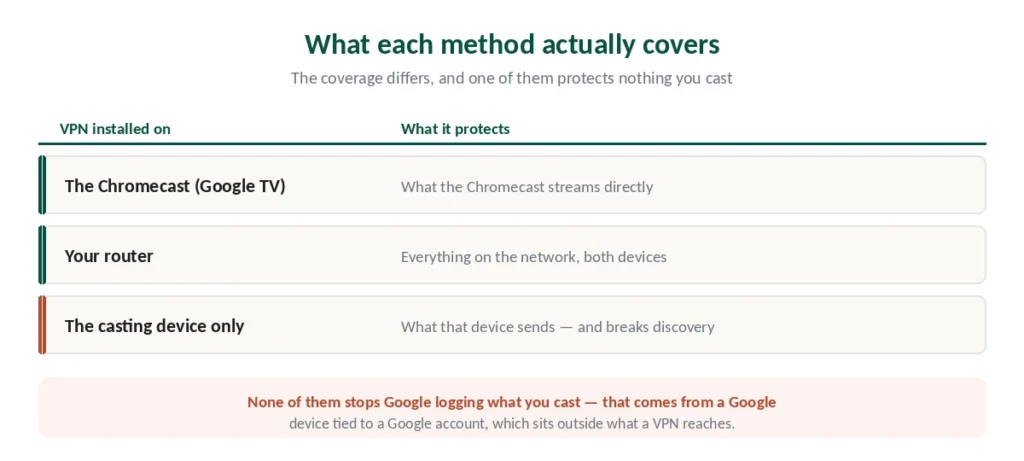
Worth being precise, because the coverage differs by method.
VPN on the Chromecast (Google TV): what the Chromecast streams directly.
On the router: everything on the network, including both the Chromecast and whatever you cast from.
On the casting device only: what that device sends — and, as covered above, this is what breaks discovery in the first place. Our guide to Windscribe on Chromecast covers free app on Google TV, a router for older models.
One privacy note. Google’s own privacy policy indicates it may collect system activity, crash reports and usage data including the apps and domains you cast. A VPN doesn’t change what Google collects from a Google device you’re signed into — what a VPN actually hides covers why logged-in accounts sit outside its reach.
Which Provider to Choose
An Android TV app matters if you have Google TV. All five providers we rank publish one.
Router support matters if you have an older dongle. Our router guide covers which approaches work, and ExpressVPN sells hardware with the VPN built into the firmware.
Local network access as a setting, since that’s what keeps casting working. Check for it before subscribing rather than after. We also have a separate guide to Mullvad on Chromecast.
Speed, because casting and streaming compete for the same bandwidth. NordVPN posted the best result in independent benchmark testing.
⚠️ Smart DNS is the fallback if none of this suits. NordVPN’s SmartPlay and similar services handle geo-restrictions on devices that can’t run a VPN — with no encryption, as our Roku guide explains.
Chromecast’s successors run VPN apps directly: see our Google TV Streamer guide and our Onn 4K guide.
How We Research
This guide draws on published setup documentation from VPN providers and Google, technical guides from named sources including WizCase, VPNAlert and VPNCentral, and our own full reviews of the providers we rank — cross-checked and verified at publication. Several sources are VPN companies describing their own Chromecast support; we used those for their own product details and confirmed the general behaviour elsewhere. Our full approach lives on the About Us page.
Chromecast VPN FAQ
Only on Chromecast with Google TV, which is a full Android TV device with the Play Store. Install your provider’s Android TV app the way you would on a phone. Older Chromecast dongles — generations 1 to 3 and Chromecast Ultra — have no app store and can’t install anything, so the VPN goes on your router or a computer instead.
Because casting requires both devices on the same network, and a VPN puts your phone on a virtual one while the Chromecast stays on ordinary Wi-Fi. They can’t see each other. Enable local network access in your VPN app’s settings, start the cast before connecting the VPN, or put the VPN on your router so everything shares one network.
A setting in most VPN apps, often labelled something like “allow LAN access,” that lets devices on your physical network remain reachable while the VPN is connected. On Windows and Android it’s what keeps casting, printing and local file sharing working. Check your provider offers it before subscribing.
Three options. Configure the VPN on your router, which covers everything and is the proper solution. Share a VPN connection from a computer as a Wi-Fi hotspot and connect the Chromecast to that. Or cast a Chrome tab from a computer running the VPN — the crudest method, with lower quality.
Because Chrome recognises Netflix and hands off to the app rather than mirroring the tab, which bypasses your VPN-protected browser entirely. Cast the desktop instead of the tab and the mirroring works as intended.
No. Google’s privacy policy indicates it may collect system activity, crash reports and usage data including the apps and domains you cast. That data comes from a Google device tied to a Google account you’re signed into, which sits outside what a VPN can affect.
The Short Version
Check which Chromecast you have. Google TV models run VPN apps from the Play Store. Older dongles can’t install anything. Our page on CyberGhost on Chromecast covers the Google TV app and the router route for older models.
If casting stopped working when you connected, that’s the network mismatch — enable local network access in your VPN app, cast before connecting, or move the VPN to your router. There is also a guide to NordVPN on Chromecast.
The router solves everything at once, which is why it keeps coming up. Everything sits on one protected network and nothing has to find anything. Our page on NordVPN deals and pricing covers current prices, renewal costs and how to read the discount.