
Disclosure: VPNFin is reader-supported. If you buy a VPN through links on this page, we may earn a commission at no extra cost to you. This never affects our ratings — here’s our full disclosure.
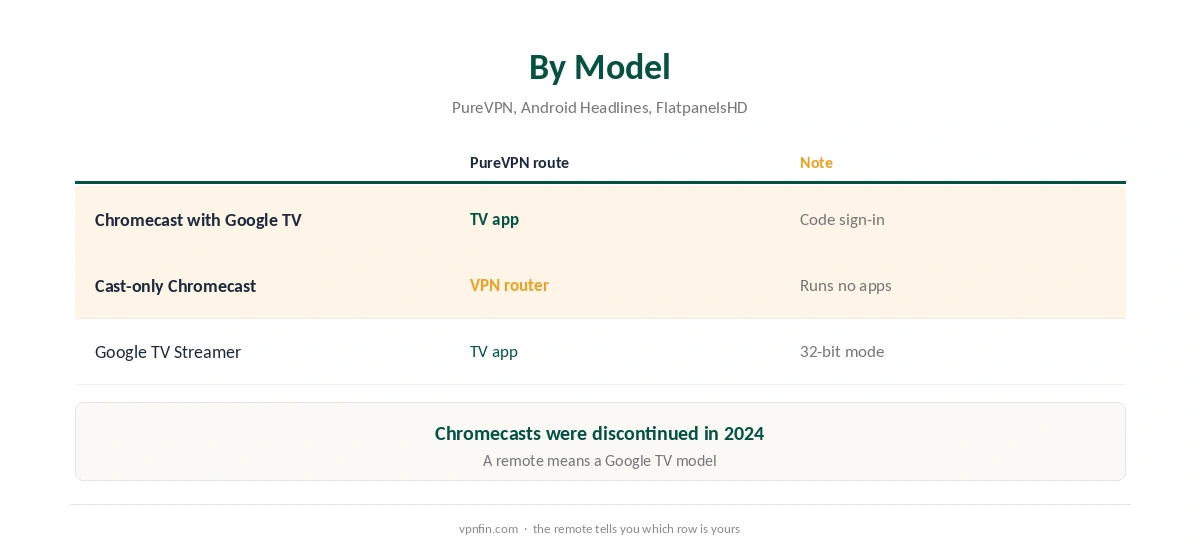
A PureVPN Chromecast setup depends on the model. The Chromecast with Google TV runs Android TV apps, so PureVPN’s TV app installs from Google Play and signs in with a six-digit code. The older cast-only Chromecast runs no apps, so it needs a VPN router. Google replaced both with the Google TV Streamer in 2024, Android Headlines reports.
This guide covers each model, the TV app’s settings, and why casting from a phone with PureVPN does not work.
Which Chromecast Do You Have?
A Chromecast with Google TV comes with a remote and shows the Google TV home screen. A cast-only Chromecast has no remote and only receives video sent from a phone or computer. The difference decides the whole setup.
PureVPN’s help centre has a dedicated article on setting up Chromecast, alongside its Android TV guide. Our Chromecast VPN guide compares other providers.
PureVPN Chromecast Setup on Google TV
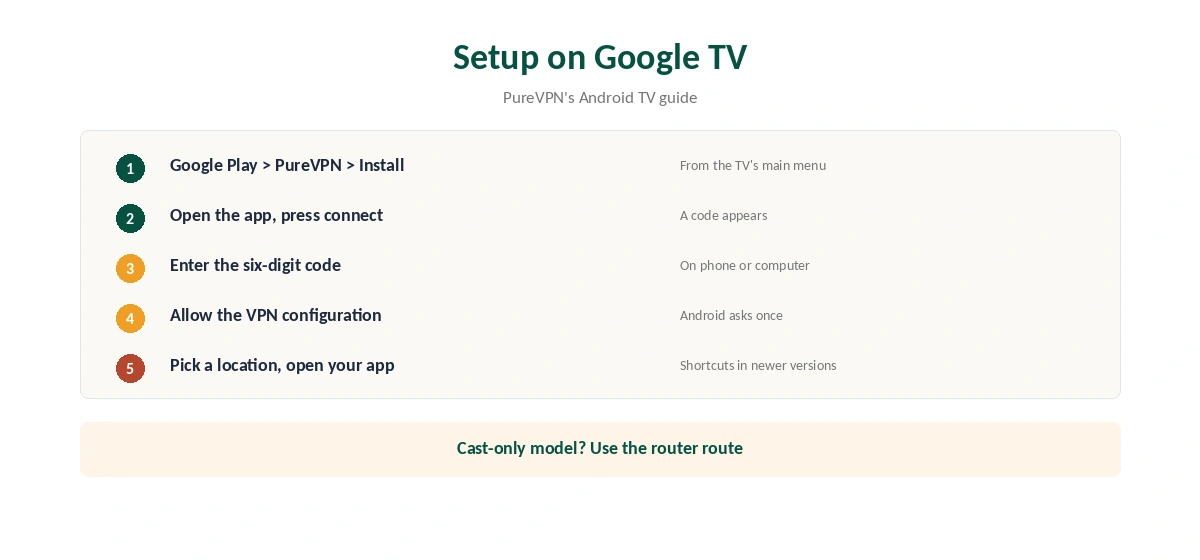
PureVPN’s Android TV guide gives the steps. Open Google Play from the TV’s main menu, search for PureVPN and install it. Open the app and press the connect icon. The app shows a six-digit code; enter it on your phone or computer to sign in.
The first time you connect, Android asks permission to add a VPN configuration; allow it. Then pick a location. PureVPN’s newer TV app also adds shortcuts to favourite streaming apps, so you can open them straight from the VPN screen.
Split Tunnelling on the TV
PureVPN’s Android TV app offers three split tunnelling modes, as our PureVPN Android TV guide explains. That lets one streaming app use the VPN while local apps use your normal connection. Keep the excluded list short, since excluded apps use your real address. Our split tunnelling guide explains the modes.
Cast-Only Chromecasts: Use a Router
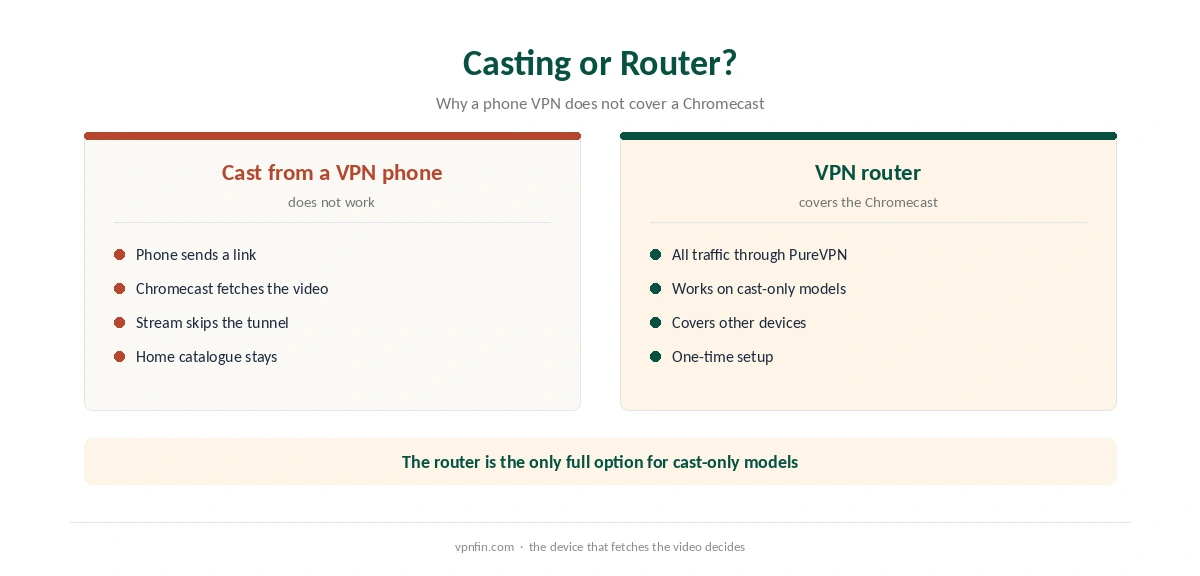
A cast-only Chromecast cannot install apps, so the VPN has to sit on the router. A router running PureVPN covers the Chromecast and every other device behind it, as our PureVPN router guide explains.
Casting from a phone that runs PureVPN does not help. When you cast, the phone sends the Chromecast a link, and the Chromecast fetches the video itself over your home network. So the phone’s tunnel never carries the stream.
Choosing a Location for Streaming
Pick the country of the catalogue you want, then the nearest city within it for speed. TV apps cache location, so close the streaming app fully and reopen it after the VPN connects. If a service blocks one server, switch to another city in the same country before changing anything else.
The shortcuts in PureVPN’s newer TV app help here. Connect, then open the streaming app straight from the PureVPN screen, so it reads the new location from the start.
Other TV Devices
The same TV app runs on Fire TV, as our PureVPN Firestick guide explains. Apple TV has its own native app, covered in our PureVPN Apple TV guide. Samsung and LG TVs cannot run VPN apps, as our smart TV guide explains.
Kill Switch on the TV
A dropped VPN on a TV usually means a catalogue change or an error, not a serious privacy risk. If you want every device covered without gaps, a router running PureVPN keeps the Chromecast in the tunnel even when the TV app is closed. For most viewers, the TV app with auto-connect is enough.
Google TV Streamer
The Google TV Streamer runs Google TV, so PureVPN’s TV app installs the same way. FlatpanelsHD notes it runs Android in 32-bit mode, which can limit some apps. Check Google Play on the device before relying on it. Our Google TV Streamer guide covers the device.
What PureVPN Costs
On 5 October 2026, PureVPN’s order page listed the Standard 2-year plan at $58.20 for the first 27 months, renewing at $47.95 a year. A separate deals page showed $58.05 for the same term with a $54.95 renewal. The page you buy from changes the renewal by seven dollars a year, so check the renewal line at checkout.
One plan covers 10 devices, and a Chromecast counts as one of them. PureVPN offers a 31-day money-back guarantee, as our PureVPN refund guide explains.
| Provider | Renewal price | Per month | Tier |
|---|---|---|---|
| NordVPN | $139.08/yr | ~$11.59 | Basic |
| Surfshark | ~$79/yr | ~$6.58 | Starter |
| ExpressVPN | $99.95/yr | ~$8.33 | Basic |
| CyberGhost | $56.94/yr | ~$4.75 | 2-year |
| PureVPN | $47.95/yr | ~$4.00 | Standard, 2-year (1-year renews $57.95) |
| IPVanish | $89.99/yr | ~$7.50 | Essential |
| Windscribe | ~$69/yr | ~$5.75 | Pro |
| Proton VPN | ~$83.88/yr | ~$6.99 | VPN Plus |
| Mullvad | ~$65/yr | ~$5.40 | flat, no tiers |
| Norton VPN | $79.99/yr | ~$6.67 | Standard |
| Hotspot Shield | ~$95.99/yr | ~$8.00 | Premium annual |
| Astrill | $300 every 2 yrs | ~$12.50 | 2-year, same at renewal |
Testing and Troubleshooting
After connecting, open a streaming app and check that the catalogue changed. If it did not, close the app fully and reopen it, since TV apps cache location. Confirm the connection from a phone on the same network with our VPN test page when using a router.
If PureVPN will not connect on the TV, switch location and restart the Chromecast. Before buying, our trial guide explains the 7-day paid trial. Our PureVPN troubleshooting guide covers the Netflix proxy error. PureVPN belongs to Gaditek, which absorbed Ivacy in 2024.
How We Research
This page draws on PureVPN’s Android TV help article and its help centre index, Android Headlines on the Google TV Streamer, FlatpanelsHD, and PureVPN’s pricing pages. We cross-checked these sources against each other, and where they conflict or something can’t be verified, we say so in the text rather than guessing. We checked time-sensitive figures, including prices in US dollars, on 6 October 2026. PureVPN showed two price grids on different pages on 5 October 2026. The main source we relied on is PureVPN’s Android TV guide. Our full approach lives on the About Us page.
PureVPN Chromecast FAQ
On a Chromecast with Google TV, yes, from Google Play. A cast-only Chromecast needs a VPN router.
The TV app shows a six-digit code; enter it on your phone or computer.
No. The Chromecast fetches the stream itself, so the phone’s VPN does not cover it.
Yes, with three modes on Android TV devices.
It runs Google TV, so the app installs the same way; FlatpanelsHD notes its 32-bit mode can limit some apps.
The Verdict
A PureVPN Chromecast setup is simple on Google TV models, with code sign-in and split tunnelling. Cast-only models need a router, and casting from a VPN phone does not change the Chromecast’s location.