
Disclosure: VPNFin is reader-supported. If you buy a VPN through links on this page, we may earn a commission at no extra cost to you. This never affects our ratings — here’s our full disclosure.
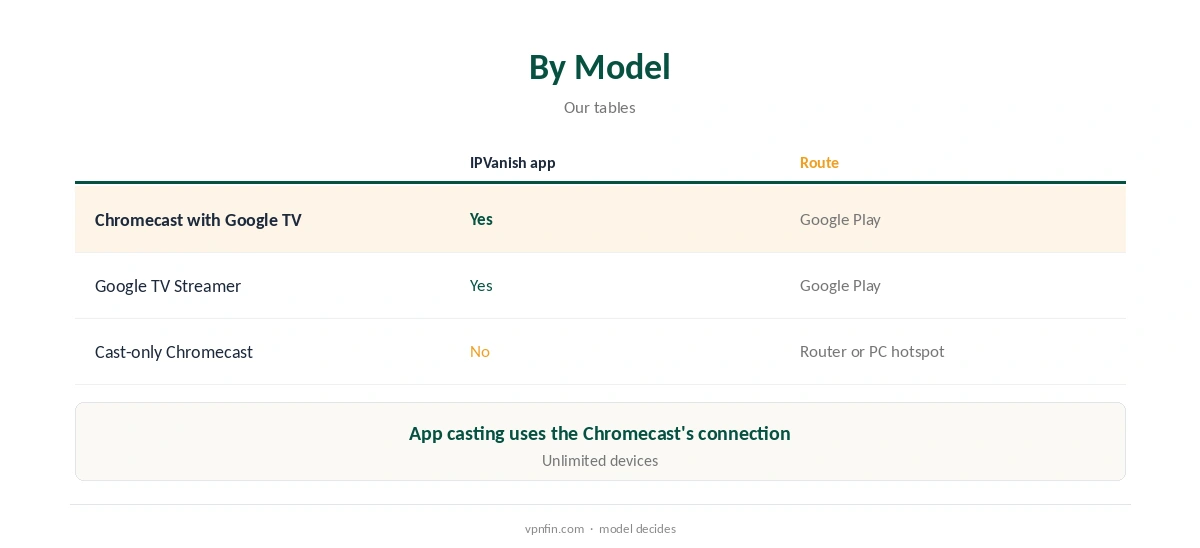
IPVanish Chromecast setup depends on the model. Chromecast with Google TV and the Google TV Streamer run Google TV, so they install IPVanish’s Android TV app from Google Play like any Android TV box. Older cast-only Chromecasts run no apps. When you cast from a phone app, the Chromecast usually fetches the stream itself, so the phone’s VPN does not cover it. Those need a router running IPVanish.
This guide covers each model, casting versus mirroring, router routes and streaming.
Which Chromecast Do You Have?
If your Chromecast came with a remote and shows a home screen with apps, it runs Google TV and can install IPVanish. The Google TV Streamer, launched as its successor, works the same way. If it has no remote and only receives casts from phones and laptops, it is a cast-only model. The Google Home app also shows the device type.
Our Chromecast VPN guide explains the difference for every provider.
IPVanish Chromecast With Google TV
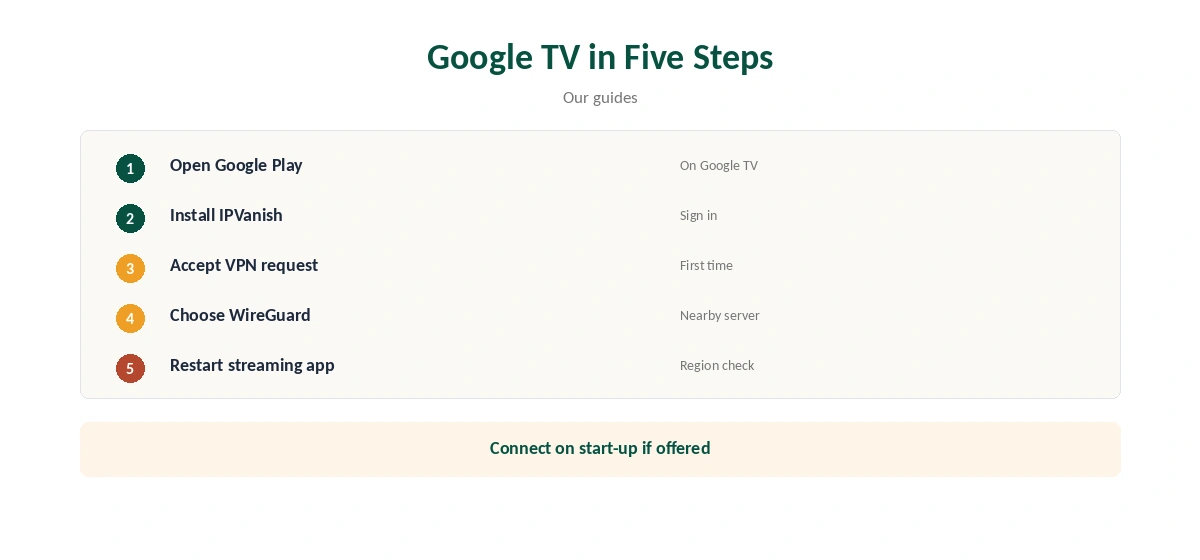
On a Chromecast with Google TV or Google TV Streamer, open Google Play, search for IPVanish, install it, sign in and connect. Accept Android’s VPN connection request the first time, then pick a nearby location.
The Android app’s settings, including WireGuard and connection on start-up, apply here too. Our IPVanish for Android guide covers them.
Cast-Only Chromecasts
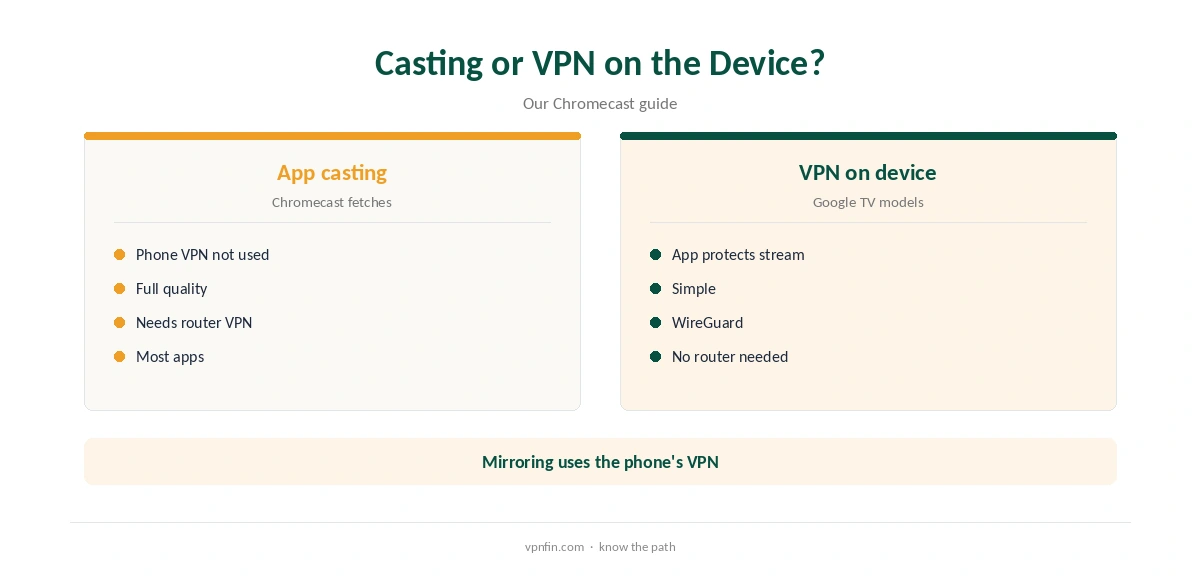
When you cast from an app such as Netflix or YouTube, the phone tells the Chromecast what to play. The Chromecast then downloads the stream over its own connection. A VPN on the phone changes nothing for that stream.
Screen mirroring works differently: the phone sends its screen, so the phone’s VPN applies, though quality is lower and the phone must stay on.
A Router or a Shared Connection
A router running IPVanish covers a cast-only Chromecast and everything else on the network, including the phones you cast from. GL.iNet routers have built-in IPVanish WireGuard support, and DD-WRT, Asus and Tomato routers use IPVanish’s OpenVPN files. Either way, the Chromecast needs no settings of its own.
Our IPVanish router guide walks through both.
A Windows PC running IPVanish can share its connection as a Mobile hotspot, and the Chromecast can join it during setup in the Google Home app. The computer must stay on, awake and connected the whole time you watch.
This suits occasional evenings; a router is simpler for daily viewing and covers your other devices too.
Settings on Google TV Models
Choose WireGuard for the best speed. Turn on connection at start-up if the app offers it on your model, so the Chromecast is protected after a restart. IPVanish’s Android app splits traffic by app or domain, our tables record.
Split tunnelling can keep a local app, such as a broadcaster’s catch-up service, on your normal connection while other apps use the VPN.
Checking It Works, Streaming and Price
On a Google TV model, the IPVanish app shows the connected location on its main screen. For cast-only models behind a router, check from a phone on the same network that the address shows IPVanish’s location.
A streaming app showing the expected region is the final check, after restarting it.
VPNOverview reached Netflix, Hulu, Prime Video, Max, Disney+ and BBC iPlayer with IPVanish in 2026, while VPNpro found its streaming inconsistent. Test your services within the refund window on the Chromecast itself.
Restart the streaming app after connecting so it checks your region again from scratch.
IPVanish costs $57.22 for the first 24 months and renews at $89.99 a year, VPNOverview lists, with no device limit. Yearly website plans carry a 30-day refund.
Our ExpressVPN Chromecast guide compares another provider’s options.
Troubleshooting
If the IPVanish app will not connect on Google TV, update it, restart the Chromecast and try another protocol, such as OpenVPN. If casting stops working behind a VPN router, make sure the phone and Chromecast are on the same network.
Our IPVanish troubleshooting guide lists more fixes.
Travelling With a Chromecast
Hotel networks often block casting between devices, or need you to pass a login page first. A travel router running IPVanish gives the Chromecast and your phone a private network to share, with the VPN applied to both.
Google TV models can also run the app directly on hotel Wi-Fi once you pass the login page. Casting from your phone may still be blocked there.
Chromecast Compared With Other Sticks
Fire TV sticks on Fire OS and Android TV boxes also run IPVanish’s app, and Apple TV has a native tvOS app. Only cast-only Chromecasts and Roku devices need a router.
If you are choosing a stick for VPN use, a Google TV model avoids the router step and keeps setup on the device itself. Our IPVanish Roku guide covers the other app-less option.
How We Research
This page draws on our Chromecast and IPVanish tables, GL.iNet’s WireGuard client documentation, VPNOverview’s and VPNpro’s IPVanish reviews and ExpressVPN’s Chromecast guidance. We cross-checked these sources against each other, and where they conflict or something can’t be verified, we say so in the text rather than guessing. We checked time-sensitive figures, including prices in US dollars, on 8 October 2026. The main source we relied on is GL.iNet’s WireGuard client guide. Our full approach lives on the About Us page.
IPVanish Chromecast FAQ
Yes, through its Android TV app from Google Play.
No; cast-only models run no apps.
Not for app casting; the Chromecast fetches the stream itself.
With a router running IPVanish.
Yes, it installs the same app.
The Verdict
IPVanish Chromecast use is simple on Google TV models with the app. Cast-only Chromecasts need a router, since phone VPNs do not cover app casting.