
Disclosure: VPNFin is reader-supported. If you buy a VPN through links on this page, we may earn a commission at no extra cost to you. This never affects our ratings — here’s our full disclosure.
Can you use a VPN on the Google TV Streamer? Yes, directly. Unlike the Chromecast it replaced in August 2024, the Streamer is a full Google TV box running Android TV 14, and Google TV is an interface on top of Android TV, so VPN apps for Android TV install from Google Play as usual, Gizmodo explains. It also has a Gigabit Ethernet port and 32GB of storage, AFTVnews notes, which removes two of the Chromecast’s old limits.
This page covers installing a VPN, the apps worth using, what casting means for your VPN, and the quirks to know.
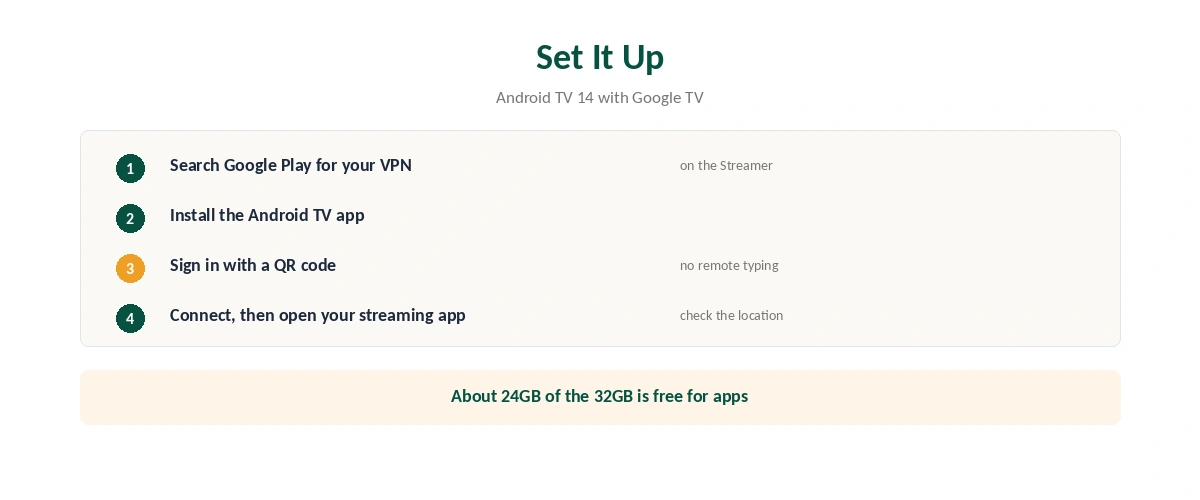
VPN for Google TV Streamer: How to Set It Up
| Step | What to do |
|---|---|
| 1 | Open Google Play on the Streamer and search for your VPN |
| 2 | Install the Android TV app |
| 3 | Sign in, ideally with a QR code from your phone |
| 4 | Pick a server and connect |
| 5 | Open your streaming app and check the location |
QR sign-in saves typing with a remote. ExpressVPN and Surfshark both offer it on Android TV, Gizmodo and Top10VPN note. Only about 24GB of the 32GB is free for apps, FlatpanelsHD found, which is still ample for a VPN.
Which VPN Apps Work
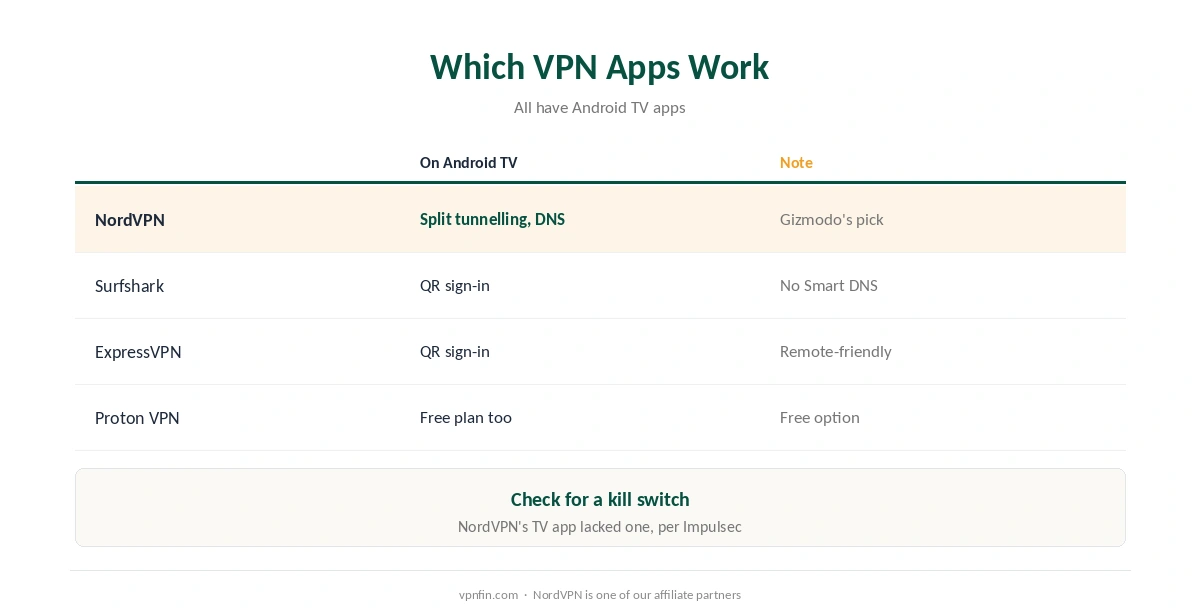
| Provider | On Android TV | Note |
|---|---|---|
| NordVPN | App with split tunnelling and custom DNS | Gizmodo’s top pick |
| Surfshark | App with QR sign-in | Smart DNS discontinued |
| ExpressVPN | App with QR sign-in | Easy to drive with a remote |
| Proton VPN | App, including the free plan | Only free VPN in Gizmodo’s picks |
Check the kill switch. An Impulsec review found NordVPN’s Android TV app lacked one, so a dropped connection could briefly expose your IP. Brand guides cover each app: NordVPN, Surfshark and ExpressVPN.
Surfshark and NordVPN share a parent, Nord Security. Free options with TV apps exist too, including Proton VPN, Windscribe and PrivadoVPN, Top10VPN lists.
Casting and the Streamer’s Quirks
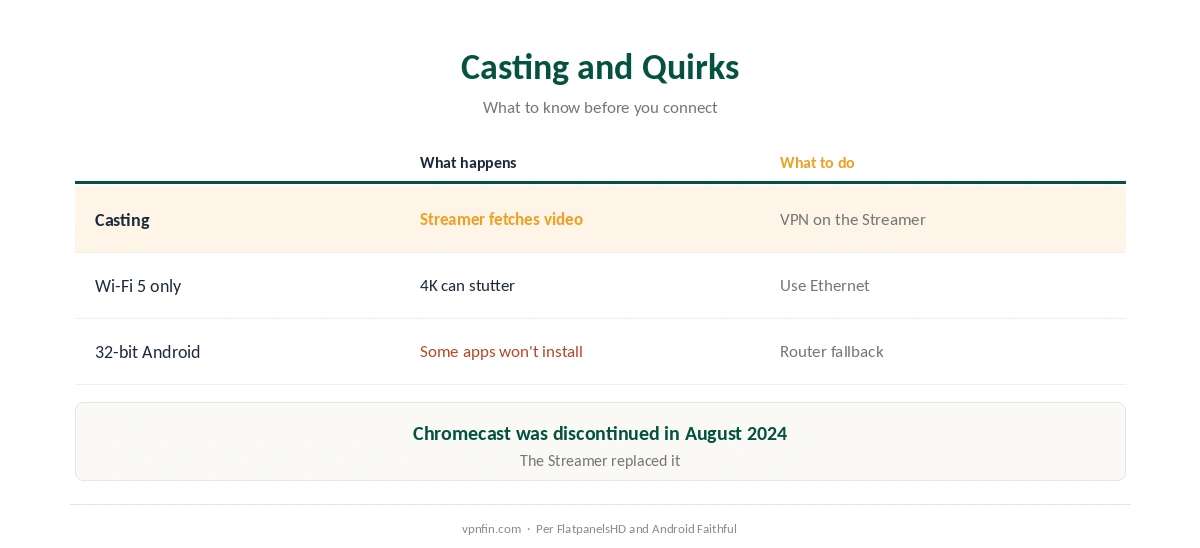
Casting uses the Streamer’s own connection. When you cast from a phone, the Streamer fetches the video itself, so the VPN has to run on the Streamer, not the phone. Our Chromecast guide explains the same issue on older dongles.
Use Ethernet for 4K. The Streamer has only Wi-Fi 5, so the Gigabit Ethernet port helps with high-bitrate 4K through a VPN, Android Faithful notes. Our speed guide covers VPN overhead.
It runs 32-bit Android. FlatpanelsHD notes some apps need 64-bit; if a VPN app refuses to install, a VPN router is the fallback, as our router vs device guide explains.
Why Put a VPN on the Streamer?
Privacy and travel are the main reasons to run a VPN for Google TV Streamer. It hides your viewing traffic from your internet provider, and if you take the box on a trip, a server at home keeps your own subscriptions working, as our travel guide explains; check each service’s terms.
Need it off for a local app? Disconnect in the VPN app, or use split tunnelling to exclude that one app. Our guide to turning off a TV VPN covers the steps.
How We Research
Specs and launch details come from AFTVnews, Android Headlines, FlatpanelsHD and Android Faithful; Android TV compatibility and app features from Gizmodo; QR sign-in and free apps from Top10VPN; the kill switch gap from Impulsec. AFTVnews’ launch report is here. We read all sources on 28 September 2026. NordVPN is one of our affiliate partners. Our full approach lives on the About Us page.
VPN for Google TV Streamer FAQ
Yes. It runs Android TV 14 with Google TV, so Android TV VPN apps install from Google Play.
No. The Streamer fetches the video itself, so the VPN needs to run on the Streamer.
NordVPN, Surfshark, ExpressVPN and Proton VPN all have Android TV apps. Proton VPN offers a free plan.
For 4K, yes. The Streamer has only Wi-Fi 5, and its Gigabit Ethernet port is steadier.
The Streamer runs 32-bit Android, and some apps need 64-bit. Use a VPN router instead.
The Verdict
A VPN for Google TV Streamer is simple: install the Android TV app from Google Play and sign in with a QR code.
Run the VPN on the Streamer itself, not your phone, and plug in Ethernet for 4K.