
Disclosure: VPNFin is reader-supported. If you buy a VPN through links on this page, we may earn a commission at no extra cost to you. This never affects our ratings — here’s our full disclosure.
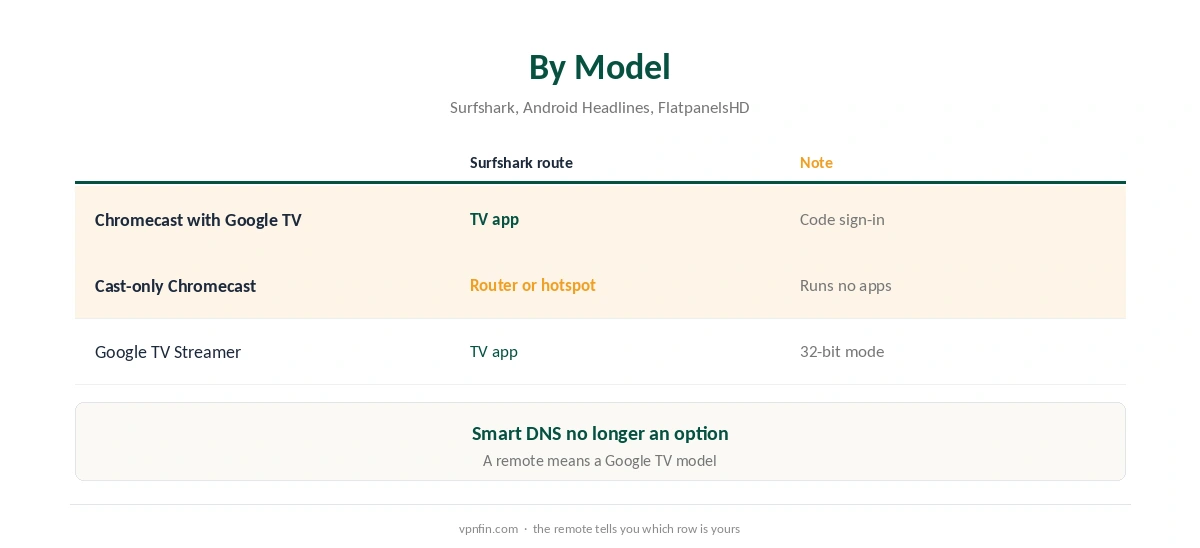
A Chromecast Surfshark setup depends on the model. The Chromecast with Google TV runs Android TV apps, and Surfshark’s own blog lists Google TV among its supported platforms. The older cast-only Chromecast runs no apps, so it needs a VPN router or a Windows hotspot. Surfshark’s Smart DNS, once an option for such devices, closed in February 2026.
This guide covers each model, the TV app’s settings, and why casting from a phone with Surfshark does not work.
Which Chromecast Do You Have?
A Chromecast with Google TV has a remote and shows the Google TV home screen. A cast-only Chromecast has no remote and only receives video sent from a phone or computer. Google replaced both with the Google TV Streamer in 2024, Android Headlines reports.
The difference decides the setup. Our Chromecast VPN guide compares other providers’ routes.
Chromecast Surfshark Setup on Google TV
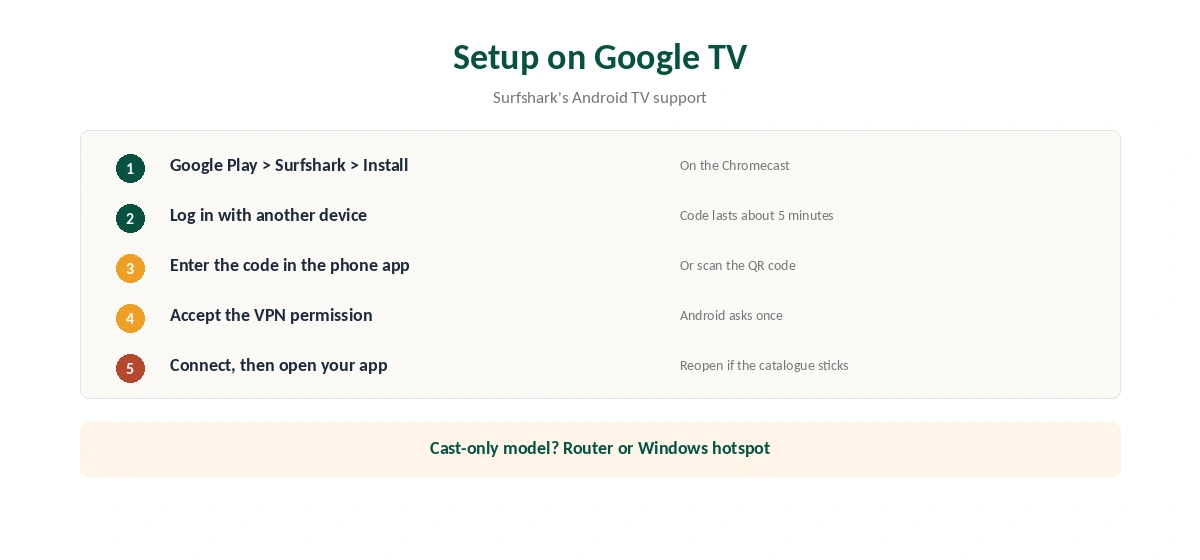
Open Google Play on the Chromecast, search for Surfshark and install it. Surfshark’s TV app signs in with a code: choose to log in with another device, then enter the code shown on the TV in the Surfshark app on your phone, or scan the QR code. The code lasts about five minutes.
Accept the VPN permission, pick a location and connect. Then open your streaming app. If the catalogue does not change, close the app fully and reopen it.
Settings in the TV App
Surfshark’s Android TV support lists CleanWeb and Bypasser under Features. Under Settings, then VPN settings, you find auto-connect, a quick-connect location, the kill switch, the protocol choice and the Small packets option.
Bypasser lets one app use the VPN while others use your normal connection, which suits a household that watches local channels and foreign services on the same TV. Our Surfshark Android TV guide covers each setting.
Cast-Only Chromecasts: Router or Hotspot
Surfshark’s support suggests two alternatives for devices without an app: a VPN router, or a VPN hotspot from a Windows PC. A router covers the Chromecast and every other device behind it, as our Surfshark router guide explains.
A Windows hotspot works for a trip or a test. The PC connects to Surfshark, shares its connection, and the Chromecast joins that network in the Google Home app. The PC must stay on while you watch.
Kill Switch and Auto-Connect on the TV
Surfshark’s Android TV support lists the kill switch and auto-connect under VPN settings. Turn on auto-connect so the VPN starts when the Chromecast wakes, and the kill switch so streaming apps do not fall back to your real address if the tunnel drops.
If a stream stops when the kill switch triggers, reconnect and reopen the app. That is the switch doing its job, not a fault. The Small packets option in the same menu can help on unstable Wi-Fi.
Setting Up the Windows Hotspot
On the PC, connect Surfshark to the country you need. Then open Settings, Network and Internet, Mobile hotspot, and turn it on. In the Google Home app on your phone, connect the Chromecast to that hotspot’s Wi-Fi name. Keep the PC on and awake while you watch. Our Surfshark Windows guide covers the desktop app.
Why Casting From a VPN Phone Fails
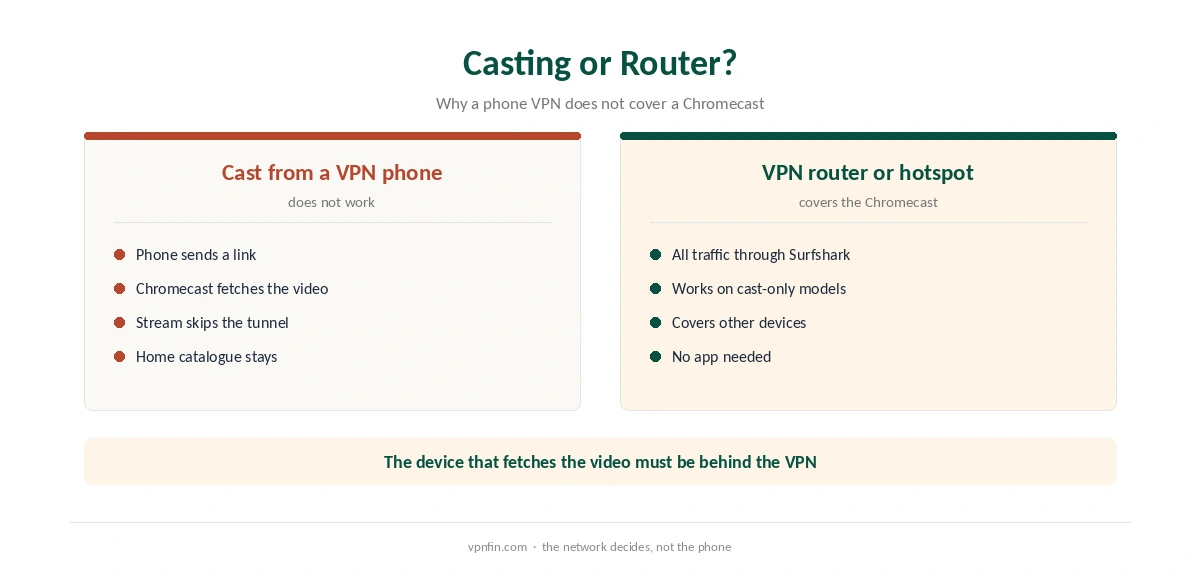
When you cast, the phone sends the Chromecast a link to the video. The Chromecast then fetches the stream itself over your home network. So a phone running Surfshark does not change what the Chromecast sees; the service sees your home IP and serves your home catalogue.
Only a VPN on the Chromecast itself, or on the network it uses, changes that.
Smart DNS Is Gone
Older guides suggest Surfshark’s Smart DNS for cast-only Chromecasts. Surfshark’s support says the service stopped on 2 February 2026, citing low demand, and that devices still set to it may lose internet access until the DNS is set back to automatic. Our Surfshark smart TV guide covers removing old Smart DNS settings.
Google TV Streamer
The Google TV Streamer runs Google TV, so the Surfshark app installs the same way. FlatpanelsHD notes it runs Android in 32-bit mode, which can limit some apps, so check Google Play on the device first. Our Google TV Streamer guide covers it.
What Surfshark Costs
On 25 September 2026, the Starter 2-year plan cost $67.23 for the first 27 months. Renewal sits at about $79 a year, according to Security.org and VPNOverview, since Surfshark’s own renewal table did not load. Surfshark sets no device limit. Our Surfshark price breakdown covers the plans, and our Surfshark refund guide explains the 30-day window.
| Provider | Renewal price | Per month | Tier |
|---|---|---|---|
| NordVPN | $139.08/yr | ~$11.59 | Basic |
| Surfshark | ~$79/yr | ~$6.58 | Starter |
| ExpressVPN | $99.95/yr | ~$8.33 | Basic |
| CyberGhost | $56.94/yr | ~$4.75 | 2-year |
| PureVPN | $47.95/yr | ~$4.00 | Standard, 2-year (1-year renews $57.95) |
| IPVanish | $89.99/yr | ~$7.50 | Essential |
| Windscribe | ~$69/yr | ~$5.75 | Pro |
| Proton VPN | ~$83.88/yr | ~$6.99 | VPN Plus |
| Mullvad | ~$65/yr | ~$5.40 | flat, no tiers |
| Norton VPN | $79.99/yr | ~$6.67 | Standard |
| Hotspot Shield | ~$95.99/yr | ~$8.00 | Premium annual |
| Astrill | $300 every 2 yrs | ~$12.50 | 2-year, same at renewal |
Related Guides
Our NordVPN Chromecast guide covers the sister brand, and our PureVPN Chromecast guide another provider. Surfshark belongs to Nord Security, which also owns NordVPN.
To confirm a router or hotspot setup, check the public IP from a phone on the same network with our VPN test page. For streaming fixes, our Surfshark Netflix guide helps.
How We Research
This page draws on Surfshark’s Android TV and smart TV support articles, its May 2026 blog on TV apps, Android Headlines, FlatpanelsHD and pricing from Surfshark, Security.org and VPNOverview. We cross-checked these sources against each other, and where they conflict or something can’t be verified, we say so in the text rather than guessing. We checked time-sensitive figures, including prices in US dollars, on 6 October 2026. Surfshark’s renewal table did not load, so renewal figures come from Security.org and VPNOverview. The main source we relied on is Surfshark’s smart TV blog. Our full approach lives on the About Us page.
Chromecast Surfshark FAQ
On a Chromecast with Google TV, yes, from Google Play. A cast-only Chromecast needs a router or Windows hotspot.
Choose to log in with another device and enter the code in the Surfshark phone app, or scan the QR code.
No longer. Surfshark ended Smart DNS on 2 February 2026.
No. The Chromecast fetches the stream itself, so the phone’s VPN does not cover it.
Yes. Surfshark’s Android TV support lists it under VPN settings.
The Verdict
A Chromecast Surfshark setup is simple on Google TV models, with code sign-in, a kill switch and Bypasser. Cast-only models need a router or Windows hotspot, and old Smart DNS settings should be removed.