
Disclosure: VPNFin is reader-supported. If you buy a VPN through links on this page, we may earn a commission at no extra cost to you. This never affects our ratings — here’s our full disclosure.
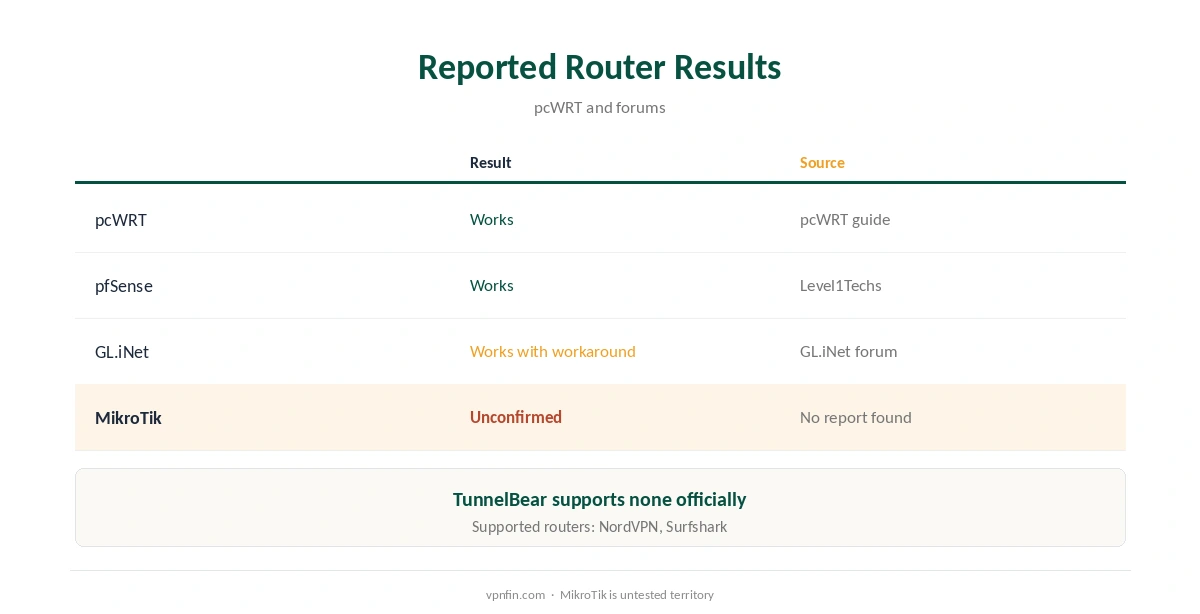
TunnelBear MikroTik setups are unofficial. TunnelBear does not support routers, pcWRT and SafetyDetectives note, but it publishes OpenVPN files for Linux that users have loaded onto pcWRT, pfSense and GL.iNet routers. MikroTik’s RouterOS has an OpenVPN client that runs over UDP or TCP, needs a username and password, and can import .ovpn files, its documentation says. We found no report confirming TunnelBear’s files on RouterOS, so treat it as an experiment.
This guide covers what RouterOS supports, the import steps, the risks and the alternatives.
What RouterOS Supports
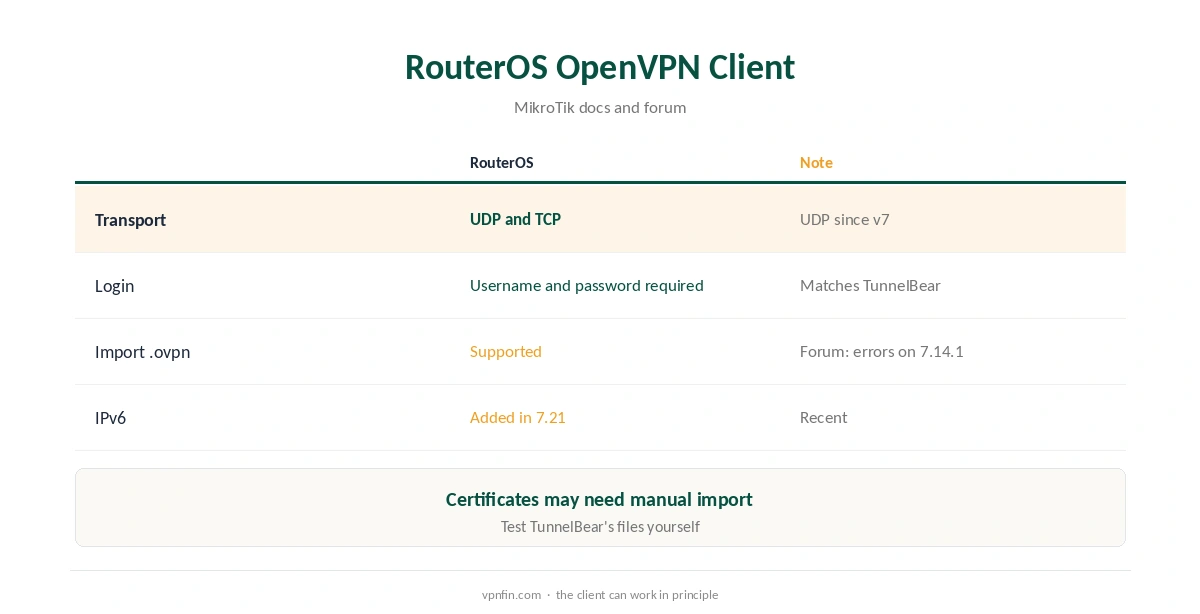
MikroTik’s documentation describes an OpenVPN client over UDP or TCP, with UDP added in RouterOS 7, medo64 notes. The client always requires a username and password, which matches TunnelBear’s login-plus-certificate files. RouterOS can import a .ovpn file and its certificates with one command. A MikroTik forum thread on version 7.14.1 reports import errors on UDP and certificates added by hand, so expect some trial and error.
TunnelBear MikroTik Import Steps
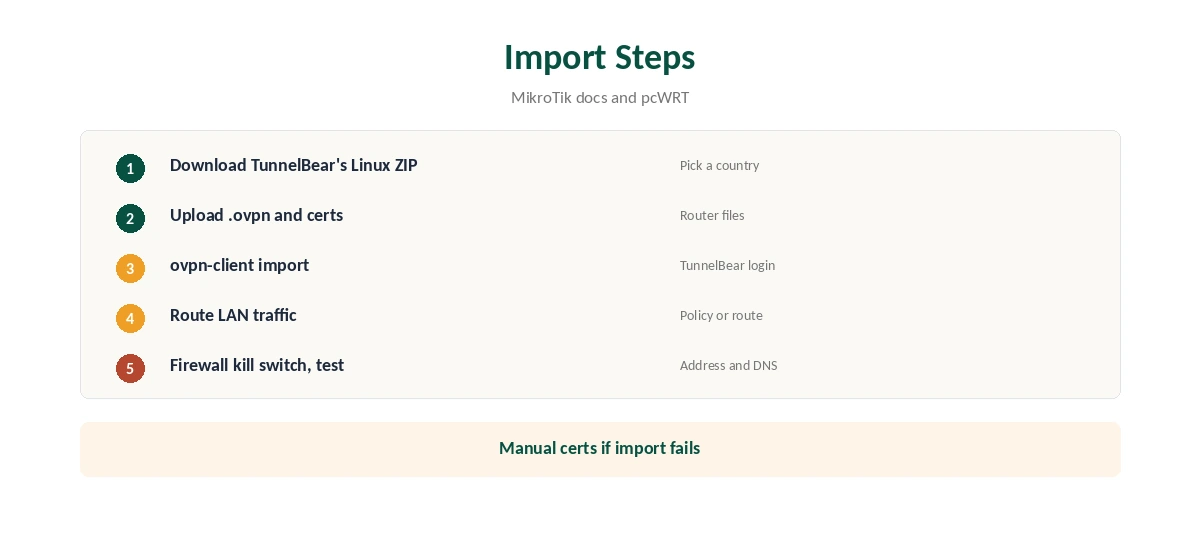
Download TunnelBear’s OpenVPN ZIP from its Linux support page and pick one country’s .ovpn file with its certificates. Upload them to the router’s files. Run RouterOS’s ovpn-client import command with your TunnelBear username and password. Check the new interface connects, then add a route or policy so LAN traffic uses it.
If the import fails, add the certificates under System, Certificates and create the OVPN client by hand with the server and port from the file.
Other Routers
pcWRT documents loading TunnelBear’s files on its routers, a Level1Techs thread reports pfSense success, and a GL.iNet user had to upload each file with its certificates separately. Our TunnelBear OpenVPN guide covers those reports.
Risks of an Unofficial Setup
No support: if a change on TunnelBear’s side breaks the files, you troubleshoot alone. No kill switch: add firewall rules so LAN traffic cannot leave outside the tunnel. And the free plan’s 2 GB a month would cover a whole household’s traffic, which runs out fast. Our kill switch guide explains the firewall approach.
TunnelBear MikroTik Routing
Once the OVPN interface connects, RouterOS does not automatically send LAN traffic through it unless the server pushes routes. Add a default route via the interface, or use routing marks to send only chosen devices through the tunnel. Keep a second route for devices that should stay outside it.
Firewall Kill Switch on RouterOS
Add a firewall rule that drops forwarded LAN traffic leaving through the WAN interface, so traffic can exit only through the VPN interface. If the tunnel drops, devices lose internet rather than leaking. Test it by disabling the OVPN interface briefly.
Router Processor Limits
OpenVPN encryption runs on the router’s CPU. Small MikroTik models may cap speeds well below your line rate. Run a speed test with and without the tunnel before deciding. Our router or device guide weighs the choice.
Is a TunnelBear MikroTik Setup Worth It?
For a tinkerer who already owns a MikroTik router and pays for TunnelBear, it may be worth an evening. For anyone buying a VPN for a router, a provider with router support saves time and gives you someone to ask when it breaks.
Turning It Off
Disable the OVPN client interface in RouterOS to return to a normal connection, and remove the default route you added. Our guide to turning off a router VPN covers other firmware.
A Quick Rule
Own a MikroTik and enjoy tinkering? Try the import on a spare evening. Need a router VPN that works without surprises? Choose a provider with router guides. On the free plan? Do not route a whole household through 2 GB.
Backing Up First
Export RouterOS’s configuration before you start, so you can restore it if a route or firewall rule cuts off internet access. Test changes from a device you can reach the router from by cable.
Choosing a Country File
Each TunnelBear .ovpn file points at one country. Start with the nearest one for speed, and name the RouterOS interface after it so you can tell several apart later.
Keeping Files Current
If the tunnel stops connecting after weeks of working, download TunnelBear’s ZIP again and re-import the file.
Checking the Connection
From a device on the network, confirm the address with our VPN test page and run our DNS leak guide. Point the router’s DNS at the VPN if requests still go to your provider.
Providers With Router Support
If you want a supported router setup, our NordVPN router guide and Surfshark router guide cover two providers that document it; the pair share an owner, Nord Security.
TunnelBear’s Record
TunnelBear has had annual Cure53 audits since 2017 and belongs to McAfee, our tables record. Its free plan gives 2 GB a month, and Unlimited sets no device limit. Our TunnelBear safety guide covers the full picture.
How We Research
This page draws on MikroTik’s OpenVPN documentation, a MikroTik forum thread on RouterOS 7.14.1, medo64 on UDP support, pcWRT’s TunnelBear guide, SafetyDetectives and our TunnelBear tables. We cross-checked these sources against each other, and where they conflict or something can’t be verified, we say so in the text rather than guessing. We checked time-sensitive figures, including prices in US dollars, on 7 October 2026. The main source we relied on is MikroTik’s OpenVPN documentation. Our full approach lives on the About Us page.
TunnelBear MikroTik FAQ
Not officially; TunnelBear does not support routers.
RouterOS can import .ovpn files, but we found no report confirming TunnelBear’s.
Yes, since RouterOS 7, per MikroTik’s documentation and medo64.
Not by default; add firewall rules.
pcWRT, pfSense and GL.iNet, per pcWRT and forum threads.
The Verdict
A TunnelBear MikroTik setup is an unsupported experiment with RouterOS’s OpenVPN client. For a router VPN you can rely on, choose a provider that documents router support.