
Disclosure: VPNFin is reader-supported. If you buy a VPN through links on this page, we may earn a commission at no extra cost to you. This never affects our ratings — here’s our full disclosure.
TunnelBear OpenVPN support comes two ways. In the apps, OpenVPN sits alongside WireGuard and IKEv2, and it is the protocol GhostBear needs to disguise traffic on Windows and Android. Outside the apps, TunnelBear publishes OpenVPN configuration files on its Linux support page, which users also load onto routers and pfSense. pcWRT notes that TunnelBear does not officially support routers, and there are no files for manual IKEv2. Our page on TunnelBear WireGuard covers switching protocol in the apps and the Linux exception.
This guide covers when to choose OpenVPN in the apps, the manual setup and its limits.
OpenVPN in the TunnelBear Apps
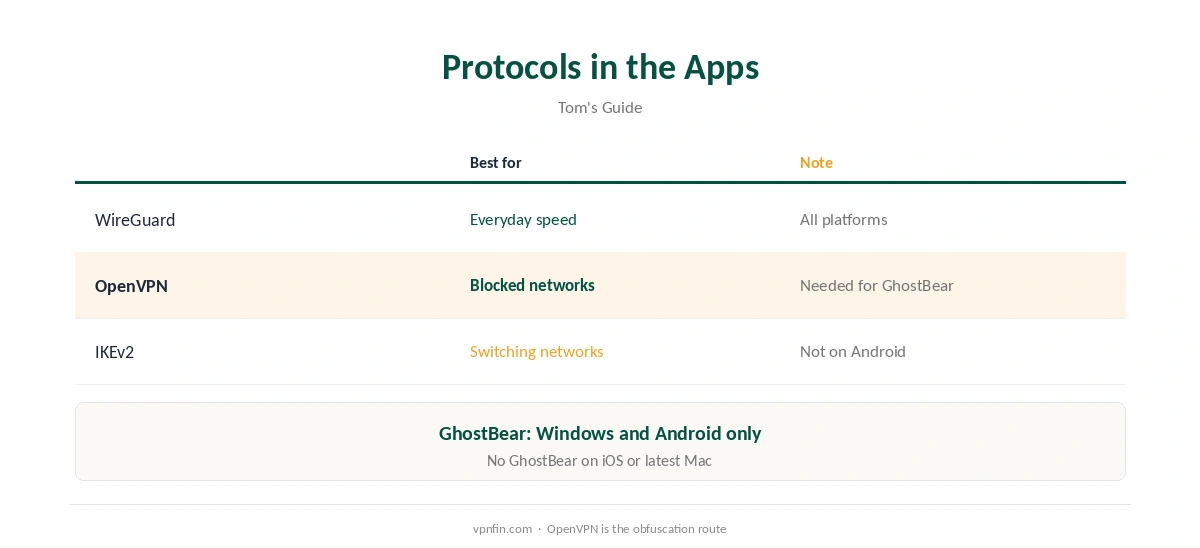
Tom’s Guide lists WireGuard, OpenVPN and IKEv2 across TunnelBear’s apps, with IKEv2 missing on Android. WireGuard is the faster everyday choice. OpenVPN earns its place on networks that block VPNs, because GhostBear, TunnelBear’s obfuscation, runs only over OpenVPN on Windows and Android.
Our WireGuard vs OpenVPN guide explains the trade-off.
TunnelBear OpenVPN and GhostBear
To use GhostBear, switch the protocol to OpenVPN first, then turn GhostBear on. Tom’s Guide notes it is missing on iOS and the latest Mac app, so those users have OpenVPN without the disguise. Our obfuscation guide explains what disguised traffic does.
Manual Setup With the Linux Files
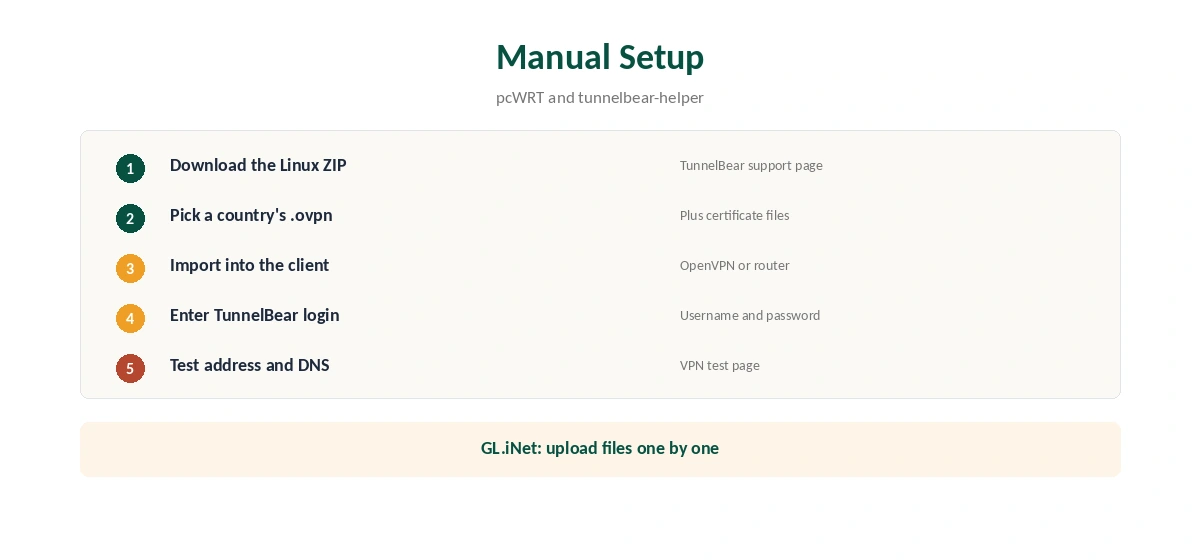
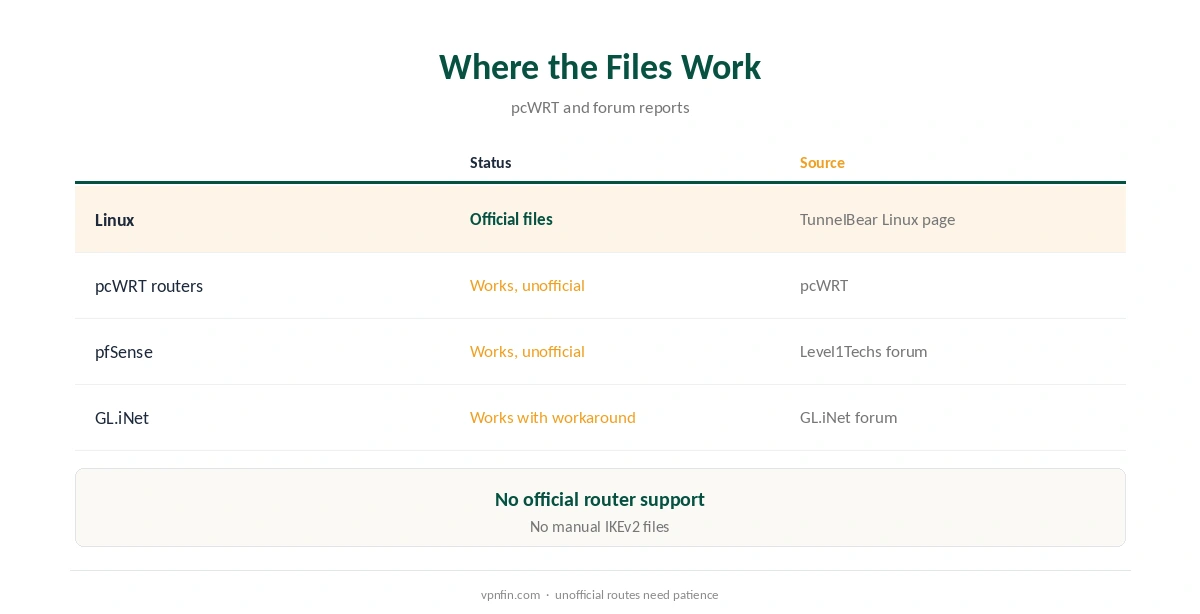
TunnelBear’s Linux support page links a ZIP of OpenVPN files, pcWRT reports. Each country has an .ovpn file, plus certificate files. A GitHub helper for Arch Linux notes that TunnelBear uses your username and password on top of the key files. Import a country’s file into your OpenVPN client, enter your TunnelBear login and connect. Our guide to TunnelBear for Linux covers OpenVPN files, NetworkManager and limits.
Routers and pfSense
pcWRT’s guide loads the files onto its routers, while stating TunnelBear does not officially support router use. A Level1Techs forum thread reports the same files working in pfSense. On a GL.iNet router, one forum user had to upload each .ovpn file with its certificates individually. Expect to troubleshoot without official help. Our page on TunnelBear on Apple TV covers why neither an app nor router support exists, and the alternatives.
Checking the Connection
After connecting, confirm the new address with our VPN test page, then run our DNS leak guide. Manual setups need the most care here, since DNS settings may not come from the provider’s app.
Linux Users
TunnelBear has no dedicated Linux app, so these files are the Linux route. Our Linux VPN guide compares providers with full Linux apps.
To stop the connection, our guide to turning off a VPN on Linux covers the service commands.
Raspberry Pi and Home Servers
The Linux files also suit a Raspberry Pi or home server that needs a tunnel, for example for downloads. Run the connection as a system service so it restarts at boot, and add firewall rules so traffic stops if the tunnel drops. Our Raspberry Pi VPN guide covers the hardware side.
Keeping the Files Current
Server addresses and certificates change over time. If a manual connection stops working, download the ZIP again from the Linux support page and replace your files. Check that your OpenVPN client accepts the cipher settings in the files, since very old clients may not.
Speed Expectations
Over the same distance, OpenVPN usually trails WireGuard on speed, and manual setups lack the app’s tuning. Pick a country close to you, prefer UDP files if both are offered, and test at your usual times. Our IKEv2 vs WireGuard guide explains the other app protocol.
A Quick Rule
App user on a normal network? Stay on WireGuard. Blocked network on Windows or Android? Switch to OpenVPN and GhostBear. Linux, router or server? Use the config files and accept that support is unofficial. Our guide to TunnelBear on a Router covers MikroTik, OpenVPN files and the limits.
Troubleshooting Manual Connections
If a manual connection fails, check the username and password first, since the files need both. Then check the system clock, because certificates fail on wrong dates. Read the client’s log for the exact error before changing files. On routers, confirm the firmware’s client supports every option in the .ovpn file; unsupported lines can stop it.
Mac and Windows Users
On Mac and Windows, the app is simpler than manual files and keeps VigilantBear, TunnelBear’s kill switch. Our TunnelBear Windows guide covers the fullest app.
Security of Manual Setups
A manual connection lacks VigilantBear, so a dropped tunnel exposes traffic. On Linux, add firewall rules that only allow traffic through the tunnel interface. Our kill switch guide explains the idea.
Checking for Updates
Revisit the Linux support page every few months. New files can fix connection problems that old ones cause, especially after TunnelBear changes its servers.
Free Plan and Limits
The free plan gives 2 GB a month, which counts manual connections too. Unlimited sets no device limit, according to our device table. Our TunnelBear pricing guide covers the plans.
Audit Record
TunnelBear has had annual Cure53 audits since 2017 and belongs to McAfee, our tables record. Our TunnelBear safety guide covers the full picture.
How We Research
This page draws on pcWRT’s TunnelBear OpenVPN guide, a Level1Techs pfSense thread, a GL.iNet forum thread, the tunnelbear-helper project on GitHub, Tom’s Guide’s TunnelBear review and our TunnelBear tables. We cross-checked these sources against each other, and where they conflict or something can’t be verified, we say so in the text rather than guessing. We checked time-sensitive figures, including prices in US dollars, on 7 October 2026. The main source we relied on is pcWRT’s TunnelBear OpenVPN guide. Our full approach lives on the About Us page.
TunnelBear OpenVPN FAQ
It does, in its apps alongside WireGuard and IKEv2, and through Linux config files.
Linked from TunnelBear’s Linux support page, per pcWRT.
Users report it works, but TunnelBear does not officially support routers.
Yes, on Windows and Android.
No files or instructions exist for that, per pcWRT.
The Verdict
TunnelBear OpenVPN matters for GhostBear in the apps and for Linux or router users through the config files. Use WireGuard for everyday speed, and OpenVPN when a network blocks VPNs.