
Disclosure: VPNFin is reader-supported. If you buy a VPN through links on this page, we may earn a commission at no extra cost to you. This never affects our ratings — here’s our full disclosure.
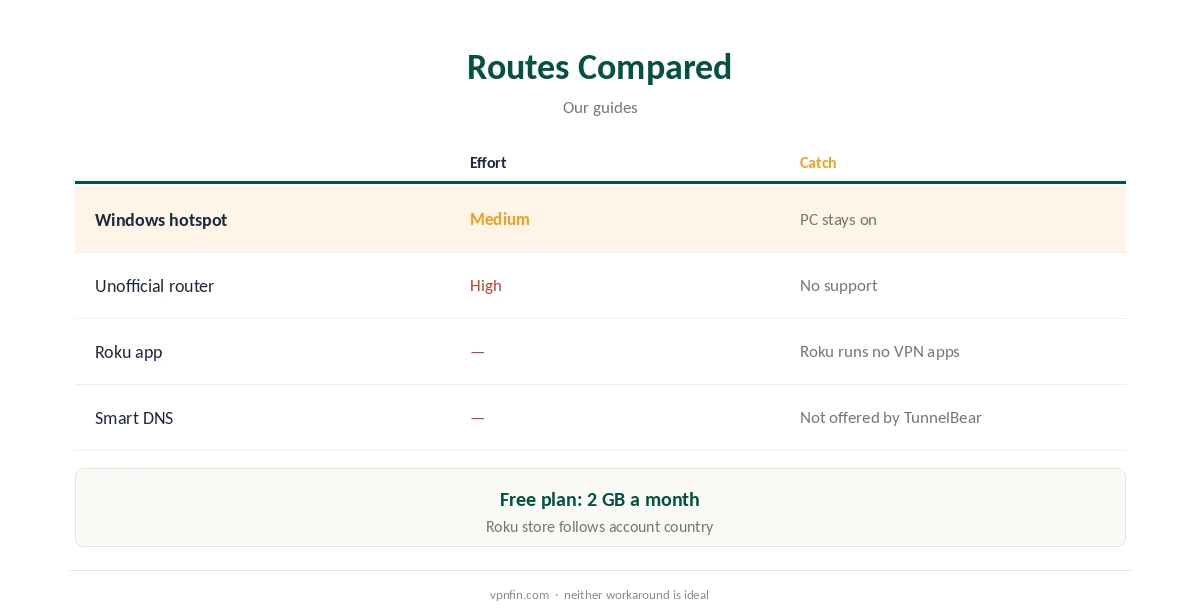
TunnelBear Roku use hits two walls. Roku devices do not run VPN apps at all, so every provider needs a router or another device in between. And TunnelBear does not support routers, SafetyDetectives notes. The remaining routes are a Windows PC running TunnelBear and sharing its connection as a hotspot, or an unofficial router setup with TunnelBear’s OpenVPN files.
This guide covers both routes, their limits and providers that suit Roku better.
Why Roku Is Hard
Roku has no built-in VPN support, so VPN apps cannot run on it; VPNAlert’s PureVPN Roku guide recommends a router or a Windows hotspot for that reason. Roku also uses the channel store of the account’s country, which a VPN does not change.
Route One: A Windows Hotspot
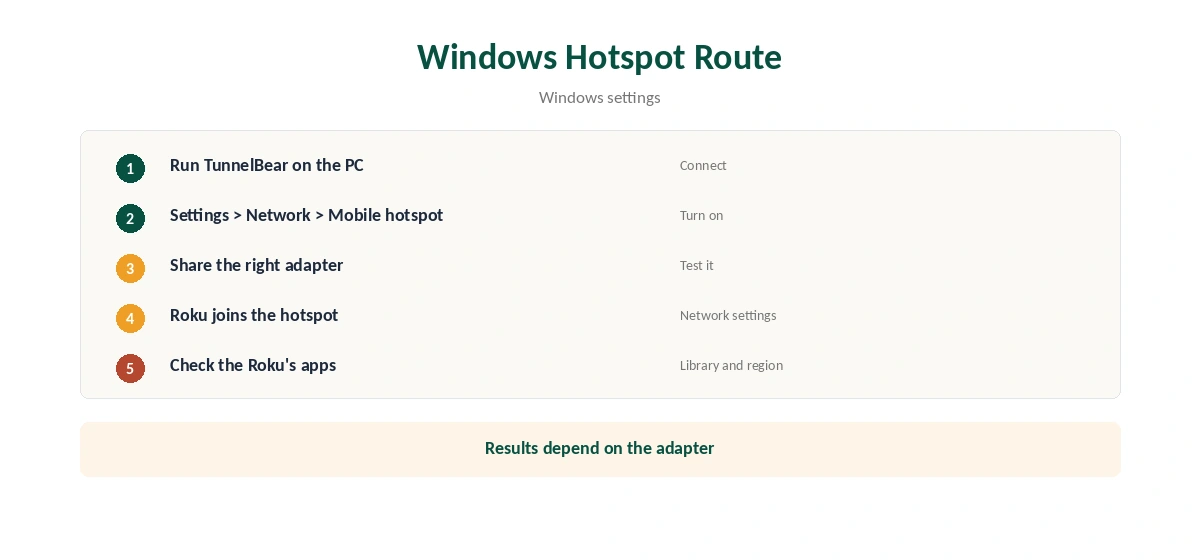
Run TunnelBear on a Windows PC, then turn on Windows’ Mobile hotspot under Settings, Network and internet, and share the connection. Join the Roku to that hotspot. Whether the shared connection carries the VPN depends on the adapter you share from, so check the Roku’s streaming apps after connecting.
Route Two: An Unofficial Router
TunnelBear’s Linux OpenVPN files have worked on pcWRT, pfSense and GL.iNet routers, users report, but TunnelBear does not support it. Our TunnelBear router guide covers the limits.
Why TunnelBear Has No Roku App Route
TunnelBear publishes apps for Windows, Mac, iOS and Android, but none for TVs or consoles, Holafly notes. SafetyDetectives adds that TunnelBear does not support router configuration, and we found no TunnelBear Smart DNS service. That leaves only unofficial workarounds.
Setting Up the Roku Network
On the Roku, open Settings, Network, Set up connection, and choose the hotspot or router network. If you switch between the VPN network and your normal Wi-Fi, the Roku keeps both saved, so you can change networks without re-entering passwords.
Roku Channels and Region
Roku’s channel store follows the country of the Roku account, not the network. A VPN changes what streaming channels see once installed, but not which channels appear in the store. Check a channel’s library after connecting rather than the store listing.
Testing a TunnelBear Roku Workaround
Open a streaming channel and check whether its library matches the server country. Then disconnect TunnelBear on the PC; if the Roku keeps streaming normally, its traffic was not going through the VPN.
A Quick Rule
Already pay for TunnelBear and own a Windows PC? Try the hotspot for occasional viewing. Watching Roku every night? Choose a provider with router support, since a PC hotspot is not a long-term fix.
The PC Side
TunnelBear’s Windows app offers WireGuard and OpenVPN, and VigilantBear, its kill switch. Keep the kill switch on so the hotspot does not fall back to your normal connection if the tunnel drops. Our TunnelBear Windows guide covers the app.
Streaming Services on Roku
Streaming services check more than your IP, and some flag VPN addresses. If a channel refuses to play, try another TunnelBear server in the same country. Our Netflix VPN guide explains how detection works.
Turning It Off
Switch the Roku back to your normal Wi-Fi, then turn off the PC’s hotspot. Restart the Roku if channels still show the other country’s library.
Is a TunnelBear Roku Workaround Worth It?
For a household that already pays for TunnelBear and wants a Roku covered once in a while, the hotspot is fine. For nightly viewing, the PC has to stay on and connected, which most people tire of quickly. A provider with router support covers the Roku permanently.
Checking for Leaks
Run our DNS leak guide on the PC while sharing. If the PC leaks DNS, the Roku’s traffic may too. Our VPN test page confirms the address.
Several Roku Devices
A hotspot covers every Roku that joins it, so a household with two or three sticks can share the same PC. TunnelBear Unlimited sets no device limit, but each Roku still depends on the PC staying on.
Keeping the PC Ready
Check TunnelBear’s Windows settings for launch-at-startup and its Trusted Networks options, so the VPN comes up when the PC starts. Disable sleep while you watch, or the Roku loses its connection.
The Free Plan on a Roku
TunnelBear’s free plan gives 2 GB a month. An hour of HD streaming can use much of it, so the free plan is not a practical Roku option even when a workaround works.
Providers That Suit Roku Better
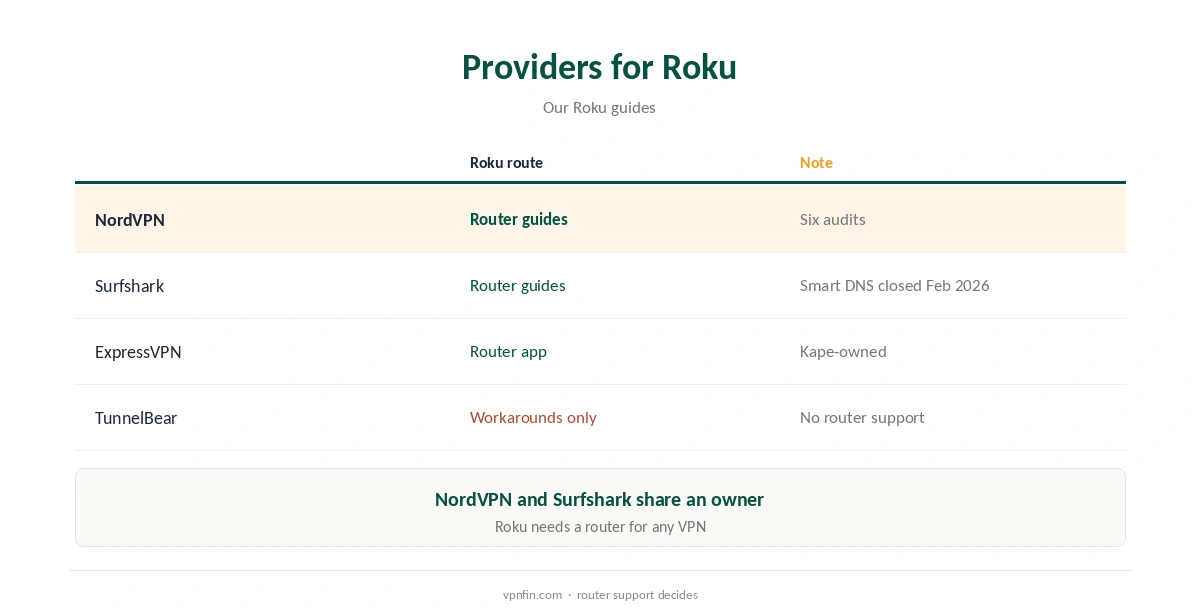
Providers with documented router support make Roku far simpler. Our NordVPN Roku guide and Surfshark Roku guide cover two; NordVPN and Surfshark share an owner, Nord Security.
Our Roku VPN guide compares the wider field.
TunnelBear’s Record
TunnelBear has had annual Cure53 audits since 2017 and belongs to McAfee, our tables record. Its free plan gives 2 GB a month, and Unlimited sets no device limit. Our TunnelBear safety guide covers the full picture.
How We Research
This page draws on SafetyDetectives, Holafly, VPNAlert’s PureVPN Roku guide, pcWRT and our TunnelBear and Roku tables. We cross-checked these sources against each other, and where they conflict or something can’t be verified, we say so in the text rather than guessing. We checked time-sensitive figures, including prices in US dollars, on 7 October 2026. The main source we relied on is pcWRT’s TunnelBear OpenVPN guide. Our full approach lives on the About Us page.
TunnelBear Roku FAQ
Not directly; Roku runs no VPN apps and TunnelBear has no router support.
You can try Windows’ Mobile hotspot; check the Roku’s apps afterwards.
Unofficially, with its Linux OpenVPN files on some routers.
We found no TunnelBear Smart DNS service.
Providers with router support, such as NordVPN and Surfshark.
The Verdict
TunnelBear Roku use relies on a Windows hotspot or an unsupported router. For a Roku, a provider with router support is the practical choice.