
Disclosure: VPNFin is reader-supported. If you buy a VPN through links on this page, we may earn a commission at no extra cost to you. This never affects our ratings — here’s our full disclosure.
NordVPN on Roku is a workaround, not an install. NordVPN’s support page states plainly that Roku OS is not supported, so there is no app to download. Gizmodo adds that Roku will not even let you change the device’s DNS settings, which rules out the usual Smart DNS shortcut on the device itself.
That leaves the network around the Roku: a router running NordVPN, a computer sharing a VPN connection, or Smart DNS set on the router. There is also a limit people discover only after paying, covered below. This guide explains each route and what it can and cannot change.
NordVPN on Roku: The Short Answer
Put NordVPN on your router, or share a VPN connection from a computer as a hotspot. Those are the two options NordVPN’s own support page gives. Our NordVPN on a router guide covers the router route.
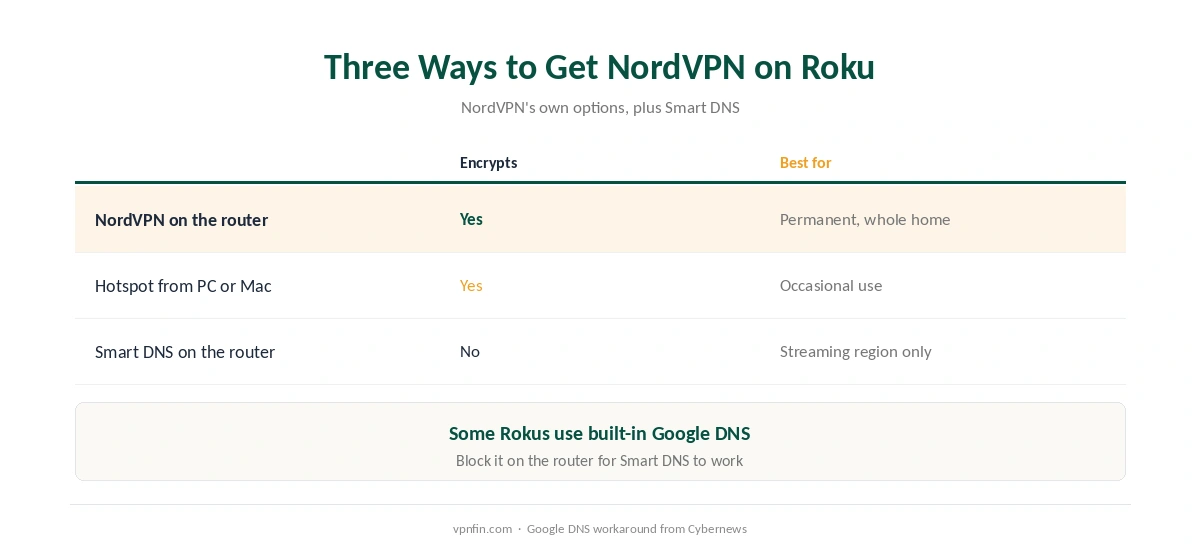
Smart DNS works only if you set it on the router, and some Roku devices use a built-in Google DNS that must be blocked there first, Cybernews reports.
A VPN will not add channels. It changes what plays inside apps you already have, but Roku ties its channel store to your account’s country. Our Roku VPN guide compares providers.
What a VPN Can and Cannot Change on Roku
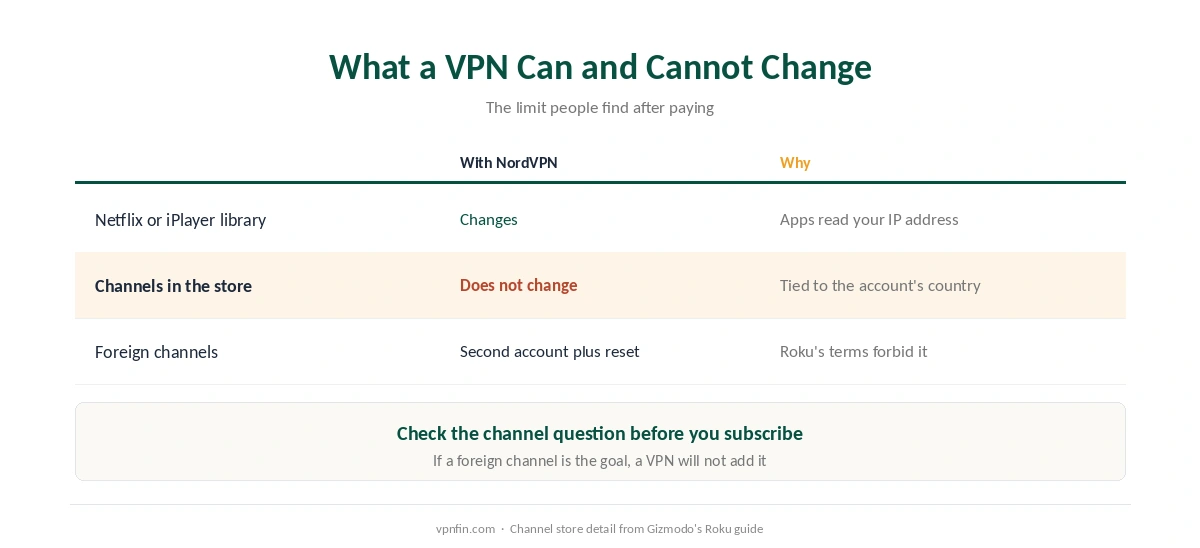
It can change the library inside apps. Netflix, Prime Video, Disney+ and BBC iPlayer read the IP address the Roku connects from, so a VPN changes the catalogue they serve, Gizmodo explains.
It cannot add a channel your account’s region does not stock. Roku ties the channel store to the country where the account was created. Getting a foreign channel means creating a second Roku account while connected to that country and factory-resetting the device. Gizmodo also notes that Roku’s terms forbid accessing content from other regions.
⚠️ Check that before you pay if a foreign channel is the reason you want a VPN. Our Netflix guide covers how streaming services treat VPN addresses.
Three Ways to Get NordVPN on Roku
| Method | Encrypts traffic | Effort | Best for |
|---|---|---|---|
| NordVPN on your router | Yes | Router setup | Permanent, whole home |
| Hotspot from a Windows PC or Mac | Yes | Moderate | Occasional use |
| Smart DNS on your router | No | Router DNS settings | Streaming region only |
The router is the permanent answer and protects every device. Most routers, though, run NordVPN over OpenVPN rather than its faster NordLynx protocol. Our router setup guide covers the general process.
The hotspot shares a computer’s NordVPN connection over Wi-Fi. On Windows, you turn on Mobile hotspot and share the NordVPN adapter, VPNAlert describes; on a Mac, Security.org points to Internet Sharing in System Settings.
Smart DNS has to go on the router, since the Roku cannot change DNS itself. Enable it in your Nord Account, enter NordVPN’s DNS addresses in the router’s WAN settings, and, if your Roku uses built-in Google DNS, block that with a firewall rule, per Cybernews. Our Smart DNS comparison covers the trade-off.
What Breaks, and How to Fix It
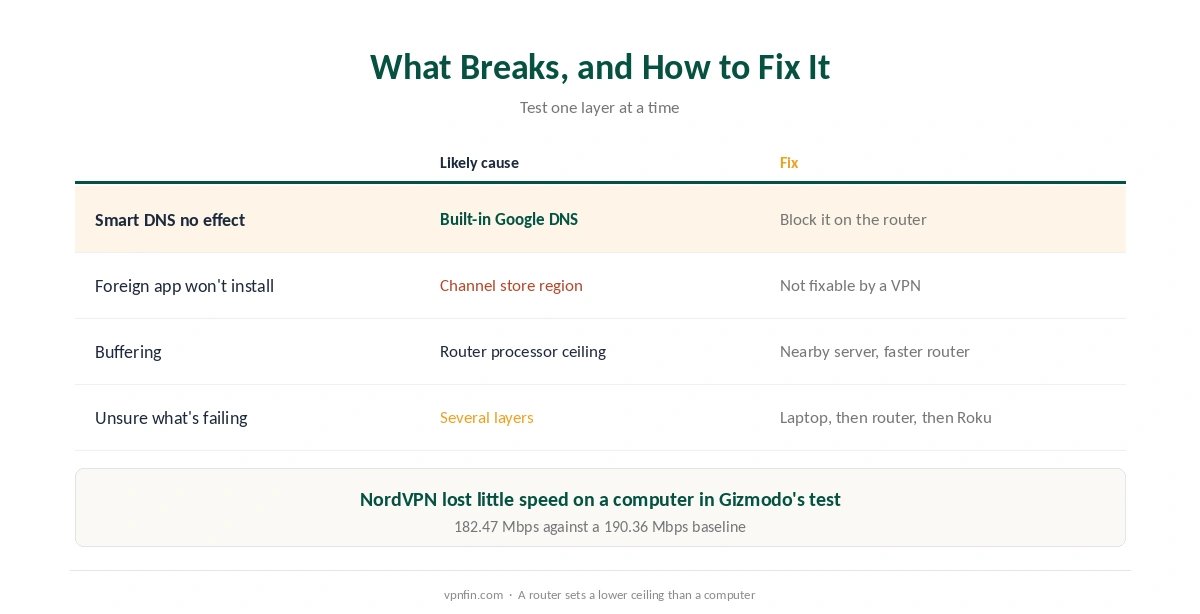
Smart DNS has no effect. The Roku may be using its built-in Google DNS. Block Google’s DNS on the router, as Cybernews describes, and check your Nord Account still approves your home IP address. Security.org also warns that streaming services have become better at detecting DNS changes.
A foreign app will not install. That is the channel store region, not the VPN. A VPN cannot change it. For what a VPN does unlock, see our streaming VPN guide.
Buffering. Gizmodo measured NordVPN at 182.47 Mbps on a computer against a 190.36 Mbps baseline, but notes a router’s processor sets a lower ceiling. Pick a nearby server, as our speed guide explains.
Test one layer at a time. Confirm the VPN works on a laptop first, then on the router or hotspot, then on the Roku, as our guide to checking a VPN describes.
Other Devices
If a Roku feels like too much work, a streaming stick that runs VPN apps may be simpler, as our NordVPN on Firestick guide explains. An Apple TV 4K is another option, covered in our NordVPN on Apple TV guide.
For the television itself, our NordVPN on Smart TV guide matches each brand to a method, and our NordVPN review covers the service. Samsung and LG sets face the same limits as Roku, so the router route covers them too.
How We Research
Roku’s lack of VPN support comes from NordVPN’s support page, the channel store and speed detail from Gizmodo’s Roku guide, and the Google DNS workaround from Cybernews. VPNAlert and Security.org supplied the hotspot steps and the Smart DNS caution. We name each source where used; all were read on 26 September 2026. We did not test on a Roku ourselves. Our full approach lives on the About Us page.
NordVPN on Roku FAQ
No. Roku OS does not support VPN apps. NordVPN suggests setting it up on your router or sharing a VPN-protected hotspot.
Only through your router, since Roku will not let you change DNS on the device. Some Roku models use built-in Google DNS, which must be blocked on the router.
No. Roku ties its channel store to your account’s country. A VPN changes the library inside apps you already have.
A little. Gizmodo measured a small drop on a computer, but a router’s processor sets a lower ceiling, so pick a nearby server.
A hotspot from a Windows PC or Mac for occasional use; a router running NordVPN for a permanent setup.
The Verdict
NordVPN on Roku always runs through something else: a router, a computer hotspot, or Smart DNS on the router.
It changes what plays inside your apps, not which channels you can install. If that limit matters, check it before you pay.