
Disclosure: VPNFin is reader-supported. If you buy a VPN through links on this page, we may earn a commission at no extra cost to you. This never affects our ratings — here’s our full disclosure.
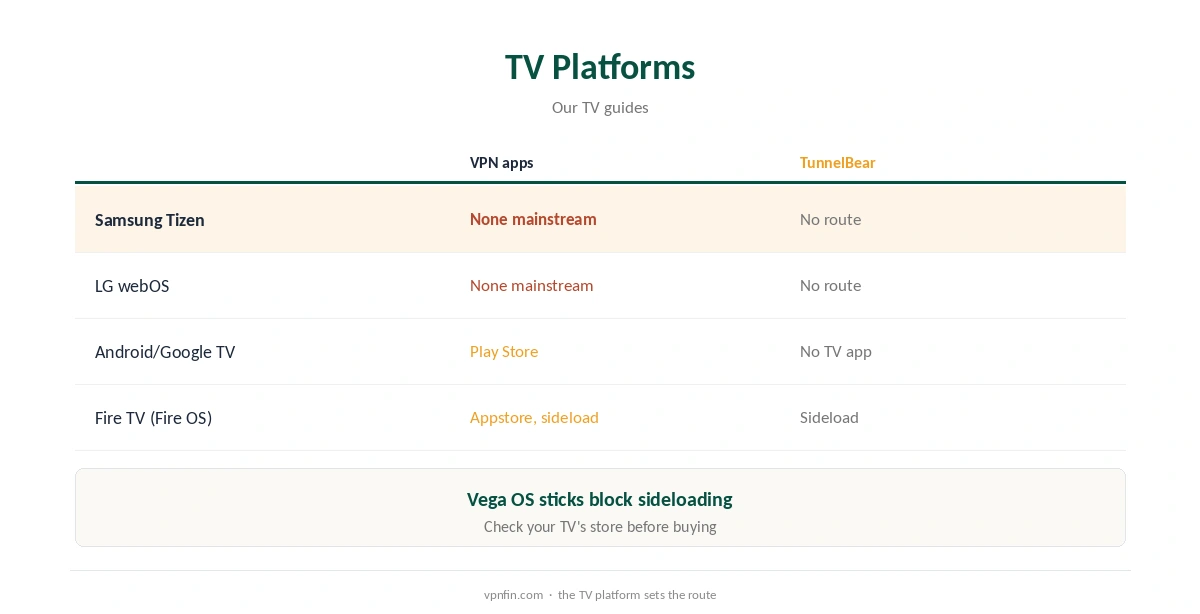
TunnelBear Samsung smart TV use has no direct route. Samsung’s Tizen system has no mainstream VPN apps, and TunnelBear publishes no TV apps of any kind, Holafly notes. TunnelBear also lacks router support and Smart DNS. The workable routes are a Windows hotspot, an unofficial router setup, or AirPlay or casting from a phone running TunnelBear, each with limits.
This guide covers the workarounds, other TV brands and providers that suit smart TVs better.
Why a TunnelBear Samsung Smart TV Setup Is Hard
Tizen does not offer VPN apps from major providers, so every VPN needs a router, a stick or a shared connection. Our Samsung TV VPN guide explains the general routes. TunnelBear closes two of them, routers and Smart DNS, by not supporting either.
Why TunnelBear Has No Smart TV App Route
TunnelBear publishes apps for Windows, Mac, iOS and Android, but none for TVs or consoles, Holafly notes. SafetyDetectives adds that TunnelBear does not support router configuration, and we found no TunnelBear Smart DNS service. That leaves only unofficial workarounds.
Workaround One: A Windows Hotspot
Run TunnelBear on a Windows PC, share the connection with Windows’ Mobile hotspot, and join the TV to it. Check the TV’s streaming apps afterwards, since results depend on which adapter Windows shares.
Workaround Two: A Streaming Stick
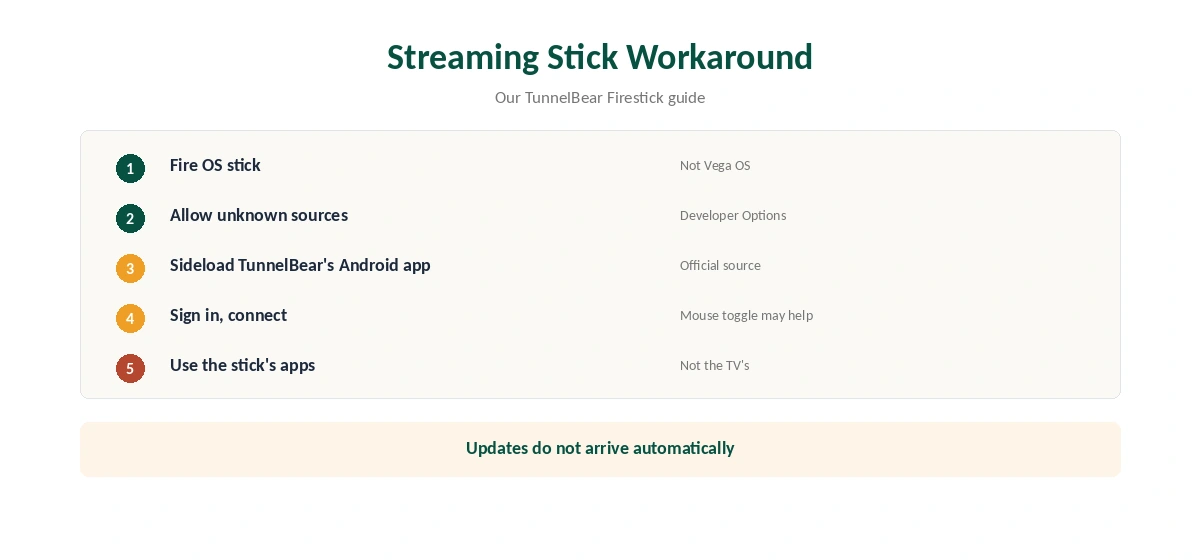
A Fire TV stick on Fire OS can run TunnelBear’s Android app by sideloading, as our TunnelBear Firestick guide explains. Plug it into the Samsung TV and use its apps instead of the TV’s own. Vega OS sticks block sideloading.
Workaround Three: Casting From a Phone
With TunnelBear running on an Android phone or iPhone, you can cast or mirror video to the TV. Screen mirroring sends what the phone plays. Some apps hand playback to the TV itself instead, which bypasses the VPN, so check the library on the TV.
Testing Any TunnelBear Samsung Smart TV Workaround
Open a streaming app on the TV and check whether its library matches the server country. On the hotspot route, disconnect TunnelBear on the PC briefly: if the TV keeps streaming the same library, its traffic was not going through the VPN.
Free Plan on a TV
TunnelBear’s free plan gives 2 GB a month. TV streaming uses data fast, so a workaround on the free plan would run out early in the month. Our TunnelBear free guide covers the limits.
The Phone Side
If you cast from a phone, run TunnelBear’s mobile app with VigilantBear on. Our TunnelBear Android guide covers the Android app, including split tunnelling by app.
Turning It Off
Switch the TV back to your normal Wi-Fi or unplug the stick. Our guide to turning off a VPN on a smart TV covers the TV settings to check afterwards.
A Quick Rule
Own a Fire OS stick? Sideload TunnelBear there and use the stick’s apps. Only watch now and then? Try a Windows hotspot. Want a TunnelBear Samsung smart TV setup that just works? It does not exist yet, so pick a provider with TV routes.
Is a TunnelBear Samsung Smart TV Workaround Worth It?
If you already own a Fire OS stick and pay for TunnelBear, the stick route costs nothing extra. Otherwise each workaround adds a device or a PC that must stay on. A provider with router support or TV apps covers the TV without extra hardware.
Checking for Leaks
On the hotspot route, run our DNS leak guide on the PC. On the stick route, use the stick’s browser if it has one.
Several TVs
A hotspot or an unofficial router covers every TV that joins it. A stick covers only the TV it is plugged into, so a household with several sets needs several sticks for a TunnelBear Samsung smart TV workaround.
Keeping the Stick Updated
A sideloaded app does not update through the Appstore. Check for a new TunnelBear Android version every month or so and reinstall it on the stick.
Other TV Brands
LG’s webOS also lacks mainstream VPN apps. Android TV and Google TV sets can install apps from the Play Store, but TunnelBear publishes no TV app, so check the store on your TV before assuming it will work.
Providers With Better TV Routes
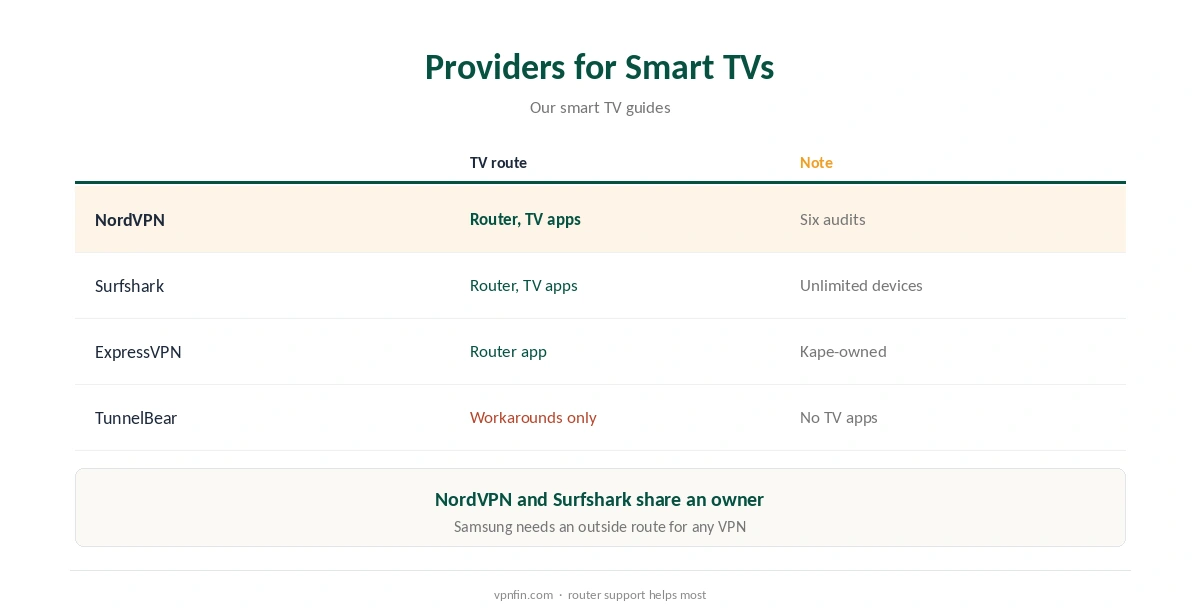
Providers with router support, TV apps or Smart DNS make smart TVs simpler. Our NordVPN smart TV guide and Surfshark smart TV guide cover two; NordVPN and Surfshark share an owner, Nord Security.
Our smart TV VPN guide compares the wider field.
TunnelBear’s Record
TunnelBear has had annual Cure53 audits since 2017 and belongs to McAfee, our tables record. Its free plan gives 2 GB a month, and Unlimited sets no device limit. Our TunnelBear safety guide covers the full picture.
How We Research
This page draws on Holafly and SafetyDetectives on TunnelBear’s platforms, our Samsung TV and TunnelBear Firestick guides and our TunnelBear tables. We cross-checked these sources against each other, and where they conflict or something can’t be verified, we say so in the text rather than guessing. We checked time-sensitive figures, including prices in US dollars, on 7 October 2026. The main source we relied on is Top10VPN’s TV app roundup. Our full approach lives on the About Us page.
TunnelBear Samsung Smart TV FAQ
Not directly; Tizen has no mainstream VPN apps and TunnelBear has no TV apps.
A Fire OS stick can run a sideloaded TunnelBear Android app.
We found no TunnelBear Smart DNS service.
No; webOS lacks mainstream VPN apps too.
Providers with router support or TV apps, such as NordVPN and Surfshark.
The Verdict
TunnelBear Samsung smart TV use needs a workaround: a Windows hotspot, a Fire OS stick or an unofficial router. For a TV, a provider with router support or TV apps is simpler.