
Disclosure: VPNFin is reader-supported. If you buy a VPN through links on this page, we may earn a commission at no extra cost to you. This never affects our ratings — here’s our full disclosure.
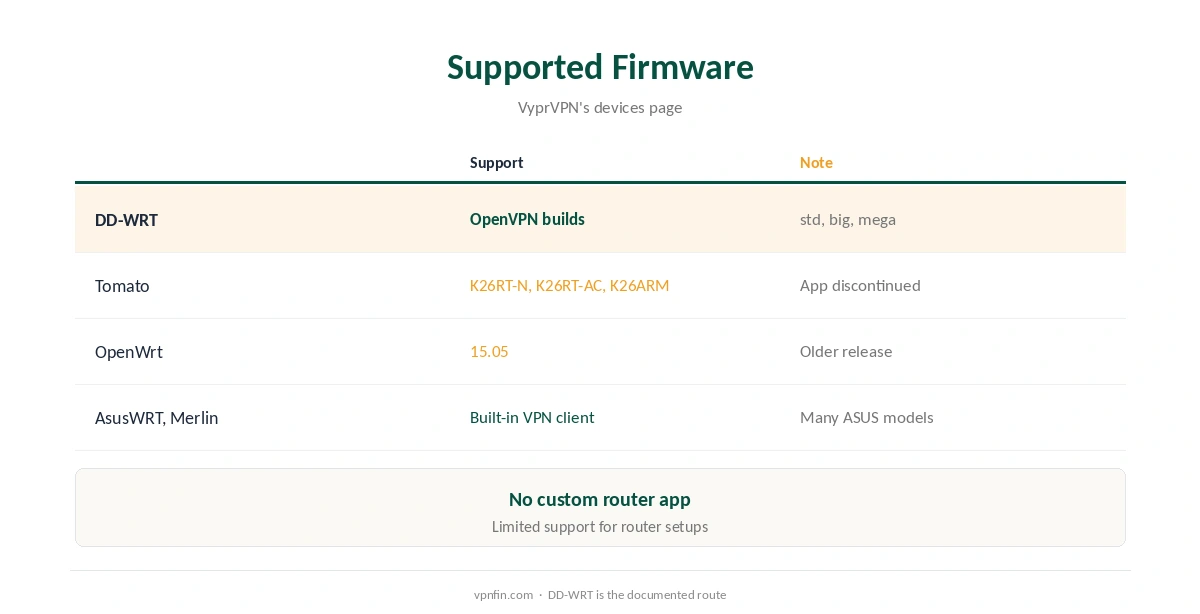
VyprVPN DD-WRT setups use OpenVPN, following VyprVPN’s own guide. You need an OpenVPN-capable DD-WRT build: standard, big and mega builds include it, mini builds do not. VyprVPN offers limited support for router setups and cannot guarantee performance, its guide warns. Comparitech notes VyprVPN discontinued its Tomato router app, so every router route today is manual. Our page on VyprVPN on Roku covers router setups and the Windows hotspot route.
This guide covers the firmware, the setup, DNS and the trade-offs.
Supported Firmware
VyprVPN’s devices page lists DD-WRT builds with the OpenVPN option, Tomato builds K26RT-N, K26RT-AC and K26ARM, OpenWrt 15.05 and AsusWRT or AsusWRT-Merlin with a built-in VPN client. Our router setup guide covers choosing a router.
VyprVPN DD-WRT Setup
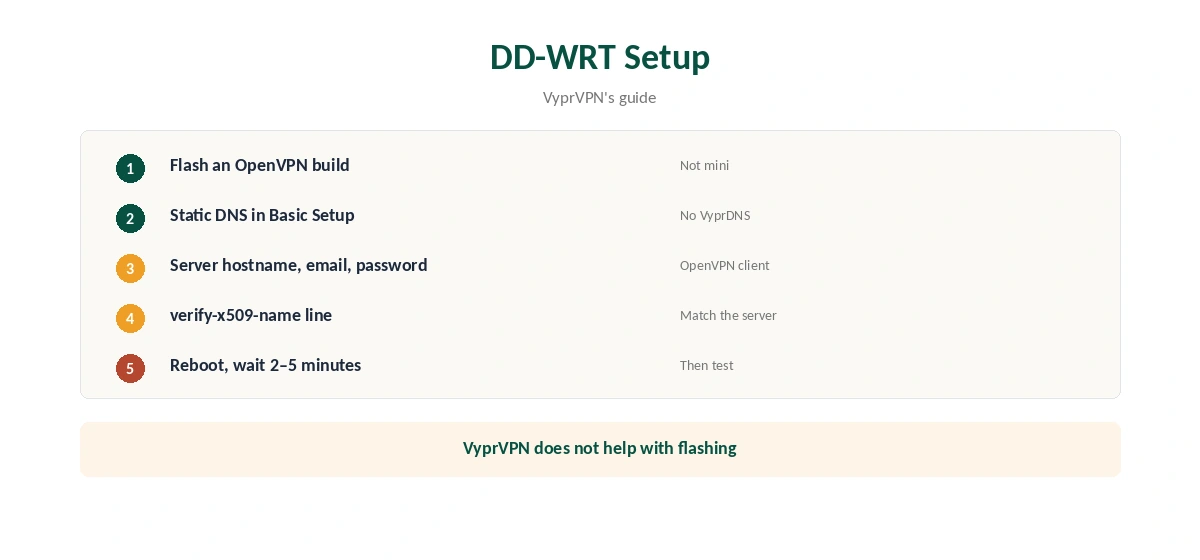
Flash your router with an OpenVPN-capable DD-WRT build first; VyprVPN does not help with flashing. Connect by Ethernet, open the firmware, and set static DNS under Setup, Basic Setup. Then enter VyprVPN’s OpenVPN settings: a server hostname, your VyprVPN email as the username, your password, and the verify-x509-name line matching that server. Save and reboot, then wait two to five minutes, the guide says.
DNS on DD-WRT
A mirror of VyprVPN’s guide notes that VyprDNS is not available in this configuration and suggests Google or OpenDNS servers instead. That means DNS requests go to a third party rather than VyprVPN. Run our DNS leak guide from a device on the network to see where they go.
What You Lose on a Router
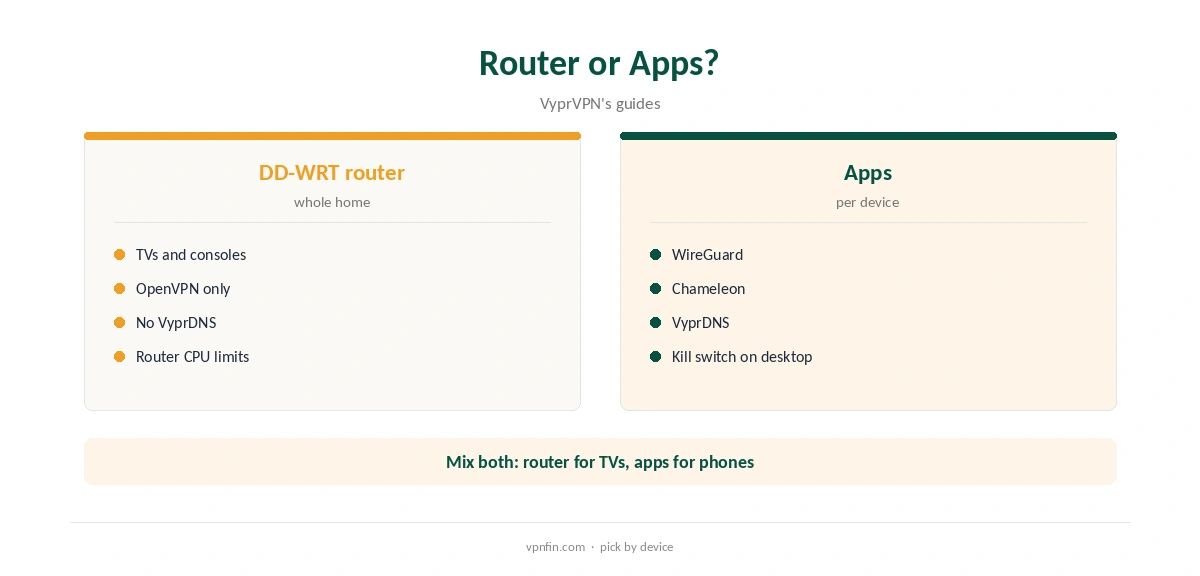
A router setup uses OpenVPN, not WireGuard or Chameleon, and has no app-level kill switch. Router processors also cap speeds. Add firewall rules so LAN traffic cannot leave outside the tunnel, as our kill switch guide explains.
Choosing a Server
VyprVPN’s servers sit in seven hubs, Tom’s Guide found, with other locations virtual. For a VyprVPN DD-WRT setup, pick the hub nearest you for speed, and remember to change both the server field and the verify-x509-name line when you switch. Our VyprVPN speed guide lists the hub cities.
Firmware Builds
VyprVPN’s devices page says most standard, big and mega DD-WRT builds include OpenVPN, while mini builds do not. Check the DD-WRT router database for your model before flashing, as VyprVPN’s guide advises, since it does not help with flashing.
Turning It Off
Disable the OpenVPN client in DD-WRT’s Services tab, or restore your saved configuration. Our guide to turning off a router VPN covers other firmware.
A Quick Rule
DD-WRT router with an OpenVPN build? Follow VyprVPN’s guide and add firewall rules. Mini build? Use the apps instead. Need WireGuard or Chameleon at home? Keep the VyprVPN DD-WRT router for TVs and use apps elsewhere.
Other Firmware Routes
VyprVPN also lists AsusWRT and AsusWRT-Merlin routers with a built-in VPN client, which avoids flashing DD-WRT on many ASUS models. Tomato builds and OpenWrt 15.05 are listed too, though that OpenWrt release is old. Check VyprVPN’s guide for your firmware before starting.
Testing Speed
Router processors limit OpenVPN speeds. Run a speed test with the tunnel on and off at the same time of day. If the router halves your speed, keep heavy devices on VyprVPN’s apps and the router for TVs and consoles.
Saving Your Configuration
Back up DD-WRT’s configuration before entering the VPN settings, so you can restore it if something breaks. Note the server hostname you used, since it appears in two places.
Is a VyprVPN DD-WRT Router Worth It?
If you already run DD-WRT and want TVs or consoles covered, the setup takes under an hour. If you rely on Chameleon or VyprDNS, keep using the apps, since the router route lacks both. Our StrongVPN router guide shows a provider with a WireGuard config generator for comparison.
Quick Check
From a phone on the router’s Wi-Fi, open our test page and run a DNS test. If DNS shows your provider, set the static DNS fields again and reboot.
Several Routers
Each router counts as one device on your plan. If you run two routers, configure each with its own server, and keep the plan’s device limit in mind.
Guest Networks
Some DD-WRT setups route only one network through the VPN. Put TVs on the VPN network and guests on a separate one.
Checking the Connection
After the reboot, check the address on VyprVPN’s IP page or our VPN test page from a device on the network. If nothing connects, recheck the server hostname in both the server field and the verify-x509-name line.
Router or Apps?
A router covers TVs and consoles that cannot run VyprVPN’s apps, but loses WireGuard, Chameleon and VyprDNS. For phones and laptops, the apps are better. Our router or device guide weighs the choice.
VyprVPN’s Record
Our audit table records one VyprVPN audit, by Leviathan Security in 2018, before Certida LLC of Texas bought the service in 2023. It operates from the US. Its 30-day guarantee covers your first purchase, as our VyprVPN plans guide explains.
How We Research
This page draws on VyprVPN’s DD-WRT OpenVPN guide and supported devices page, a mirror of the guide hosted by Giganews, Comparitech’s VyprVPN review and our VyprVPN tables. We cross-checked these sources against each other, and where they conflict or something can’t be verified, we say so in the text rather than guessing. We checked time-sensitive figures, including prices in US dollars, on 7 October 2026. The main source we relied on is VyprVPN’s DD-WRT guide. Our full approach lives on the About Us page.
VyprVPN DD-WRT FAQ
It does, with OpenVPN on builds that include the OpenVPN option.
Standard, big and mega builds; mini builds lack OpenVPN, VyprVPN says.
No. Comparitech says the Tomato app was discontinued.
Not in this configuration, per a mirror of VyprVPN’s guide.
Only in a limited way; it cannot guarantee router performance.
The Verdict
VyprVPN DD-WRT setups work with OpenVPN and VyprVPN’s guide, but without WireGuard, Chameleon or VyprDNS. Add a firewall kill switch and check DNS.