
Disclosure: VPNFin is reader-supported. If you buy a VPN through links on this page, we may earn a commission at no extra cost to you. This never affects our ratings — here’s our full disclosure.
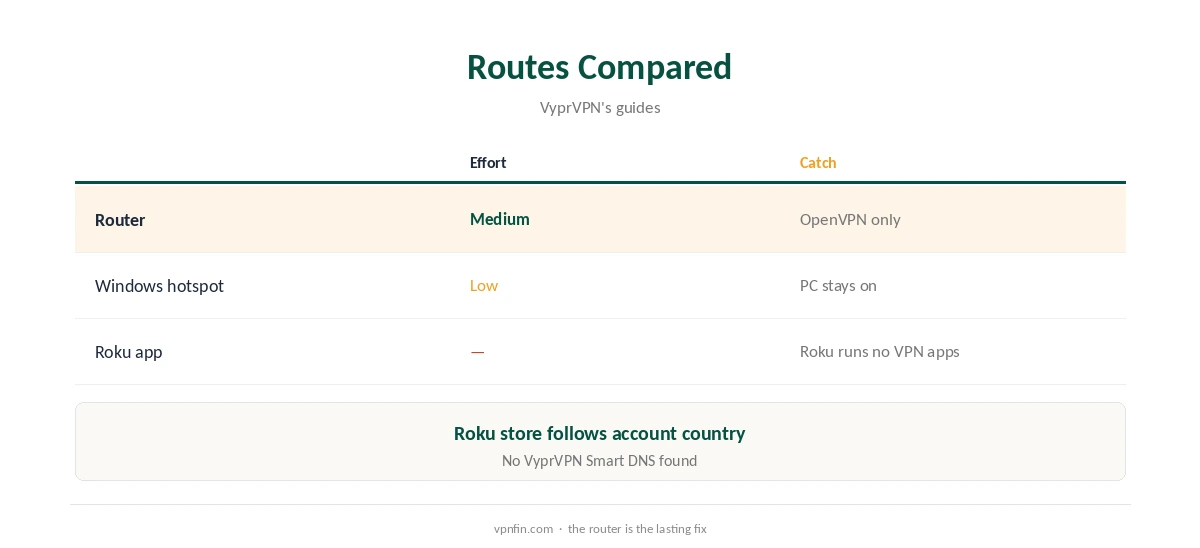
VyprVPN Roku use needs a router or a PC in between, because Roku devices run no VPN apps. VyprVPN does document router setups: OpenVPN guides for DD-WRT, Tomato, OpenWrt 15.05 and AsusWRT or Merlin routers, its devices page shows. A router running VyprVPN covers the Roku and every other device on the network. A Windows PC sharing its VyprVPN connection is the quicker, temporary option.
This guide covers both routes, their limits and the checks.
Why Roku Needs a Router
Roku has no built-in VPN support, so VPN apps cannot run on it, as VPNAlert’s PureVPN Roku guide notes. Roku’s channel store also follows the account’s country, which a VPN does not change. Our Roku VPN guide explains the general routes.
VyprVPN Roku Through a Router
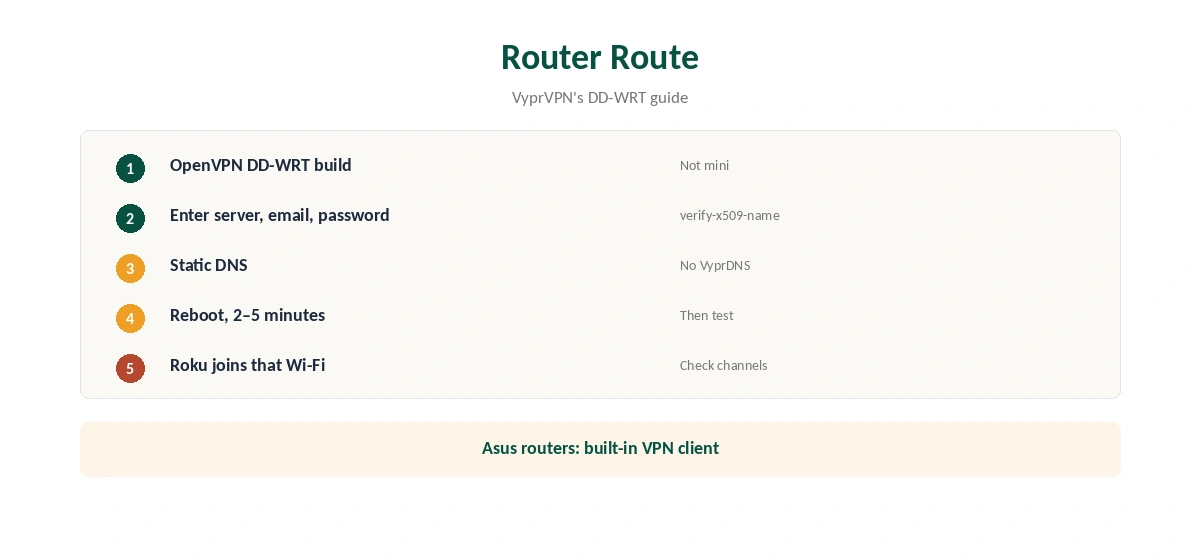
Follow VyprVPN’s router guide for your firmware. On DD-WRT, use a build with OpenVPN, enter VyprVPN’s server, your email and password and the matching verify-x509-name line, then reboot. Join the Roku to that router’s Wi-Fi under Settings, Network. Our VyprVPN DD-WRT guide covers each step.
Supported Firmware
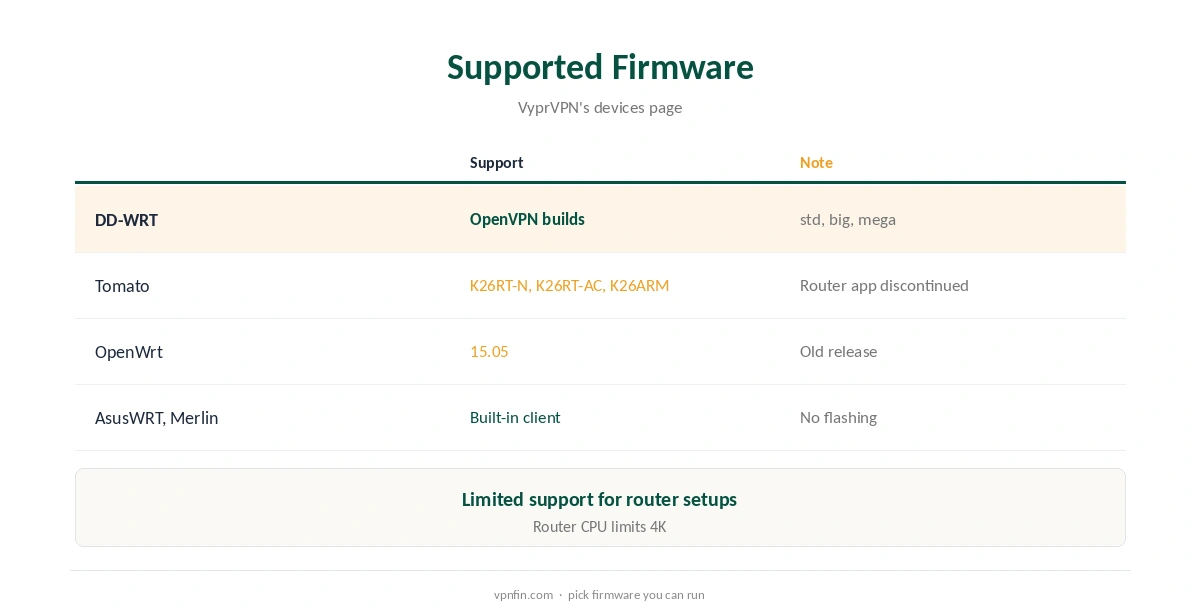
VyprVPN lists DD-WRT builds with OpenVPN, Tomato builds K26RT-N, K26RT-AC and K26ARM, OpenWrt 15.05 and AsusWRT or AsusWRT-Merlin with a built-in VPN client. It offers limited support for routers and cannot guarantee performance, its guide warns.
The Windows Hotspot Route
Run VyprVPN on a Windows PC, turn on Mobile hotspot in Windows settings and join the Roku to it. Results depend on which adapter Windows shares, so check the Roku’s channels afterwards. It works for an evening but keeps the PC on.
What You Lose on a Router
Router setups use OpenVPN rather than WireGuard or Chameleon, and a mirror of VyprVPN’s DD-WRT guide says VyprDNS is not available there. Modest processors also cap speeds, which matters for 4K. Our VyprVPN speed guide explains the hub cities that set distance.
Asus Routers Without Flashing
Many ASUS routers run AsusWRT, which VyprVPN lists with a built-in VPN client. That avoids flashing DD-WRT. Load an OpenVPN config into the router’s VPN client page, sign in with your VyprVPN details and connect. Then point the Roku at that network.
Choosing a Server
VyprVPN’s servers sit in seven hubs, Tom’s Guide found. For a VyprVPN Roku setup, pick the hub in the country of the library you want, or the nearest one for everyday speed. Change both the server field and the verify-x509-name line on DD-WRT when you switch.
Roku Settings
On the Roku, open Settings, Network, Set up connection, and choose the VPN network. Restart the Roku after switching, so channels pick up the new connection. If a channel still shows your home library, remove and re-add it.
A Quick Rule
Asus router? Use its built-in VPN client. DD-WRT router? Follow VyprVPN’s guide. Neither? Try a Windows hotspot for an evening, then decide whether a supported router is worth buying.
Is a VyprVPN Roku Setup Worth It?
If you already own a supported router, adding VyprVPN for the Roku takes an evening and covers every device at home. If you would need to buy or flash a router just for the Roku, compare that effort with providers that offer more router tools. Our StrongVPN router guide shows one with a WireGuard config generator.
A Second Network
Keep a non-VPN Wi-Fi network for devices that should skip the tunnel, such as smart home hubs. Put the Roku on the VPN network only. Our router or device guide explains the trade-offs.
Turning It Off
Move the Roku back to your normal Wi-Fi, or disable the router’s VPN client. Our guide to turning off a router VPN covers each firmware.
Several Devices
A router usually counts as one device on your plan, and it covers every Roku, TV and console behind it. Sources disagree on VyprVPN’s limit, five or ten, which matters less once a router carries the household.
Quick Check
Restart the Roku after joining the VPN network, then open a channel and confirm the library matches the server country.
Keeping It Working
If channels stop playing after weeks of working, check the router’s VPN status page first. A changed server address or certificate can stop the tunnel; re-enter the settings from VyprVPN’s current guide and reboot the router once more.
Checking the Connection
Open a Roku channel and check whether its library matches the server country. From a phone on the same Wi-Fi, run our DNS leak guide to see where DNS requests go.
VyprVPN’s Record
Our audit table records one VyprVPN audit, by Leviathan Security in 2018, before Certida LLC of Texas bought the service in 2023. Its 30-day guarantee covers your first purchase, as our VyprVPN plans guide explains.
Related Guides
Our NordVPN Roku guide and Surfshark Roku guide cover two rivals; NordVPN and Surfshark share an owner, Nord Security.
How We Research
This page draws on VyprVPN’s supported devices page and DD-WRT guide, a mirror of the guide hosted by Giganews, VPNAlert’s PureVPN Roku guide and our VyprVPN tables. We cross-checked these sources against each other, and where they conflict or something can’t be verified, we say so in the text rather than guessing. We checked time-sensitive figures, including prices in US dollars, on 7 October 2026. The main source we relied on is VyprVPN’s supported devices page. Our full approach lives on the About Us page.
VyprVPN Roku FAQ
No. Roku runs no VPN apps.
Run VyprVPN on a supported router, or share a Windows PC’s connection.
DD-WRT with OpenVPN, Tomato, OpenWrt 15.05 and AsusWRT or Merlin.
Not on DD-WRT, per a mirror of VyprVPN’s guide.
No; the store follows the Roku account’s country.
The Verdict
VyprVPN Roku use works best through a supported router. Expect OpenVPN only, no VyprDNS, and limited support.