
Disclosure: VPNFin is reader-supported. If you buy a VPN through links on this page, we may earn a commission at no extra cost to you. This never affects our ratings — here’s our full disclosure.
StrongVPN OpenWrt setups run on WireGuard configs from StrongVPN’s generator at wg.strongvpn.com. VPNCentral rates StrongVPN’s router range as the widest in its 2026 WireGuard roundup, with configs for 67 locations in 42 countries. OpenWrt can load such a config into a WireGuard interface. A router covers devices without apps, including Apple TV and Android TV, which StrongVPN has no apps for, Top10VPN notes. Our page on StrongVPN on Apple TV covers the router and Smart DNS routes without a tvOS app.
This guide covers the generator, the OpenWrt steps, the checks and the trade-offs.
Generating a Config
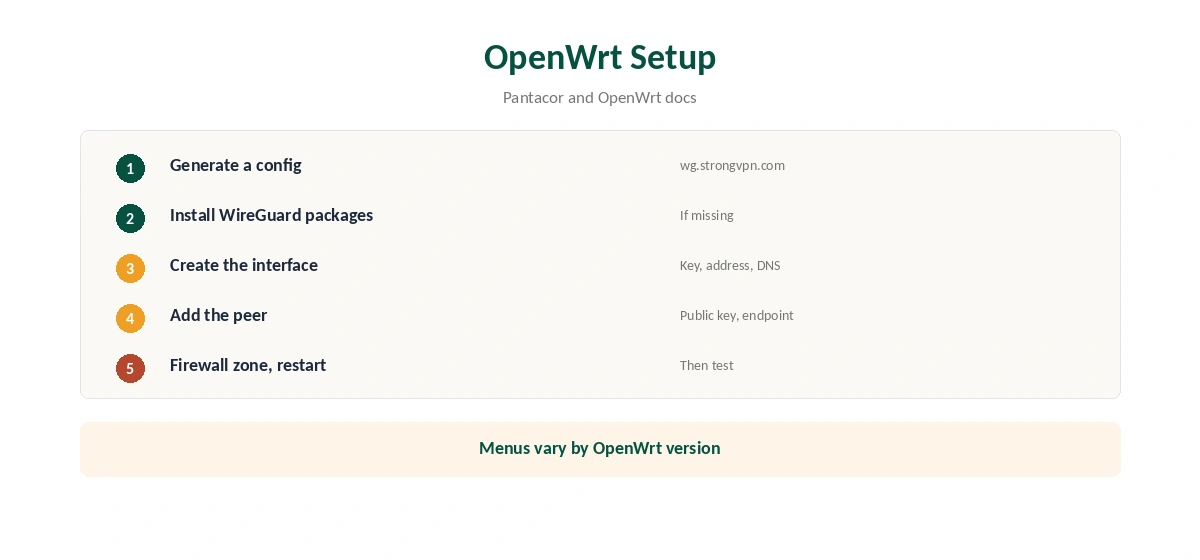
Open wg.strongvpn.com and sign in with your StrongVPN username and password. Select a location and click Generate, Pantacor’s guide shows. For a router, you do not need a platform-specific option; a generic config works.
StrongVPN OpenWrt Setup
On OpenWrt, install the WireGuard packages if they are missing, then create a WireGuard interface. Copy the private key, address and DNS from the generated config into the interface, and add the server as a peer with its public key and endpoint. Assign the interface to a firewall zone that forwards LAN traffic, then restart the network.
Exact menus vary by OpenWrt version, so follow your firmware’s WireGuard documentation alongside the config.
WireGuard or OpenVPN on a Router
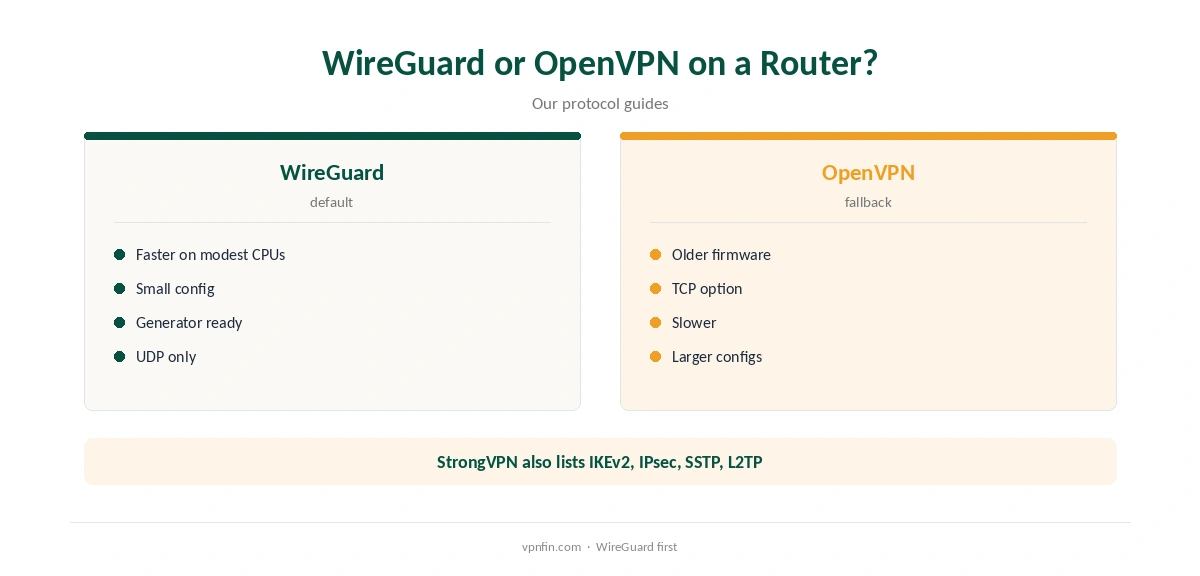
WireGuard runs faster on modest router processors, which makes it the better default. AllAboutCookies lists OpenVPN, IKEv2, IPsec, SSTP and L2TP among StrongVPN’s protocols as well, for firmware without WireGuard. Our WireGuard vs OpenVPN guide explains the trade-offs.
Kill Switch on a Router
A router setup has no app-level kill switch. Configure the firewall so LAN traffic can leave only through the WireGuard interface. If the tunnel drops, devices lose internet rather than leaking. Our kill switch guide explains the idea.

Checking the Connection
From a device on the network, confirm the address with our VPN test page and run our DNS leak guide. Point the router’s DNS at the config’s DNS servers if requests still go to your provider. Our page on StrongVPN’s server list covers network size by source, owned servers and P2P.
StrongVPN OpenWrt Performance
Router processors set the speed ceiling. Pick the location nearest you, prefer WireGuard, and watch CPU load during a speed test. If the router maxes out, consider a faster model or keep heavy devices on their own apps.
Other Firmware
VPNCentral’s roundup covers StrongVPN’s wide router support beyond OpenWrt. DD-WRT and pfSense both accept WireGuard configs; many stock routers include an OpenVPN or WireGuard client too. Our TorGuard router guide shows how another provider handles OpenWrt with its own app.
Updating the Config
Keys and server addresses can change. If the tunnel stops working, generate a fresh config from the same page and replace the old values. Keep a note of which location each interface uses.
Turning It Off
Disable the WireGuard interface in OpenWrt to return to a normal connection. Our guide to turning off a router VPN covers other firmware.
Is a StrongVPN OpenWrt Setup Right for You?
If you already run OpenWrt and want every device covered, a StrongVPN OpenWrt setup takes minutes once the config is generated. If your router runs stock firmware, compare flashing it with using StrongVPN’s apps on each device.
Testing Speed
Run a speed test with the tunnel off, then on, at the same time of day. Repeat for two locations and keep the faster one. Our guide to VPN speed explains the overhead.
A Quick Rule
OpenWrt router? Generate a WireGuard config and add a firewall kill switch. Older firmware? Fall back to OpenVPN. Devices that dislike VPNs? Put them on a second network.
Checking a StrongVPN OpenWrt Tunnel
On OpenWrt, the interface status page shows the latest handshake and data counters. A recent handshake and rising counters mean the StrongVPN OpenWrt tunnel is working. If the handshake is old, check the endpoint and keys, then restart the interface.
Quick Check
Unplug the router’s WAN cable briefly. With the firewall kill switch in place, devices should lose internet rather than fall back to your provider. Reconnect and confirm the tunnel returns within a minute. If it does not, restart the WireGuard interface and check the logs.
Backing Up Settings
Before changing the network, back up OpenWrt’s configuration from its system menu, so you can restore it if the tunnel breaks internet access.
What a Router Covers
Every device on the router’s network uses the tunnel, including TVs and consoles. StrongVPN allows 12 devices, and a router usually counts as one. Keep a second network for devices that should skip the VPN. Our router or device guide weighs the choice.
StrongVPN’s Record
StrongVPN belongs to Ziff Davis, which also owns IPVanish, and our audit table records no independent audit. It allows 12 devices, and its 30-day guarantee covers yearly plans only, as our StrongVPN refund guide explains.
Related Guides
Our router setup guide covers general steps, and our StrongVPN WireGuard guide covers the generator in more detail.
How We Research
This page draws on Pantacor’s StrongVPN WireGuard guide, VPNCentral’s 2026 WireGuard router roundup, Top10VPN’s and AllAboutCookies’ StrongVPN reviews and our StrongVPN tables. We cross-checked these sources against each other, and where they conflict or something can’t be verified, we say so in the text rather than guessing. We checked time-sensitive figures, including prices in US dollars, on 7 October 2026. Security.org lists $11.99 a month or $47.69 for the first year. The main source we relied on is Pantacor’s StrongVPN WireGuard guide. Our full approach lives on the About Us page.
StrongVPN OpenWrt FAQ
Yes, with a WireGuard config from wg.strongvpn.com.
VPNCentral counts WireGuard configs for 67 locations in 42 countries.
Not by default; set firewall rules so traffic leaves only through the tunnel.
StrongVPN lists OpenVPN among its protocols, for firmware without WireGuard.
Our audit table records no independent audit.
The Verdict
StrongVPN OpenWrt setups are straightforward thanks to the WireGuard generator and wide router support. Add a firewall kill switch, test for leaks, and weigh the missing audit.