
Disclosure: VPNFin is reader-supported. If you buy a VPN through links on this page, we may earn a commission at no extra cost to you. This never affects our ratings — here’s our full disclosure.
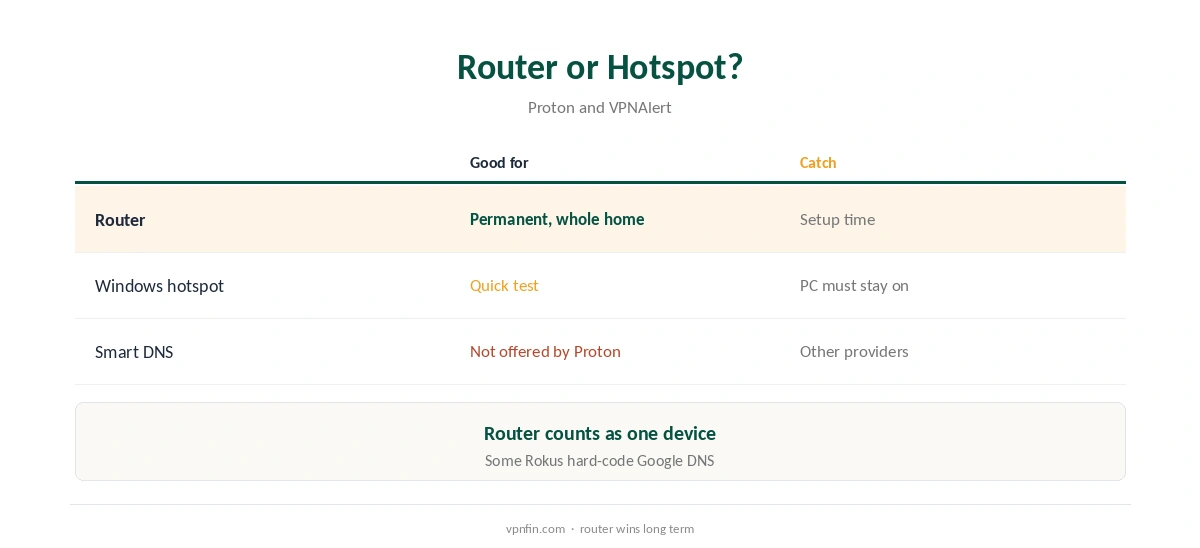
A Proton VPN Roku setup needs a workaround, because Roku OS runs no VPN apps and Proton offers no Smart DNS, Gizmodo’s 2026 testing notes. Two routes work: a router running a Proton WireGuard config, which covers the Roku and everything else at home, or a Windows PC sharing its Proton connection as a mobile hotspot. Roku’s channel store also follows your Roku account’s country, not your IP, NordVPN’s support pages note.
This guide covers both routes, the Roku-specific catches and alternatives.
Why Roku Needs a Workaround
Roku does not support VPN apps, NordVPN’s and VPNAlert’s guides confirm. Some providers offer Smart DNS for such devices, but Proton does not. Our Roku VPN guide explains the options for every provider.
Proton VPN Roku Route One: A Router
Download a WireGuard configuration from your Proton account, choosing Router as the platform, and import it into a supported router such as OpenWrt, AsusWRT RT-AX or GL.iNet’s Flint. The Roku then connects through the VPN automatically. Our Proton VPN router guide walks through supported firmware.
Route Two: A Windows Hotspot
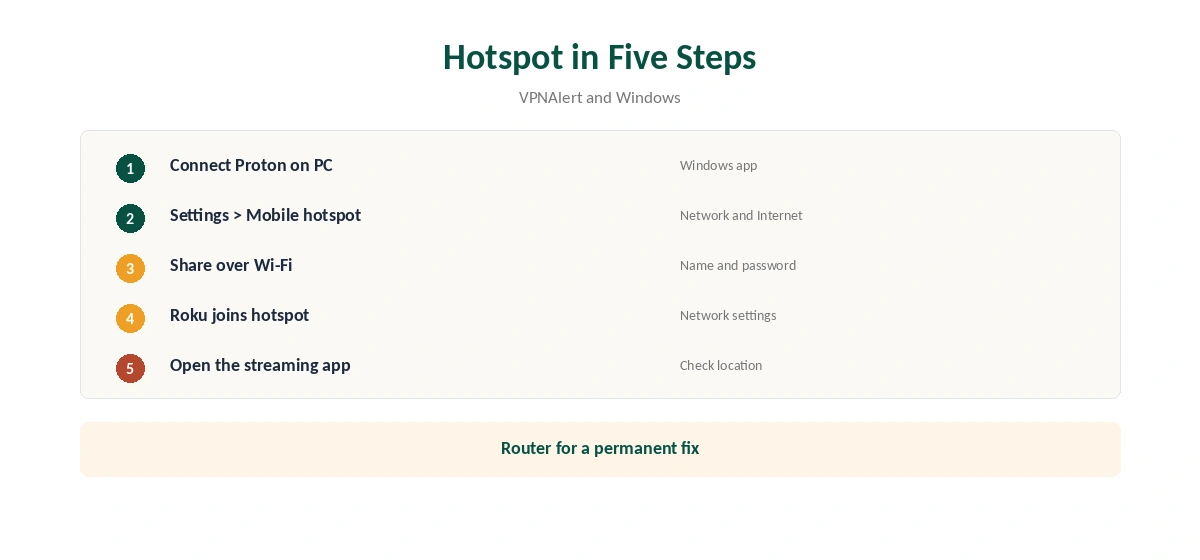
On a Windows PC with Proton connected, open Settings, Network and Internet, Mobile hotspot, and share the connection over Wi-Fi. Connect the Roku to that network. VPNAlert describes the same method for other providers. The PC must stay on while you watch.
Roku Catches
The channel store follows your Roku account’s country, so a VPN changes what streaming apps see, not which apps you can install. Some Roku models use Google DNS that cannot be changed on the device, VPNAlert notes; block it with a router rule if streaming apps still see your real region.
Which Router to Use
Proton publishes guides for OpenWrt, AsusWRT RT-AX models, AsusWRT-Merlin, pfSense, OPNsense, MikroTik, GL.iNet’s Flint and Tomato. Proton notes Asus RT-AC models and some RT-AX models lack WireGuard, so check before buying.
Roku Account Region
ExpressVPN’s Roku guidance advises keeping the Roku account in the same country as the VPN server. The channel store follows the account, so some channels may not appear even when the VPN works.
Testing the Setup
After connecting, open a streaming channel and check that it shows the server country’s catalogue. If not, restart the Roku, then check for a hard-coded DNS on your model.
Speed
Routers and hotspots add a step, so test speed at your usual viewing time. A wired connection from the Roku to the router removes Wi-Fi as a bottleneck.
Several Devices
A router counts as one device on VPN Plus’s 10, and covers the Roku, TVs and consoles together. Our Proton VPN smart TV guide covers TVs with apps.
Proton VPN Roku vs a Roku App
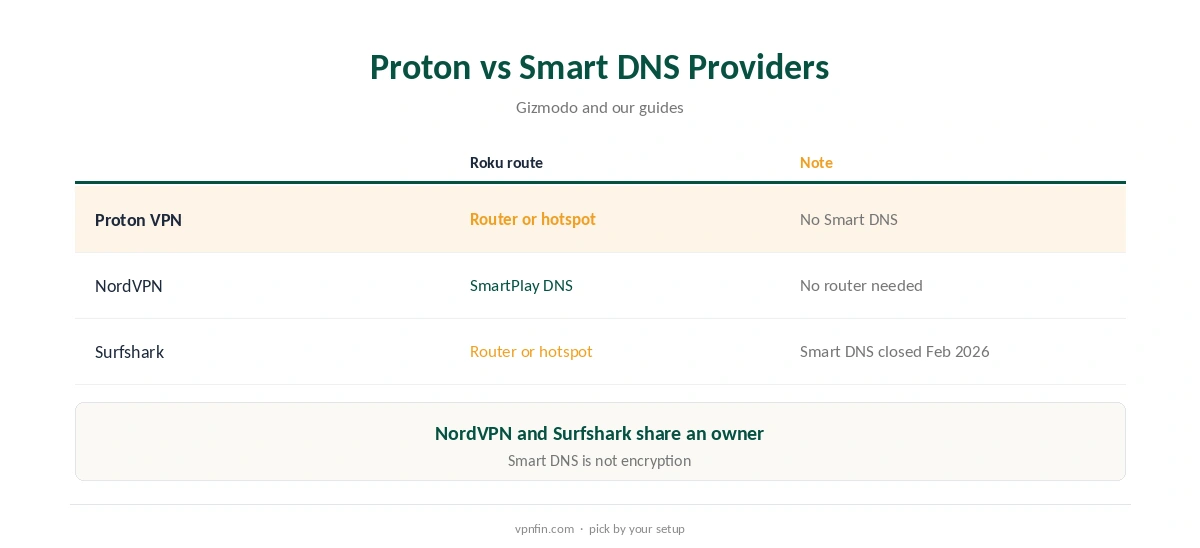
Some providers publish Roku guidance but no provider can ship a VPN app for Roku OS. The router and hotspot routes are the same for Proton as for NordVPN, Surfshark or PureVPN.
Kids and Shared TVs
A VPN does not filter content. For a family Roku, use Roku’s own parental controls and keep the VPN for location and privacy.
Quick Check
After connecting, visit our VPN test page from a phone on the same network to confirm the router or hotspot shows the server’s country.
Turning It Off
On a router, disable the VPN profile in the admin console; on a hotspot, stop sharing or disconnect Proton on the PC. Our guide to turning off a router VPN covers common firmware.
Who It Suits
Roku owners who already have a capable router, or who will buy one, suit the Proton VPN Roku route. Those who want no router should compare a provider with Smart DNS.
Privacy
Proton has five Securitum audits in our table, and the router route follows the same no-logs policy. Our VPN audit tracker explains what audits check.
Quick Rule
Lasting fix: router. Quick test: Windows hotspot. No router at all: compare a Smart DNS provider.
Keeping Configs Current
If the router stops connecting, download a fresh WireGuard config from your Proton account and import it again; server keys and addresses can change.
Support
Paid Proton users can reach support by live chat, its release notes say. Ask which servers suit streaming in your country.
Is Proton VPN Roku Setup Worth It?
If you stream on a Roku and already pay for Proton, yes: a router covers it and every other device at home.
Free Plan
The free plan’s WireGuard configs and server choices are limited, and streaming support is for paid plans, Proton’s support pages say. Use a paid plan if the Roku is mainly for streaming.
Alternatives
NordVPN’s SmartPlay changes the streaming location through DNS with no app, Gizmodo notes, which suits a Roku without a router. Our NordVPN Roku guide and Surfshark Roku guide cover other approaches; both providers belong to Nord Security.
How We Research
This page draws on Gizmodo’s 2026 smart TV testing, NordVPN’s and VPNAlert’s Roku guides, Proton’s router guides and our Proton tables. We cross-checked these sources against each other, and where they conflict or something can’t be verified, we say so in the text rather than guessing. We checked time-sensitive figures, including prices in US dollars, on 8 October 2026. The main source we relied on is Gizmodo’s smart TV VPN test. Our full approach lives on the About Us page.
Proton VPN Roku FAQ
No; Roku OS runs no VPN apps.
No, Gizmodo notes; use a router or a hotspot.
A router, since it covers the Roku permanently.
No; the store follows your Roku account’s country.
Only through a router or hotspot, and streaming needs a paid plan.
The Verdict
A Proton VPN Roku setup works through a router or a Windows hotspot. For a simpler DNS route, compare providers that offer Smart DNS.