
Disclosure: VPNFin is reader-supported. If you buy a VPN through links on this page, we may earn a commission at no extra cost to you. This never affects our ratings — here’s our full disclosure.
Mullvad Android brings the same privacy tools as the desktop app to phones running Android 8 or later. You can install it from Google Play, F-Droid or as an APK, its code repository says. Settings include DAITA against traffic analysis, multihop, quantum-resistant tunnels, anti-censorship and split tunnelling, Mullvad’s Android guide lists. Since September 2026, multihop can switch on automatically when a feature needs it.
This guide covers installation, setup with Android’s always-on VPN, each privacy feature, battery use, recent version issues and pricing.
Where to Install It
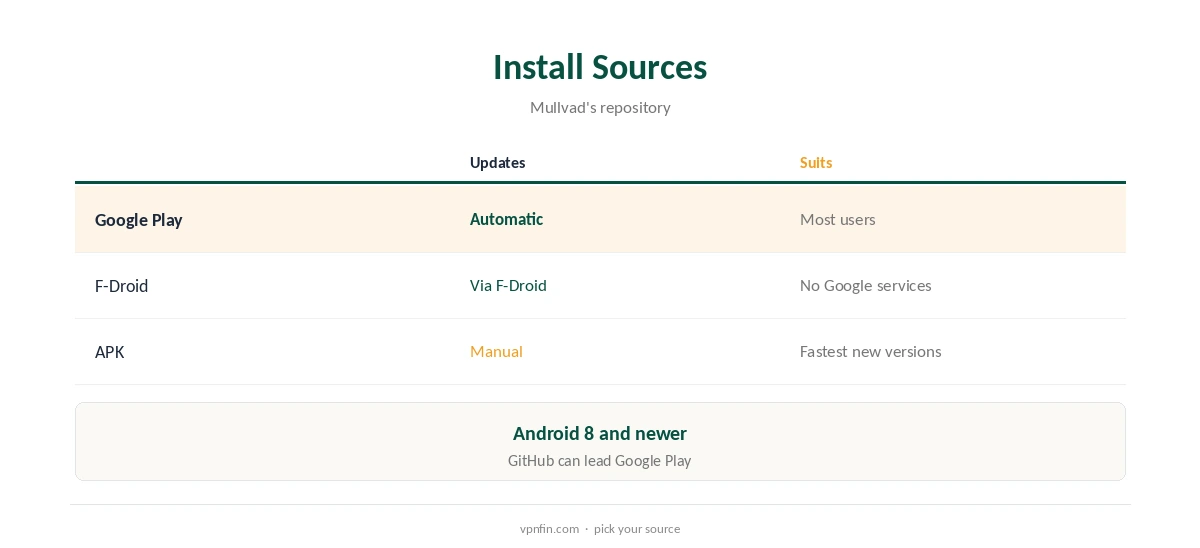
The Android app is available on Google Play and F-Droid, and as a signed APK from Mullvad’s site and GitHub, the repository notes. F-Droid suits users who avoid Google services; Google Play updates automatically on most phones.
Mullvad supports Android 8 and newer. Updates can reach GitHub before Google Play: TechRadar noted version 2026.10 appeared before the store listing caught up.
Mullvad Android Setup
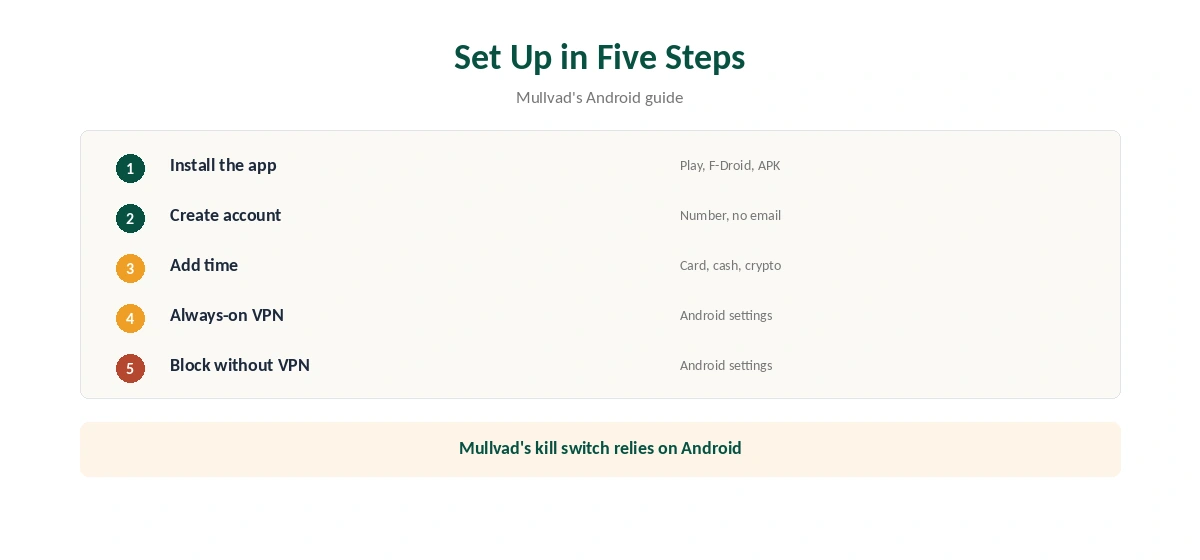
Open the app and create an account; Mullvad issues an account number instead of asking for an email. Add time with a card, cash by post or cryptocurrency, then connect. The app picks a server, or you choose one from the interactive map added in 2026.
Mullvad’s auto-connect and lockdown rely on Android’s own settings, its guide explains. Turn on Always-on VPN and Block connections without VPN in Android’s VPN settings, so the phone connects at start-up and blocks traffic if the tunnel drops. Our kill switch guide explains why that matters.
DAITA and Multihop
DAITA, Defence Against AI-guided Traffic Analysis, adds noise and padding to make traffic patterns harder to analyse. Not every server supports it, so the app routes you through a DAITA-enabled server using multihop when needed, Mullvad’s guide says.
Version 2026.9 added a when-needed multihop option that turns on automatically for DAITA and similar settings, and separate entry and exit filters. Multihop first reached Android in late 2024, the changelog records. Our Double VPN guide explains multi-hop routing.
Quantum-Resistant Tunnels
Quantum-resistant tunnels add a post-quantum key exchange to WireGuard. Mullvad enabled them by default on Android in 2025, then in January 2026 removed the Automatic setting, leaving a simple on or off switch, the changelog shows.
Mullvad has used WireGuard only since it dropped OpenVPN in January 2026, our tables record. Our post-quantum VPN guide explains what the extra key exchange protects against.
Anti-Censorship and Split Tunnelling
Anti-censorship settings disguise WireGuard traffic where networks block VPNs; Gizmodo notes Shadowsocks obfuscation on Android. Split tunnelling lets chosen apps bypass the tunnel, useful for a banking app that rejects VPN addresses.
Local network sharing keeps printers and casting working while connected. DNS content blockers filter adverts, trackers and malware domains inside the tunnel, configurable in VPN settings.
Same Features as Desktop
Mullvad’s repository lists quantum-resistant tunnels, DAITA and WireGuard multihop on Windows, Linux, macOS, Android and iOS alike, so a phone carries the same protections as a laptop. The Android app shares the desktop’s tunnel and security service with its own interface.
One gap matters for TVs: Mullvad has no Fire TV app, Gizmodo notes. Mullvad’s supported-platform list covers Windows, Linux, macOS, Android and iOS, not TVs. For a TV, a router running Mullvad’s WireGuard configuration covers it as one of your five devices. Our guide to Mullvad on Android TV covers official Google TV support, with split tunnelling.
Battery Use
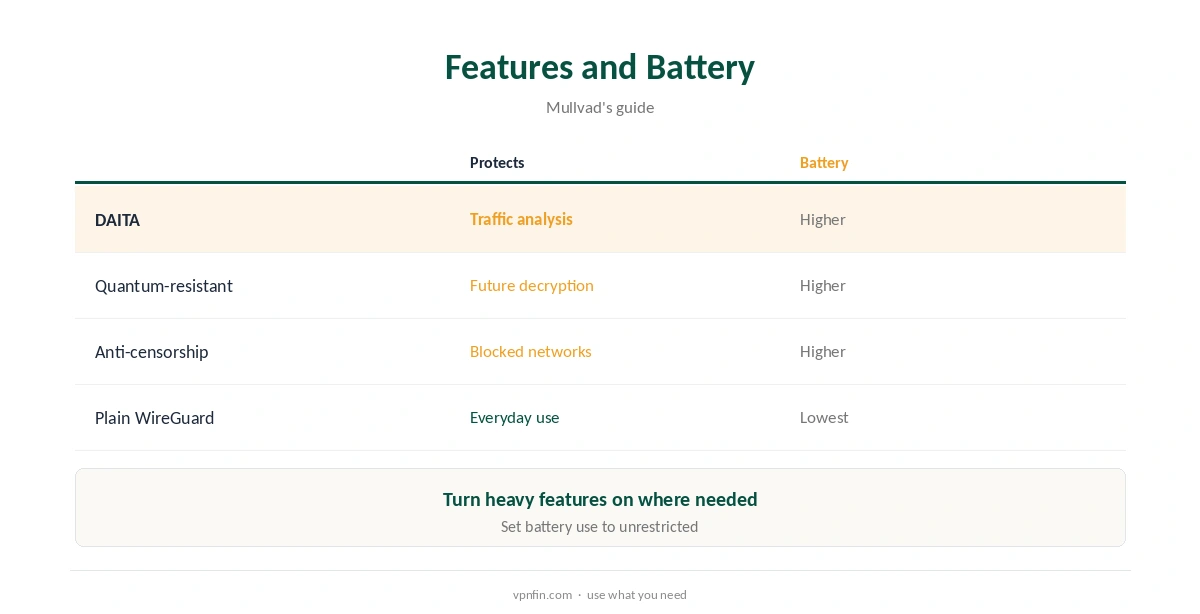
Mullvad’s own guide warns that DAITA, quantum-resistant tunnels and anti-censorship can use more battery. Turn them on where you need them, such as on untrusted networks, rather than everywhere.
Android battery savers can also close VPN apps in the background. Set Mullvad’s battery use to unrestricted if the connection drops when the screen is off. Our VPN battery guide covers protocol costs.
Turning It Off
Disconnect in the app for a quick break. Because Mullvad relies on Android’s Always-on VPN and Block connections without VPN, turn those off in Android’s VPN settings before uninstalling, or the phone may block traffic with no VPN running.
Our guide to turning off a VPN on Android shows where those settings live on most phones.
Recent Version Issues
Mullvad warned that version 2026.9 and earlier could fail the first connection attempt with quantum-resistant tunnels or DAITA, and advised moving to 2026.10, TechRadar and the release notes report. GitHub lists later releases too. Our guide to Mullvad for Netflix covers blocked in tests, and how to keep your home library.
If the first connection fails, simply try again or update the app. Keep the app current, since fixes land often and several releases arrived within weeks of each other. Our guide to Mullvad on Firestick covers the APK route, and the Vega OS gap.
Price and Devices
Mullvad charges a flat €5 a month, about $65 a year, with no discounts and no renewal jump, our tables record. One account covers five devices, and Mullvad refunds within 14 days of payment. Our guide to Mullvad on Chromebook covers the Android app, or ChromeOS’s built-in WireGuard.
Mullvad has more than 10 audits in our table, and police who visited its office with a warrant left with nothing. Our IPVanish vs Mullvad page compares it with a household-focused rival.
How We Research
This page draws on Mullvad’s Android guide, its GitHub repository and changelog, TechRadar’s September 2026 report, Gizmodo’s Mullvad review and our Mullvad tables. We cross-checked these sources against each other, and where they conflict or something can’t be verified, we say so in the text rather than guessing. We checked time-sensitive figures, including prices in US dollars, on 8 October 2026. The main source we relied on is Mullvad’s Android guide. Our full approach lives on the About Us page.
Mullvad Android FAQ
Google Play, F-Droid, or an APK from Mullvad’s site or GitHub.
Android 8 and newer.
It uses Android’s Always-on VPN and Block connections without VPN.
It can, Mullvad warns, as can quantum-resistant tunnels.
A flat €5 a month, about $65 a year, for five devices.
The Verdict
Mullvad Android packs DAITA, multihop and quantum-resistant tunnels into a no-email app. Turn on Android’s always-on settings, and use the heavier features where they matter.