
Disclosure: VPNFin is reader-supported. If you buy a VPN through links on this page, we may earn a commission at no extra cost to you. This never affects our ratings — here’s our full disclosure.
Windscribe on Firestick installs from the Amazon Appstore, where Amazon has listed its app since 2017, and signs in with Lazy Login, which links the TV to your account without typing a password on the remote, Windscribe says. Cloudwards found OpenVPN, WireGuard and IKEv2 on the Fire TV app, along with split tunnelling, though it noted the app has some issues. The free plan works on Fire TV too.
This guide covers which Fire TVs work, setup, the free plan on a TV, split tunnelling, streaming and the limits.
Which Fire TVs Work
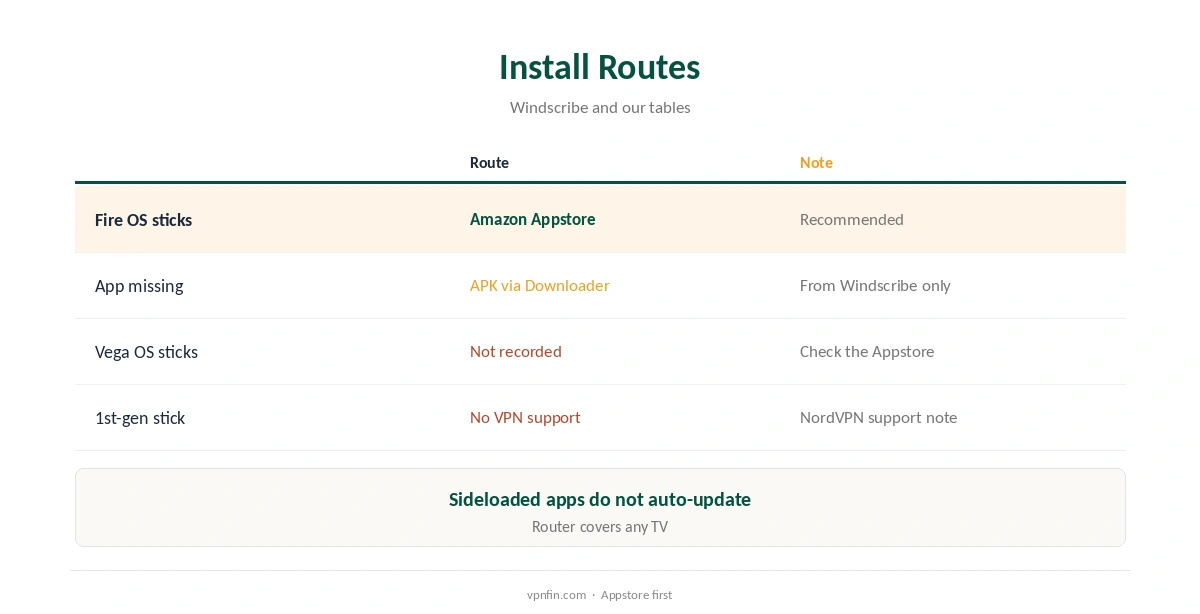
Windscribe’s Appstore app runs on Fire OS devices, including Fire TV Stick, Fire TV Cube and Fire TVs. The first-generation Fire TV Stick does not allow VPN connections at all, NordVPN’s support pages note, so no app will work there.
Newer sticks running Amazon’s Vega OS need apps built for that system. Our tables record Vega OS apps from NordVPN, IPVanish, Surfshark, Proton VPN and ExpressVPN, but not yet from Windscribe; NordVPN and Surfshark share an owner, Nord Security. Our Vega OS VPN guide tracks the list.
Windscribe Firestick Setup
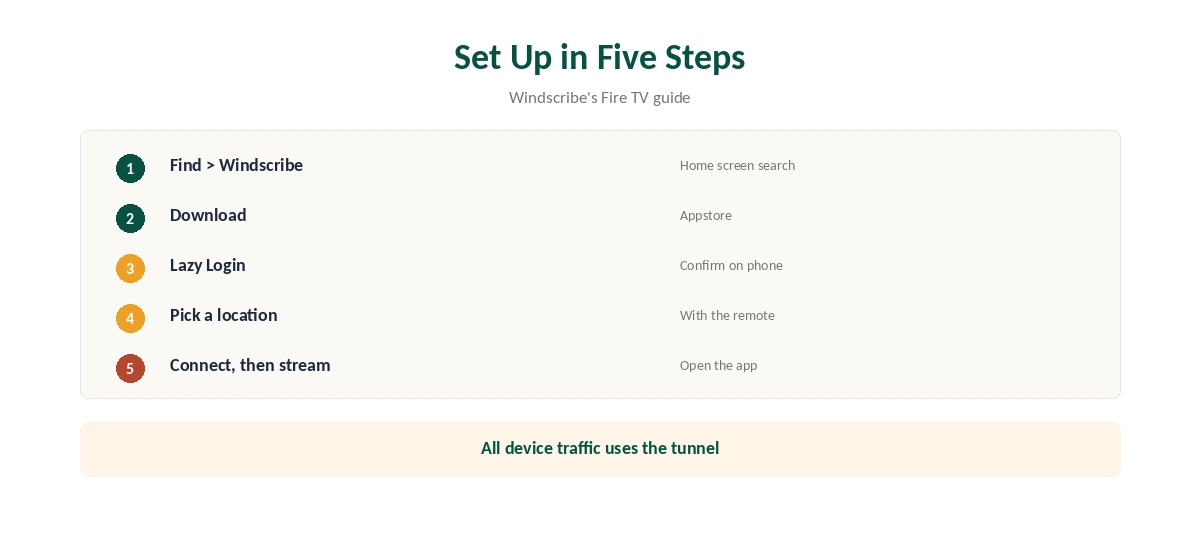
Open Find on the Fire TV home screen, search for Windscribe and download the app, or send it to the device from Windscribe’s download page. Open it and choose Lazy Login, then confirm the link on your phone or computer, as Windscribe’s guide explains.
Pick a location with the remote and connect, starting with a nearby server for the best speed. Once connected, all traffic on the device goes through the tunnel until you disconnect, Windscribe’s guide notes. Then open the streaming app as usual.
If the App Is Missing
Windscribe also offers a Fire TV APK. Install Downloader from the Appstore, or use an app such as Send Files to TV, and install the APK from Windscribe’s site, the company explains. Only download the APK from Windscribe itself.
Sideloaded apps do not update automatically, so check Windscribe’s site for new versions. The Appstore route is simpler for most users.
Split Tunnelling on Fire TV
Cloudwards found split tunnelling easy to set up in inclusive or exclusive mode, and recommends inclusive mode on the free plan to save data: only the apps you choose use the VPN, so everything else leaves your allowance alone.
Exclude apps that need your home location, such as a local broadcaster’s app, and include the streaming app you want to move. Revisit the list after installing new apps, so each one is where you want it. Our split tunnelling guide explains both modes.
Free Plan on a TV
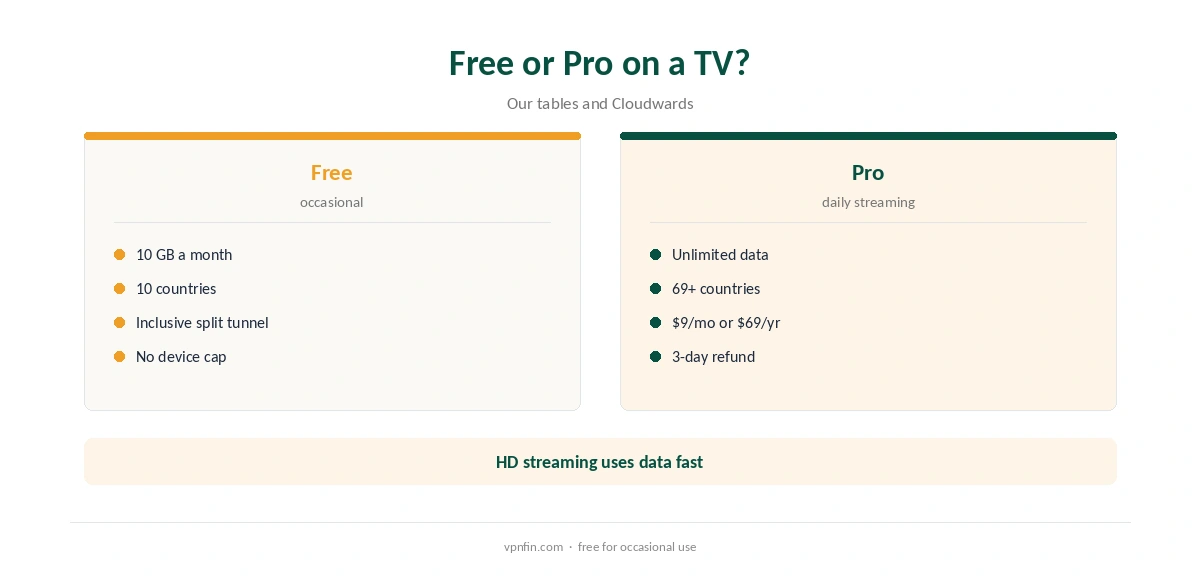
The free plan gives 10 GB a month after you confirm an email, or 2 GB without, with servers in 10 countries. Video uses data quickly, so the allowance runs out fast if you watch through the VPN.
Use the free plan on a TV to reach a service now and then, or with inclusive split tunnelling for one app. Daily streaming needs Pro, at $9 a month or $69 a year, our tables record. Our Windscribe Free guide covers the limits.
Protocols on Fire TV
Cloudwards found OpenVPN, WireGuard and IKEv2 on the Fire TV app. WireGuard is the fastest choice for streaming on a stick’s modest processor; OpenVPN over TCP helps if a network blocks WireGuard.
Stealth and WStunnel, available on desktop, did not appear in Cloudwards’ Fire TV protocol list. On a network that blocks VPNs, a router running Windscribe may work better. Our router setup guide covers that route.
Streaming Results
Security.org reported problems with Netflix on Windscribe. Cloudwards still lists Windscribe among the best free VPNs for Firestick for its speed and features.
Test the services you use within the seven-day refund window, before you use 10 GB, if you buy Pro. Our Firestick VPN guide compares providers that tested better for streaming.
Turning It Off
Open the app and disconnect to return the stick to your normal connection. To remove the app, go to Settings, Applications, Manage Installed Applications, choose Windscribe and uninstall.
If streaming apps still show the VPN’s location after disconnecting, restart the stick. Our guide to turning off a VPN on Firestick walks through each step.
Ad and Malware Blocking
Windscribe’s Fire TV app blocks adverts and malware at the DNS level, the company says, through its R.O.B.E.R.T. tool. That covers apps on the stick, not just a browser, and works on the free plan as well as Pro. Windscribe describes the same R.O.B.E.R.T. tool on desktop and mobile, so one setting covers your whole account.
DNS blocking can break some apps that load adverts from the same domains as content. If a streaming app fails, turn the blocker off for that session and try again, then switch it back on afterwards. Our guide to Windscribe on Kodi covers running it on the device, testing free and streaming on Pro.
How We Research
This page draws on Windscribe’s Fire TV page and setup guide, Cloudwards’ 2026 free Firestick VPN testing, NordVPN’s Fire TV support notes and our Windscribe and Vega OS tables. We cross-checked these sources against each other, and where they conflict or something can’t be verified, we say so in the text rather than guessing. We checked time-sensitive figures, including prices in US dollars, on 8 October 2026. The main source we relied on is Windscribe’s Fire TV guide. Our full approach lives on the About Us page.
Windscribe Firestick FAQ
Yes; Amazon has listed its Fire TV app since 2017.
Yes, with 10 GB a month after confirming an email.
Use Lazy Login and confirm on another device.
Our tables do not yet record a Windscribe Vega OS app.
Yes, in inclusive or exclusive mode, Cloudwards found.
The Verdict
Windscribe on Firestick is easy to install and generous on the free plan, but streaming results vary. Use inclusive split tunnelling to make free data last.