
Disclosure: VPNFin is reader-supported. If you buy a VPN through links on this page, we may earn a commission at no extra cost to you. This never affects our ratings — here’s our full disclosure.
Windscribe iPhone support covers six protocols: WireGuard, OpenVPN over UDP and TCP, IKEv2, Stealth and WStunnel. WireGuard carries post-quantum encryption, its App Store listing says. A firewall acts as an always-on kill switch, and the free plan gives 10 GB a month. Recent updates added IP rotation and pinning and custom app icons. The app needs iOS 15 or later.
This guide covers setup, protocols, the kill switch, network rules, the free plan, buying Pro in the app and the limits iOS imposes on every VPN.
Windscribe iPhone Setup
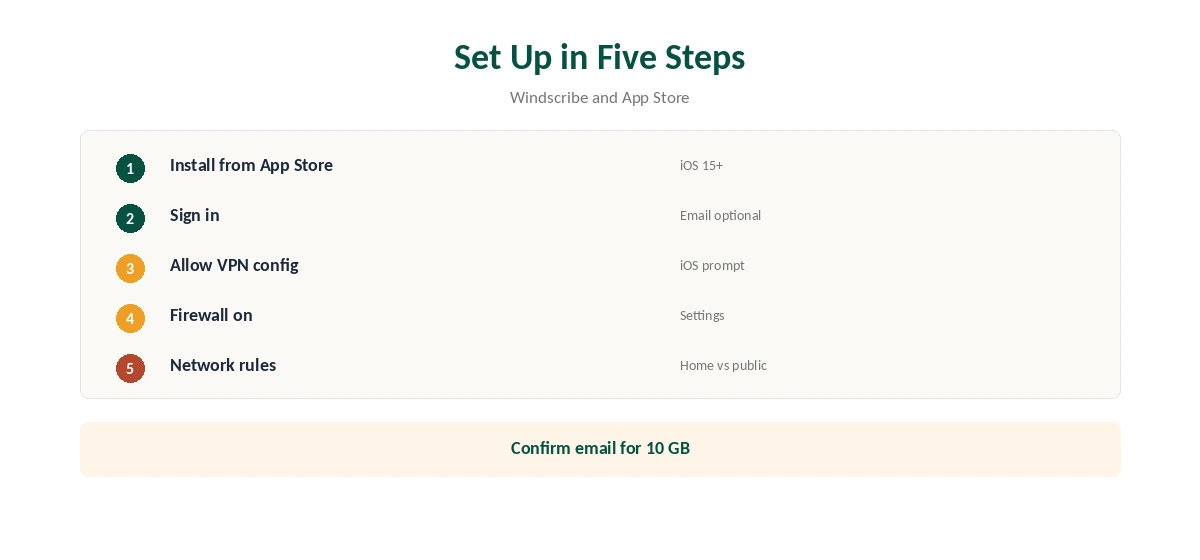
Install Windscribe from the App Store on iOS 15 or later, open it and sign in or create an account. An email is optional, but confirming one raises free data from 2 GB to 10 GB. Allow iOS to add the VPN configuration when asked.
Pick a location and connect. Then open settings to choose a protocol and turn on the firewall. Our iPhone VPN guide compares other providers’ iOS apps.
Six Protocols on iOS
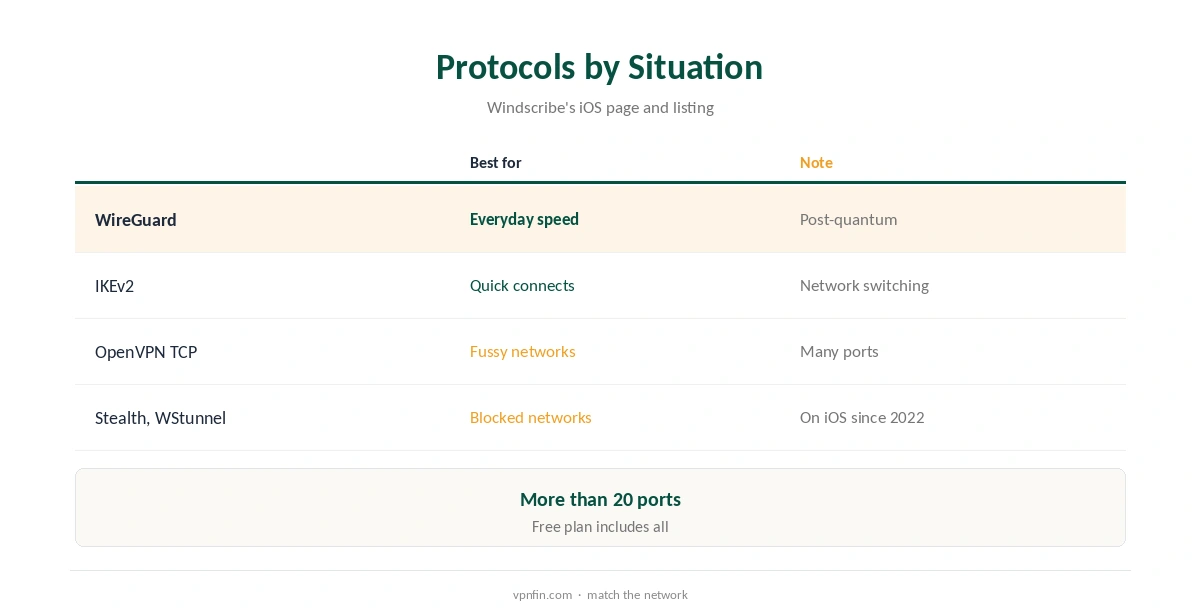
WireGuard is the fast default and carries post-quantum encryption, the listing says. IKEv2 offers quick connections, and OpenVPN over UDP or TCP helps on fussy networks. Windscribe’s iOS page lists more than 20 ports to try: six for WireGuard, 11 for OpenVPN over TCP and 11 for Stealth, for example.
Stealth disguises OpenVPN as HTTPS and has been on iOS since December 2022, Windscribe’s help pages note. WStunnel uses WebSocket when even Stealth is filtered. Our obfuscation guide explains both.
The Firewall and Always-On VPN
Windscribe’s iOS firewall blocks all traffic if the VPN drops, the App Store listing describes. It works as an always-on VPN rather than a separate kill switch. Tom’s Guide notes iOS has no standalone kill switch toggle and relies on this system-level always-on approach.
Turn it on before relying on the VPN on public Wi-Fi, and leave it on, so switching between Wi-Fi and mobile data cannot expose traffic in between. Our kill switch guide explains the difference between always-on and reactive switches.
Network Rules and Ad Blocking
Windscribe can act automatically when you join a Wi-Fi network: connect on café or hotel Wi-Fi, stay off on home Wi-Fi, its iOS page describes. Set rules once, and the app follows them, so you never forget to connect on an unfamiliar network.
R.O.B.E.R.T. blocks adverts and trackers across every app, not only in Safari, Windscribe says, unlike App Store ad blockers that work only inside Safari. Our Windscribe safety guide covers its privacy record.
iPad, Mac and Apple TV
The same app runs on iPad, and Windscribe also offers apps for macOS and Apple TV, its App Store listing says. One account covers them all, with no device limit on free or Pro plans, our tables record, though free data is shared across devices. Our guide to Windscribe on Apple TV covers the native tvOS app, setup and the free plan.
The listing also states the developer collects no data from the app. Our Windscribe for Mac guide covers the desktop version.
Free Plan and Pro in the App
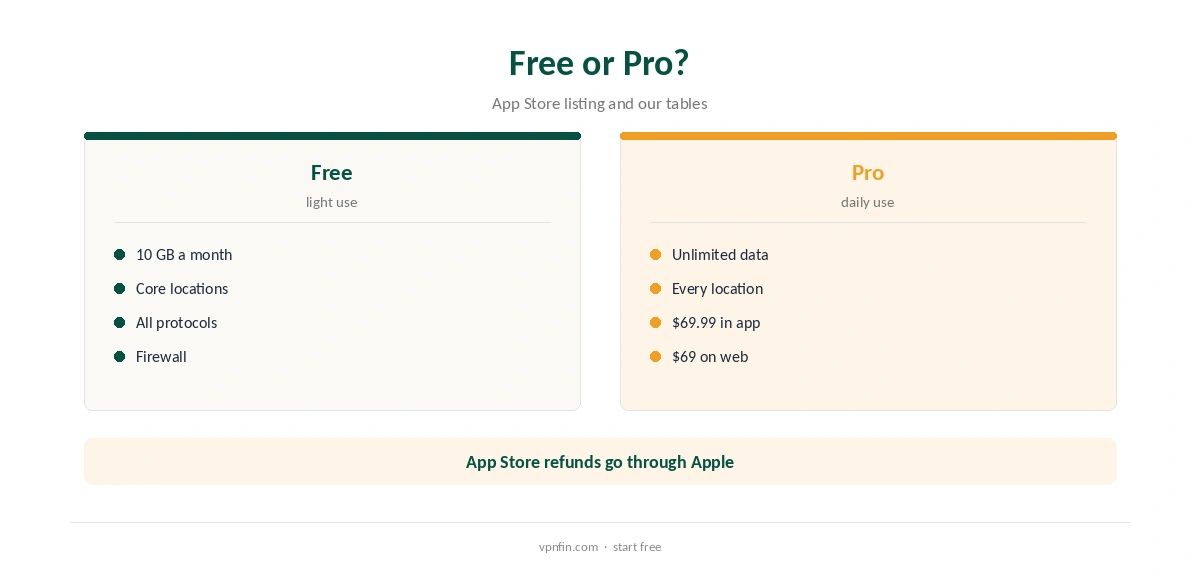
The free plan gives 10 GB a month with a confirmed email and access to core locations, the listing says. Pro, bought in the app, is listed at $69.99, against $69 a year on Windscribe’s site, our tables record.
Windscribe’s own refund window is seven days, under 10 GB of use, its help article says; App Store purchases follow Apple’s refund process instead. Our Windscribe Free guide covers the free limits.
IP Rotation and Custom Icons
Recent updates added IP rotation and pinning, to change or keep the address you appear from. They also added custom app icons that disguise Windscribe as a calculator or clock, the App Store listing says. The same update mentioned Amnezia WireGuard for anti-censorship.
Disguised icons help where having a VPN app on screen draws unwanted attention. IP pinning suits sites that dislike frequent address changes. Our VPN fines guide explains where VPN use carries legal risk.
Turning It Off
Disconnect in the app for a quick break. To stop it fully, turn off the firewall and any network rules first, then delete the app; iOS removes its VPN configuration with it.
If you subscribed in the App Store, cancel in Settings, your name, Subscriptions, since deleting the app does not cancel billing. Our guide to turning off a VPN on iPhone covers the settings.
The iOS Limit Every VPN Shares
One limit applies to every provider: Michael Horowitz’s long-running tests found iOS sending some traffic outside VPN tunnels on an iPad, with several VPNs including Windscribe, and Proton reported an iOS bypass flaw in 2020. Horowitz recommends a VPN router for full protection.
For most people a VPN app still protects browsing on public Wi-Fi. For the strictest protection, run Windscribe on a router, as our router setup guide explains.
How We Research
This page draws on Windscribe’s App Store listing and iOS feature page, its Stealth help article, Tom’s Guide’s Windscribe review, Michael Horowitz’s iOS VPN tests and our Windscribe tables. We cross-checked these sources against each other, and where they conflict or something can’t be verified, we say so in the text rather than guessing. We checked time-sensitive figures, including prices in US dollars, on 8 October 2026. The main source we relied on is Windscribe’s App Store listing. Our full approach lives on the About Us page.
Windscribe iPhone FAQ
It is, with 10 GB a month after confirming an email.
iOS 15 or later, the App Store listing says.
Its firewall works as an always-on VPN that blocks traffic on drops.
Since December 2022, Windscribe says.
Slightly: $69 a year against $69.99 in the app.
The Verdict
Windscribe iPhone support is unusually complete, with six protocols, Stealth and a free plan. Turn on the firewall, set network rules and remember iOS’s own limits.