
Disclosure: VPNFin is reader-supported. If you buy a VPN through links on this page, we may earn a commission at no extra cost to you. This never affects our ratings — here’s our full disclosure.
Windscribe for Mac has the same key features as its Windows app, TechRadar found: WireGuard, the firewall, custom DNS, MAC address spoofing, split tunnelling, port and protocol options, network allow-listing and proxy support. Windscribe’s firewall uses macOS’s own packet filter to block traffic outside the tunnel, its code wiki notes. One known issue matters: on Monterey and Ventura, split tunnelling can interrupt existing TCP connections.
This guide covers setup, the firewall, the two split-tunnelling types, Mac-specific settings, known issues and the free plan.
Windscribe for Mac Setup
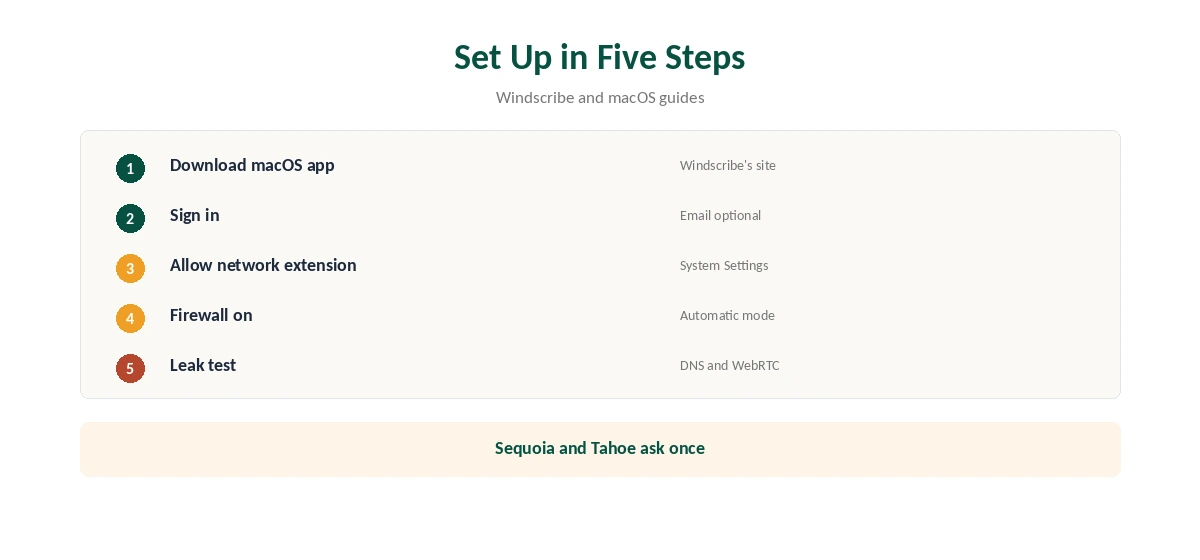
Download the macOS app from Windscribe’s site, open the installer and follow the prompts. Sign in, or create an account without an email, then pick a location and connect.
On macOS Sequoia and Tahoe, the first connection asks you to allow a network extension: open System Settings, General, Login Items and Extensions, then Network Extensions, and switch the VPN on, Bitdefender’s and Little Snitch’s guides describe. Our tables record Windscribe among VPNs that ran without problems on macOS 15.
The Firewall on macOS
Windscribe calls its kill switch a firewall and says it uses native operating-system APIs to block all connectivity outside the tunnel, rather than reacting after a drop. On macOS, that means the system’s PF packet filter, the code wiki explains.
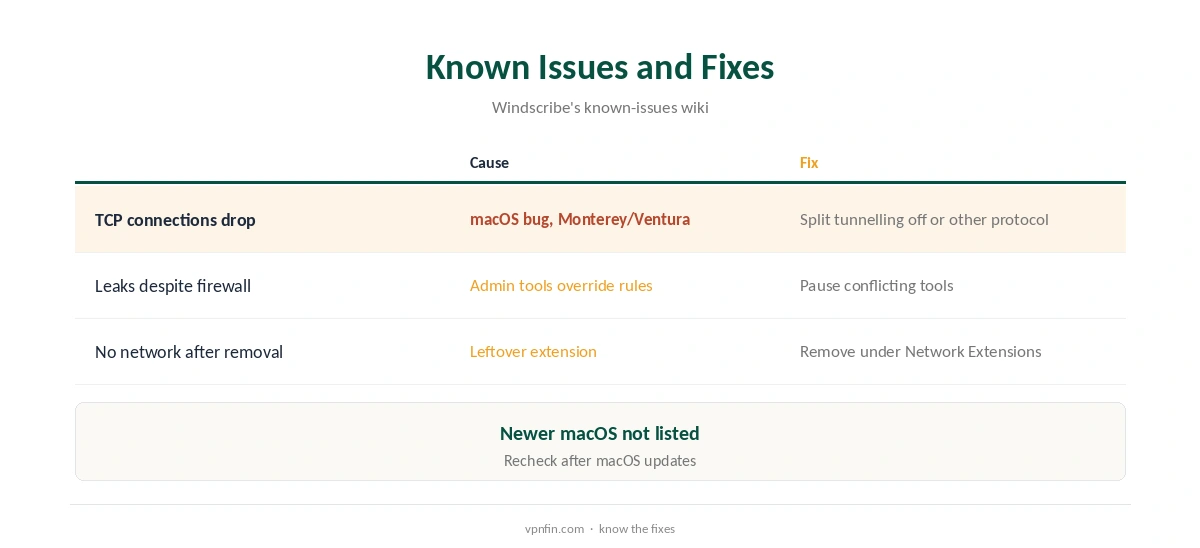
Other programs with administrator rights, such as some firewalls, can override those rules and cause leaks, Windscribe warns. Some tools reassert their rules repeatedly, so Windscribe avoids fighting them. Remove or pause such tools if leak tests fail. Our kill switch guide explains why a firewall-style switch is stricter.
Two Kinds of Split Tunnelling
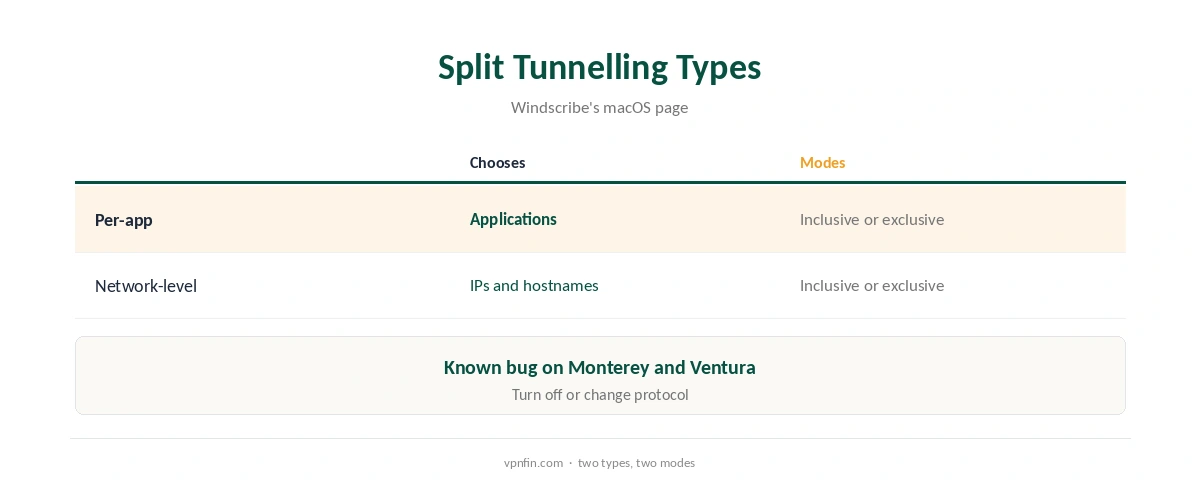
Windscribe offers two split-tunnelling types on Mac, per-app and network-level, each with two modes, its macOS page says. Per-app chooses which applications use the VPN; network-level does the same for IP addresses and hostnames.
Inclusive mode sends only your chosen apps or networks through the tunnel; exclusive mode sends everything except them. Our split tunnelling guide explains when to use each.
Known Issue on Monterey and Ventura
Because of a macOS bug, starting the split-tunnelling extension on Monterey or Ventura can interrupt existing TCP connections, Windscribe’s known-issues page says. The fix is to turn split tunnelling off or use a different protocol.
Newer macOS versions are not listed with the issue, and our tables record Windscribe running without problems on macOS 15. If downloads or video calls drop when you connect, check this first. Our Mac VPN troubleshooting guide covers other causes.
MAC Spoofing and Custom Configs
MAC address spoofing gives your Mac a new hardware address on each network, so public Wi-Fi operators cannot track the same laptop across visits, Windscribe explains. Custom DNS lets you choose your own resolver, though the firewall still keeps that traffic inside the tunnel.
Custom Config support lets the app load WireGuard or OpenVPN configurations, which Windscribe describes as handy for devices that do not support VPN apps. Network allow-listing marks trusted networks, so the VPN connects automatically elsewhere, such as in a café or on a train.
Windscribe’s Privacy Record
Windscribe’s no-logs claim held when an Athens court dismissed charges against its CEO in April 2025, because the company had no user data to give, TechRadar and Tom’s Guide reported. In 2021, two seized Ukrainian servers held no user data but exposed an encryption key, which Windscribe disclosed and fixed.
The audit picture is mixed: Windscribe cites a 2024 PacketLabs infrastructure audit, while Security.org found no audit of the no-logs policy. Our Windscribe safety guide covers the full record.
Protocols and Ports
The Mac app’s Connection panel lets you choose WireGuard, OpenVPN over UDP or TCP, IKEv2 or Stealth, and pick a port, TechRadar found. WireGuard is the everyday choice; IKEv2 reconnects quickly after a MacBook wakes.
If a hotel or office network blocks VPNs, switch to Stealth or change the port before giving up. Free accounts can use Stealth too. Our obfuscation guide explains how Stealth-type protocols work.
Free Plan on a Mac
The free plan runs in the same Mac app: 10 GB a month after confirming an email, 2 GB without, servers in 10 countries and no device limit. Stealth and WStunnel are available on free accounts for networks that block VPNs. Our guide to Windscribe for Linux covers the desktop app, windscribe-cli and known issues.
Pro costs $9 a month or $69 a year, our tables record, with a refund window of only seven days, under 10 GB of use. Our Windscribe Free guide covers the limits.
Leak Testing and Removal
After setup, run our DNS leak guide with the firewall on. If you remove Windscribe later, quit the app first, then delete it and check Network Extensions for a leftover entry.
Leftover extensions can block or slow the network after removal, MacRumors forum users note. Our guide to turning off a VPN on Mac walks through it.
How We Research
This page draws on TechRadar’s 2026 Windscribe review, Windscribe’s macOS page and known-issues wiki, Bitdefender’s and Little Snitch’s macOS guides and our Windscribe and macOS tables. We cross-checked these sources against each other, and where they conflict or something can’t be verified, we say so in the text rather than guessing. We checked time-sensitive figures, including prices in US dollars, on 8 October 2026. The main source we relied on is Windscribe’s macOS page. Our full approach lives on the About Us page.
Windscribe for Mac FAQ
It has a native macOS app with the same key features as Windows.
Its firewall uses macOS’s packet filter to block traffic outside the tunnel.
A macOS bug on Monterey and Ventura; turn it off or change protocol.
It does, with 10 GB a month after confirming an email.
A new hardware address on each network, against Wi-Fi tracking.
The Verdict
Windscribe for Mac matches the Windows app feature for feature, with a strict firewall and two kinds of split tunnelling. On Monterey or Ventura, watch for the split-tunnelling bug.