
Disclosure: VPNFin is reader-supported. If you buy a VPN through links on this page, we may earn a commission at no extra cost to you. This never affects our ratings — here’s our full disclosure.
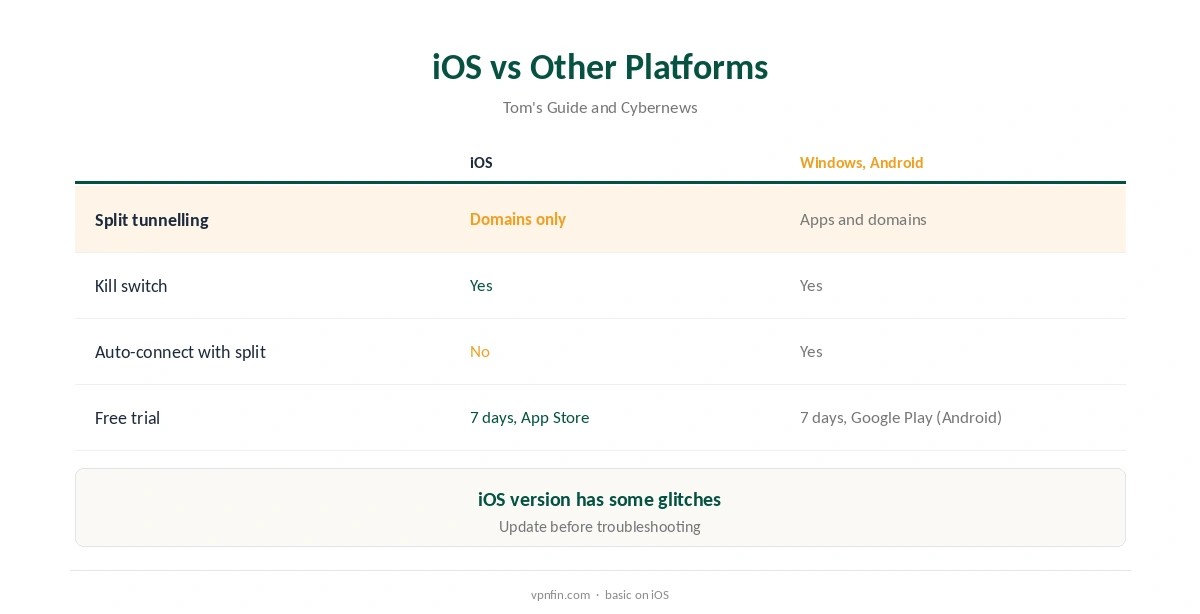
IPVanish iPhone users get a seven-day free trial through the App Store on yearly plans, VPNOverview reports. They also get the same unlimited device limit as every IPVanish plan. The iOS app includes a kill switch, Cybernews found. Split tunnelling on iOS works by domain only, not by app, and turning it on disables auto-connect, Tom’s Guide found. The review also noted a few glitches in the iOS version.
This guide covers setup, the trial, iOS features and their limits, Apple TV, pricing and the iOS restrictions every VPN faces.
IPVanish iPhone Setup
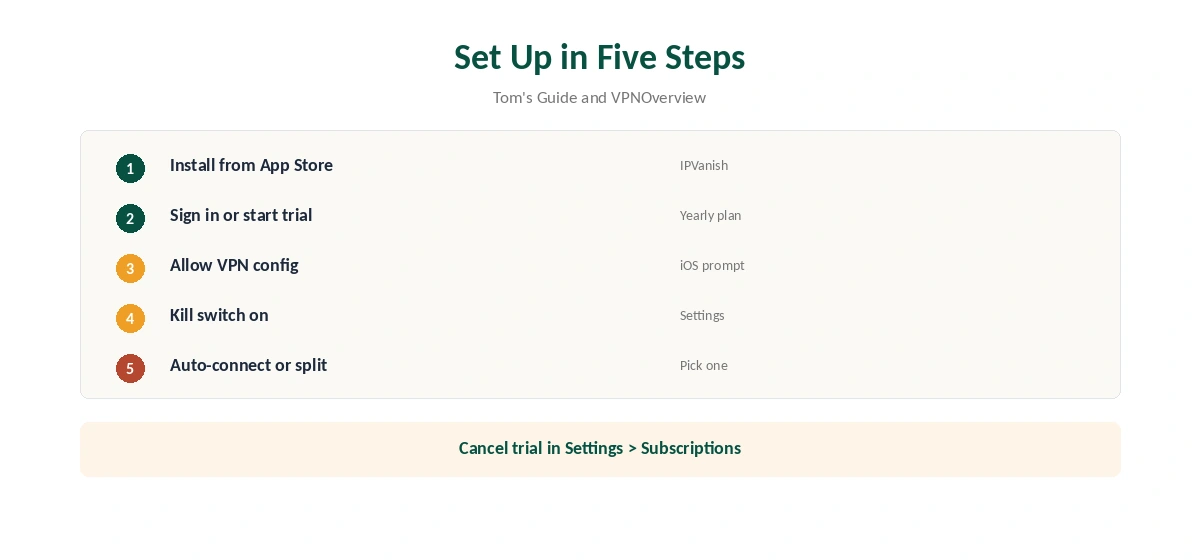
Install IPVanish from the App Store, open it and sign in, or start the free trial on a yearly plan. Allow iOS to add the VPN configuration, pick a location and connect.
Then open settings and turn on the kill switch and auto-connect. Pick a nearby server for everyday browsing. Top10VPN measured about 93 Mbps on a 100 Mbps line on nearby IPVanish servers. Our iPhone VPN guide compares other providers’ iOS apps.
The Seven-Day Trial
The App Store trial applies to yearly plans, VPNOverview reports. It converts to a paid subscription unless you cancel before day seven. Cancel in Settings, your name, Subscriptions; deleting the app does not cancel it, and the charge follows when the week ends.
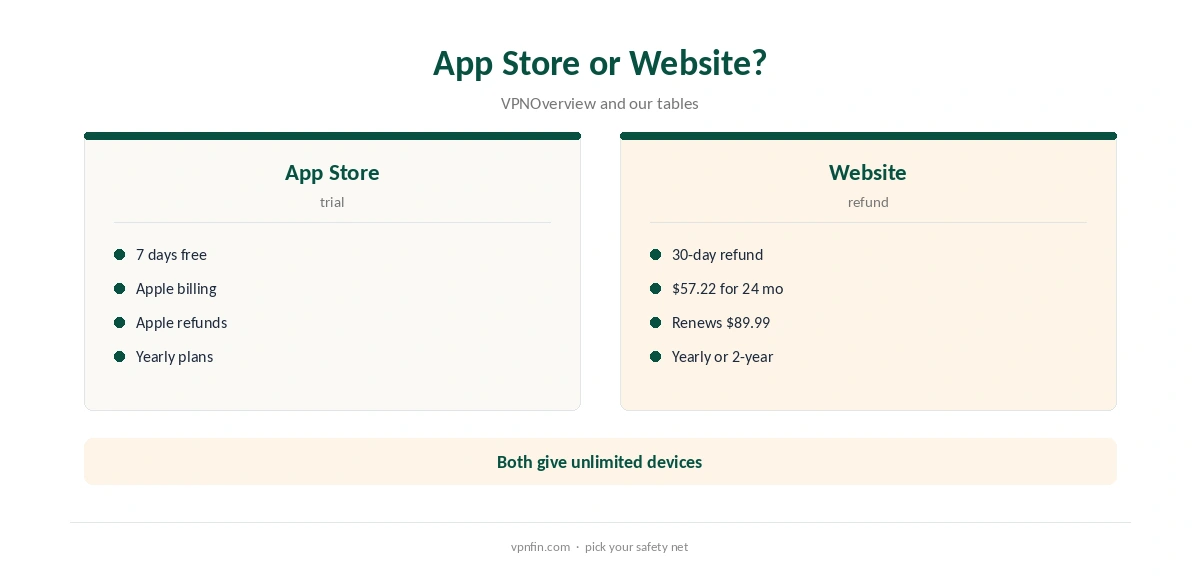
The 30-day website refund does not cover App Store purchases, VPNOverview notes, so App Store refunds go through Apple. Our IPVanish free guide compares the trial with the refund.
Split Tunnelling on iOS
On iPhone, IPVanish splits traffic by domain only: add a website such as your bank’s, and it bypasses the VPN, Tom’s Guide found. Windows and Android also split by app; iOS does not.
Turning split tunnelling on also disables auto-connect on iOS, the review notes, so choose which matters more. Our split tunnelling guide explains the trade-offs.
Kill Switch and Protocols
IPVanish has a kill switch in its iOS app as on other platforms, Cybernews found. On desktop, Security.org’s tests saw it cut the connection within a second every time.
WireGuard is the fast choice on a phone, and IKEv2 reconnects quickly when moving between Wi-Fi and mobile data. Tom’s Guide notes the iOS version has a few glitches, so update the app before troubleshooting.
Streaming on iPhone
VPNOverview reached Netflix, Hulu, Prime Video, Max, Disney+ and BBC iPlayer with IPVanish in 2026, while VPNpro found its streaming access inconsistent. Results on a phone follow the same servers as on desktop.
If an app shows your home library, close it fully, switch server in the same country and reopen it. Our Netflix VPN guide explains why services block some servers.
Privacy and Ownership
IPVanish has two audits in our table, by Leviathan and Schellman, and owns its servers rather than renting them, Top10VPN notes. VPNpro counts 568 RAM-only servers across 19 locations.
Its parent, Ziff Davis, also owns StrongVPN, PCMag and CNET, our ownership table records, so read those outlets’ IPVanish coverage with that in mind. Our VPN audit tracker explains what audits check.
Apple TV and Other Devices
IPVanish has a dedicated Apple TV app as well as iOS and Mac apps, our tables record, so one account covers a whole Apple household. There is no device limit, so an iPhone, an iPad, a Mac and an Apple TV can all connect at once on one plan.
Our IPVanish for Mac guide covers the desktop app, and the same account works on Fire TV and Android.
App Store or Website Purchase
Buying on the website gives the 30-day refund on yearly and two-year plans and VPNOverview’s listed price of $57.22 for 24 months, renewing at $89.99 a year. Buying in the App Store gives the seven-day trial instead, with Apple’s billing and refunds.
If you want the longest test, buy on the website; if you want no charge at all for a week, use the App Store trial. Either way, note the date you started. Our IPVanish price guide compares plans.
Turning It Off
Disconnect in the app for a quick break. To stop it fully, turn off auto-connect and the kill switch first, then delete the app; iOS removes its VPN configuration with it.
If you subscribed in the App Store, cancel in Settings, your name, Subscriptions, since deleting the app does not cancel billing. Our guide to turning off a VPN on iPhone covers the settings.
The iOS Limit Every VPN Shares
Michael Horowitz’s long-running tests found iOS sending some traffic outside VPN tunnels on an iPad, with several VPNs, and Proton reported an iOS bypass flaw in 2020. The problem sits in iOS, not in one provider.
A VPN app still protects browsing on public Wi-Fi for most people. For the strictest protection, Horowitz recommends a VPN router, as our router setup guide explains.
How We Research
This page draws on Tom’s Guide’s, VPNOverview’s, Cybernews’ and Security.org’s IPVanish reviews, Michael Horowitz’s iOS VPN tests and our IPVanish tables. We cross-checked these sources against each other, and where they conflict or something can’t be verified, we say so in the text rather than guessing. We checked time-sensitive figures, including prices in US dollars, on 8 October 2026. The main source we relied on is Tom’s Guide’s IPVanish review. Our full approach lives on the About Us page.
IPVanish iPhone FAQ
It does, in the App Store, with a seven-day trial on yearly plans.
By domain only, and it disables auto-connect.
Cybernews found one in all IPVanish apps, including iOS.
No; Apple handles those refunds.
Yes, alongside the iOS and Mac apps.
The Verdict
IPVanish iPhone support is solid for an Apple household, with a trial and unlimited devices. Split tunnelling is basic on iOS, so weigh it against auto-connect.