
Disclosure: VPNFin is reader-supported. If you buy a VPN through links on this page, we may earn a commission at no extra cost to you. This never affects our ratings — here’s our full disclosure.
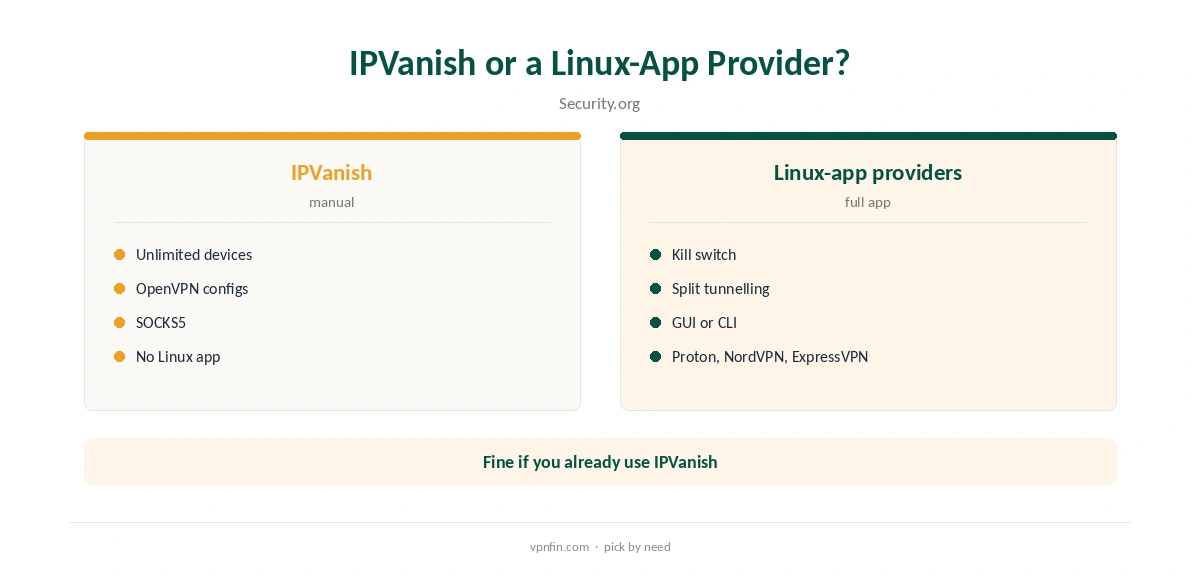
IPVanish Linux users set it up manually: Security.org notes IPVanish, unlike NordVPN, Proton, ExpressVPN, PIA and Surfshark, needs configuration through NetworkManager or the terminal rather than a dedicated app. VPNAlert’s guide uses IPVanish’s OpenVPN configuration files with Ubuntu’s network settings or the openvpn command. Sources list support for Ubuntu, Fedora, Kali, Linux Mint, Lubuntu and Pop!_OS. Our guide to IPVanish OpenVPN covers UDP or TCP, ports, Scramble and manual setup.
This guide covers the two routes, downloading the configurations, NetworkManager and terminal setup, leak protection and when another provider suits Linux better.
No Official Linux App
Security.org’s 2026 Linux ranking groups IPVanish with providers that require manual setup. VPNAlert says plainly that IPVanish has no graphical Linux app. One review claims official Linux clients, but the same review wrongly says IPVanish has no Apple TV app, so we do not rely on it. TechRadar reported that Apple TV app gaining WireGuard and OpenVPN in July 2026.
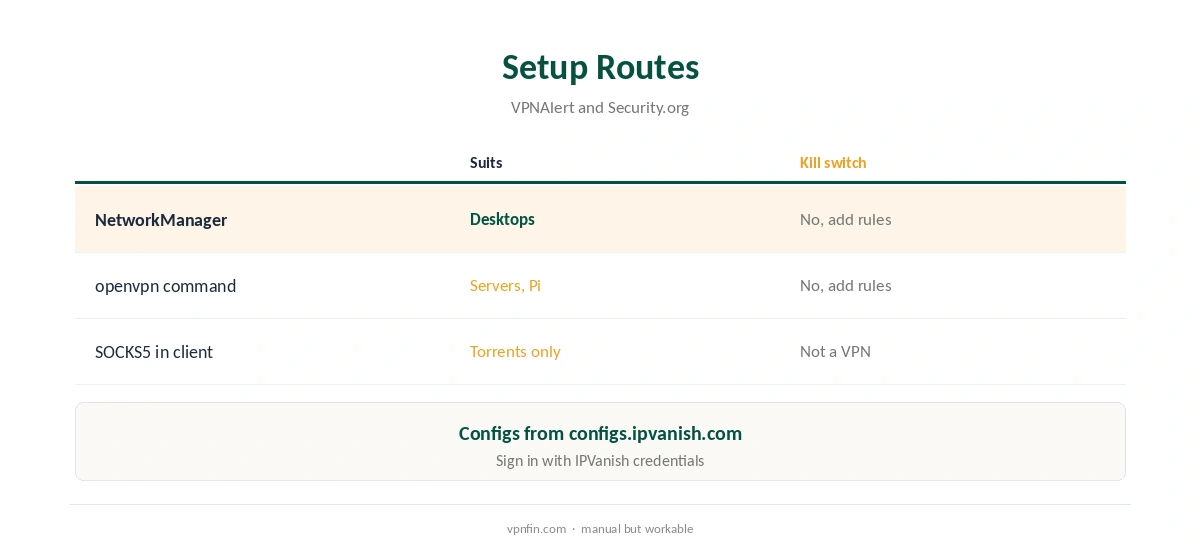
Manual setup works well but lacks app features such as a kill switch toggle or split tunnelling. It also means switching locations through your network settings rather than a server list. Our Linux VPN guide compares providers with full Linux apps.
Download the Configuration Files
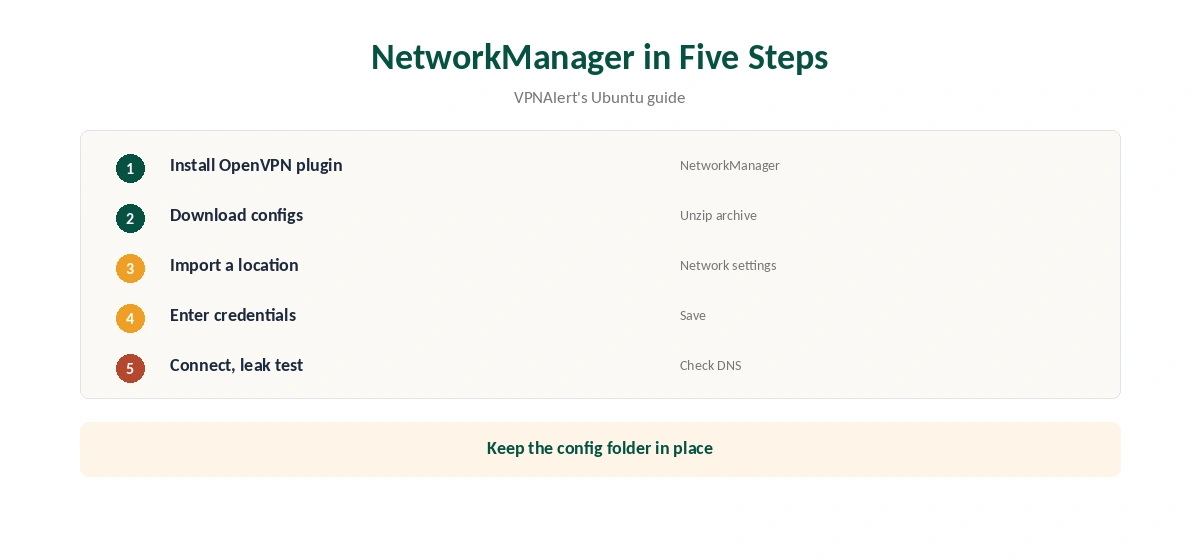
IPVanish publishes OpenVPN configuration files in one archive, which VPNAlert fetches with wget or curl from configs.ipvanish.com. Unzip it to get one file per server location plus the certificate file. Re-download the archive now and then, since server lists change and old files may point to retired servers.
You sign in with your IPVanish username and password when connecting. Keep the folder somewhere permanent, since NetworkManager references the certificate by path, and moving it later breaks the profiles.
IPVanish Linux Setup With NetworkManager
Install NetworkManager’s OpenVPN plugin, open network settings, add a VPN and import a configuration file. VPNAlert’s walkthrough shows it on Ubuntu 22.04. Enter your IPVanish credentials, save and switch the connection on.
Import a few locations you use often, so switching is one click in the network menu. Name each profile by city to tell them apart. Our guide to turning off a VPN on Linux covers disconnecting and removing profiles.
Using the Terminal
On servers or minimal installs, run the openvpn command with a configuration file and enter your credentials when prompted, VPNAlert describes. A credentials file lets it connect without typing, but protect that file’s permissions so only root can read it.
To keep the tunnel up after reboot, run OpenVPN as a system service. That suits a home server or a Raspberry Pi, and IPVanish’s unlimited device limit means the server does not use up a slot others need. Our guide to IPVanish on Raspberry Pi covers OpenVPN, a service and containers.
Leak Protection Without an App
A manual setup has no app-level kill switch, so traffic can leave outside the tunnel if it drops. Add firewall rules that allow traffic only through the VPN interface, or accept the risk on trusted networks. Tools such as ufw make those rules simpler to write on Ubuntu, and you can keep a rule set ready for public networks.
Check DNS after connecting, since NetworkManager may keep your usual resolver. Setting DNS manually in the VPN profile avoids that. Our DNS leak guide covers testing and fixes.
Speed and Streaming on Linux
Top10VPN measured about 93 Mbps on a 100 Mbps line on nearby IPVanish servers. OpenVPN over UDP is usually faster than TCP, so pick UDP configurations unless a network blocks them, and keep one TCP profile as a fallback.
VPNOverview reached Netflix, Hulu, Prime Video, Max, Disney+ and BBC iPlayer with IPVanish in 2026, while VPNpro found its streaming access inconsistent; browser streaming on Linux uses the same servers.
SOCKS5 for Linux Torrenting
IPVanish’s SOCKS5 proxy, on more than 25 servers in 14 countries, VPNAlert reports, works in Linux torrent clients such as qBittorrent or Transmission without any VPN setup.
SOCKS5 does not encrypt traffic, and VPN.ac advises disabling DHT, PEX and IPv6 in the client to prevent leaks. Bind the client to the proxy so it never falls back to a direct connection. Our SOCKS5 VPN guide explains the set-up.
Privacy and Ownership
IPVanish has two audits in our table, by Leviathan and Schellman, and owns its servers rather than renting them, Top10VPN notes; VPNpro counts 568 RAM-only servers across 19 locations.
Its parent, Ziff Davis, also owns StrongVPN, PCMag and CNET, our ownership table records. Our VPN audit tracker explains what audits check.
When Another Provider Fits Linux Better
If you want a Linux app with a kill switch and split tunnelling, providers such as Proton, NordVPN and ExpressVPN ship them; NordVPN and Surfshark share an owner, Nord Security. IPVanish suits Linux users who already use it elsewhere and value its unlimited devices, and those comfortable maintaining a manual setup. Our guide to IPVanish on Synology NAS covers a DSM OpenVPN profile, or a torrent container.
Plans cost $57.22 for the first 24 months and renew at $89.99 a year, VPNOverview lists. Our IPVanish price guide compares plans.
How We Research
This page draws on Security.org’s 2026 Linux VPN ranking, VPNAlert’s IPVanish Linux guide, VPN.ac on SOCKS5, VPNOverview’s pricing and our IPVanish tables. We cross-checked these sources against each other, and where they conflict or something can’t be verified, we say so in the text rather than guessing. We checked time-sensitive figures, including prices in US dollars, on 8 October 2026. The main source we relied on is VPNAlert’s IPVanish Linux guide. Our full approach lives on the About Us page.
IPVanish Linux FAQ
No; Security.org and VPNAlert describe manual setup instead.
Import IPVanish’s OpenVPN files into NetworkManager.
Yes, with the openvpn command and a configuration file.
Not in a manual setup; use firewall rules.
Use its SOCKS5 proxy in the client, with leak settings off.
The Verdict
IPVanish Linux support is manual but workable through NetworkManager or the terminal. Add firewall rules for leak protection, or choose a provider with a full Linux app.