
Disclosure: VPNFin is reader-supported. If you buy a VPN through links on this page, we may earn a commission at no extra cost to you. This never affects our ratings — here’s our full disclosure.
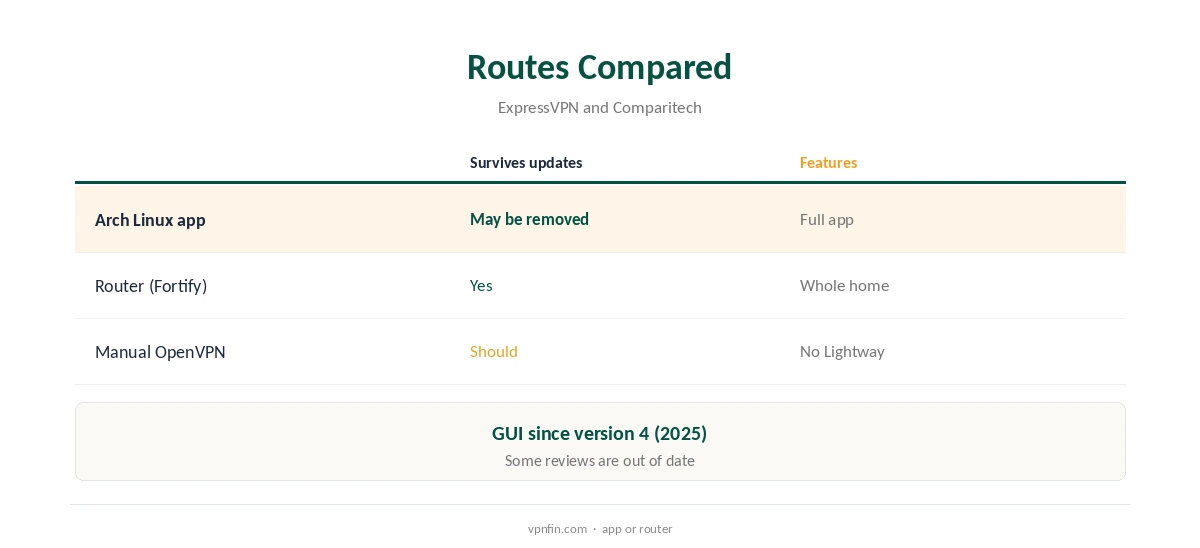
ExpressVPN on Steam Deck has an official route. ExpressVPN’s own Steam Deck page tells you to install its Linux app for Arch, since SteamOS is Arch-based. It also warns that SteamOS system updates may remove third-party apps, so you may need to reinstall. Its Linux app gained a graphical interface in 2025, with Network Lock and split tunnelling. A router running ExpressVPN covers the Deck without any install.
This guide covers the app route, the update catch, Gaming Mode, the router and manual options, and what a VPN does for gaming.
The Official Route
ExpressVPN’s Steam Deck page directs you to the Linux app for Arch. A 2026 comparison by findcheapvpns called ExpressVPN’s the clearest provider-written Steam Deck instructions, while noting the reinstall caveat.
Some reviews still say ExpressVPN has no Linux graphical app, but that changed in March 2025 when version 4 added one, alongside a command-line interface for scripting. Our ExpressVPN Linux guide covers the app’s features.
ExpressVPN on Steam Deck Setup
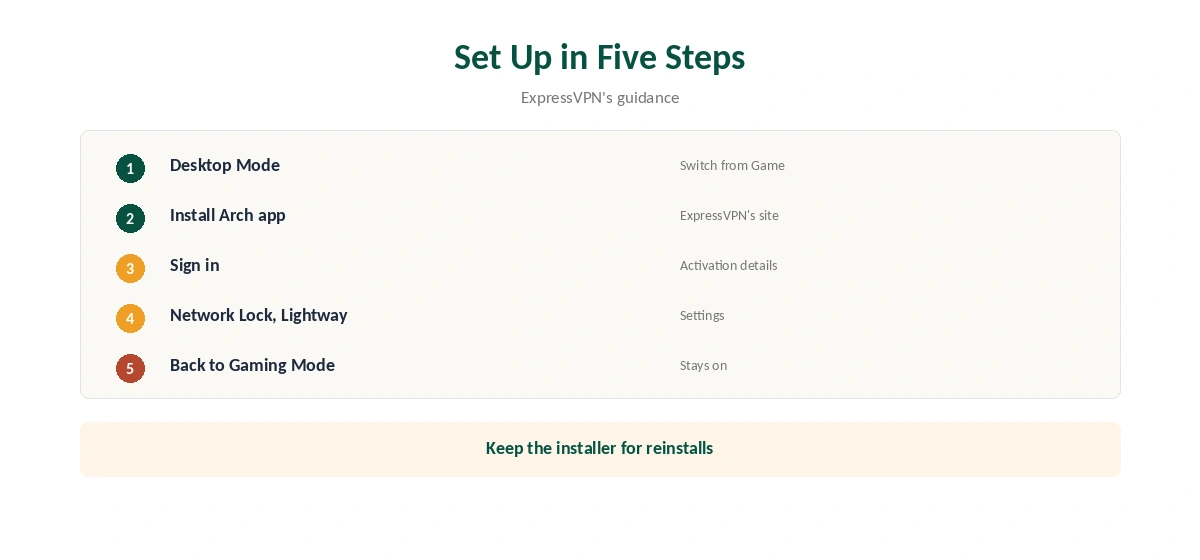
Switch to Desktop Mode, download the Arch package from ExpressVPN’s site and install it, following ExpressVPN’s instructions. Sign in with your activation details and connect, choosing a nearby location for the lowest added latency.
Turn on Network Lock, ExpressVPN’s kill switch, and choose Lightway, its default protocol with post-quantum key exchange. OpenVPN is the fallback if a network blocks Lightway. Then check your address in a browser before returning to Gaming Mode, so you know the tunnel is up before you play.
The Update Catch
SteamOS is a customised Arch Linux with a read-only system partition, and Valve warns that updates can wipe changes made inside that image, Ars Technica reported. ExpressVPN itself warns that SteamOS updates may remove third-party apps, so plan to reinstall after a major update. Check whether ExpressVPN still runs each time SteamOS updates itself. A quick launch from the applications menu tells you.
Keep the installer in your Downloads folder, and re-check Network Lock and your chosen location after reinstalling, in case anything changed. If you would rather avoid the maintenance, a router or a manual profile sidesteps it.
Gaming Mode
A VPN connected in Desktop Mode stays active in Gaming Mode, Comparitech notes. TunnelDeck, a community plugin for the Decky Loader, can switch NetworkManager VPN connections from Gaming Mode, which suits manual profiles more than the app. Decky Loader is a community project, so install it only if you are comfortable with that.
Our Steam Deck VPN guide compares the routes across providers.
Split Tunnelling for Steam Downloads
ExpressVPN’s Linux app splits traffic by app or by IP address, its 2025 release notes say. You can keep game downloads outside the tunnel for full speed while a browser or chat app stays protected.
Set it under Options, Split Tunneling in Desktop Mode before returning to Gaming Mode, and test a download to confirm the speed. Our split tunnelling guide explains when excluding traffic makes sense.
The Router Route
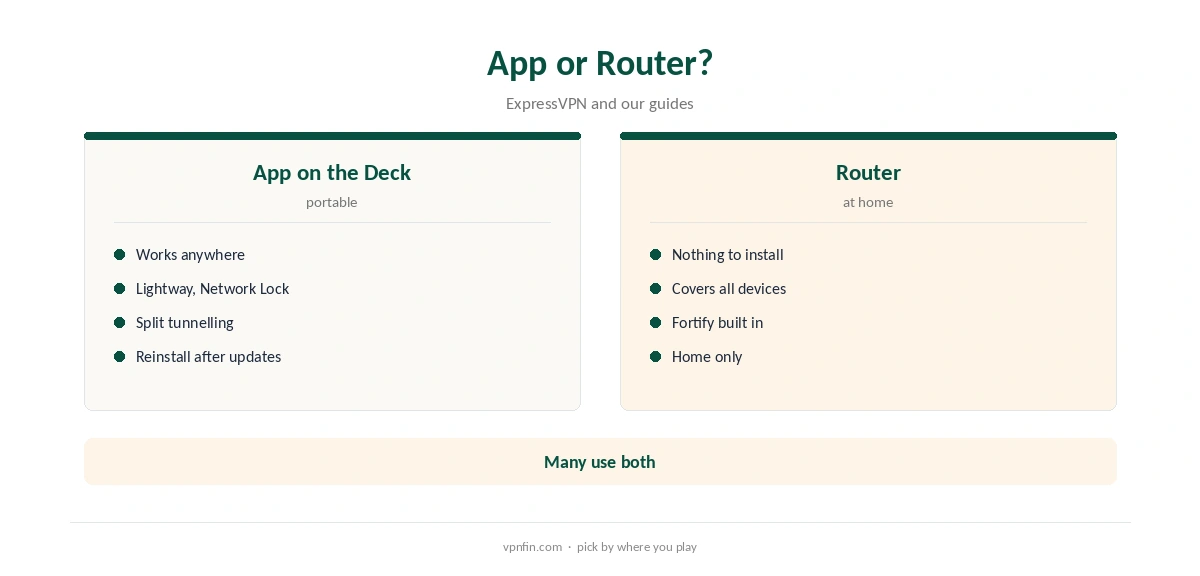
ExpressVPN suggests connecting the Deck to its Fortify router, which has ExpressVPN built in. It protects every connected device, including consoles and TVs that cannot run an app at all. Any router running ExpressVPN does the same, with nothing to reinstall on the Deck, and the protection survives every SteamOS update.
Our ExpressVPN router guide covers Fortify and the end of older router firmware. A router only protects the Deck at home, though.
Manual Profiles
Comparitech notes ExpressVPN provides OpenVPN files for manual configuration, which import into NetworkManager like any other profile. A manual profile lacks Lightway and the app’s features but survives updates better than an installed app.
Use it if the app has been removed and you need a connection quickly, then reinstall the app when you have time. Delete the manual profile afterwards so two connections do not compete. Our DNS leak guide covers testing after setup.
Removing It
Turn off Network Lock’s always-on setting before uninstalling, or the Deck may stay offline. Our guide to turning off ExpressVPN covers that trap on every platform.
Then remove the package in Desktop Mode. If you used a manual profile instead, delete it in KDE’s network settings. Check your address afterwards to confirm the Deck is back on its normal connection.
Will It Help Your Games?
A VPN adds a hop, so ping usually rises, as our gaming VPN guide explains. Use ExpressVPN on the Deck for privacy on public Wi-Fi, such as hotels and trains, rather than to chase lower ping. Split tunnelling can keep game traffic direct while other apps stay protected.
ExpressVPN’s Basic plan renews at $99.95 a year after its first term and covers 10 devices, our tables record. The Deck takes one slot alongside your phone and laptop.
How We Research
This page draws on ExpressVPN’s Steam Deck page and Linux announcement, findcheapvpns’ and Comparitech’s Steam Deck guides, Ars Technica on SteamOS and our ExpressVPN and Steam Deck tables. We cross-checked these sources against each other, and where they conflict or something can’t be verified, we say so in the text rather than guessing. We checked time-sensitive figures, including prices in US dollars, on 8 October 2026. The main source we relied on is ExpressVPN’s Steam Deck page. Our full approach lives on the About Us page.
ExpressVPN on Steam Deck FAQ
Yes, through its Linux app for Arch, which ExpressVPN recommends.
It may; ExpressVPN warns you might need to reinstall.
A connection made in Desktop Mode stays active, Comparitech notes.
A router running ExpressVPN, such as Fortify.
Since version 4, released in March 2025.
The Verdict
ExpressVPN on Steam Deck is officially supported through the Arch Linux app; expect to reinstall after big updates. A router avoids the upkeep.