
Disclosure: VPNFin is reader-supported. If you buy a VPN through links on this page, we may earn a commission at no extra cost to you. This never affects our ratings — here’s our full disclosure.
A NordVPN uninstall removes the app, but it does not cancel the subscription, and on Windows it can leave a network adapter behind. Turning NordVPN off is a third, smaller step. Mixing them up can leave an app that still launches at login, as one Microsoft forum thread shows, or a renewal charge for a deleted VPN.
This guide covers all three: switching the VPN off, removing it from each device, and clearing what an uninstall can leave. Cancelling the payment has its own guide, linked below.
Turn Off, Uninstall or Cancel?
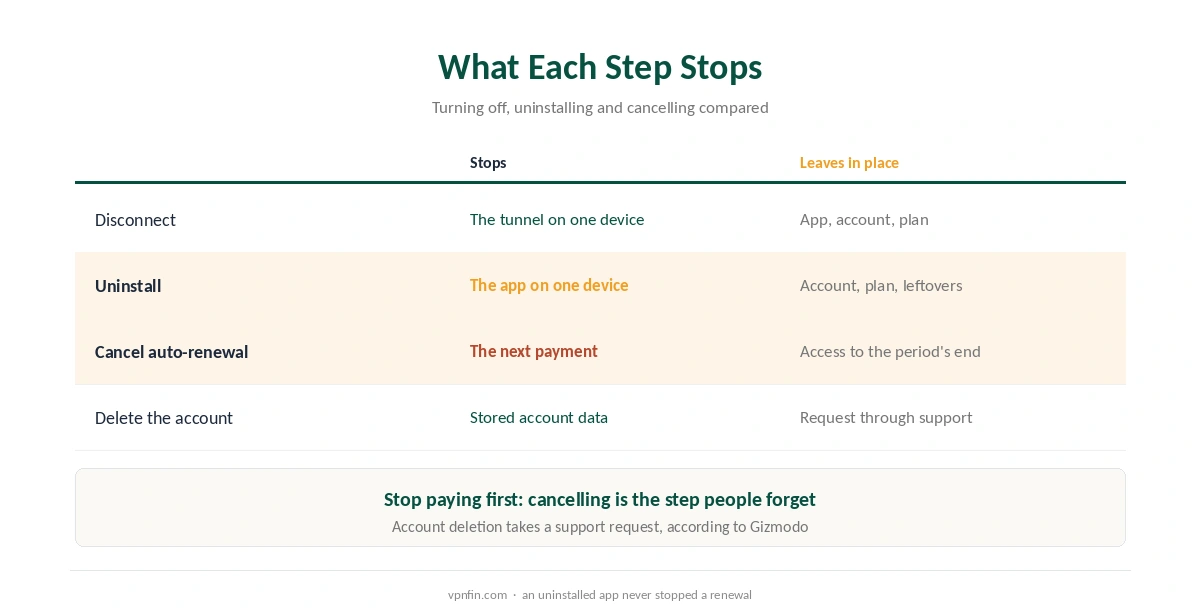
Turning NordVPN off means disconnecting, so your traffic goes out normally until you connect again. Uninstalling removes the app from one device. Cancelling stops the next payment for every device on the account, and you do it in the Nord Account or the app store you paid through.
So if you want to stop paying, uninstalling is not enough. Follow our guide to cancelling NordVPN first, then remove the apps.
How to Turn NordVPN Off Without Removing It
Open the app and press Disconnect. That ends the tunnel on that device. If NordVPN reconnects by itself, auto-connect is on, so switch it off in the app’s settings. Also, if the app opens at login and you do not want it to, turn off its launch-at-startup option; one Windows user on Microsoft’s forum fixed an unwanted autostart exactly that way.
Disconnect before you uninstall, so the app closes its own tunnel first. Our kill switch guide explains why an active VPN can block traffic. Device-specific steps sit in our guides for Windows and Mac.
NordVPN Uninstall Steps on Each Device
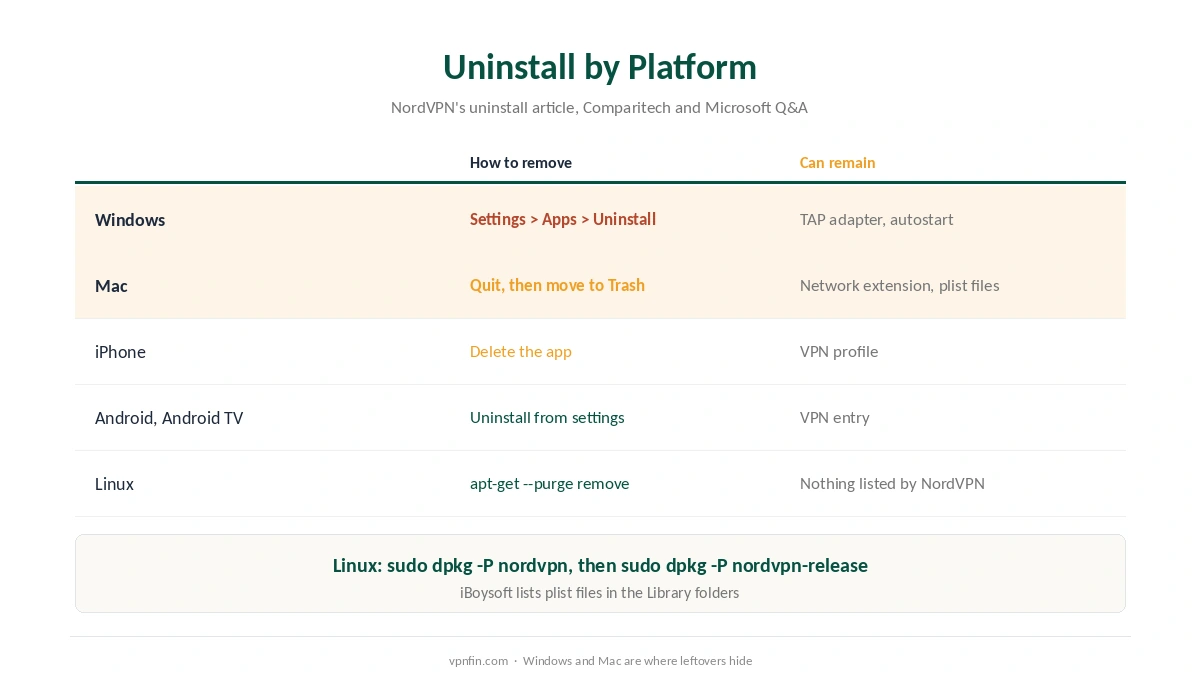
NordVPN’s support article keeps it simple: remove the app the way the operating system removes any app. On Windows, open Settings, Apps, Installed apps, then choose NordVPN and Uninstall. On a Mac, quit the app first, then move it from Applications to the Trash.
Phones work the same way: delete the app as usual. Afterwards, check that no NordVPN profile remains: on iPhone under General, VPN and Device Management, and on Android under the VPN settings. On Android TV and Fire TV, remove it from the Applications menu. Our guides for iPhone and Android show the menus.
Linux is the one platform where NordVPN gives commands. Run sudo apt-get –purge remove ‘nordvpn*’, or use sudo dpkg -P nordvpn followed by sudo dpkg -P nordvpn-release. Our Linux VPN guide covers the wider steps.
When the NordVPN Uninstall Leaves Something Behind
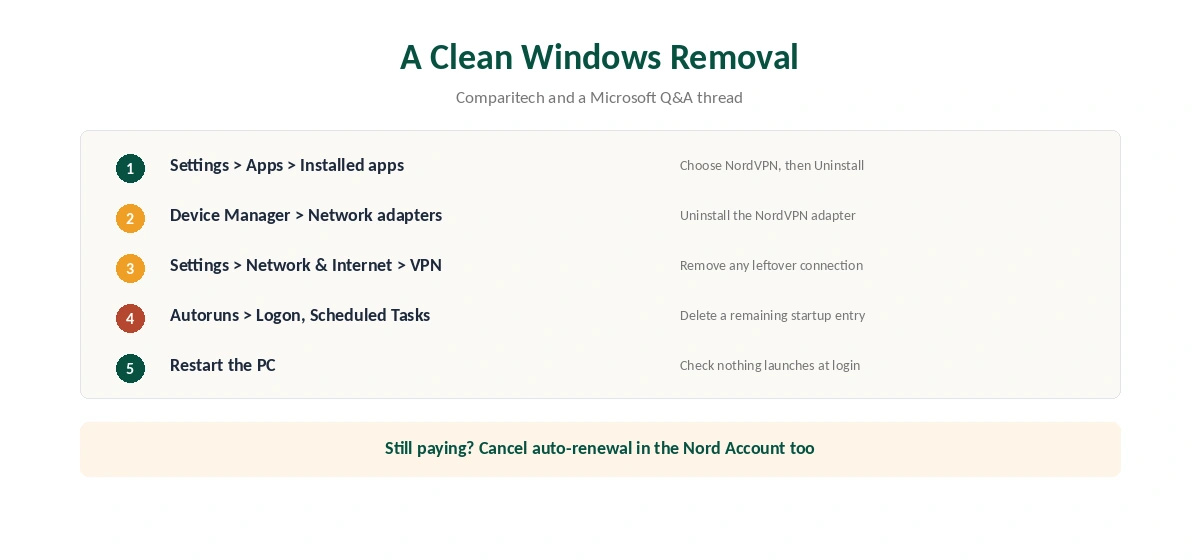
Windows is where the guides we read report leftovers. Comparitech notes that a TAP network adapter can remain after removal. Open Device Manager, expand Network adapters, right-click the NordVPN adapter and choose Uninstall. Then check Settings, Network and Internet, VPN, for a leftover connection.
If NordVPN still launches at login after removal, one user on Microsoft’s forum traced it with Microsoft’s free Autoruns tool. The Logon and Scheduled Tasks tabs showed the leftover entry, and deleting it ended the problem.
On a Mac, open System Settings, General, Login Items and Extensions, then Network Extensions, and remove any NordVPN entry that remains. iBoysoft, which sells a cleaning tool, also lists preference files such as com.nordvpn.NordVPN.plist in the Library folder. Remove them only if you want no trace left on the Mac.
If You Uninstalled NordVPN to Fix a Problem
A reinstall is a standard step in NordVPN’s own troubleshooting, so removing and reinstalling can help. However, it is rarely the first fix. If the VPN drops, start with our NordVPN disconnection guide. If it never connects, try our NordVPN not connecting guide. For slow speeds, see our NordVPN speed guide.
On Android, NordVPN’s support pages also suggest replacing the Google Play app with the APK from its website. Our NordVPN Windows guide and NordVPN Mac guide cover a clean reinstall.
Your Account and Data After Removal
Removing the app leaves your Nord Account untouched. According to Gizmodo, deleting the account and its data takes a request to NordVPN support. Before that, cancel any active subscription, and check our NordVPN review for its no-logs audits if data retention is your concern.
If anything still looks wrong after removal, restart the device before trying anything else.
How We Research
This page draws on NordVPN’s uninstall article and troubleshooting articles, a Microsoft Q&A thread, and guides from Comparitech, iBoysoft and Gizmodo. We cross-checked these sources against each other, and where they conflict or something can’t be verified, we say so in the text rather than guessing. We read every source on 5 October 2026. The main source we relied on is NordVPN’s uninstall article. Our full approach lives on the About Us page.
How to Turn Off NordVPN FAQ
No. The subscription lives in your Nord Account or app store account. Turn off auto-renewal there, or the plan renews even with the app removed.
A startup entry may remain. One Windows user found it with Microsoft’s Autoruns tool under Logon and Scheduled Tasks and deleted it.
Use the purge command from NordVPN’s Linux support article, shown in the Linux section above. On Debian-based systems, dpkg -P nordvpn followed by dpkg -P nordvpn-release also works.
If you no longer use NordVPN, yes. Open Device Manager, Network adapters, right-click the NordVPN adapter and choose Uninstall.
Press Disconnect in the app, then switch off auto-connect if it reconnects by itself. Turn off launch at startup to stop it opening at login.
The Verdict
A clean NordVPN exit has three parts: cancel the payment, uninstall the app on each device, and clear leftovers on Windows and Mac. Do them in that order, and nothing will launch, connect or charge you afterwards.