
Disclosure: VPNFin is reader-supported. If you buy a VPN through links on this page, we may earn a commission at no extra cost to you. This never affects our ratings — here’s our full disclosure.
NordVPN on Windows has the most complete set of controls of any NordVPN app. Split tunnelling and the kill switch both exist there in full. NordVPN’s own support page explains that the two conflict: when the VPN drops, the kill switch blocks every app, including ones you excluded.
This guide covers setup on standard and ARM-based Windows PCs, the settings worth changing, and how to fix the problems that follow. NordVPN’s recent release notes say its Internet Kill Switch now has two options. Older guides may not match your screen.
NordVPN on Windows: The Short Answer
Download the app from NordVPN’s site, sign in, and use Quick Connect. Windows asks you to approve the installation once. Our Windows VPN guide compares NordVPN with other providers.
On an ARM laptop, use the native ARM app. iTechGuides reports that split tunnelling and Threat Protection Pro need version 7.38.1.0 or later.
Decide between kill switch and split tunnelling. NordVPN’s own advice is to enable the kill switch only when you need strict protection. It stops excluded apps working when the VPN drops.
Setting Up NordVPN on Windows
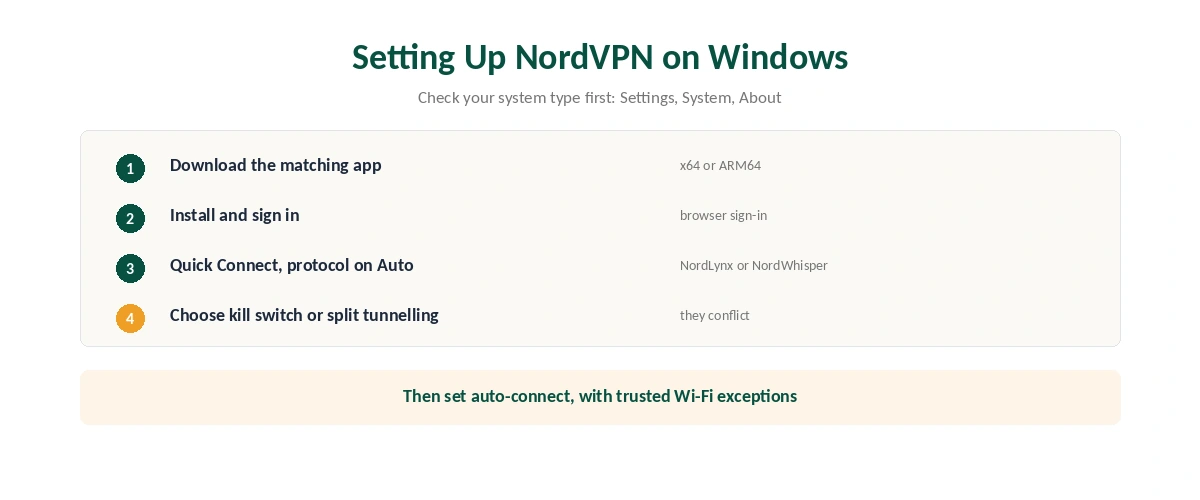
| Step | What to do | Note |
|---|---|---|
| 1 | Check your system type | Settings, System, About |
| 2 | Download the Windows app from NordVPN’s site | x64 or ARM64 to match |
| 3 | Install and sign in | The browser opens to sign in |
| 4 | Connect with Quick Connect | Protocol on Auto by default |
| 5 | Set auto-connect | All networks, or Wi-Fi with trusted exceptions |
| 6 | Choose kill switch or split tunnelling | They conflict; see below |
Leave the protocol on Auto unless you have a reason to change it. NordLynx is fastest; NordWhisper, added to the Windows app this year, disguises traffic on restrictive networks, as our obfuscation guide explains.
Check the price before the first renewal. VPNOnline recorded NordVPN’s US two-year Basic plan at $83.43 for the first 27 months in July 2026, renewing at $139.08 a year. Our NordVPN pricing page breaks the numbers down.
Kill Switch or Split Tunnelling
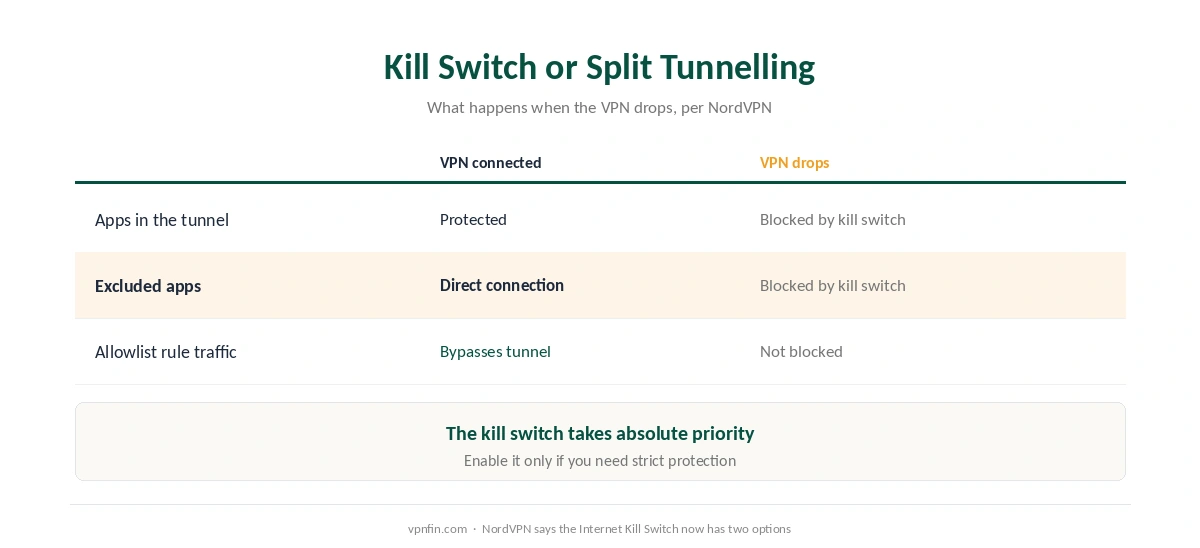
The kill switch takes priority. NordVPN’s support page on the two features says the Internet Kill Switch blocks all traffic whenever you are not connected. No other setting can bypass it. If the VPN disconnects, split tunnelling stops working, and the kill switch blocks every app, including those you excluded.
Allowlist rules are the exception. Traffic matching an allowlist rule bypasses the tunnel and is not blocked by the kill switch, NordVPN’s split tunnelling page notes.
So choose by what matters more. For strict protection, use the kill switch. For a work app, a game or a torrent client that must behave differently, use split tunnelling and accept the trade-off; our torrenting guide covers that case. Our kill switch guide and our split tunnelling guide explain each in full.
What Breaks, and How to Fix It
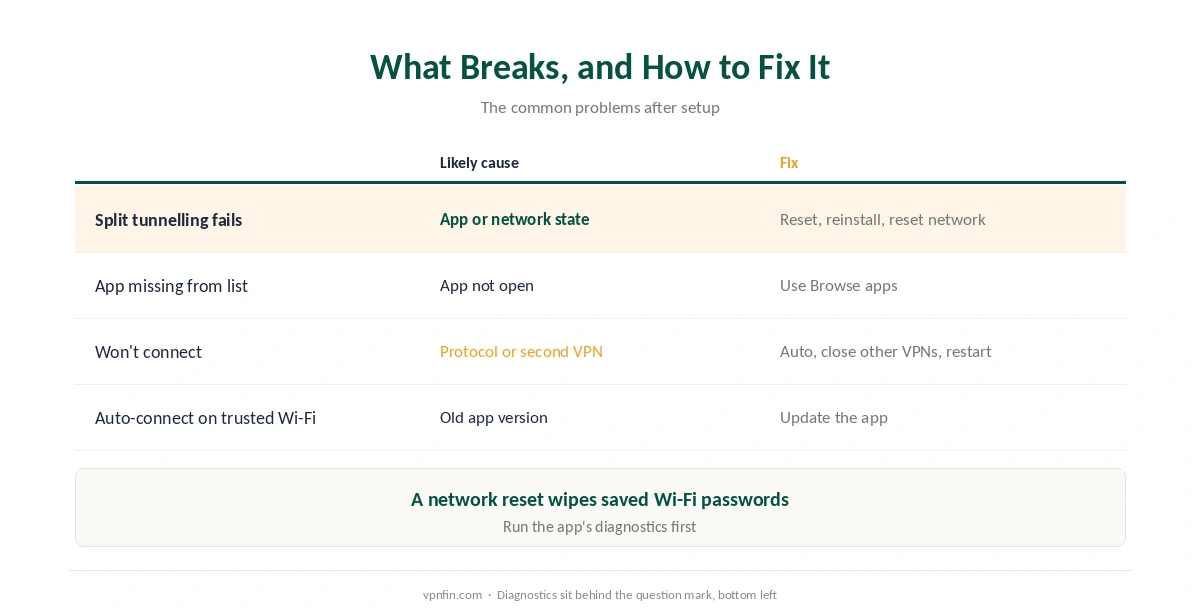
Split tunnelling in NordVPN on Windows does not split. NordVPN’s troubleshooting page suggests resetting the app, reinstalling it, and then resetting the network. The last step also wipes saved Wi-Fi networks and passwords. Its built-in diagnostics sit behind the question mark at the bottom left of the app.
An app is missing from the split tunnelling list. The list shows only apps that are open; use Browse apps to find the rest.
The VPN will not connect. Set the protocol back to Auto, close any other VPN app, and restart, VPNOnline advises. Two VPN clients can fight over the same route. Our Windows troubleshooting guide covers firewall and adapter issues.
Auto-connect ignores your trusted Wi-Fi. NordVPN’s release notes say a recent update fixed exactly this, so update the app. Then confirm the tunnel with our guide to checking a VPN, and run a DNS leak test.
Turning It Off
Disconnect from the app or the system tray icon, and turn off auto-connect if you want Windows to start without it. Our guide to turning off a VPN on Windows covers every method. On a Mac, see our NordVPN on Mac guide, and for the service overall, our NordVPN review.
How We Research
The kill switch and split tunnelling detail comes from NordVPN’s support pages, and the recent changes from its Windows release notes. ARM support comes from iTechGuides’ August 2026 report. VPNOnline supplied the July 2026 pricing and connection advice. We name each source where used; all were read on 26 September 2026. We did not test on Windows ourselves. Our full approach lives on the About Us page.
NordVPN on Windows FAQ
Download the Windows app from NordVPN’s site, install it, sign in, and use Quick Connect. Then set auto-connect and choose between the kill switch and split tunnelling.
Yes, with a native ARM64 app. Split tunnelling and Threat Protection Pro arrived on ARM from version 7.38.1.0, iTechGuides reports.
The kill switch takes priority over split tunnelling. When the VPN disconnects, it blocks all traffic, including apps you excluded, unless an allowlist rule applies.
Try resetting the app, reinstalling it, then resetting the network, as NordVPN’s support suggests. The network reset also clears saved Wi-Fi passwords.
Set the protocol to Auto, close any other VPN app, and restart. Two VPN clients can compete for the same network route.
The Verdict
NordVPN on Windows is the fullest version of the app, and setting it up takes minutes on both standard and ARM PCs.
The one decision that matters is kill switch or split tunnelling, because they conflict when the VPN drops. Pick the one that fits how you use the PC.