
Disclosure: VPNFin is reader-supported. If you buy a VPN through links on this page, we may earn a commission at no extra cost to you. This never affects our ratings — here’s our full disclosure.
Windscribe Warzone use helps with privacy, not with easier matches. Warzone’s skill-based matchmaking ranks skill above location, so a VPN cannot reliably find weaker lobbies, and frequent location changes may risk a shadow ban, VPNOverview warns. Windscribe’s free plan works for testing but its 10 GB goes quickly with game updates; Pro adds temporary port forwarding, which can help NAT.
This guide covers Warzone’s servers, Activision’s position, Windscribe’s settings, consoles and the free plan.
Where Windscribe Warzone Traffic Goes
Warzone’s servers sit in regions such as Virginia, Chicago, Los Angeles, London, Frankfurt and Tokyo, pong.com reports, hosted on Azure and AWS. A Windscribe location near your usual region keeps ping lowest.
Skill-based matchmaking can still send you to distant lobbies, with or without a VPN. Our gaming VPN guide explains why ping rises through a VPN.
Activision and Anti-Cheat
Activision’s terms do not forbid VPNs, VPNOverview found, and Ricochet does not target them, though frequent location changes may trigger a shadow ban. Cybernews’ German edition reports that anti-cheat changes from Season 4 may recognise VPNs.
Stay on one location and avoid using the VPN to hunt for easier lobbies, which risks the account you care about.
Windscribe Warzone Settings
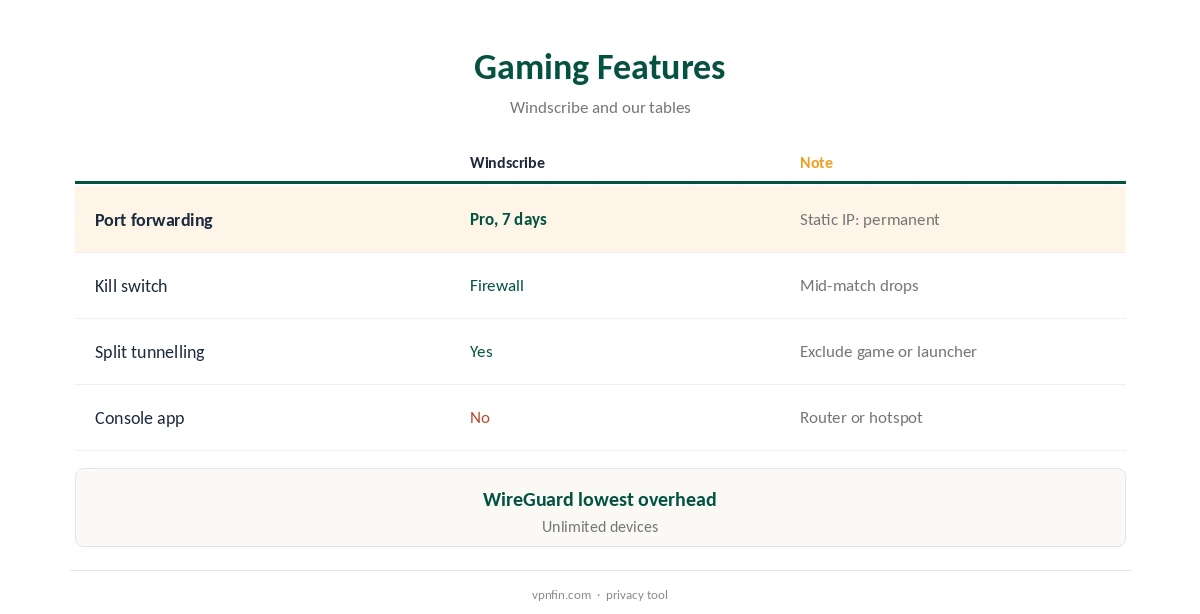
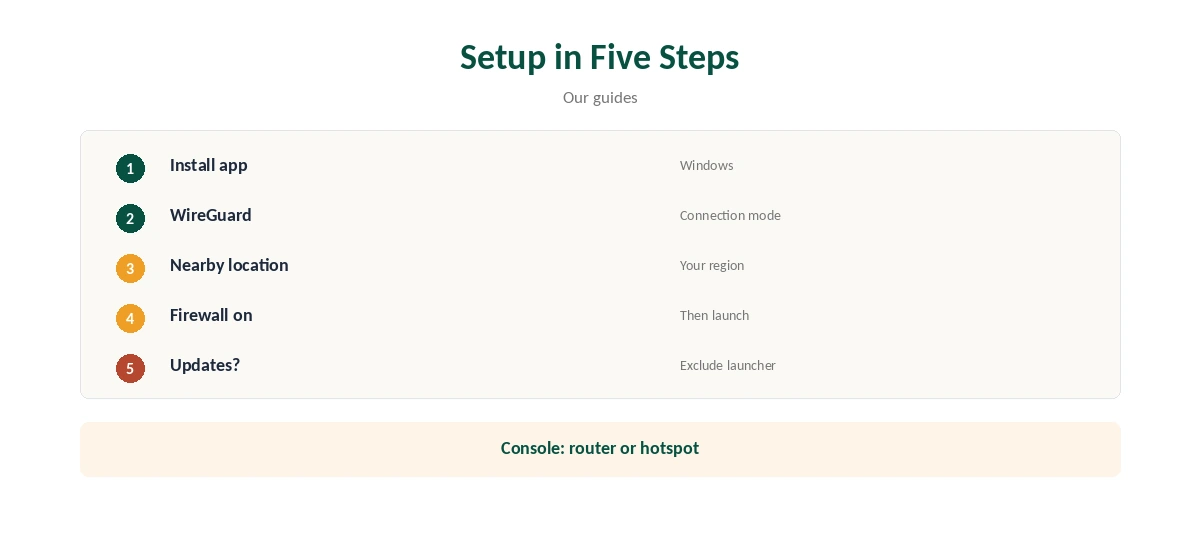
Choose WireGuard for the lowest overhead and a nearby location in the Windscribe app. Windscribe’s firewall, its kill switch, keeps your IP hidden if the tunnel drops mid-match.
Split tunnelling can keep the game outside the VPN while chat and browser stay inside. Our Windscribe WireGuard guide covers the protocol.
Port Forwarding and NAT
Windscribe Pro includes temporary port forwarding that lasts seven days, and a paid static IP can carry a permanent one, Windscribe’s pages note. That can help a strict NAT type, which affects party chat.
Many big providers offer no port forwarding at all, so this is one of Windscribe’s gaming advantages.
PlayStation, Xbox and On the Road
PlayStation and Xbox consoles cannot run VPN apps. A router running Windscribe, which needs a paid plan or a GL.iNet router, or a Windows hotspot on the free plan, covers the console.
Our Windscribe PS5 guide and Xbox guide walk through both.
The Free Plan for Gaming
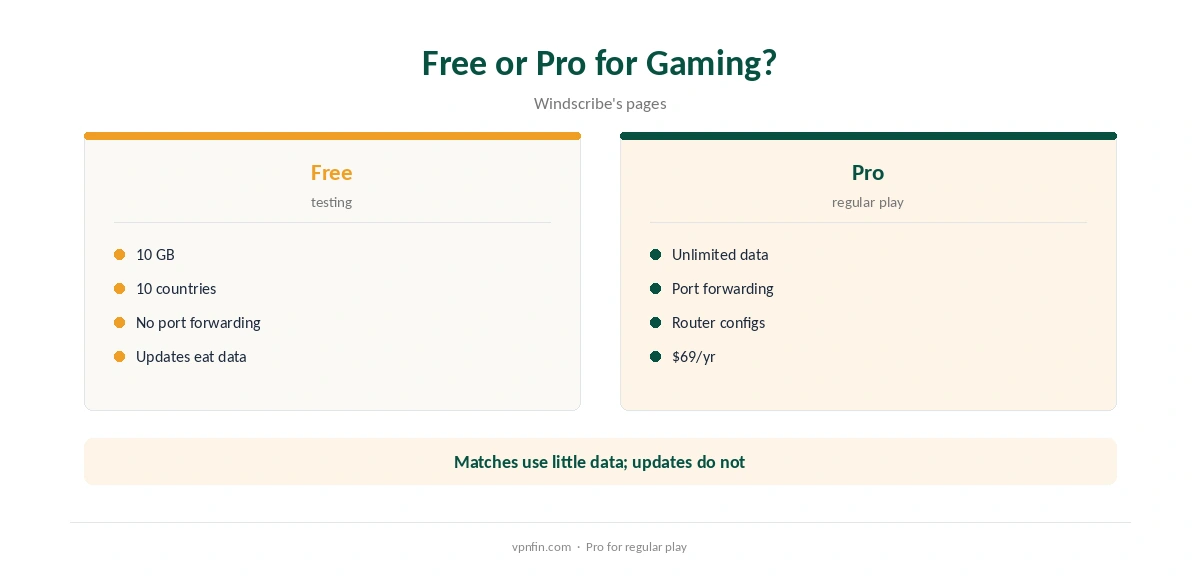
The free plan’s 10 GB covers plenty of play, since matches use little data, but a single Warzone update can be far larger. Turn the VPN off for downloads, or exclude the launcher with split tunnelling.
The free plan gives 10 GB a month after confirming an email. Pro costs $9 a month or $69 a year with no renewal jump, or Build-a-Plan from $3. Windscribe’s terms allow a refund of the first payment within seven business days, under 10 GB used.
Privacy, Streamers and DDoS
Windscribe’s no-logs claim held when an Athens court dismissed charges against its CEO in April 2025, because no user data existed. Hiding your home IP from other players helps against DDoS attempts, especially for streamers and competitive players.
Our IPVanish Warzone guide compares another provider.
Lag Is More Than Ping
Rubber-banding and missed shots often come from packet loss and unstable latency rather than a high average. A nearby Windscribe location rarely makes these worse, but an overloaded or far-off one can.
If matches feel worse, compare a few with the VPN off before blaming the network or the game.
Streamers are the likeliest DDoS targets once their address leaks. With Windscribe on the gaming PC, both the game and streaming software share the VPN’s address instead of your home one.
Unlimited devices mean a second streaming PC or a phone for chat fits on the same account.
Hotel and campus networks often add their own lag or block game ports. A travel router running Windscribe gives a laptop or console a private connection there.
Expect higher ping far from your usual region whatever you do, VPN or not.
Launchers, Updates and Testing Before You Commit
Battle.net and Steam updates for Warzone run to many gigabytes, which would drain the free plan’s 10 GB in one go. Exclude the launcher with split tunnelling, or pause the VPN while updating.
Matches themselves use little data, so play stays well within the allowance most months.
Windscribe refunds the first payment within seven business days if you have used less than 10 GB, its terms say. Test on the free plan first, then upgrade if port forwarding or more locations matter.
Watch your data in the app during a paid trial, since big downloads can push you past the 10 GB refund limit quickly.
Checking Your Setup
Turn on Warzone’s on-screen latency and packet loss display, then compare several matches with Windscribe on and off at the same time of day. Keep whichever setup gives steadier numbers.
A browser leak test confirms your home IP stays hidden from other players.
How We Research
This page draws on pong.com’s Warzone server analysis, VPNOverview’s Warzone guide, Cybernews’ German Warzone coverage, Windscribe’s information page and our Windscribe tables. We cross-checked these sources against each other, and where they conflict or something can’t be verified, we say so in the text rather than guessing. We checked time-sensitive figures, including prices in US dollars, on 8 October 2026. The main source we relied on is Windscribe’s information page. Our full approach lives on the About Us page.
Windscribe Warzone FAQ
Usually not; use a nearby location to keep the cost small.
Not reliably; skill-based matchmaking outweighs location.
Yes; Pro includes a temporary seven-day option.
Yes, but updates can use up 10 GB quickly.
Through a router or a Windows hotspot.
The Verdict
Windscribe Warzone use suits privacy and DDoS protection on a nearby server, with port forwarding as a bonus on Pro. It will not beat matchmaking.