
Disclosure: VPNFin is reader-supported. If you buy a VPN through links on this page, we may earn a commission at no extra cost to you. This never affects our ratings — here’s our full disclosure.
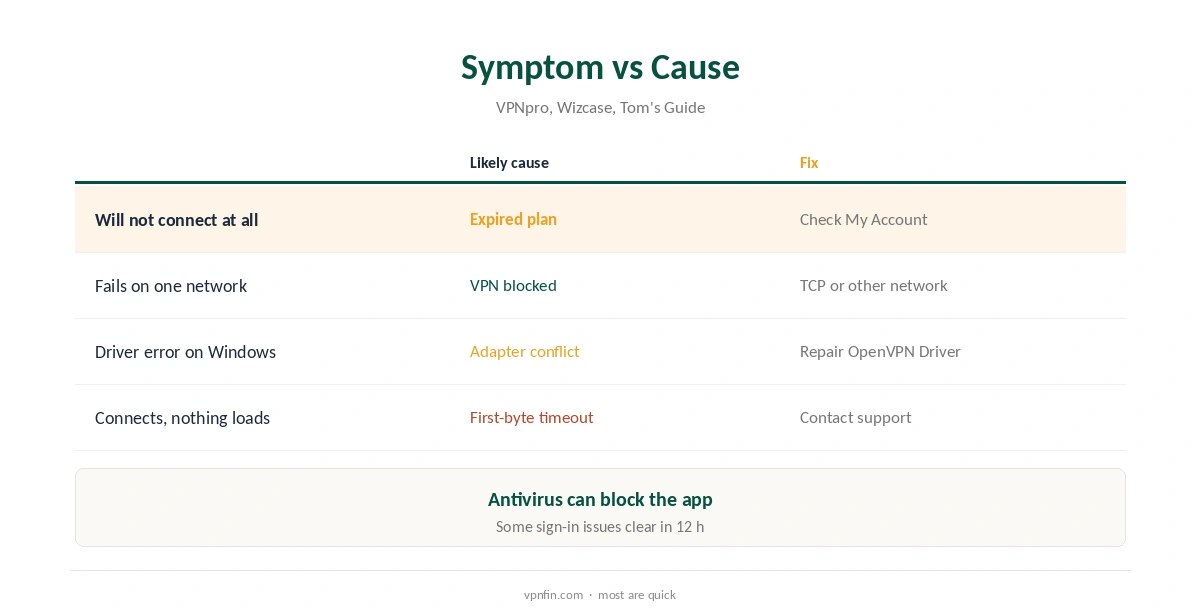
IPVanish not working usually traces to a few causes, VPNpro’s troubleshooting guide lists: an expired subscription, a protocol the network blocks, a conflict with the OpenVPN network driver on Windows, or a first-byte timeout that needs support. Some limits are platform quirks, such as split tunnelling switching off auto-connect on iPhone, Tom’s Guide found.
This guide works through the causes in order, from quick checks to device-specific limits, with the fix for each.
Check the Subscription First
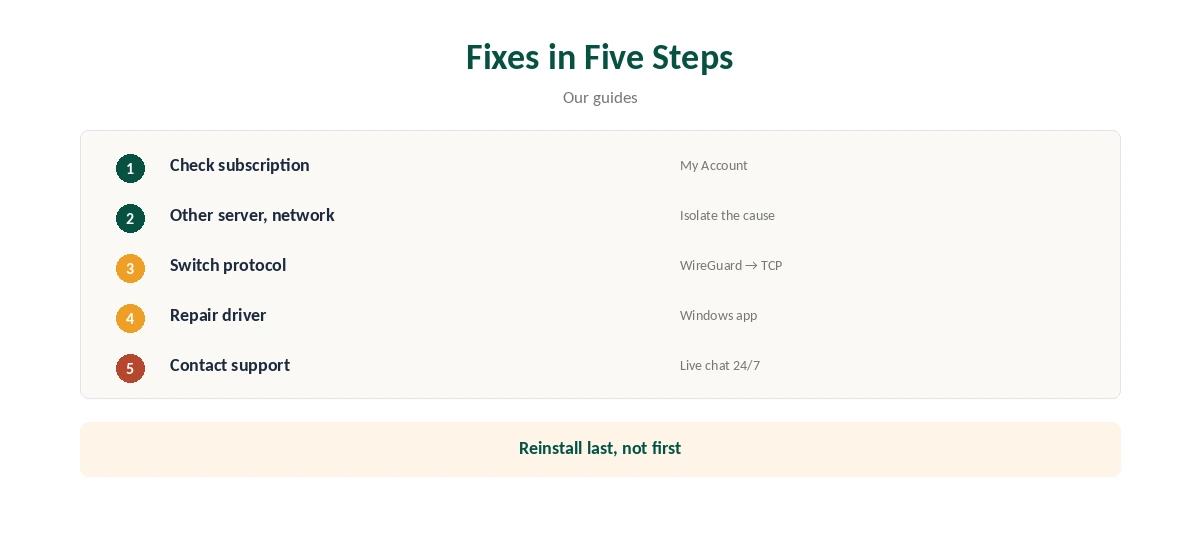
An expired subscription stops connections without an obvious error, VPNpro notes, so check it before changing any settings. Sign in at ipvanish.com and check the Subscription page in My Account to confirm the plan is active and paid up.
If you subscribed through an app store, check the store’s subscription list instead. Our guide to cancelling IPVanish shows where each type of subscription lives.
Is IPVanish Not Working, or Is It the Network?
Try another server first, then another network, such as a phone hotspot, to narrow down the cause. If IPVanish connects there, your usual network is blocking VPN traffic, which is common on school, office and hotel Wi-Fi. Captive portals on hotel Wi-Fi also need signing in before any VPN can connect.
Our hotel Wi-Fi guide and school Wi-Fi guide explain why those networks block VPNs.
Switch Protocol
IPVanish offers WireGuard, OpenVPN and IKEv2. If one fails, try another. On networks that block UDP, switch OpenVPN to TCP in the protocol options, Wizcase advises, which can get through some hotel and office firewalls.
WireGuard is fastest, OpenVPN over TCP gets through more restrictive networks, and IKEv2 reconnects quickly after sleep. Our WireGuard vs OpenVPN guide explains the trade-offs, including speed and battery.
Repair the OpenVPN Driver on Windows
OpenVPN on Windows depends on a virtual network adapter. If another VPN has taken it, or it was damaged, IPVanish’s Windows app offers an Install/Repair OpenVPN Driver option, Wizcase describes; run it and reconnect.
Antivirus software can also block IPVanish, Wizcase adds, so allow it through rather than turning protection off. Another VPN app installed alongside can claim the same adapter, so quit other VPNs first. Our Windows VPN troubleshooting guide covers adapters and firewall rules.
Timeouts and Sign-In Errors
A first-byte timeout, where the app connects but nothing loads, usually needs IPVanish’s support, VPNpro says. Both VPNpro and Wizcase suggest that some sign-in problems clear after waiting up to 12 hours, or with support’s help.
IPVanish offers live chat around the clock and email at support@ipvanish.com, TechRepublic and its store listing note. Include your device, app version and the steps you have tried, so support can skip the basics and get to the cause.
Device-Specific Limits
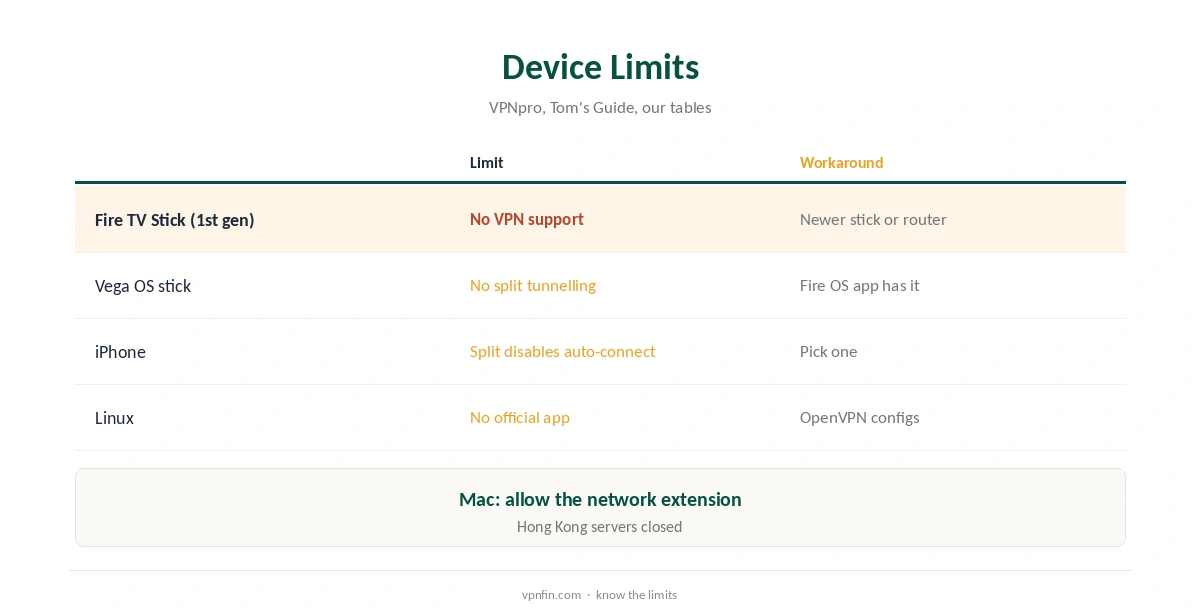
No VPN works on the first-generation Fire TV Stick, VPNpro notes. IPVanish’s Vega OS app lacks split tunnelling, which the Fire OS app has. iPhone split tunnelling works by domain only and turns off auto-connect, Tom’s Guide found.
Mac users should check the network extension is allowed in System Settings. On Linux, IPVanish has no official app, so check your OpenVPN configuration files are current. Our IPVanish Linux guide covers the setup.
Kill Switch Side Effects
IPVanish’s kill switch is strict and cannot be customised, Tom’s Guide notes. If the VPN disconnects, the kill switch blocks the internet until it reconnects, which can look like IPVanish has broken the connection.
Reconnect, or switch the kill switch off briefly to confirm it is the cause, then turn it back on. Our kill switch guide explains why blocked internet is the feature working.
Phones Dropping the Connection
On Android, battery savers can close VPN apps in the background; set IPVanish’s battery use to unrestricted and turn on Always-on VPN in Android’s settings. On iPhone, Tom’s Guide noted a few glitches in IPVanish’s iOS app, so update it first.
Our IPVanish for Android guide and IPVanish iPhone guide cover each phone’s settings.
Before Reinstalling
Reinstalling the app belongs at the end of the list, not the start, Wizcase’s and VPNpro’s guides suggest. Try the app on a second device first, such as a phone on mobile data: if it works there, the problem sits on the first device rather than IPVanish’s servers.
If you do reinstall on Windows, remove the old app, restart, then install the current version from IPVanish’s site, so the network driver installs cleanly.
Streaming Errors
Streaming results vary: VPNOverview reached Netflix, Hulu, Prime Video, Max, Disney+ and BBC iPlayer with IPVanish in 2026, while VPNpro found its access inconsistent. IPVanish also closed its Hong Kong servers, our tables record. For why it slows down and what to change, see our page on IPVanish running slow.
If a service shows an error, close it fully, switch server in the same country and reopen it. Clearing the app’s cache or the browser’s cookies can also help. Our Netflix VPN guide explains why services block some servers.
How We Research
This page draws on VPNpro’s and Wizcase’s IPVanish troubleshooting guides, Tom’s Guide’s and TechRepublic’s IPVanish reviews, VPNOverview and our IPVanish tables. We cross-checked these sources against each other, and where they conflict or something can’t be verified, we say so in the text rather than guessing. We checked time-sensitive figures, including prices in US dollars, on 8 October 2026. The main source we relied on is VPNpro’s IPVanish troubleshooting guide. Our full approach lives on the About Us page.
IPVanish Not Working FAQ
Often an expired plan, a blocked protocol or a Windows driver conflict.
WireGuard first, then OpenVPN over TCP, then IKEv2.
Use the app’s Install/Repair OpenVPN Driver option.
No; no VPN works on that model.
Live chat, around the clock, or support@ipvanish.com.
The Verdict
When IPVanish is not working, check the subscription, switch network and protocol, and repair the Windows driver before reinstalling. Device limits explain the rest.