
Disclosure: VPNFin is reader-supported. If you buy a VPN through links on this page, we may earn a commission at no extra cost to you. This never affects our ratings — here’s our full disclosure.
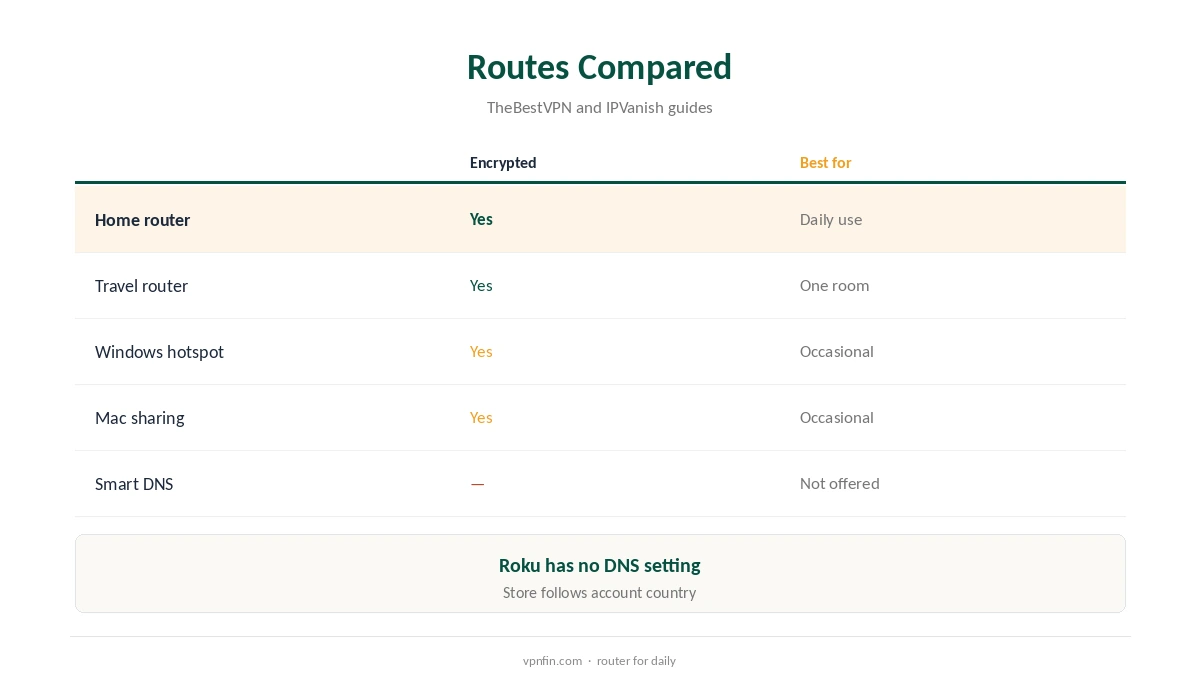
IPVanish for Roku works only indirectly, because Roku devices and Roku TVs take no VPN apps at all, TheBestVPN notes. IPVanish offers no Smart DNS service and no pre-configured router, TheBestVPN noted in August 2026. Devices without an app need a router running IPVanish or a connection shared from a computer. Both routes give full encryption, and IPVanish’s unlimited devices mean the router or computer does not use up a scarce slot. Our guide to IPVanish on a Router covers built-in WireGuard on GL.iNet, OpenVPN elsewhere.
This guide covers the router route, the hotspot route on Windows and Mac, Roku’s own settings, what to avoid and how to check.
Why Roku Needs a Workaround
Roku’s operating system has no VPN support and no way to install one. Every Roku VPN guide routes the device through something else, TheBestVPN’s 2026 guide explains. Other providers add Smart DNS for Roku; IPVanish does not, so its two routes both need extra hardware or a computer.
Our Roku VPN guide compares providers that offer Smart DNS or pre-configured routers.
IPVanish for Roku via a Router
Set up IPVanish on a compatible router using its guides for DD-WRT, Asus or Tomato firmware, then connect the Roku to that network. Every device behind the router uses the VPN, including phones and TVs, so check that suits everyone at home.
To keep the rest of the home off the VPN, put a small travel router running IPVanish between the Roku and your main router. Our router setup guide compares the options.
Sharing From Windows
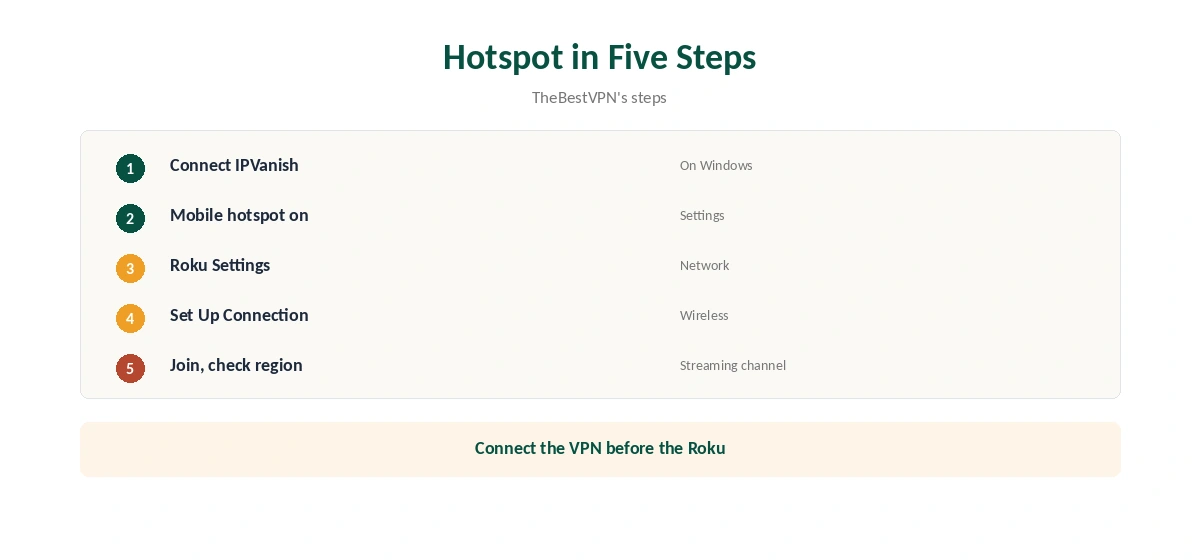
Connect IPVanish on a Windows PC, then turn on Mobile hotspot under Settings, Network and Internet. On the Roku, open Settings, Network, Set Up Connection, Wireless, and join the hotspot, TheBestVPN’s steps show.
The PC must stay on and connected while you watch, and its sleep settings should not cut the hotspot. If the Roku shows the wrong region, disconnect and reconnect it after IPVanish is already connected.
Sharing From a Mac
On a Mac, connect IPVanish, then use Internet Sharing in System Settings to share the connection over Wi-Fi. vpnRanks walks through this method for Roku. Join the Mac’s shared network from the Roku’s wireless settings, entering the password you set on the Mac.
macOS can share over Wi-Fi only when the Mac itself reaches the internet another way, such as by Ethernet, so check your setup first.
Roku Account Rules
A Roku account’s country is set when you create it, and the channel store follows that country rather than your VPN location. Channels from another region need a second account and a device reset, our Roku tables record.
A VPN changes what streaming apps see, not the Roku store itself. Streaming services may also block VPN addresses or check your payment country. Our PureVPN Roku guide covers the same rule in more detail.
Roku TVs and Streaming Sticks
Roku TVs from brands such as TCL and Hisense run the same Roku operating system as the sticks, so the same rules apply: no VPN app, and a router or hotspot as the route. The TV’s own network settings join the router or hotspot just like a stick, under Settings, Network.
A Roku TV connected by cable to a router running IPVanish gives the steadiest picture, especially for 4K streams.
What to Avoid
Ignore guides that tell you to enter IPVanish Smart DNS addresses on a Roku: TheBestVPN found IPVanish offers no Smart DNS. Roku devices also lack a DNS setting of their own, so Smart DNS from any provider has to go on the router.
Our Smart DNS vs VPN guide explains why Smart DNS does not encrypt.
Streaming, Price and Privacy
VPNOverview reached Netflix, Hulu, Prime Video, Max, Disney+ and BBC iPlayer with IPVanish in 2026, while VPNpro found its streaming inconsistent. IPVanish costs $57.22 for the first 24 months and renews at $89.99 a year, VPNOverview lists.
It has two audits in our table, by Leviathan and Schellman, owns its servers and is based in the US. Our IPVanish price guide compares the plans.
Checking It Works
A Roku has no browser, so check from a phone or laptop on the same router or hotspot. A streaming channel showing the expected region is another sign. Restart the channel after the VPN connects.
IPVanish offers 30 days for a refund on yearly plans bought on its website, enough time to test your channels. Monthly plans carry no refund.
If the Roku Will Not Connect
Connect IPVanish on the computer first, then turn on the hotspot, then join it from the Roku. That order means the Roku joins a network that is already protected. If the Roku still fails, restart the hotspot and forget the old network on the Roku before joining again.
On networks that block VPNs, switch IPVanish to OpenVPN over TCP before sharing. Our IPVanish troubleshooting guide covers more fixes.
How We Research
This page draws on TheBestVPN’s Roku and smart TV guides, BleepingComputer’s and vpnRanks’ IPVanish Roku guides, Comparitech and our IPVanish and Roku tables. We cross-checked these sources against each other, and where they conflict or something can’t be verified, we say so in the text rather than guessing. We checked time-sensitive figures, including prices in US dollars, on 8 October 2026. The main source we relied on is TheBestVPN’s Roku VPN guide. Our full approach lives on the About Us page.
IPVanish for Roku FAQ
No; Roku runs no VPN apps.
Through a router running IPVanish or a computer hotspot.
No; TheBestVPN found it offers none.
No; the account’s country decides the store.
IPVanish sets no device limit, so it does not matter.
The Verdict
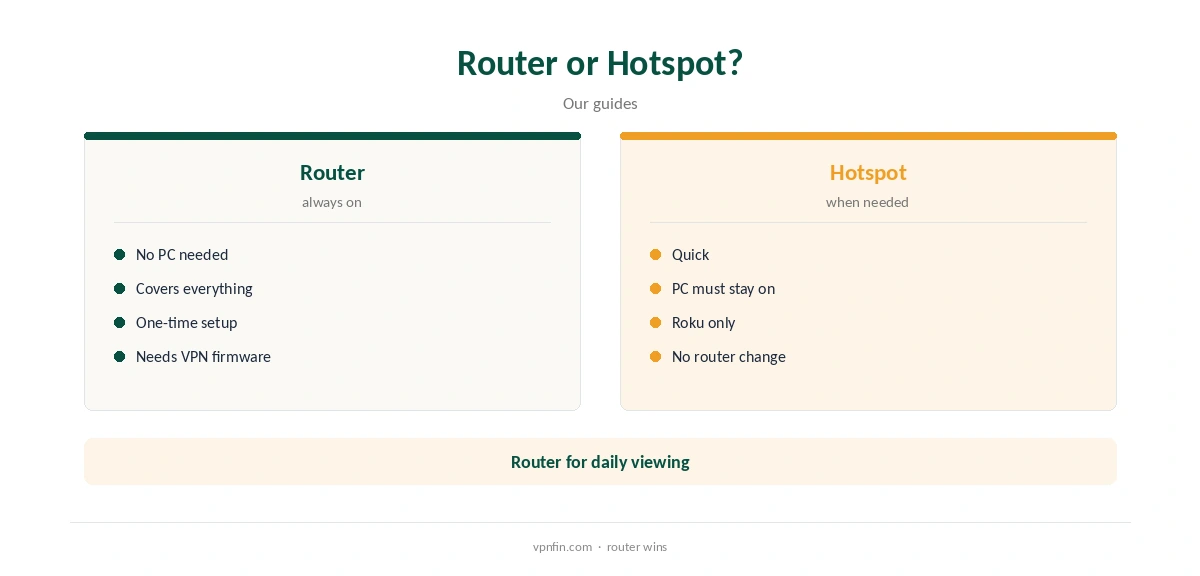
IPVanish for Roku means a router or a hotspot from a computer. A router suits daily use; a hotspot suits the odd evening.