
Disclosure: VPNFin is reader-supported. If you buy a VPN through links on this page, we may earn a commission at no extra cost to you. This never affects our ratings — here’s our full disclosure.
Ask which of these encrypts your traffic more and you will get two confident, opposite answers.
One published guide states that Onion Over VPN encrypts once while Double VPN encrypts twice. Another states that Onion Over VPN encrypts several times while Double VPN encrypts only twice. Both are accurate. They are counting different things, and the disagreement is the fastest way to understand what these features actually do.
They are not two strengths of the same feature. Double VPN chains two VPN servers. Onion Over VPN sends you through one VPN server and then into the Tor network. Different routes, different purposes, and different reasons to leave both switched off.
The Short Answer
Double VPN for ordinary browsing where you want more than a single hop. Two VPN servers, two layers of VPN encryption, a noticeable speed cost.
Onion Over VPN when you need Tor. One VPN server, then the Onion network with its own three relays and three layers on top. Considerably slower and it breaks many websites.
Neither for everyday use. NordVPN’s own documentation says Double VPN is not recommended for everyday activities, which is unusual candour from a provider about its own feature.
And if Onion Over VPN is missing from your app, you are on the wrong protocol — see below.
The Encryption Question, Settled
This is where the confusion lives, so it is worth being exact.
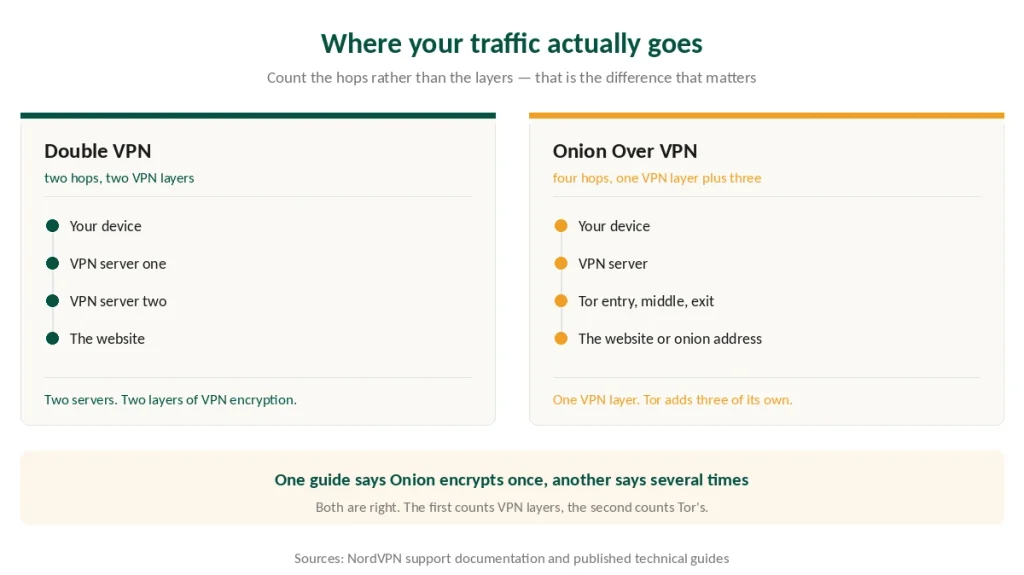
Double VPN applies two layers of VPN encryption. Your traffic is encrypted, sent to the first server, encrypted again, sent to the second, then out to the internet. Two servers, two VPN layers.
Onion Over VPN applies one layer of VPN encryption, then hands your traffic to Tor — which applies its own encryption in three layers as it passes through three relays.
So the counts are: Double VPN gives two VPN layers across two hops. Onion Over VPN gives one VPN layer plus three Tor layers across four hops in total.
⚠️ A guide saying “Onion encrypts once” is counting VPN layers. A guide saying “several times” is counting Tor’s. Neither is wrong, and neither tells you which to pick, because more layers is not the useful question.
The useful question is what each protects you from. Double VPN hides the destination from the first server and your address from the second. Onion Over VPN additionally hides from your internet provider that you are using Tor at all, and hides your real address from Tor’s entry node.
When Each One Is the Right Answer
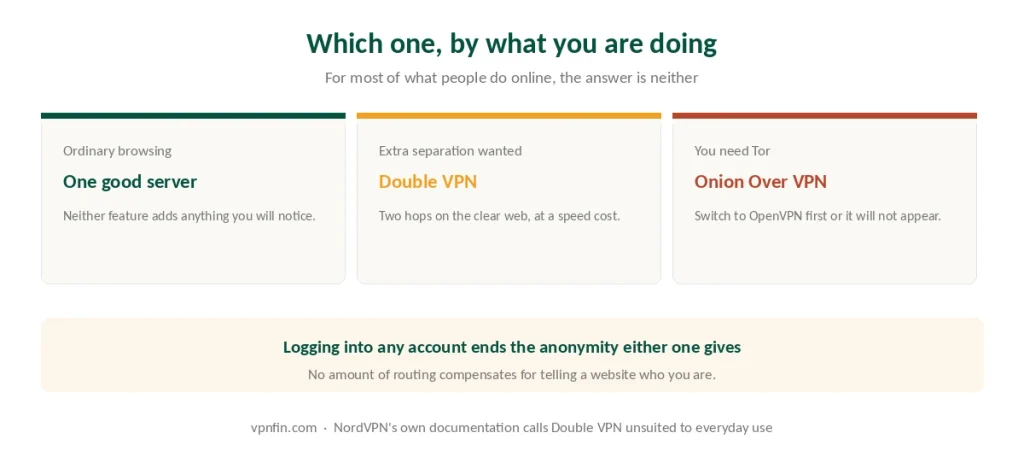
Use Double VPN when you want more separation than a single hop gives and you are browsing the ordinary web. It is faster than the Tor route by a wide margin and does not break sites.
Use Onion Over VPN when you specifically need the Onion network — reaching .onion addresses, or operating where Tor use itself would attract attention. It lets you reach Tor without installing the Tor browser, which is its main practical advantage.
⚠️ Use neither for streaming, gaming or downloads. Both add latency by design. NordVPN’s support documentation states plainly that a slower connection is expected with Double VPN because it routes and encrypts through a second server, and that it is not recommended for everyday activities.
⚠️ And neither survives you logging in. The moment you sign into an account that identifies you — email, social media, a shop — the anonymity both features provide is gone for that session. No amount of routing compensates for telling a website who you are, which is the point what a VPN actually hides makes at length.
Why Onion Over VPN Disappeared From Your App
A common complaint, and the answer is a setting rather than a removal.
Onion Over VPN is available on the OpenVPN protocol. If your app is set to NordLynx — the default, because it is faster — the Onion servers do not appear in the list. NordVPN’s own support page confirms this, and adds that Double VPN can also be missing for the same reason on some platforms.
To bring it back:
- Open settings and find Auto-connect
- Turn off automatic protocol selection
- Set the protocol to OpenVPN (TCP)
- Return to the server list — Specialty Servers now shows Onion Over VPN
⚠️ This costs you speed twice over, since OpenVPN is slower than NordLynx before Tor is involved at all. Our protocol guide explains the difference.
⚠️ If it is still missing after switching, NordVPN attributes that to instability or limited capacity among Tor nodes rather than to your setup.
The Rest of the Specialty Menu
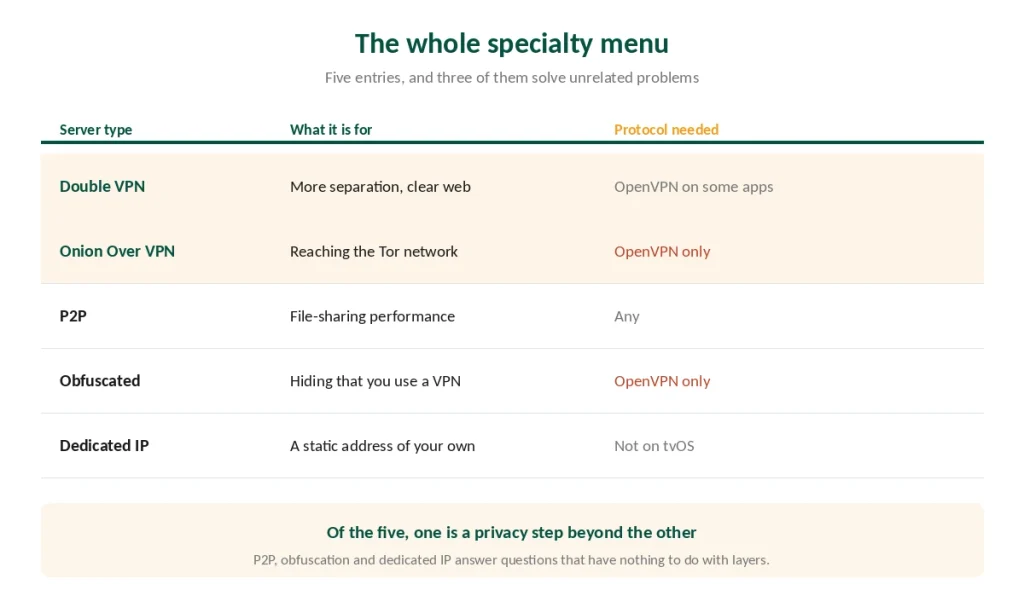
People arrive at this comparison having opened the Specialty Servers list and found five entries rather than two. Here is what the other three do.
P2P servers are optimised for file sharing and are a different category entirely — not a privacy level but a performance one. You can use Double VPN while sharing files; the two are not alternatives. Our torrenting guide covers which providers restrict P2P to designated servers and which allow it everywhere.
Obfuscated servers disguise the fact that you are using a VPN at all, for networks that block tunnel traffic. Also OpenVPN only.
Dedicated IP gives you a static address nobody else uses, which is the fix for banks and services that flag shared VPN addresses — our banking guide covers why that happens. Not available on tvOS.
⚠️ Only one of these five is a privacy escalation over Double VPN, and it is the Onion one. The others solve unrelated problems.
Which Providers Offer What
NordVPN has both, plus P2P, obfuscated and dedicated IP servers. Double VPN is included on the standard plan. Our NordVPN review covers the wider picture.
Proton VPN calls its version Tor over VPN, and it is simpler to reach — the servers carry TOR in their name and appear in the ordinary search. It also has Secure Core, which is its multi-hop equivalent. Our Proton VPN review has the detail.
Surfshark offers multi-hop under the name Dynamic MultiHop, letting you choose both ends of the chain rather than picking from fixed pairs. No Tor routing. Our Surfshark review sets it against the others.
ExpressVPN does not offer a double VPN feature at all, which is worth knowing if that is why you were considering it.
IPVanish added Double Hop in December 2024.
What About Chaining Two Providers Yourself?
It comes up, and the honest answer is that it is worse in most respects.
Running two VPN apps at once usually conflicts rather than chaining cleanly, and making it work reliably tends to require a virtual machine for the second one.
The argument for it is that a single provider controlling both hops could, in principle, correlate them — whereas two unrelated companies cannot. That is a real difference if your threat model includes the provider itself.
The arguments against are cost, complexity, and that you are now trusting two companies instead of one. Published guidance is consistent that Double VPN from an audited provider is close enough for most purposes and far simpler.
⚠️ If the provider is who you are hiding from, neither feature helps and a provider that never learns your identity is the more coherent answer than chaining.
How We Research
This guide draws on NordVPN’s own support documentation on specialty server categories and protocol requirements, its published feature pages for both modes, and technical guides from named outlets including Cloudwards, TechNadu, Cybernews and VPNAlert — cross-checked and verified at publication. Where those sources contradicted each other on encryption layers, we set out both counts and explain what each is measuring rather than picking one. We don’t run our own speed tests, and we do not publish guidance on reaching specific content through Tor. Our full approach lives on the About Us page.
Onion Over VPN vs Double VPN FAQ
Both, depending on what you count. Double VPN applies two layers of VPN encryption across two servers. Onion Over VPN applies one VPN layer, then Tor adds its own three layers across three relays. Published guides give opposite answers because they are measuring different things.
Because the feature requires the OpenVPN protocol. If your app is set to NordLynx, the Onion servers do not appear. Open settings, disable automatic protocol selection, choose OpenVPN TCP, and they return to the Specialty Servers list. Double VPN can be hidden the same way on some platforms.
No, and the provider says so. NordVPN’s support documentation states that a slower connection is expected because traffic routes and encrypts through a second server, and that it is not recommended for everyday activities. A single well-chosen server is the right default.
They are unrelated. P2P servers are optimised for file sharing performance, not for privacy escalation. You can use Double VPN while sharing files, since the two are not alternatives. Of NordVPN’s five specialty server types, only the Onion option is a privacy step beyond Double VPN.
Usually not. Two apps running at once tend to conflict, and doing it reliably often means running the second in a virtual machine. The genuine argument for it is that no single company controls both hops. The costs are complexity, price, and trusting two companies rather than one.
The Verdict
These are not two settings on the same dial. Double VPN chains two VPN servers for ordinary browsing. Onion Over VPN adds the Tor network for reaching the Onion side of the internet.
The encryption argument is a distraction. One counts VPN layers, the other counts Tor’s, and the number is not what should decide it.
If Onion Over VPN is missing, switch to OpenVPN. That resolves it in almost every case, at a further cost to speed.
And for the overwhelming majority of what people actually do online, a single well-chosen server is the right answer. Both of these features exist for narrow cases, and one of the providers offering them says so in its own documentation. Our page on NordVPN torrenting covers P2P servers, kill switches and the port forwarding question.