
Disclosure: VPNFin is reader-supported. If you buy a VPN through links on this page, we may earn a commission at no extra cost to you. This never affects our ratings — here’s our full disclosure.
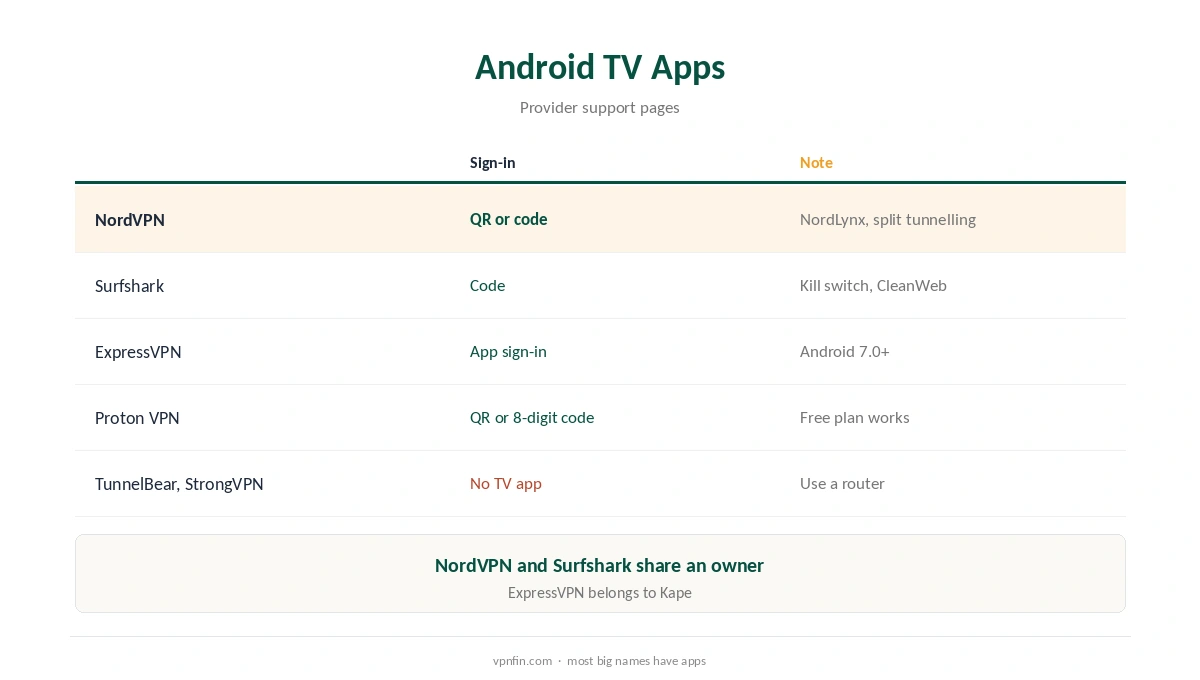
A VPN for Android TV is easy to set up, because most major providers publish native apps in the Google Play Store for TV. NordVPN, Surfshark, ExpressVPN and Proton VPN all have Android TV apps, with sign-in by QR code or a short code entered on your phone. Proton’s free plan works on Android TV too, though streaming support is for paid plans only. TunnelBear and StrongVPN publish no Android TV app, so check before buying.
This guide covers which providers work, the setup, devices such as Nvidia Shield and Google TV Streamer, and the limits.
Providers With Android TV Apps
NordVPN’s Android TV app signs in by QR code or a code at its remote page, and supports NordLynx, NordWhisper and OpenVPN. Surfshark signs in with a code and includes a kill switch and CleanWeb. ExpressVPN needs Android 7.0 or later and offers split tunnelling. Proton VPN needs Android 8 or later and signs in with a QR or eight-digit code. NordVPN and Surfshark share an owner, Nord Security.
VPN for Android TV Setup
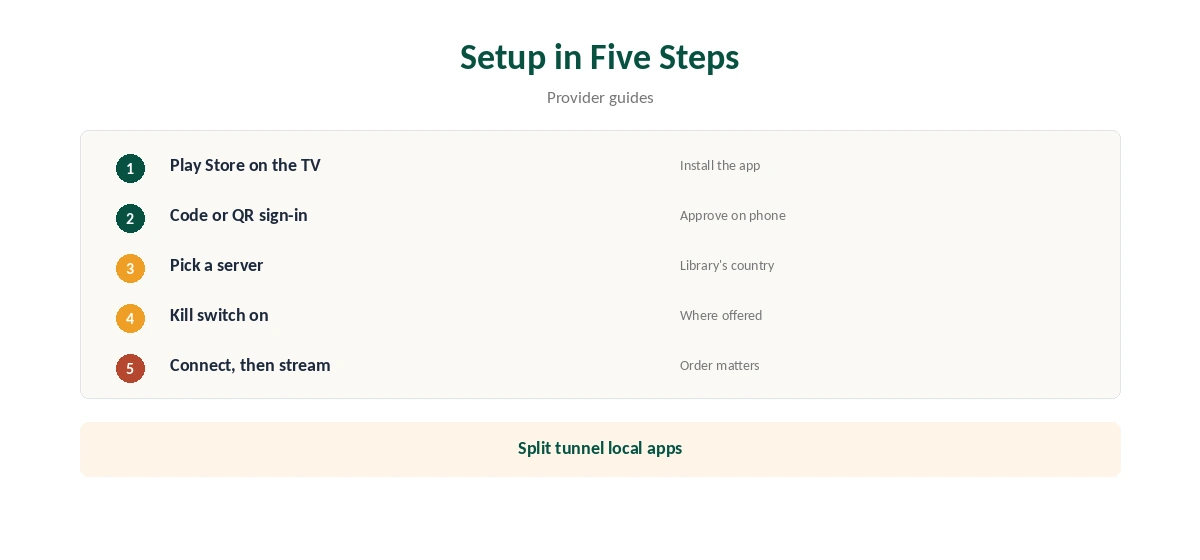
Open the Play Store on the TV, install your provider’s app and open it. Choose the code or QR sign-in, then approve it on your phone or computer. Pick a server in the country you need, turn on the kill switch where offered, and connect before opening streaming apps. Our NordVPN Android TV guide walks through one app.
Nvidia Shield and Google TV Streamer
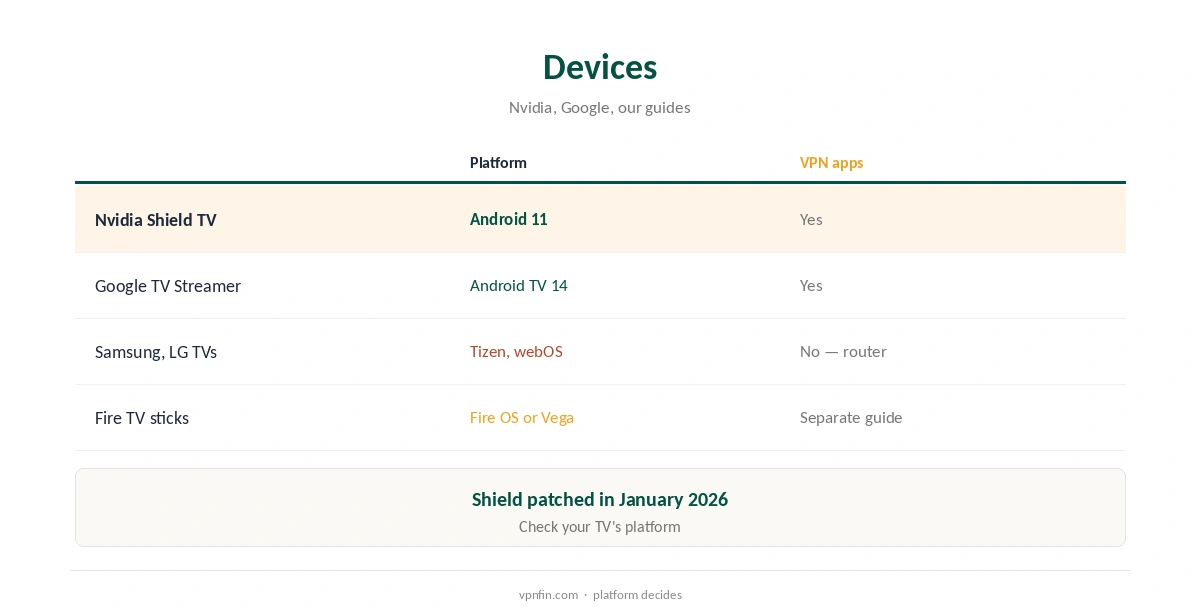
Nvidia’s Shield TV runs Android 11 and received security patches in January 2026, so current VPN apps run on it. Google’s TV Streamer runs Android TV 14. Our Nvidia Shield VPN guide and Google TV Streamer VPN guide cover each device.
Split Tunnelling on a TV
NordVPN and ExpressVPN let you exclude apps from the VPN on Android TV, which keeps local apps such as your broadcaster’s player on your home connection while a streaming app uses the VPN. Our split tunnelling guide explains how it works.
Free Options
Proton VPN’s free plan installs and works on Android TV, its support pages say, but streaming support is for paid plans. Hotspot Shield also offers an Android TV app with a free tier, as our Hotspot Shield Android TV guide explains.
Which VPN for Android TV Suits Streaming?
Pick by the services you watch. Proton’s free plan works on the TV, but streaming support needs a paid plan. NordVPN and Surfshark reached Netflix in several regions in TechRadar’s 2026 testing. Our Netflix VPN guide compares results.
Sideloading
ExpressVPN notes its Android TV app can be installed from the Play Store or sideloaded. Sideloading is a fallback when an app does not appear in your TV’s store; use only the provider’s own download.
Kodi on Android TV
Kodi runs on many Android TV boxes, and a VPN app on the box covers it. Our Kodi VPN guide explains what that protects.
Checking the Connection
Open a browser on the TV, or the provider’s own status screen, to confirm the server country. If a streaming app still shows your home catalogue, close it fully, clear its data and reopen it.
Several Devices
Each TV counts as a device on your plan. Surfshark allows unlimited devices; NordVPN allows 10 and Proton VPN Plus 10, our tables record.
A VPN for Android TV and Local Apps
Some local broadcasters’ apps need your home address. Split tunnelling, where offered, keeps those outside the VPN while other apps use it.
Keeping Apps Updated
Android TV updates apps automatically when enabled. After an update, check the protocol and kill switch settings stayed the same.
Remote Control Tips
Code sign-in avoids typing passwords with a remote. Proton uses an eight-digit code at protonvpn.com/tv; NordVPN a code at its remote sign-in page.
Free Plan Limits on TV
Free plans rarely suit TV use: Proton’s free plan has no streaming support, and capped plans run out fast with HD video.
Quick Check
After connecting, open a streaming app and confirm the catalogue matches the server country before settling in.
Routers as an Alternative
A VPN router covers every device in the home, including TVs without apps. It counts as one device on most plans but slows down on weaker hardware, so test speeds before relying on it. Our guide to Mullvad on Android TV covers official Google TV support, with split tunnelling.
Buying a New Streamer
If you are choosing a streaming box partly for VPN use, an Android TV or Google TV device keeps the most provider apps available, compared with platforms that run none. Our guide to IPVanish on Android TV covers Nvidia Shield and Google TV setup.
TVs Without Android TV
Samsung’s Tizen and LG’s webOS run no VPN apps. For those, use a VPN router or share a connection from a computer, as our smart TV VPN guide explains. Fire TV sticks are covered in our Firestick VPN guide.
How We Research
This page draws on NordVPN’s, Surfshark’s, ExpressVPN’s and Proton VPN’s Android TV support pages, Nvidia’s update notes, Top10VPN and Holafly on providers without TV apps, and our device tables. We cross-checked these sources against each other, and where they conflict or something can’t be verified, we say so in the text rather than guessing. We checked time-sensitive figures, including prices in US dollars, on 7 October 2026. The main source we relied on is Proton VPN’s Android TV guide. Our full approach lives on the About Us page.
VPN for Android TV FAQ
NordVPN, Surfshark, ExpressVPN and Proton VPN, among others.
Most apps use a QR code or a short code approved on your phone.
Yes, but streaming support is for paid plans.
No; use a router or a shared connection.
TunnelBear and StrongVPN, among others.
The Verdict
A VPN for Android TV is simplest with a provider that publishes a native app and code sign-in. Pick by the streaming services you need, and use a router for TVs without Android TV.