
Disclosure: VPNFin is reader-supported. If you buy a VPN through links on this page, we may earn a commission at no extra cost to you. This never affects our ratings — here’s our full disclosure.
Does Surfshark have a free trial? Yes: 7 days, taken on Surfshark’s website, for new users on 12-month or 24-month plans. Surfshark’s support page, updated on 11 September 2026, adds a detail many guides miss: once the trial ends and Surfshark charges you, the 30-day money-back guarantee still applies. That gives you 37 days to decide, as Surfshark’s own trial page puts it.
There is one limit worth knowing before you start: the trial allows three devices, not the unlimited connections Surfshark is known for. This page covers how the trial works, how to cancel, and what to test.
Surfshark Free Trial: The Short Answer
7 days, on the website. Choose a 12-month or 24-month plan on Surfshark’s trial page and pay with PayPal, Apple Pay or a credit card; Surfshark charges nothing for 7 days, its support page says.
Up to three devices during the Surfshark free trial. After it converts to a paid plan, connections become unlimited.
Then 30 more days to get a refund. If Surfshark charges you when the trial ends, you can still request a full refund within 30 days. Our Surfshark review covers the service, and our Surfshark price guide the plans.
How the Surfshark Free Trial Works
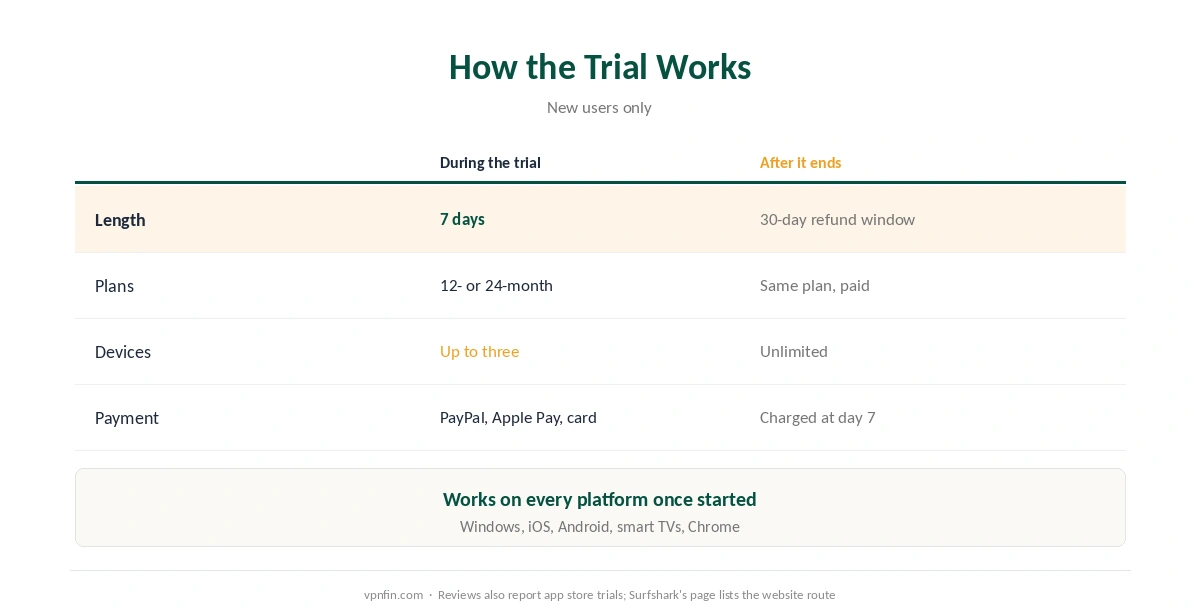
| Detail | Surfshark free trial | After it ends |
|---|---|---|
| Length | 7 days | 30-day refund window |
| Plans | 12-month or 24-month | Same plan, paid |
| Devices | Up to three | Unlimited |
| Payment | PayPal, Apple Pay or card | Charged when the trial ends |
| Who qualifies | New users | — |
The Surfshark free trial works on every platform. Once you have a trial subscription, you can use Surfshark on Windows, iOS, Android, smart TVs and Chrome, Surfshark says. You start the trial on the website, then sign in on each device.
Reviews also report app store trials. Several reviews describe 7-day trials through Google Play and the App Store; Surfshark’s support article now describes only the website route, so check the store listing if you prefer that path.
How to Start and Cancel
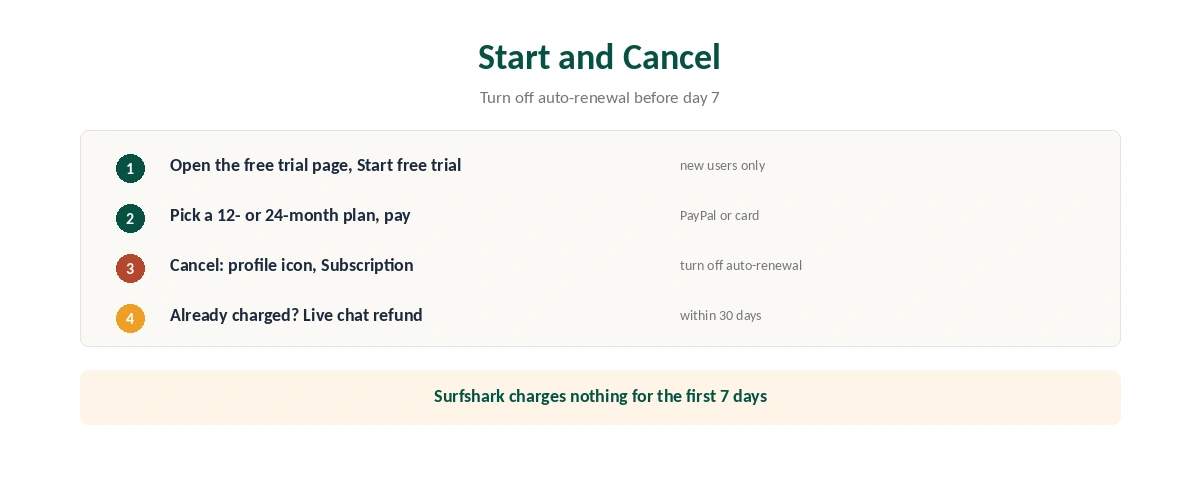
| Step | What to do | Note |
|---|---|---|
| 1 | Open Surfshark’s free trial page, click Start free trial | New users only |
| 2 | Pick a 12-month or 24-month plan | Shorter plans don’t qualify |
| 3 | Enter your email or continue with Google or Apple | Creates the account |
| 4 | Pay with PayPal or a credit card | Nothing charged for 7 days |
| 5 | To stop: profile icon, Subscription, turn off auto-renewal | Do this before day 7 |
| 6 | Charged already? Ask live chat for a refund | Within 30 days |
Turning off auto-renewal stops future payments. Surfshark’s steps are to log in on the website, open the profile icon, choose Subscription and disable auto-renewal. A refund after the trial goes through live chat, as our refund guide explains for other providers too.
What to Test in 7 Days
Speed on your connection, since every VPN adds some slowdown, as our speed guide explains.
The streaming libraries you use, a common reason to choose any VPN, as our Surfshark and Netflix page explains.
Your three most important devices. The trial’s device limit makes this a natural test: phone, laptop and TV, as our Surfshark on Android TV guide shows for the last. Our guide to checking a VPN covers leak tests.
How Surfshark’s Trial Compares
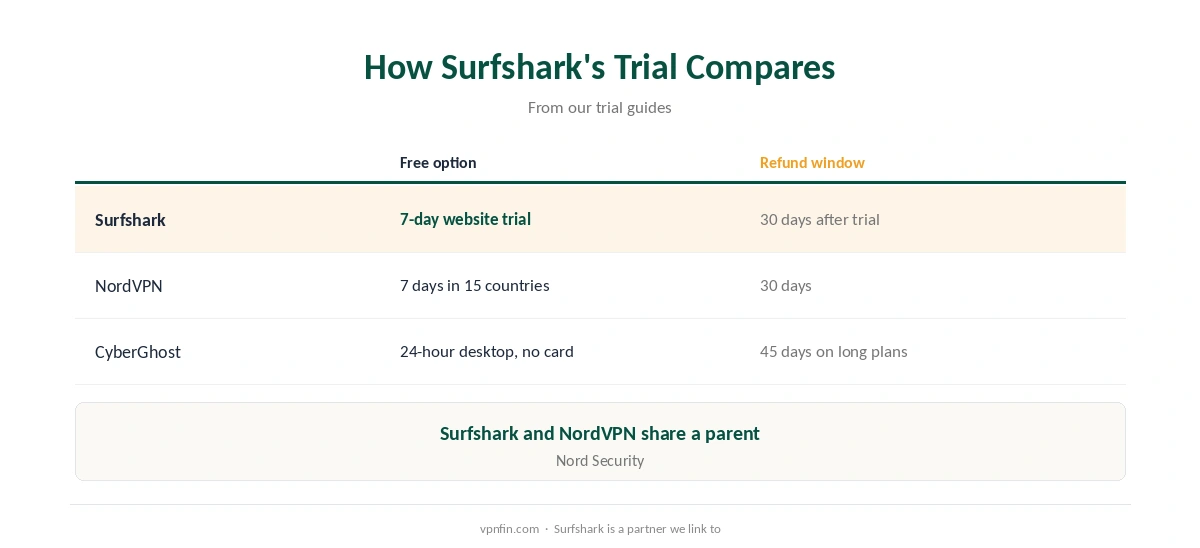
NordVPN offers a 7-day website trial in 15 countries and a 3-day Android trial, as our NordVPN free trial guide explains. NordVPN and Surfshark share a parent, Nord Security.
Other options include CyberGhost’s 24-hour desktop trial and Proton VPN’s free plan, covered in our free VPN trial guide.
How We Research
The trial terms, device limit, payment methods, sign-up and cancellation steps come from Surfshark’s support article, updated on 11 September 2026, and the 37-day total from Surfshark’s trial page. CyberInsider, Gizmodo and VPN.com describe the app store trials. We read all sources on 27 September 2026. Surfshark is a partner we link to. Our full approach lives on the About Us page.
Surfshark Free Trial FAQ
Yes. New users get 7 days free on 12-month or 24-month plans, taken on Surfshark’s website with PayPal, Apple Pay or a credit card.
Up to 3 during the trial. Once it becomes a paid plan, connections have no limit.
Yes. Once the trial ends and Surfshark charges you, you can request a full refund within 30 days through live chat.
Log in on the website, open the profile icon, choose Subscription and turn off auto-renewal before day 7.
Surfshark’s support page describes the website trial, which then works on any device. Reviews also report 7-day trials through app stores.
The Verdict
The Surfshark free trial gives you 7 days, then 30 more to get a refund once it charges you: 37 days in total.
Test on three devices, cancel auto-renewal early if you are unsure, and remember the unlimited-device promise starts only after the trial.