
Disclosure: VPNFin is reader-supported. If you buy a VPN through links on this page, we may earn a commission at no extra cost to you. This never affects our ratings — here’s our full disclosure.
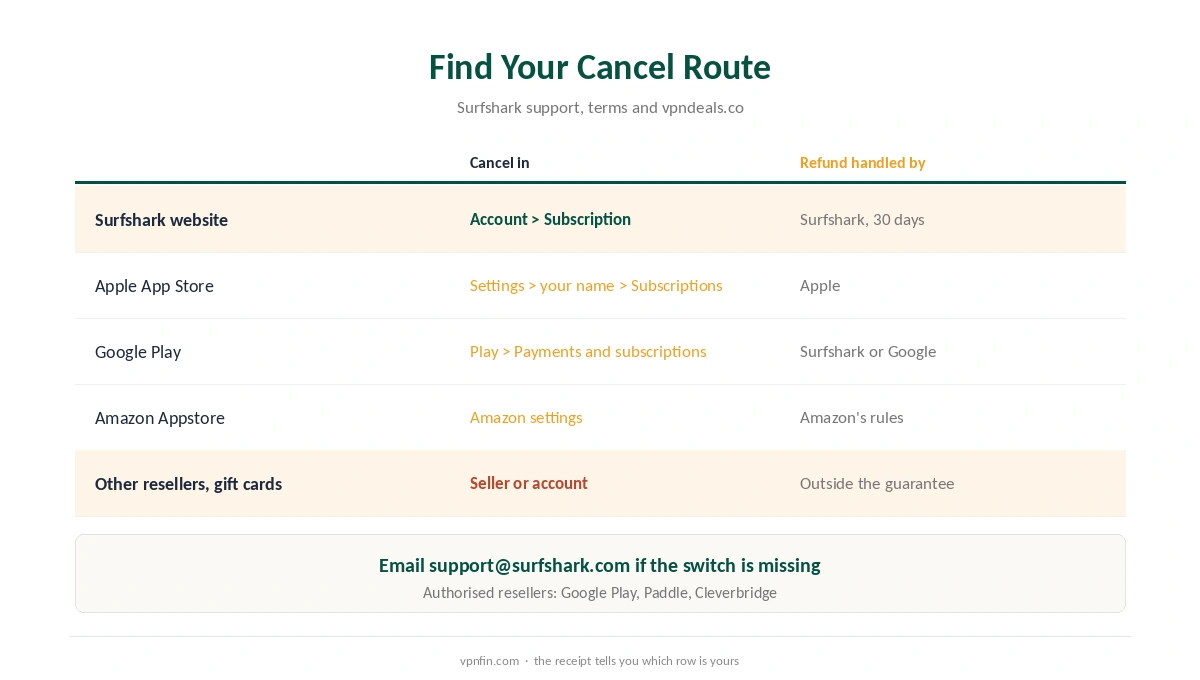
A Surfshark cancel means turning off auto-renewal, and where you do it depends on how you paid. A website purchase means you cancel in your Surfshark account. For Google Play, App Store or Amazon purchases, you cancel in that store. Surfshark’s terms also accept a request by email to support@surfshark.com.
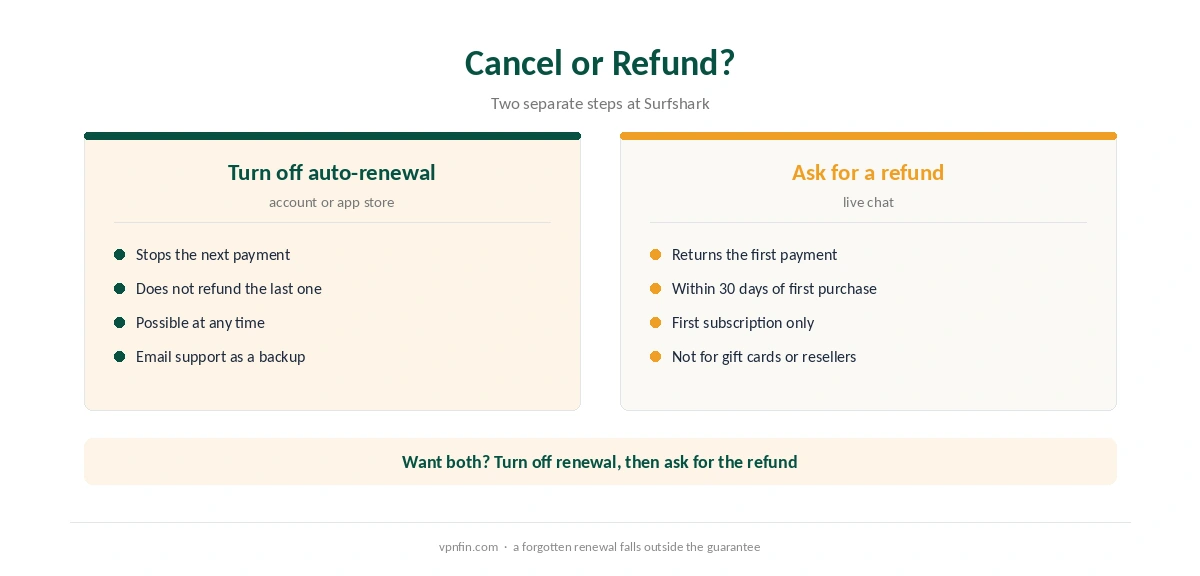
Cancelling stops the next payment; it does not refund the last one. For money back, see our Surfshark refund guide. This page covers the cancellation.
How to Disable Surfshark Auto-Renew on the Website
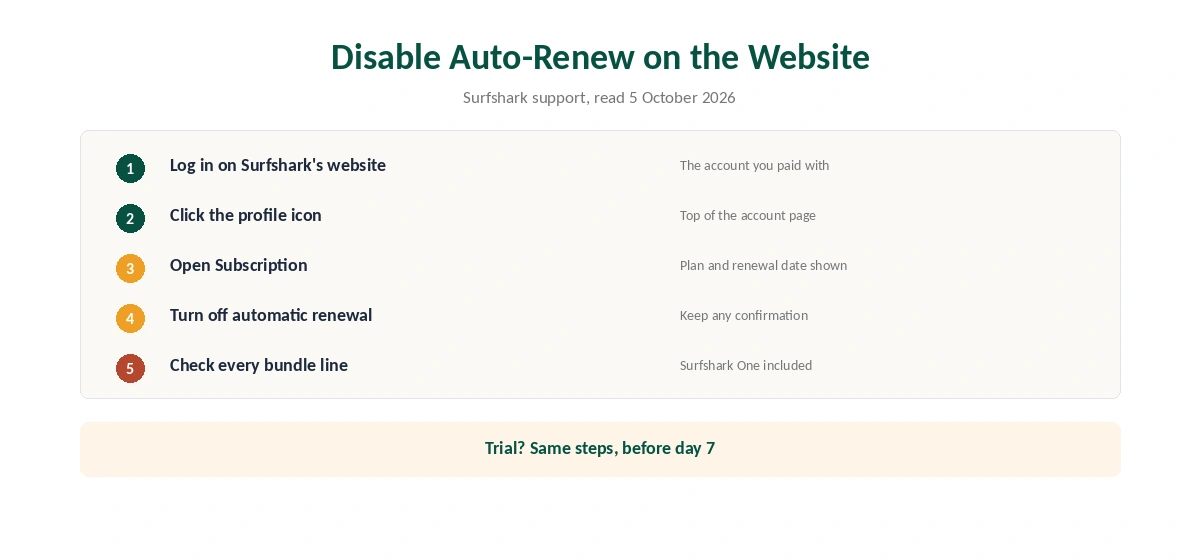
Surfshark’s support article gives the route. Log in to your account on Surfshark’s website, click the profile icon, then open Subscription. There, turn off automatic renewal.
Afterwards, check the status and keep any confirmation. If you bought Surfshark One or another bundle, vpndeals.co advises checking that you cancelled the whole bundle, not only the VPN line.
Surfshark Cancel Steps in the App Stores
If you paid in an app store, cancel there. On an iPhone, open Settings, tap your name, then Subscriptions. On Android, open Google Play, then your profile, Payments and subscriptions, Subscriptions. Amazon Appstore purchases follow Amazon’s own rules, including for refunds, according to vpndeals.co.
Surfshark’s refund policy names Google Play, Paddle and Cleverbridge as authorised resellers. Purchases through other resellers, prepaid cards or gift cards fall outside the guarantee.
Cancelling During the Free Trial
Surfshark’s 7-day trial on its website covers 12-month and 24-month plans and allows up to three devices. To stop it from becoming a paid plan, turn off auto-renewal through the same Subscription page before day 7. A Surfshark cancel during the trial works exactly like one after it.
If you let it run, you still have 30 days after the first charge to ask for a refund, which Surfshark’s trial page describes as 37 days in total. Our Surfshark trial guide covers the sign-up.
Paid add-ons need their own check. Surfshark’s refund policy lists an anonymous dedicated IP among the non-refundable extras, as our dedicated IP guide notes.
The Renewal Email and the Renewal Price
Surfshark’s billing practices page says it emails you 30 days before a renewal, except on monthly plans. That email is therefore your reminder to cancel. Plans renew at the full, non-introductory rate.
The jump is large. The Starter 2-year plan costs $67.23 for the first 27 months. Surfshark’s own renewal table did not load for us, but Security.org and VPNOverview report renewals of about $79 a year for Starter, $99 for One and $119 for One+. Surfshark’s page also says it may test different prices, renewal prices included. Our Surfshark price breakdown and renewal price comparison put those figures in context.
| Provider | Renewal price | Per month | Tier |
|---|---|---|---|
| NordVPN | $139.08/yr | ~$11.59 | Basic |
| Surfshark | ~$79/yr | ~$6.58 | Starter |
| ExpressVPN | $99.95/yr | ~$8.33 | Basic |
| CyberGhost | $56.94/yr | ~$4.75 | 2-year |
| PureVPN | $47.95/yr | ~$4.00 | Standard, 2-year (1-year renews $57.95) |
| IPVanish | $89.99/yr | ~$7.50 | Essential |
| Windscribe | ~$69/yr | ~$5.75 | Pro |
| Proton VPN | ~$83.88/yr | ~$6.99 | VPN Plus |
| Mullvad | ~$65/yr | ~$5.40 | flat, no tiers |
| Norton VPN | $79.99/yr | ~$6.67 | Standard |
| Hotspot Shield | ~$95.99/yr | ~$8.00 | Premium annual |
| Astrill | $300 every 2 yrs | ~$12.50 | 2-year, same at renewal |
What Happens After a Surfshark Cancel
A Surfshark cancel ends future payments. The refund guarantee, by contrast, covers the first subscription only, within 30 days. So a renewal you forget is outside it. Our guide to cancelling a VPN compares the rules across providers.
If you also want the apps gone, follow our Surfshark uninstall guide. On Windows, that includes Surfshark Antivirus if you had Surfshark One.
Before You Leave
If a technical fault is the reason, a fix may be quicker. Our Surfshark disconnection guide and Surfshark speed guide cover the common complaints.
If price is the reason, our NordVPN vs Surfshark page compares Surfshark with its sister brand under Nord Security. Our VPN ownership map shows the group. NordVPN’s own steps differ, as our NordVPN cancellation guide shows.
The Renewal Reminder
Surfshark’s billing practices say it emails customers 30 days before a renewal, except on monthly plans. Renewal happens at the full rate. Use that email as your reminder to decide.
Amazon Appstore Purchases
If you bought Surfshark through the Amazon Appstore, refunds follow Amazon’s rules. Cancel through your Amazon account rather than Surfshark’s site.
Email Support
If the website steps do not work, Surfshark lists support@surfshark.com as an alternative. Include the email address on the account and ask for automatic renewal to be turned off. Keep the reply as confirmation.
Surfshark One and Other Bundles
If you bought a bundle such as Surfshark One, make sure the whole bundle is cancelled, not only the VPN, vpndeals notes. Check the Subscription page after cancelling to confirm that every product shows renewal turned off.
How We Research
This page draws on Surfshark’s trial, refund and billing practices pages, its terms of service and vpndeals.co’s cancellation guide on 5 October 2026. We cross-checked these sources against each other, and where they conflict or something can’t be verified, we say so in the text rather than guessing. We checked time-sensitive figures, including prices in US dollars, on 25 September 2026. Surfshark’s renewal table did not load for us, so renewal figures come from Security.org and VPNOverview. The main source we relied on is Surfshark’s support centre. Our full approach lives on the About Us page.
How to Cancel Surfshark FAQ
Log in on Surfshark’s website, click the profile icon, open Subscription and turn off automatic renewal. If you paid in an app store, cancel there instead.
The same Subscription page in your account has the switch. You can also email support@surfshark.com, according to Surfshark’s terms.
No. Cancelling stops the next payment. A refund is a separate live chat request within 30 days of the first purchase.
Surfshark’s billing page says it emails you 30 days before a renewal, except on monthly plans.
Yes, if you do not want a paid plan. Turn off auto-renewal before day 7. If you forget, a 30-day refund window still applies to that first payment.
The Verdict
To cancel Surfshark, find where you paid and turn off auto-renewal there, then check that you cancelled any bundle in full. Watch for the email 30 days before renewal. A refund, if you need one, is a separate step.