
Disclosure: VPNFin is reader-supported. If you buy a VPN through links on this page, we may earn a commission at no extra cost to you. This never affects our ratings — here’s our full disclosure.
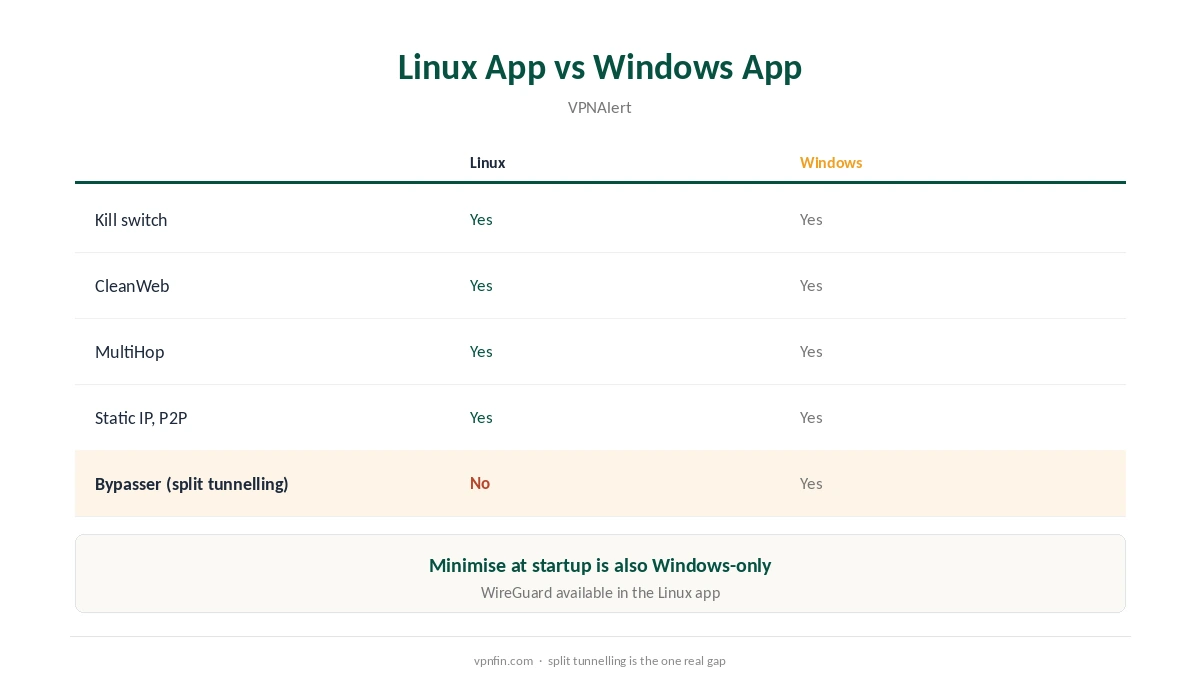
Surfshark for Linux comes as a graphical app that runs on Debian 11 and later, Ubuntu 20.04 and later, and Linux Mint 20 and later, according to Impulsec, VPNAlert and ProPrivacy. It installs through a script, Snap or Flatpak, and includes a kill switch, CleanWeb and MultiHop. Split tunnelling, called Bypasser on Windows, is missing on Linux, VPNAlert notes.
This guide covers installation, the features you get, what is missing, and the manual fallback for other distributions.
Installing Surfshark for Linux
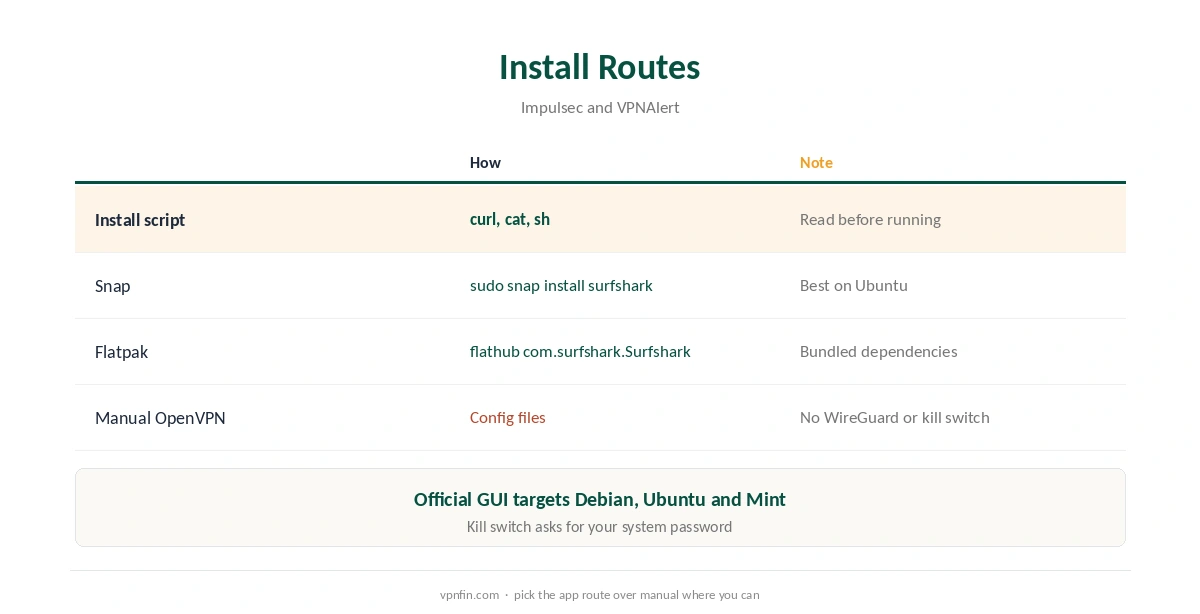
The official route is an install script. Impulsec and VPNAlert give the steps: download it with curl from Surfshark’s downloads site, display it with cat to read what it does, then run it with sh. Reading the script first is good practice for anything that asks for system rights.
Two package routes avoid the script. Impulsec lists sudo snap install surfshark for Snap, which works best on Ubuntu, and flatpak install flathub com.surfshark.Surfshark for Flatpak. Both keep the app updated through their own stores.
Surfshark for Linux: First Run and the Kill Switch
After installing, open Surfshark from the app menu and log in. VPNAlert notes that turning on the kill switch asks for your system password, because it changes network rules. Once enabled, it stops traffic if the VPN drops.
VPNAlert also recommends switching on auto-connect, so the tunnel starts when you log in. Our kill switch guide explains the trade-off between strict blocking and convenience.
Features on Linux, and What Is Missing
VPNAlert lists CleanWeb for blocking ads and trackers, MultiHop for routing through two servers, static IP locations and P2P support in the Linux app. WireGuard is available too, which VPNAlert notes you lose with a manual OpenVPN setup.
Bypasser, Surfshark’s split tunnelling, is a Windows feature that the Linux app lacks, as is the option to minimise at startup. If you need to exclude apps from the VPN on Linux, you would have to manage routes yourself. Our split tunnelling guide explains what the feature does.
Choosing Features on Linux
In the speed tests we have read, WireGuard is the faster protocol, and the Linux app offers it alongside OpenVPN. Start with WireGuard and switch only if a network blocks it. MultiHop routes your traffic through two servers, which adds privacy but also delay; our double VPN explainer covers the trade-off.
CleanWeb blocks ads, trackers and known malicious domains at the DNS level. It can occasionally break a site, so pause it if a page will not load. Static IP locations give you the same address each time, which helps with sites that flag changing IPs. Static IPs are fixed per location, so pick one close to you for speed.
Updating and Removing Surfshark for Linux
Snap and Flatpak installs update themselves through their stores. For the script install, Impulsec gives the update command: sudo apt-get –only-upgrade install surfshark. Keeping the app current matters, since updates can fix connection problems as well as security issues.
To remove it, use the same route you installed with: snap remove, flatpak uninstall, or your package manager. Our Surfshark uninstall guide covers cancelling and removing across devices.
Other Distributions: Manual OpenVPN
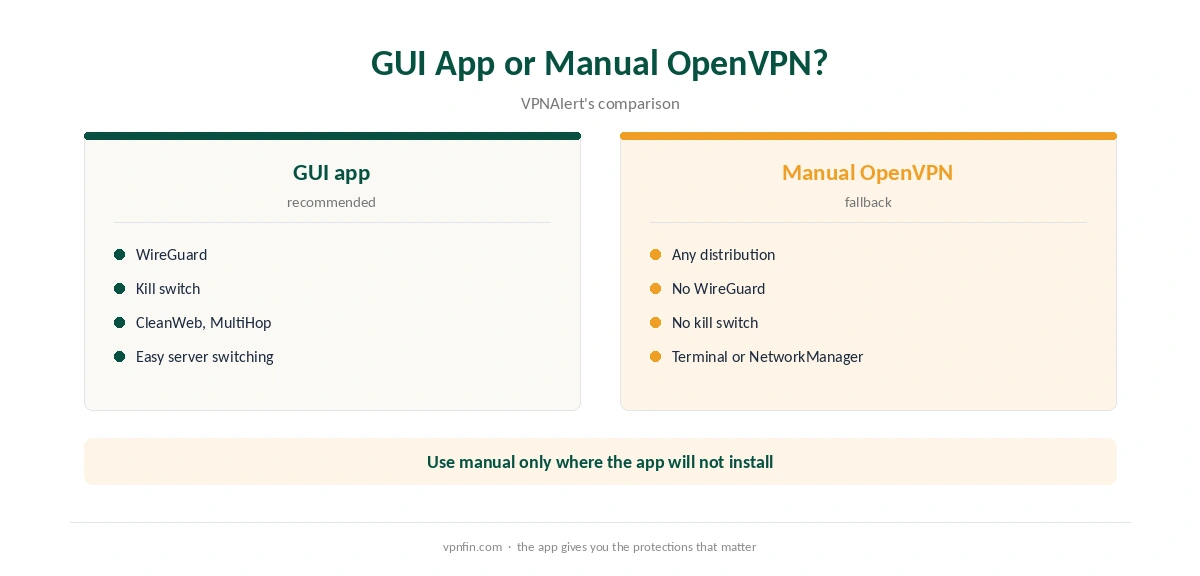
Fedora, Arch and other distributions outside the official list can use Surfshark’s OpenVPN configuration files with the system’s OpenVPN client or NetworkManager. VPNAlert warns that this route loses WireGuard, the kill switch and the graphical interface, so treat it as a fallback.
Snap and Flatpak may also run on more distributions than the official list names, since they bundle their own dependencies. Test them before falling back to manual OpenVPN. Our WireGuard vs OpenVPN page explains what you give up.
What Surfshark Costs
On 25 September 2026, the Starter 2-year plan cost $67.23 for the first 27 months. Renewal sits at about $79 a year, according to Security.org and VPNOverview, since Surfshark’s own renewal table did not load. Surfshark sets no device limit, so a Linux machine adds nothing to the count. The 30-day refund window gives you time to test the app on your own distribution. Our Surfshark price breakdown covers the plans.
| Provider | Renewal price | Per month | Tier |
|---|---|---|---|
| NordVPN | $139.08/yr | ~$11.59 | Basic |
| Surfshark | ~$79/yr | ~$6.58 | Starter |
| ExpressVPN | $99.95/yr | ~$8.33 | Basic |
| CyberGhost | $56.94/yr | ~$4.75 | 2-year |
| PureVPN | $47.95/yr | ~$4.00 | Standard, 2-year (1-year renews $57.95) |
| IPVanish | $89.99/yr | ~$7.50 | Essential |
| Windscribe | ~$69/yr | ~$5.75 | Pro |
| Proton VPN | ~$83.88/yr | ~$6.99 | VPN Plus |
| Mullvad | ~$65/yr | ~$5.40 | flat, no tiers |
| Norton VPN | $79.99/yr | ~$6.67 | Standard |
| Hotspot Shield | ~$95.99/yr | ~$8.00 | Premium annual |
| Astrill | $300 every 2 yrs | ~$12.50 | 2-year, same at renewal |
Checks and Related Guides
After connecting, test the tunnel with our VPN test page and IPv6 leak guide. If the connection drops, our Surfshark disconnection guide applies. Run both tests again after each Surfshark update or kernel upgrade.
Slow speeds have their own fixes in our Surfshark speed guide. Start by picking a nearer location and switching between WireGuard and OpenVPN, then compare the results. If speeds stay low on every server, check the same connection without the VPN to rule out your own line.
Our Linux VPN guide compares providers, and our NordVPN Linux guide covers the sister brand’s app. Surfshark belongs to Nord Security, which also owns NordVPN.
How We Research
This page draws on Surfshark Linux guides from Impulsec, VPNAlert and ProPrivacy, and pricing from Surfshark’s site, Security.org and VPNOverview. We cross-checked these sources against each other, and where they conflict or something can’t be verified, we say so in the text rather than guessing. We checked time-sensitive figures, including prices in US dollars, on 25 September 2026. Surfshark’s renewal table did not load, so renewal figures come from Security.org and VPNOverview. The main source we relied on is VPNAlert’s Surfshark Ubuntu guide. Our full approach lives on the About Us page.
Surfshark on Linux FAQ
Yes, a graphical app for Debian 11+, Ubuntu 20.04+ and Mint 20+, according to Impulsec and VPNAlert.
Run the official install script after reading it, or use sudo snap install surfshark or the Flathub package.
Yes. VPNAlert notes it asks for your system password when you enable it.
No. Bypasser is missing from the Linux app, VPNAlert notes.
Try Snap or Flatpak first; otherwise use manual OpenVPN, which loses WireGuard and the kill switch.
The Verdict
Surfshark for Linux offers a proper graphical app on Debian, Ubuntu and Mint, with the kill switch and WireGuard. Split tunnelling is the gap. Other distributions should try Snap or Flatpak before manual OpenVPN.