
Disclosure: VPNFin is reader-supported. If you buy a VPN through links on this page, we may earn a commission at no extra cost to you. This never affects our ratings — here’s our full disclosure.
If Surfshark is slow, start with Surfshark’s own benchmark: its support articles say a speed drop of around 30% is expected with any VPN. Anything near that figure is normal. A much bigger gap points to a fixable cause, and Surfshark’s articles for Windows, Mac, Android and iOS list them.
This guide puts those fixes in order and shows where the advice differs by platform, starting with the protocol.
Step 1: Measure the Gap
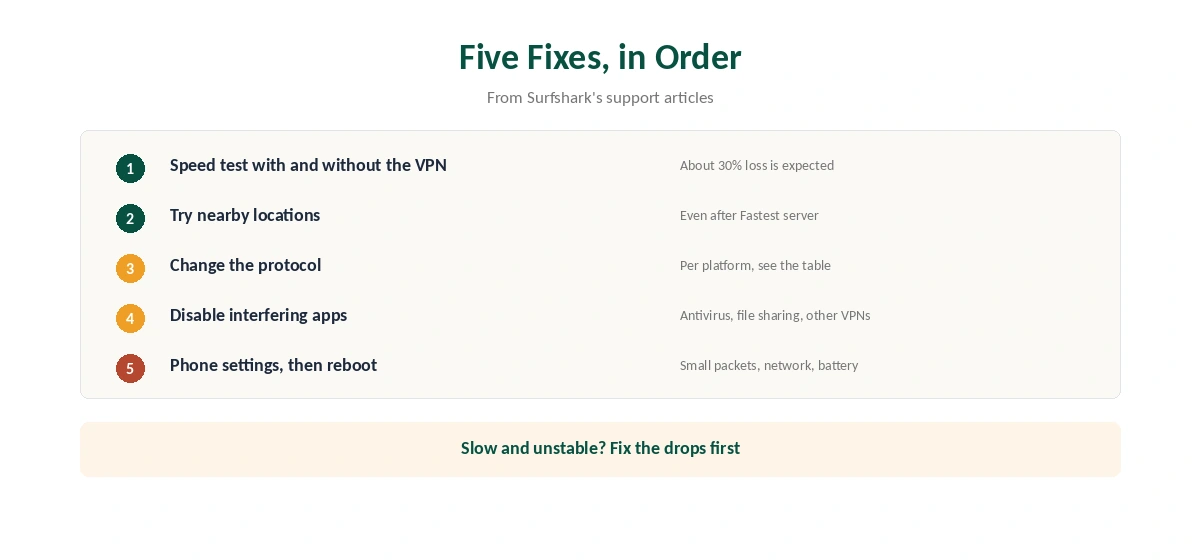
Disconnect Surfshark and run a speed test, then connect and test again on the same device. Compare the two results against the 30% figure. Our guide to VPN speed loss explains where that loss comes from.
If the plain connection is slow too, Surfshark is not the cause. Fix the Wi-Fi or contact your internet provider first.
Step 2: Why Surfshark Is Slow on the Fastest Server Button
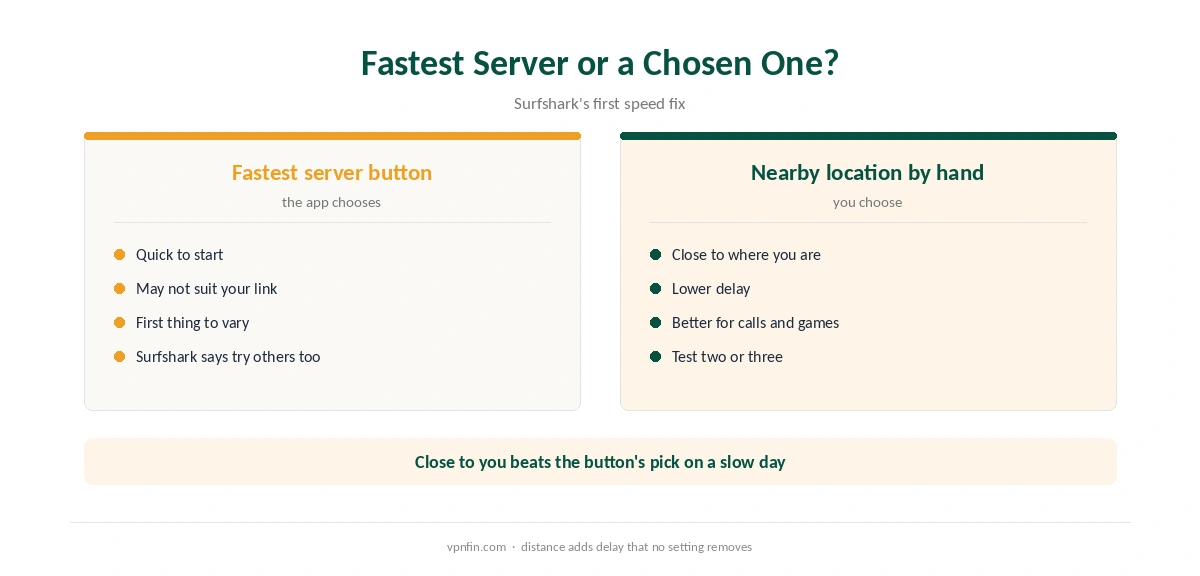
Surfshark’s articles say to try several locations even if you used the Fastest server button. Pick the ones close to your physical location. A distant server adds delay that no setting can remove.
For calls and games, delay matters more than download speed. Our gaming VPN guide covers that side.
Step 3: Change the Protocol
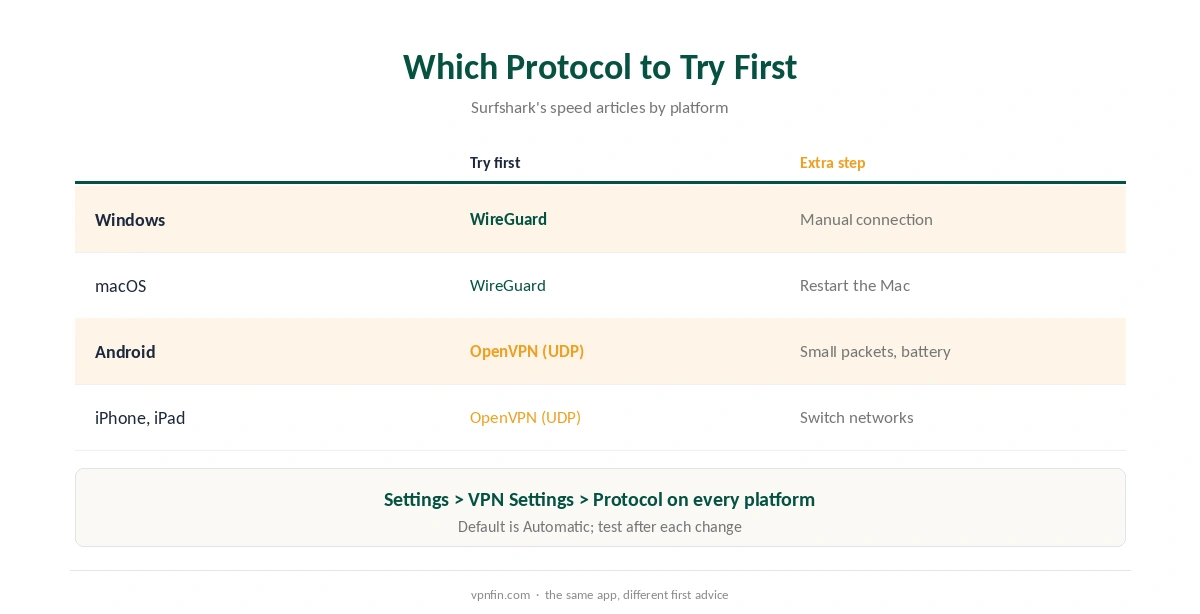
Here the advice splits by platform. On Windows and Mac, Surfshark suggests switching from Automatic to WireGuard. On Android and iPhone, it suggests OpenVPN (UDP) first, then WireGuard if that does not help.
The setting sits under Settings, VPN Settings, Protocol on every platform. Test after each change. Our WireGuard vs OpenVPN page explains the trade-offs.
Step 4: Remove Interfering Apps
Surfshark names three kinds of app that compete for the same network resources: antivirus software, file-sharing clients and other VPNs. Disable them for a test, reboot, and measure again.
On Windows, Surfshark adds one more option. A manual VPN connection bypasses the app’s extra features, which can help if one of them slows the link. Our Surfshark Windows guide covers the app’s layout. On a Mac, our Surfshark Mac guide shows the same settings.
Step 5: Phone Settings That Slow Surfshark
On Android, Surfshark lists three more checks. Turn on Small packets, switch between Wi-Fi and mobile data, and turn off battery-saving mode. On iPhone, switching networks is the main extra step. Our Surfshark iPhone guide shows where the settings sit.
When Surfshark Is Slow and Unstable
If Surfshark is slow and also drops, follow our Surfshark disconnection guide first, because an unstable link tests slow. For a connection that fails entirely, see our Surfshark not connecting guide.
Finally, confirm the tunnel on our VPN test page. If speeds stay too low within 30 days of your first purchase, our Surfshark refund guide explains the request. For a comparison with its sister brand under Nord Security, see our NordVPN vs Surfshark page.
Measuring Your Baseline
Surfshark’s support says a drop of about 30% is expected with a VPN. Run a speed test without Surfshark first, then with it, on the same device and server. If the drop is near 30%, the setup is working as intended.
If the drop is much larger, work through the steps above. Our guide to VPN speed loss explains what causes the normal cost.
Trying Nearby Locations
Surfshark’s support advises trying nearby locations even after using Fastest server. The fastest server by ping is not always the fastest for downloads at that moment. Test two or three nearby cities and keep the best.
Security Software and Other VPNs
Antivirus tools can slow VPN traffic, Surfshark’s support notes. Add Surfshark as an exception or pause the tool briefly to test. Other VPN apps running at the same time also cause conflicts, so quit them first.
Router-Level Controls
Parental or security controls on the router can interfere as well, Surfshark’s Windows article adds. If speeds are poor on every device at home, check the router’s settings before blaming Surfshark.
Phones and Protocol Order
Surfshark’s support gives a different order for phones. On Android and iOS, try OpenVPN UDP first, then WireGuard. On Windows and macOS, switch from Automatic to WireGuard. Test each change on the same server, so you compare like with like.
If speeds stay low, contact Surfshark’s support with speed tests with and without the VPN. Our Surfshark disconnection guide covers related stability fixes. Repeat the comparison after any app update, since defaults can change between versions.
How We Research
This page draws on Surfshark’s slow-connection articles for Windows, macOS, Android and iOS, and its article on connection interruptions. We cross-checked these sources against each other, and where they conflict or something can’t be verified, we say so in the text rather than guessing. We read every source on 5 October 2026. The main source we relied on is Surfshark’s Windows speed article. Our full approach lives on the About Us page.
Slow Surfshark FAQ
Surfshark’s support articles say a drop of around 30% is expected with a VPN. A much larger gap points to a server, protocol or app problem.
Surfshark suggests WireGuard first on Windows and Mac. On Android and iPhone, it suggests OpenVPN (UDP) first, then WireGuard.
That button may not pick the best server for your connection. Surfshark suggests testing several locations close to you.
An Android setting that reduces the size of each packet. Surfshark says it may improve speed and stability on some networks.
Yes. Surfshark lists antivirus, file-sharing clients and other VPNs as apps that can compete for the same network resources.
The Verdict
In Surfshark’s own articles, a slow Surfshark needs a nearer server, the right protocol for the platform or one less app competing for the network. Measure against the 30% benchmark, change one thing at a time, and test after each step. Our Surfshark review covers the wider picture.