
Disclosure: VPNFin is reader-supported. If you buy a VPN through links on this page, we may earn a commission at no extra cost to you. This never affects our ratings — here’s our full disclosure.
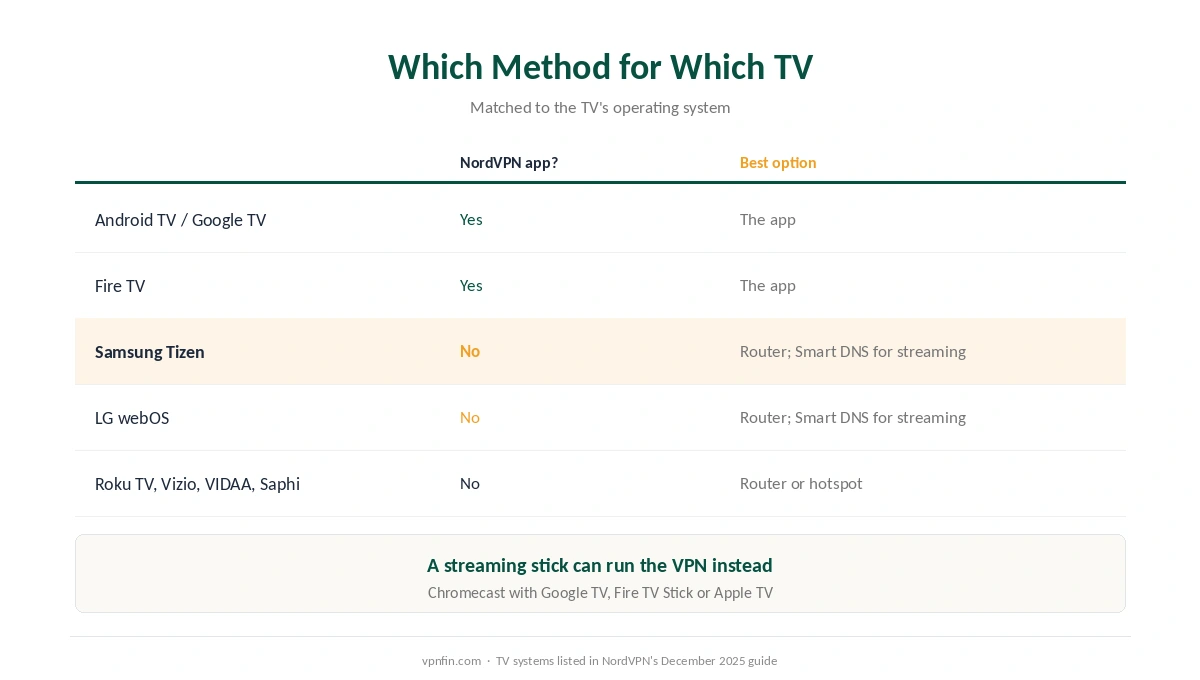
Whether you can run NordVPN on a smart TV depends almost entirely on who made the TV’s software. NordVPN’s own guide says Android TV and Fire TV sets can install its app directly. Samsung’s Tizen, LG’s webOS, Vizio’s SmartCast, Roku TV, Hisense’s VIDAA and Philips’s Saphi cannot, and need the VPN supplied another way: a router, a shared connection from a computer, or a hotspot.
There is also Smart DNS, which NordVPN includes and which works on almost any TV. It changes the region streaming services see, but NordVPN is clear that it is not a VPN and encrypts nothing. This guide matches each TV to its best option.
NordVPN on Smart TV: The Short Answer
Android TV or Google TV: install the NordVPN app from the Play Store, as our NordVPN on Android TV guide explains.
Samsung, LG and most other brands: put NordVPN on your router for full protection, as our NordVPN on a router guide explains, or use Smart DNS if you only need a different streaming region.
No compatible router? Share a NordVPN connection from a Windows PC or Mac over Wi-Fi. It works, but it is a stopgap rather than a permanent setup. Our smart TV VPN guide compares providers.
Which Method for Which TV
| TV software | NordVPN app? | Best option |
|---|---|---|
| Android TV / Google TV | Yes | The app |
| Fire TV | Yes | The app |
| Samsung Tizen | No | Router, or Smart DNS for streaming only |
| LG webOS | No | Router, or Smart DNS for streaming only |
| Roku TV, Vizio, VIDAA, Saphi | No | Router or hotspot |
A streaming stick is another route for NordVPN on Smart TV. NordVPN notes that a Chromecast with Google TV, a Fire TV Stick or an Apple TV can run the VPN even when the television itself cannot; our Chromecast guide explains which Chromecasts qualify. Our NordVPN on Firestick guide and our NordVPN on Apple TV guide cover those.
Smart DNS: What It Does and Does Not Do
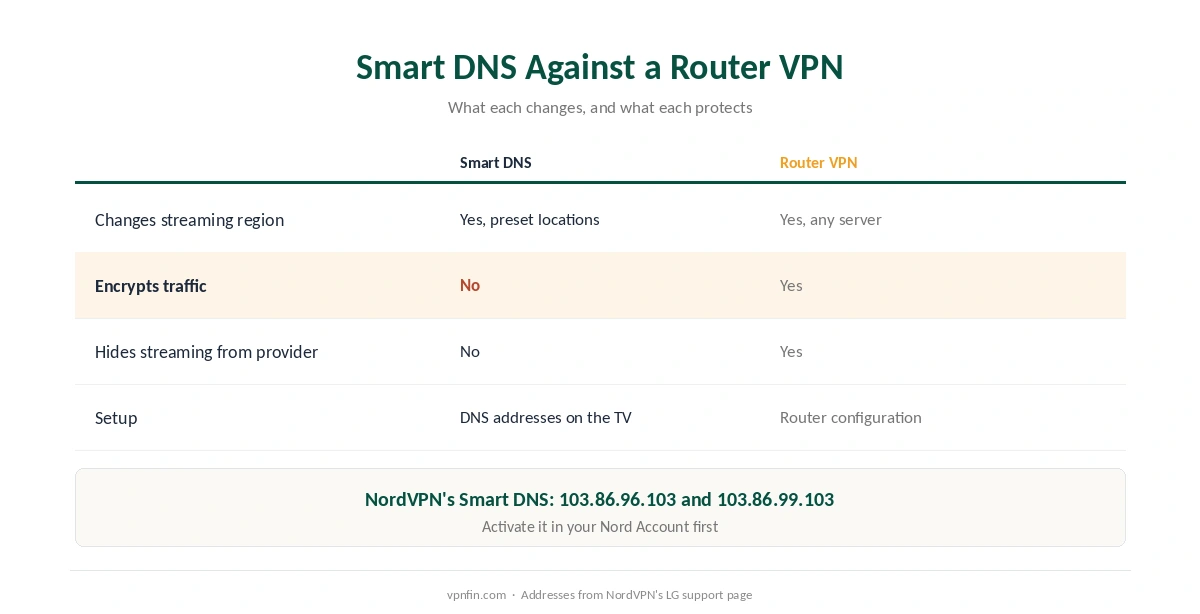
What it does. Smart DNS routes your TV’s DNS requests through NordVPN’s servers, so streaming services see a different region. It is quick to set up and needs no extra hardware.
What it does not do. It does not encrypt anything. Comparitech notes that your internet provider can still see you are streaming and may still throttle you, and NordVPN adds that Smart DNS works only with preset locations. Our Smart DNS comparison covers the trade-off.
Setting up Smart DNS for NordVPN on Smart TV sets from LG. NordVPN’s support page says to activate Smart DNS in your Nord Account first, which approves your home IP address. Then on the TV go to Settings, Network, Network Connection, choose the expert option, set DNS Mode to Manual, and enter 103.86.96.103, with 103.86.99.103 as the second address. Samsung’s menus differ slightly but follow the same idea. For Roku devices, see our Roku guide.
Sharing NordVPN From a Computer
On Windows, Comparitech describes turning on Mobile hotspot under Settings, Network and Internet, then sharing the NordVPN network adapter with it. The method relies on OpenVPN, so switch protocol in the NordVPN app first.
On a Mac, Gizmodo describes using Internet Sharing under System Settings, Sharing, to share the VPN connection over Wi-Fi. It uses more resources and is not ideal for long streaming sessions, but it works in a pinch.
For anything permanent, use a router. It protects every device without a computer left running, as our router setup guide explains for any provider.
What Breaks, and How to Fix It
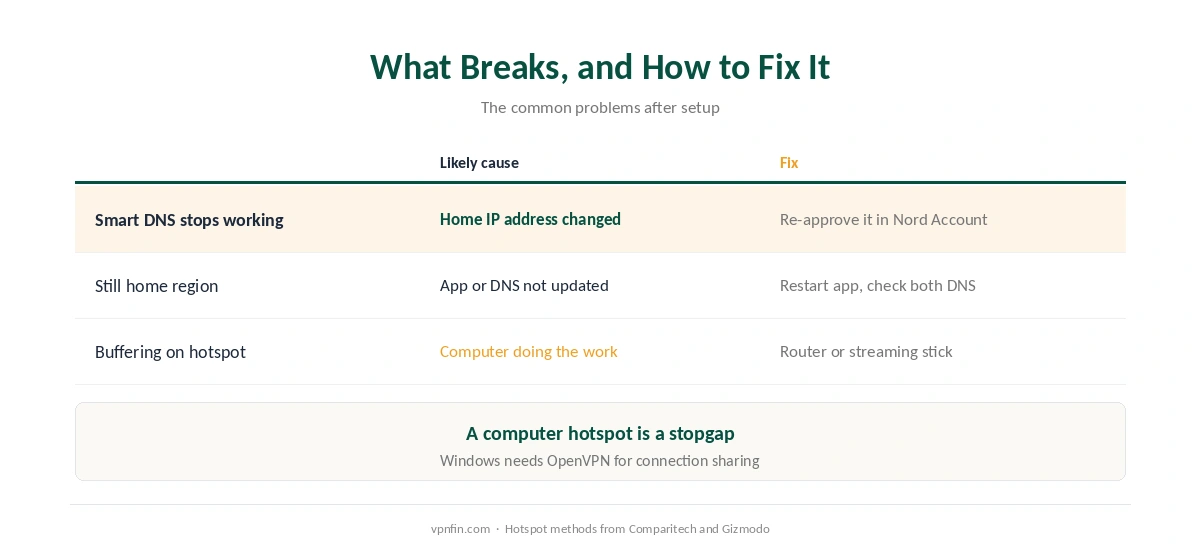
Smart DNS stops working after a change of internet connection. Your home IP address has changed. Log in to your Nord Account and re-approve it.
The TV still shows your home region. Restart the streaming app, and if you use Smart DNS, check both DNS addresses were saved. Our Netflix guide explains why services block some addresses.
Buffering over a hotspot. The computer is doing the work; a router or a streaming stick is faster. Our speed guide explains why.
How We Research
The list of TV systems and the Smart DNS limits come from NordVPN’s own smart TV guide, the LG steps and DNS addresses from its support page, the Windows hotspot method from Comparitech, and the Mac method from Gizmodo’s LG TV guide. We name each source where used; all were read on 26 September 2026. We did not test on a television ourselves. Our full approach lives on the About Us page.
NordVPN on Smart TV FAQ
Not as an app. Samsung’s Tizen and LG’s webOS do not support VPN apps. Use NordVPN on your router, share a connection from a computer, or use Smart DNS for streaming only.
Those running Android TV, Google TV or Fire TV. Install NordVPN from the TV’s app store.
No. It changes the region streaming services see but encrypts nothing, and your internet provider can still see your traffic.
NordVPN’s LG guide lists 103.86.96.103 as the primary address and 103.86.99.103 as the secondary. Activate Smart DNS in your Nord Account first.
A common cause is a change of home IP address. Log in to your Nord Account and approve the new address.
The Verdict
NordVPN on Smart TV means different things for different sets. Android TV and Fire TV run the app; Samsung, LG and most others need a router for full protection.
Smart DNS is the quick option for streaming regions, as long as you remember it is not a VPN. Our NordVPN review covers the service as a whole.