
Disclosure: VPNFin is reader-supported. If you buy a VPN through links on this page, we may earn a commission at no extra cost to you. This never affects our ratings — here’s our full disclosure.
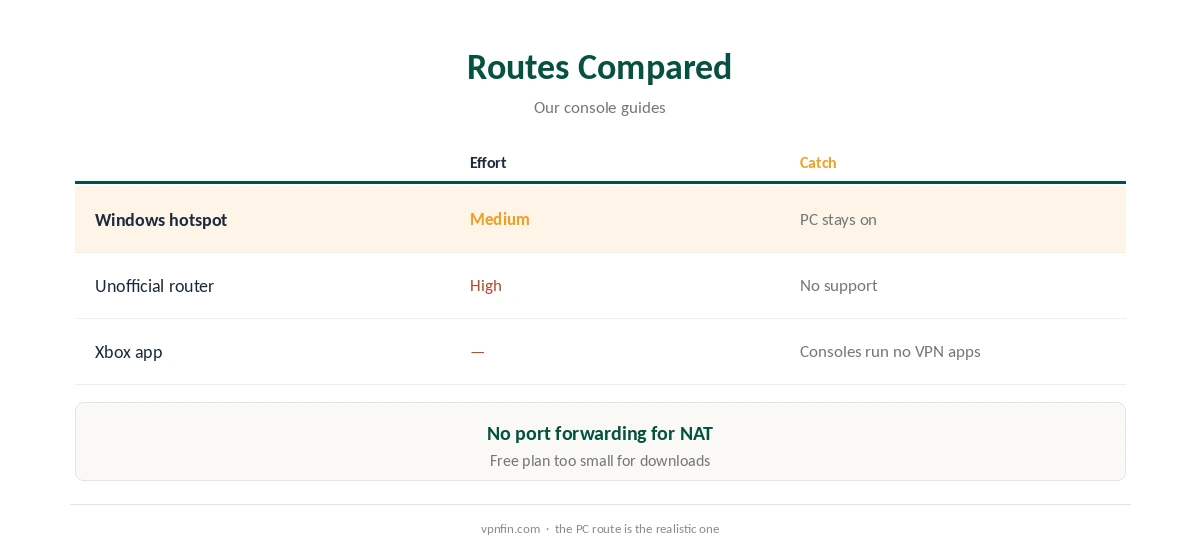
TunnelBear Xbox use needs a workaround, because Xbox consoles do not run VPN apps and TunnelBear does not support routers. The practical route is a Windows PC running TunnelBear and sharing its connection, either through Windows’ Mobile hotspot or an Ethernet bridge. An unofficial router with TunnelBear’s OpenVPN files is the other option. Expect higher ping and possible NAT issues with any VPN on a console.
This guide covers the routes, the gaming trade-offs and better options.
Why Consoles Are Hard
Xbox and PlayStation consoles have no VPN apps, so any provider needs a router or a shared connection, as our Xbox VPN guide explains. TunnelBear also lacks router support and Smart DNS, which leaves the PC route.
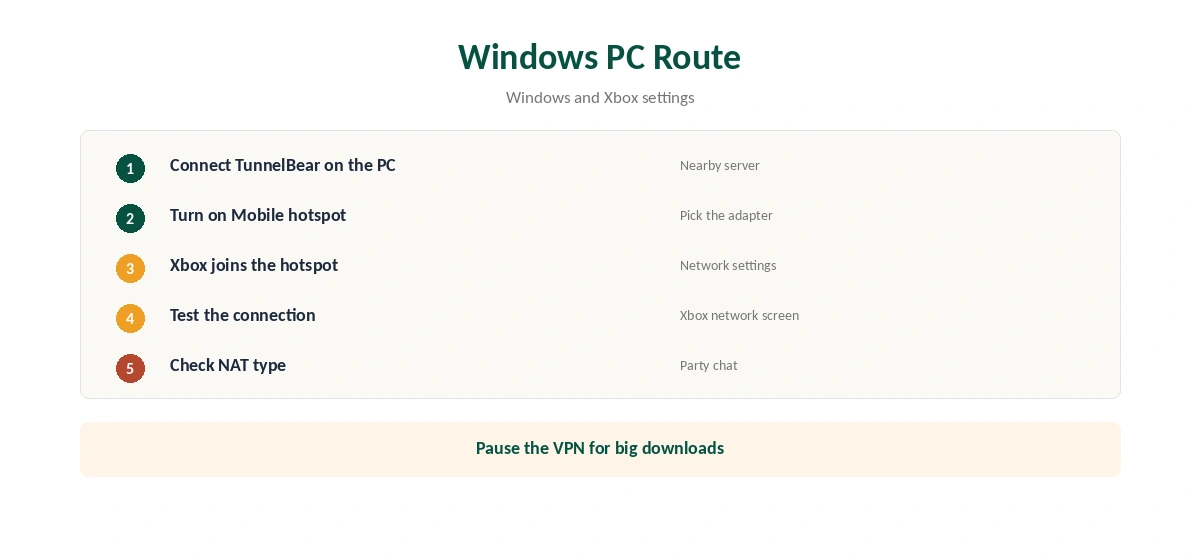
TunnelBear Xbox Setup Through a Windows PC
Connect TunnelBear on the PC. Turn on Mobile hotspot under Settings, Network and internet, choosing the adapter to share. On the Xbox, open network settings and join the hotspot. Test the connection on the console, then check its network screen for the NAT type.
Gaming Trade-Offs
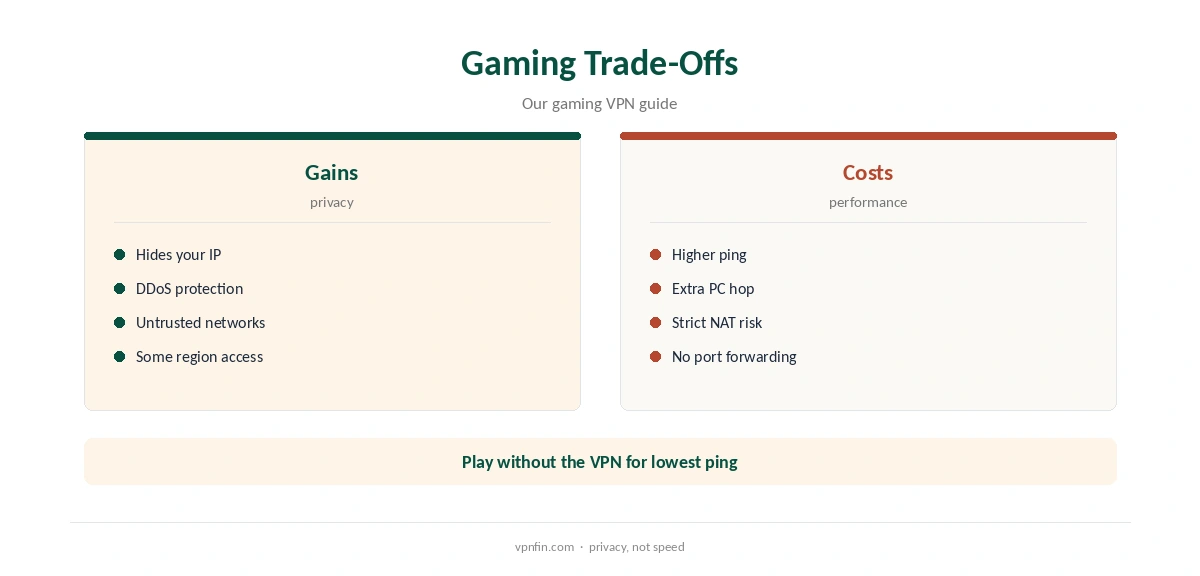
A VPN adds a step between you and game servers, so ping usually rises. Sharing through a PC adds another hop. Strict NAT can affect party chat and matchmaking. TunnelBear has no port forwarding to ease that. Our gaming VPN guide explains what a VPN can and cannot do for games.
When a VPN Helps on Xbox
The main benefits are hiding your IP from other players, which helps against DDoS attacks, and protection on networks you do not trust. For lower ping, play without the VPN on your nearest region.
The Free Plan on a Console
TunnelBear’s free plan gives 2 GB a month, shared across devices. Game downloads and updates can exceed that in one go, so pause the VPN for large downloads or pay for Unlimited.
Why TunnelBear Has No Xbox App Route
TunnelBear publishes apps for Windows, Mac, iOS and Android, but none for TVs or consoles, Holafly notes. SafetyDetectives adds that TunnelBear does not support router configuration, and we found no TunnelBear Smart DNS service. That leaves only unofficial workarounds.
TunnelBear Xbox via an Ethernet Bridge
If the PC has both Wi-Fi and Ethernet, Windows can bridge connections so the Xbox plugs into the PC by cable. That avoids Wi-Fi interference on the console’s side, which helps latency. Set it up in Windows’ network adapter settings, then check the Xbox’s network test.
PlayStation Too
The same PC-sharing method works for PlayStation consoles, which also run no VPN apps. Our PS5 VPN guide covers the console side.
Testing the Setup
Run the Xbox network test with the VPN on and off, and note the latency and NAT type each time. If NAT goes strict and party chat fails, play without the VPN for multiplayer and keep it for downloads on untrusted networks.
A Quick Rule
Competitive gaming? Skip the VPN for lowest ping. Facing DDoS? Share TunnelBear from a PC. Want a console VPN every day? Choose a provider with router support.
The PC Side
TunnelBear’s Windows app offers WireGuard and OpenVPN with VigilantBear, its kill switch, and split tunnelling by app and website. Pick a server near the game’s region to limit ping. Our TunnelBear Windows guide covers the settings.
Turning It Off
Switch the Xbox back to your normal network and turn off the PC’s hotspot or bridge. Run the Xbox network test again to confirm NAT returned to normal.
Is a TunnelBear Xbox Setup Worth It?
For occasional protection on a shared network, sharing from a PC is workable. For daily console use, keeping a PC on and accepting higher ping is a poor trade. A router-supported provider covers the console without the PC.
Checking the Connection
On the PC, confirm the address with our VPN test page and run our DNS leak guide. The Xbox shares that connection, so a clean result on the PC is a good sign.
Several Consoles
A Windows hotspot can serve an Xbox and a PlayStation at once. TunnelBear Unlimited sets no device limit, but all consoles share the PC’s connection, so speeds drop when several play at once. For a TunnelBear Xbox setup with two consoles, test both at the same time.
Keeping the PC Ready
Check TunnelBear’s Windows settings for launch-at-startup and Trusted Networks options so the VPN is up before you play, and disable sleep, or the console drops offline mid-match.
Providers That Suit Consoles
Providers with router support avoid keeping a PC on. Our NordVPN Xbox guide and Surfshark Xbox guide cover two; NordVPN and Surfshark share an owner, Nord Security.
TunnelBear’s Record
TunnelBear has had annual Cure53 audits since 2017 and belongs to McAfee, our tables record. Its free plan gives 2 GB a month, and Unlimited sets no device limit. Our TunnelBear safety guide covers the full picture.
How We Research
This page draws on Holafly and SafetyDetectives on TunnelBear’s platforms, our Xbox and gaming VPN guides and our TunnelBear tables. We cross-checked these sources against each other, and where they conflict or something can’t be verified, we say so in the text rather than guessing. We checked time-sensitive figures, including prices in US dollars, on 7 October 2026. The main source we relied on is pcWRT’s TunnelBear OpenVPN guide. Our full approach lives on the About Us page.
TunnelBear Xbox FAQ
No. Xbox consoles run no VPN apps, and TunnelBear has none for consoles.
Share a Windows PC’s TunnelBear connection, or try an unofficial router.
Unlikely; a VPN usually raises ping.
No, which can make strict NAT harder to fix.
No; 2 GB a month runs out with game downloads.
The Verdict
TunnelBear Xbox use works only through a Windows PC or an unofficial router, with gaming trade-offs. For a console, a provider with router support is simpler.