
Disclosure: VPNFin is reader-supported. If you buy a VPN through links on this page, we may earn a commission at no extra cost to you. This never affects our ratings — here’s our full disclosure.
TunnelBear Android support is one of its stronger platforms. Tom’s Guide lists WireGuard and OpenVPN on Android, though not IKEv2, split tunnelling by app, and GhostBear, TunnelBear’s obfuscation, which works on Android over OpenVPN. Holafly names VigilantBear as the kill switch. The free plan gives 2 GB a month, and Unlimited sets no device limit.
This guide covers the setup, the features, the free plan and the refund catch for Google Play purchases.
TunnelBear Android Setup
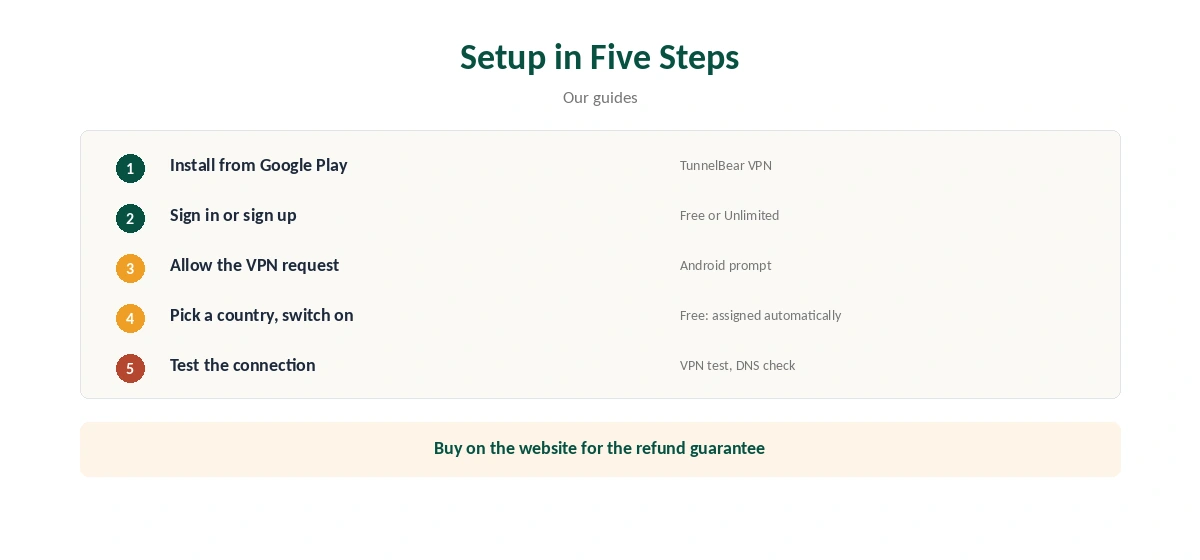
Install TunnelBear from Google Play, open it and sign in or create an account. Allow the VPN connection request when Android asks. Pick a country if your plan allows it, then switch on.
Confirm the new address with our VPN test page and run a DNS check with our DNS leak guide.
Features on Android
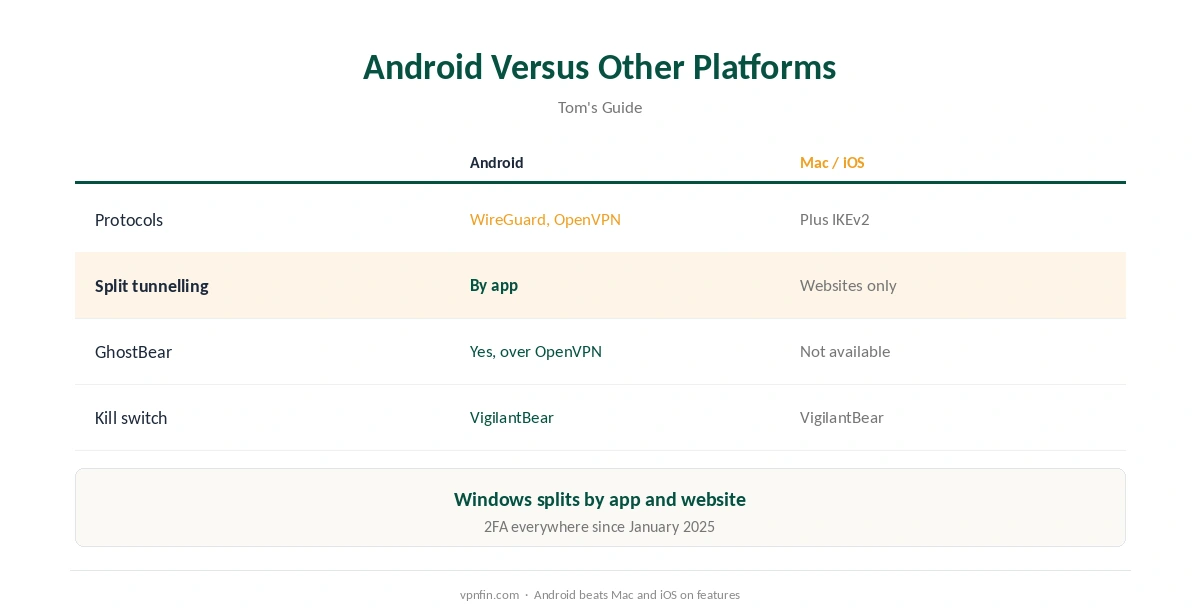
Tom’s Guide lists WireGuard and OpenVPN on Android, with IKEv2 the one protocol missing. Split tunnelling works by app, so you can keep a banking or streaming app outside the VPN. Two-factor authentication arrived in January 2025.
Our split tunnelling guide explains how app-based splitting works.
GhostBear on Android
GhostBear disguises VPN traffic on networks that block VPNs. Tom’s Guide notes it works on Windows and Android, only with OpenVPN, and is missing on iOS and the latest Mac app. That makes Android one of the better TunnelBear platforms for restrictive networks. Our obfuscation guide explains the idea.
Settings Worth Turning On
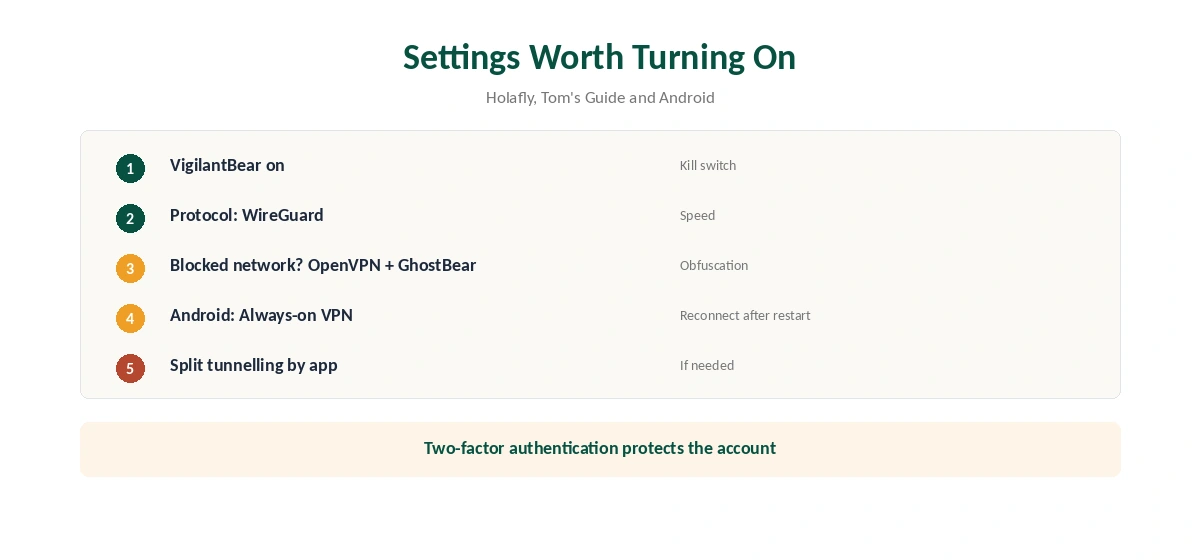
Turn on VigilantBear so traffic stops if the connection drops, as our kill switch guide explains. Choose WireGuard for speed, and switch to OpenVPN with GhostBear on blocking networks.
Android’s own settings add a layer: turn on Always-on VPN for TunnelBear in the network settings, so the phone reconnects after restarts.
The Free Plan on Android
The free plan gives 2 GB a month, and since early 2026 assigns your server automatically, TheBestVPN reports. On a phone, that covers public Wi-Fi browsing but not much video. Our TunnelBear free guide covers the limits.
Buying Through Google Play
Google Play purchases fall outside TunnelBear’s 30-day guarantee, its terms say, and follow Google’s refund rules instead. If you want the guarantee, buy an annual plan on TunnelBear’s website and sign in on the phone. The cost section below links to our full refund guide.
TunnelBear Android Battery and Data
WireGuard is the lighter protocol in the comparisons we read, which helps battery life on phones. On mobile data, a VPN adds a little overhead to every connection, so watch your allowance on capped plans. Split tunnelling can keep data-heavy apps such as video streaming outside the VPN when privacy is not the goal.
Android TV and Chromebooks
We found no TunnelBear app for TV platforms; Holafly notes there are no apps for smart TVs or consoles. On Chromebooks that run Android apps, the Android app works, as our TunnelBear Chromebook guide explains.
Troubleshooting
If TunnelBear will not connect, switch protocol, then country, then clear the app’s cache in Android’s app settings. Battery-saving modes can stop VPN apps in the background; exclude TunnelBear from them. Our Android VPN troubleshooting guide covers more fixes.
Choosing a Server on Android
Paid users can pick a country from the map or list; free users get a server assigned automatically since early 2026. Pick the nearest country for everyday browsing, and your home country when travelling to keep banking and streaming consistent. Our travel VPN guide covers the rest of a travel setup.
Several Phones on One Plan
TunnelBear Unlimited sets no device limit, according to our device table, so one plan covers every phone and tablet in a household, plus laptops. Each person signs in with the same account.
Notifications and Quick Settings
Android shows a key icon in the status bar while TunnelBear is connected. Add TunnelBear’s tile to Quick Settings, where Android allows it, to switch the VPN on and off without opening the app. That makes it easier to keep protection on when you join a new network, such as hotel or airport Wi-Fi. For sideloading and alternatives for the missing Fire TV app, see our page on TunnelBear on Firestick.
Quick Check
After connecting, the key icon should appear and the VPN test should show a new address.
Public Wi-Fi
Phones join more public networks than any other device. TunnelBear on Android encrypts every app on those networks, which our public Wi-Fi guide explains.
What TunnelBear Costs
Tom’s Guide lists TunnelBear Unlimited at $9.99 a month, about $4.17 a month on one year and $3.33 a month on three years, with no device limit; other reviewers quote $3.33 for one year, so check the checkout. Our TunnelBear price guide covers the plans, and our TunnelBear refund guide explains the limited 30-day guarantee.
Related Guides
Our Android VPN guide compares providers, and our guide to turning off a VPN on Android covers removing profiles. TunnelBear has belonged to McAfee since March 2018.
How We Research
This page draws on Tom’s Guide’s TunnelBear review, Holafly, TheBestVPN, TunnelBear’s terms of service and pricing sources including TechRepublic and Security.org. We cross-checked these sources against each other, and where they conflict or something can’t be verified, we say so in the text rather than guessing. We checked time-sensitive figures, including prices in US dollars, on 6 October 2026. Sources disagree on the one-year price; check TunnelBear’s checkout. The main source we relied on is Tom’s Guide’s TunnelBear review. Our full approach lives on the About Us page.
TunnelBear Android FAQ
It does, through its Google Play app with WireGuard and OpenVPN.
Yes, by app, per Tom’s Guide.
It is, over OpenVPN.
No. IKEv2 is the one protocol missing on Android.
Not under TunnelBear’s guarantee; Google’s rules apply.
The Verdict
TunnelBear Android support is solid, with app-based split tunnelling and GhostBear for blocking networks. Buy directly if you want the refund guarantee, and turn on VigilantBear and Always-on VPN.