
Disclosure: VPNFin is reader-supported. If you buy a VPN through links on this page, we may earn a commission at no extra cost to you. This never affects our ratings — here’s our full disclosure.
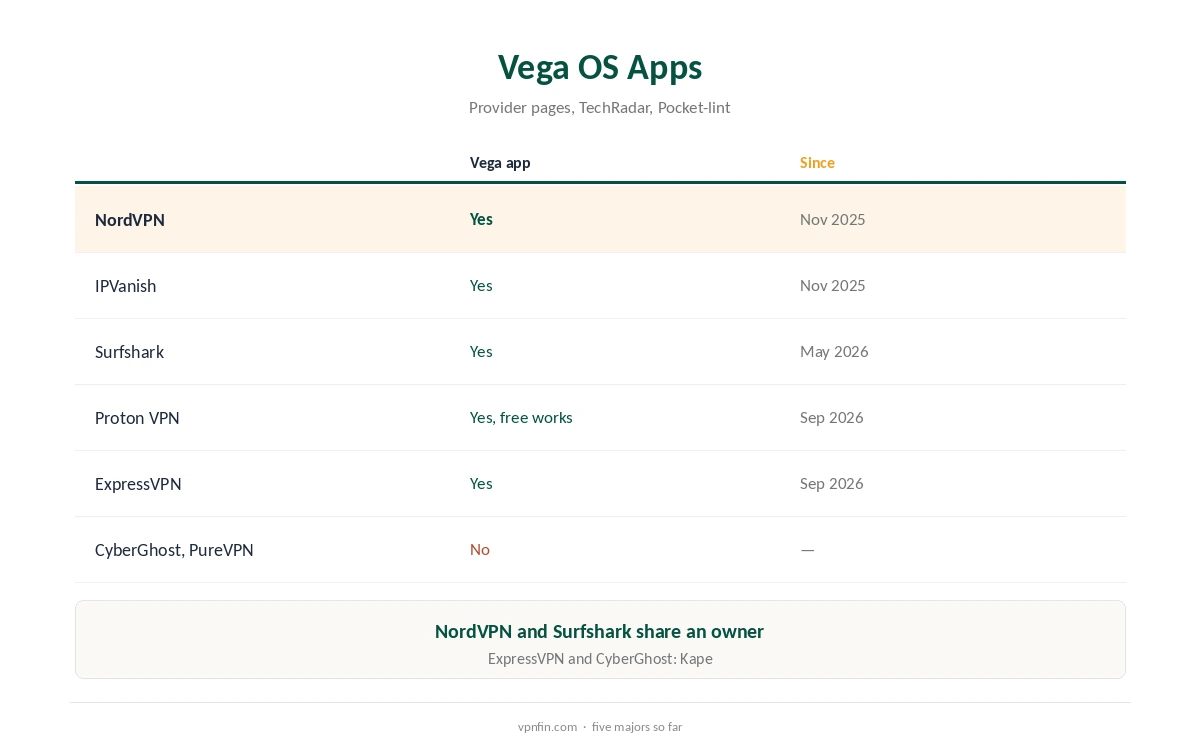
A Vega OS VPN has to come from the Amazon Appstore, because Vega OS, the Linux-based system on Amazon’s newest Fire TV sticks, blocks sideloading. VPN support arrived with an update in late November 2025, Pocket-lint reported, and NordVPN and IPVanish were first. Surfshark followed in May 2026, and Proton VPN and ExpressVPN in September 2026. CyberGhost and PureVPN have no Vega app yet, according to Gizmodo, Security.org and PureVPN’s download page. Our guide to IPVanish on Firestick covers apps for Fire OS and Vega OS, and what each does.
This guide covers which sticks run Vega, which apps work, the setup and a DNS caveat ExpressVPN has documented.
Which Fire TV Sticks Run Vega OS?
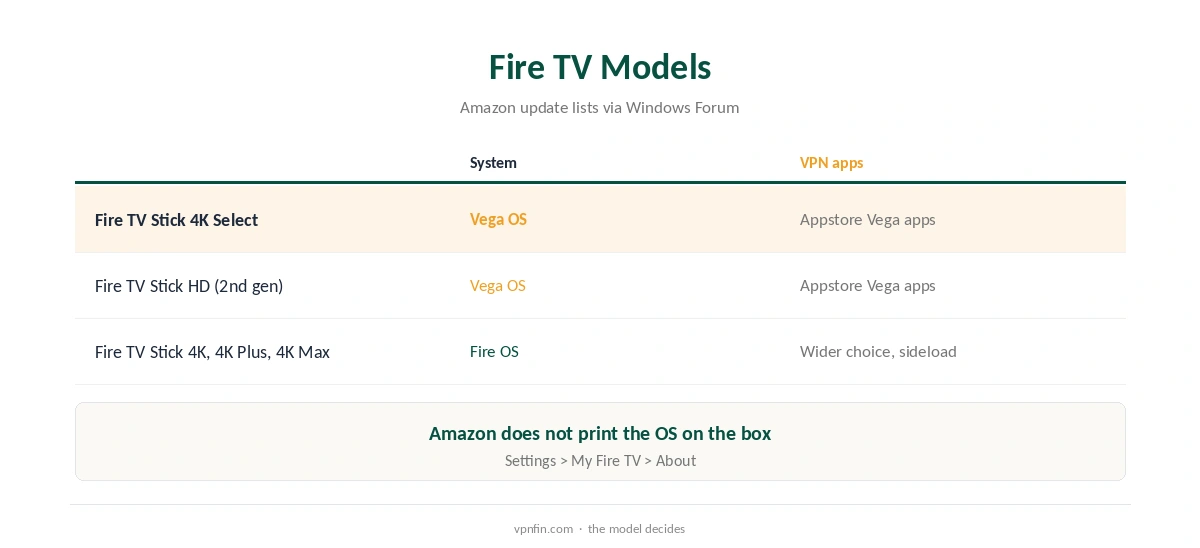
Amazon’s update notes list the Fire TV Stick 4K Select and the second-generation Fire TV Stick HD on Vega OS. The 4K, 4K Plus and 4K Max stay on Fire OS. Amazon does not print the system on the box, Proton’s support page notes, so check Settings, My Fire TV, About. Our Firestick VPN guide covers Fire OS models.
Vega OS VPN Apps
NordVPN’s Fire TV page confirms support for Vega OS and the 4K Select. Surfshark launched its Vega app in May 2026, TechRadar and Tom’s Guide reported. Proton VPN’s Vega app arrived on 17 September 2026, and its free plan works there, though streaming support is for paid plans. ExpressVPN became the fourth major provider in September 2026, TechRadar noted. NordVPN and Surfshark share an owner, Nord Security.
Vega OS VPN Setup
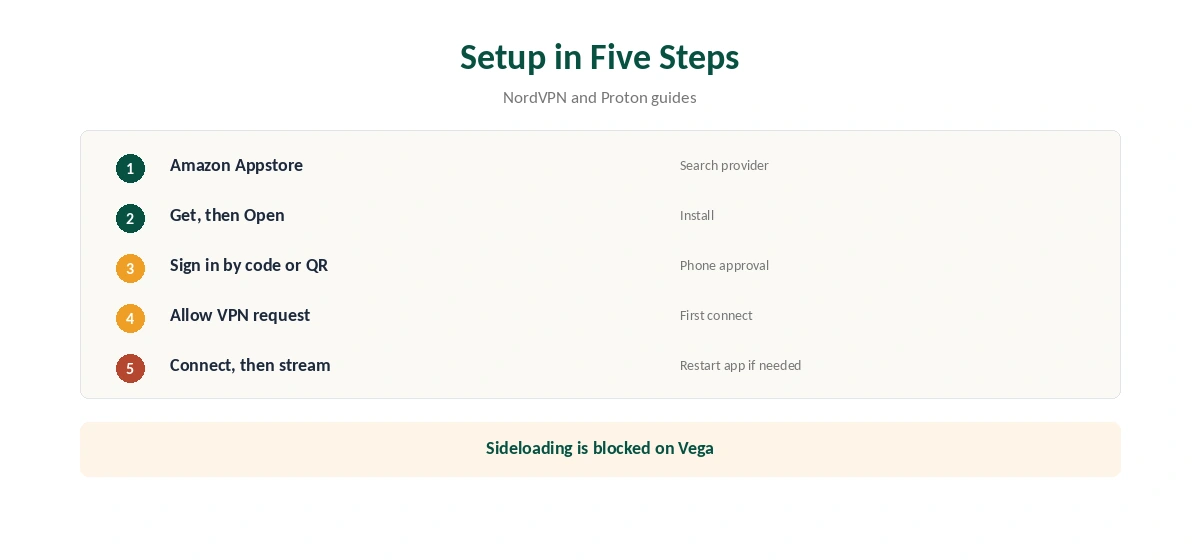
Open the Amazon Appstore on the stick, search for your provider and choose Get. Open the app, sign in with the code or QR option, allow the VPN request and connect. If a streaming app shows the wrong library, pick another server in the same country and restart the app. Our NordVPN Firestick guide walks through one app.
The DNS Caveat
ExpressVPN documents three kinds of DNS request that leave outside the tunnel on Vega OS: Amazon diagnostics, captive portal checks and start-up requests from some apps, including Netflix. It describes the last as a platform bug, with a firmware fix expected in late 2026. Traffic itself stays in the tunnel. Our DNS leak guide explains why DNS matters.
Is a Vega OS VPN as Good as on Fire OS?
Mostly, but some features are still arriving. A forum report from September 2026 says Surfshark’s Vega app runs the WireGuard core while its kill switch and ad blocker had not yet arrived; treat that as unconfirmed and check the app’s settings. Fire OS apps, by contrast, are mature and often include split tunnelling.
Free Plans on Vega
Proton VPN’s free plan installs and works on Vega, with Quick Connect and the free countries, its support pages say. That makes it the simplest way to test a Vega OS VPN without paying. Our Proton VPN Firestick guide covers the app.
Wi-Fi Speed on the Stick
NordVPN’s Vega guidance notes that the stick’s Wi-Fi often limits speed more than the VPN does, and that an Ethernet adapter helps. Test speed with and without the VPN before blaming the provider.
Buying a New Stick
If you rely on a provider without a Vega app, a Fire OS model such as the 4K Max keeps more options, including sideloading. Check the system on the product page or ask the retailer, since the box does not say.
Several Devices
Each stick counts as a device on your plan. Surfshark allows unlimited devices; NordVPN and Proton VPN Plus allow 10.
Vega OS VPN Sign-In
ExpressVPN’s Vega app signs in by QR code or email, and Proton’s by QR or an eight-digit code entered on its official TV page. Code sign-in avoids typing passwords with the remote.
Checking the Connection
After connecting, open a streaming app and confirm the catalogue matches the server country. If it does not, restart the app, then try another server in the same country.
Updating the Stick
VPN support on Vega arrived through a system update, so keep the stick current: Settings, My Fire TV, Check for Updates, as Pocket-lint describes.
Kill Switch
Check the Vega app’s settings for a kill switch and turn it on where offered, since features differ from the Fire OS apps.
Streaming Apps
Connect before opening streaming apps, and restart them after switching servers, as NordVPN’s Vega guidance advises.
Refunds
NordVPN, Surfshark and Proton VPN offer 30-day refunds, so a Vega app can be tested on your own stick without risk.
No App Yet
CyberGhost and PureVPN have no Vega app, and we found no confirmation for PrivadoVPN or PIA. On a Vega stick, the alternative is a VPN router covering the whole home. ExpressVPN belongs to Kape, which also owns CyberGhost. Our VPN router setup guide explains it.
How We Research
This page draws on NordVPN’s, Proton VPN’s, ExpressVPN’s and Surfshark’s Vega pages, Pocket-lint, TechRadar, Tom’s Guide, Gizmodo, Security.org and Amazon update lists summarised by Windows Forum. We cross-checked these sources against each other, and where they conflict or something can’t be verified, we say so in the text rather than guessing. We checked time-sensitive figures, including prices in US dollars, on 8 October 2026. The main source we relied on is Proton VPN’s Vega OS guide. Our full approach lives on the About Us page.
Vega OS VPN FAQ
NordVPN, IPVanish, Surfshark, Proton VPN and ExpressVPN have Vega apps.
No; Vega OS installs apps only from the Amazon Appstore.
The Fire TV Stick 4K Select and second-generation Fire TV Stick HD.
Yes, though streaming support is for paid plans.
ExpressVPN documents some, with a platform fix expected in late 2026.
The Verdict
A Vega OS VPN is now a real option, with five major providers in the Appstore. Check your stick’s system first, pick a provider with a Vega app, and watch for Amazon’s DNS fix.