
Disclosure: VPNFin is reader-supported. If you buy a VPN through links on this page, we may earn a commission at no extra cost to you. This never affects our ratings — here’s our full disclosure.
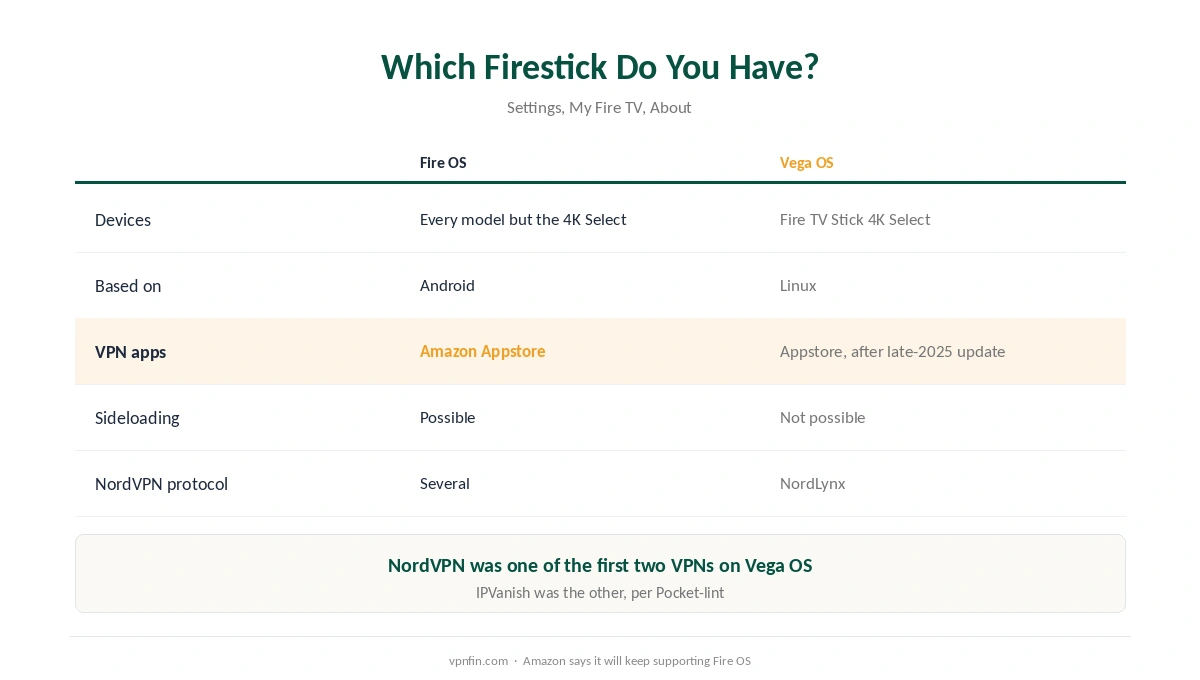
Setting up NordVPN on Firestick depends on which Firestick you own. Most models run Fire OS, which is based on Android, and NordVPN has long been in the Amazon Appstore for them. The Fire TV Stick 4K Select, launched in October 2025, runs Vega OS, Amazon’s new Linux-based system. It shipped without VPN support and cannot install apps from outside the Appstore.
Amazon enabled VPN apps on Vega OS with an update in late November 2025, and NordVPN was one of the first two providers ready, Pocket-lint reported. This guide covers setup on both systems, and the things that most often go wrong afterwards.
NordVPN on Firestick: The Short Answer
Install NordVPN from the Amazon Appstore on any Firestick, sign in, allow the VPN permission, and connect. NordVPN’s own download page confirms support for Vega OS and the Fire TV Stick 4K Select.
On a 4K Select, update first. VPN apps need the Vega OS update Amazon released in late November 2025; check under Settings, My Fire TV, Check for Updates.
If a streaming app still shows the wrong region, switch to another server in the same country and relaunch the app. Our Firestick VPN guide compares NordVPN with other providers.
Which Firestick Do You Have?
Fire OS devices are every Firestick except the 4K Select, including the 4K Plus and 4K Max. They are built on Android, and Amazon says it will keep supporting Fire OS, NordVPN’s blog notes.
Vega OS devices are, for now, the Fire TV Stick 4K Select. It runs Amazon’s Linux-based system, installs apps only from the Amazon Appstore, and gained VPN support with its OS 1.1 update, XDA reported.
To check, open Settings, then My Fire TV, then About. If you are still choosing a streaming device, our smart TV guide covers the alternatives. The difference matters because sideloading an app, the old workaround on Fire OS, does not exist on Vega OS.
Setting Up NordVPN on Firestick
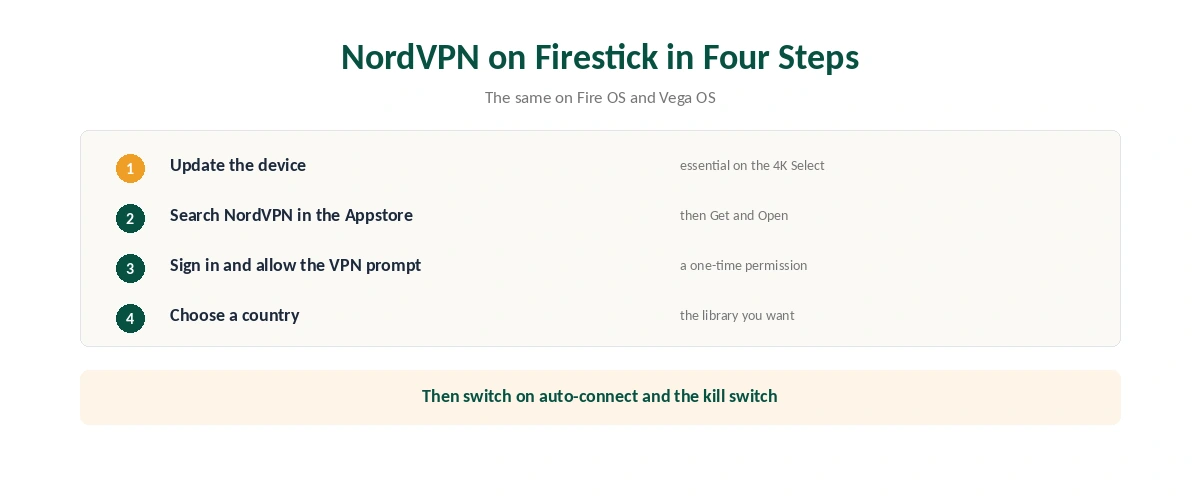
| Step | What to do | Note |
|---|---|---|
| 1 | Update the device | Essential on a 4K Select |
| 2 | Open the Amazon Appstore and search NordVPN | Same on both systems |
| 3 | Select Get, then Open | Free to download |
| 4 | Sign in to your NordVPN account | Subscribe first on a phone or computer |
| 5 | Allow the VPN permission | A one-time system prompt |
| 6 | Choose Quick Connect or a country | Pick the country whose library you want |
On Vega OS, NordVPN runs on NordLynx, its WireGuard-based protocol, DoVPN reports. That is fast enough for 4K streams on ordinary broadband. Our guide to checking a VPN shows how to confirm the tunnel is up.
Turn on auto-connect in the app’s settings so the VPN starts with the device, and keep the kill switch on, as our kill switch guide explains.
What Breaks, and How to Fix It
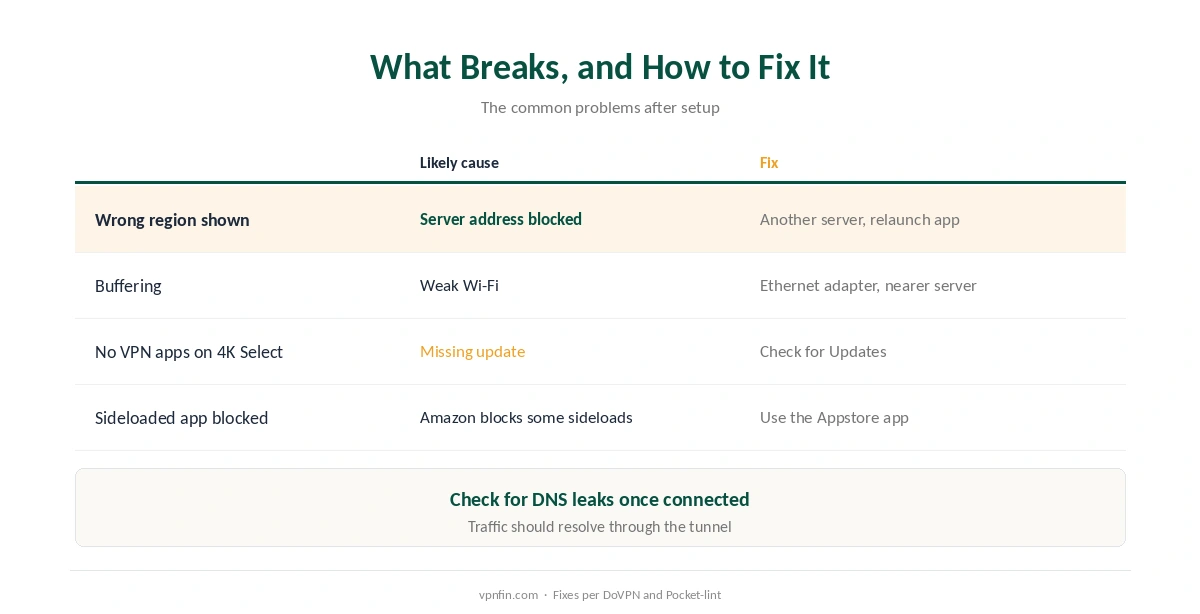
The streaming app still sees your real region. Services block known VPN addresses. DoVPN’s advice is to switch to another server in the same country and relaunch the streaming app. The app often picks up the new address on restart. Our Netflix guide explains why.
Buffering or slow speeds with NordVPN on Firestick. Wi-Fi is more often the bottleneck than the VPN, DoVPN notes; move the router closer or use an Ethernet adapter, and pick a nearby server. Our speed guide explains the trade-off.
No VPN apps on a 4K Select. The device needs the late-2025 Vega OS update; without it, the Appstore will not show VPN apps at all.
An old sideloaded app stops working. Amazon has begun blocking sideloaded apps it identifies as giving access to pirated content, Pocket-lint reports, and Vega OS allows no sideloading. Use the Appstore version; our Kodi guide covers Kodi users specifically.
DNS leaks. Check that your DNS requests go through the tunnel, as our DNS leak guide explains.
Turning It Off
Open the NordVPN app and disconnect, or turn off auto-connect if you want the Firestick to start without the VPN. Our guide to turning off a VPN on Firestick covers every method.
Other providers. ExpressVPN added a Vega OS app in September 2026, as our ExpressVPN Firestick guide explains, and IPVanish launched alongside NordVPN. Our NordVPN review covers NordVPN’s wider strengths, and our streaming guide compares it for TV use.
How We Research
Vega OS details come from NordVPN’s own download page and blog, Pocket-lint’s November 2025 report and XDA’s December 2025 report. Setup steps and fixes come from DoVPN’s guides. We name each source where used; all were read on 26 September 2026. We did not test on a Firestick ourselves. Our full approach lives on the About Us page.
NordVPN on Firestick FAQ
Yes, after the Vega OS update Amazon released in late November 2025. Install NordVPN from the Amazon Appstore; sideloading is not possible on Vega OS.
Open the Amazon Appstore, search for NordVPN, select Get, then Open. Sign in, allow the VPN permission and connect.
The device needs the Vega OS update from late November 2025. Go to Settings, My Fire TV, Check for Updates.
The service has probably blocked that server’s address. Switch to another server in the same country and relaunch the streaming app.
On Fire OS you could, but the Appstore version is simpler and safer. On Vega OS sideloading is not possible.
The Verdict
NordVPN on Firestick is a straightforward Appstore install on both Fire OS and Vega OS, provided a 4K Select has its late-2025 update.
Most problems afterwards are a blocked server address or weak Wi-Fi, and both have quick fixes.