
Disclosure: VPNFin is reader-supported. If you buy a VPN through links on this page, we may earn a commission at no extra cost to you. This never affects our ratings — here’s our full disclosure.
Proton VPN on Firestick has two things going for it that most rivals lack: a free plan that runs on the device, and, since 17 September 2026, a native app for Amazon’s newer Vega OS sticks. Proton’s own support pages confirm both, with one condition that matters for a streaming device: the free plan can install and connect, but streaming support is reserved for paid plans.
Some guides published as recently as August still say Proton does not support Vega OS. That is now out of date. This guide covers which app your stick needs, what the free plan can and cannot do, and what breaks.
Proton VPN on Firestick: The Short Answer
Search the Amazon Appstore for Proton VPN and install it. On Fire OS sticks you get Proton’s Android TV app; on Vega OS sticks, its new Vega app. You cannot install the Android app on a Vega stick, Proton notes.
Sign in with the QR code or the eight-digit code, entered only at Proton’s official firetv address, as launch coverage of the Vega app describes.
For streaming, you need a paid plan. The free plan offers Quick Connect and Proton’s free countries only. Our Proton VPN review covers the service.
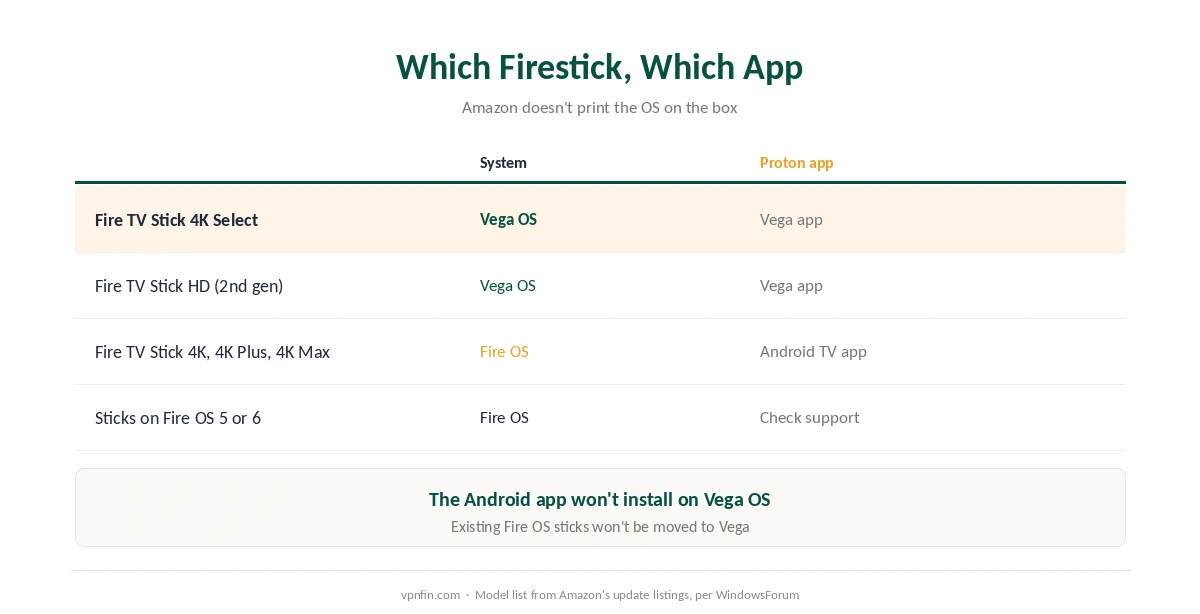
Which Firestick, Which App
| Stick | Operating system | Proton app |
|---|---|---|
| Fire TV Stick 4K Select | Vega OS | Vega app, since 17 September 2026 |
| Fire TV Stick HD (2nd generation) | Vega OS | Vega app |
| Fire TV Stick 4K, 4K Plus, 4K Max | Fire OS | Android TV app |
| Older sticks on Fire OS 5 or 6 | Fire OS | Check support; router may be needed |
Amazon does not print the operating system on the box, Proton notes. The model list above comes from Amazon’s own update listings, as reported by WindowsForum, and Amazon has no plans to move existing Fire OS sticks to Vega. Our NordVPN on Firestick guide explains how to check.
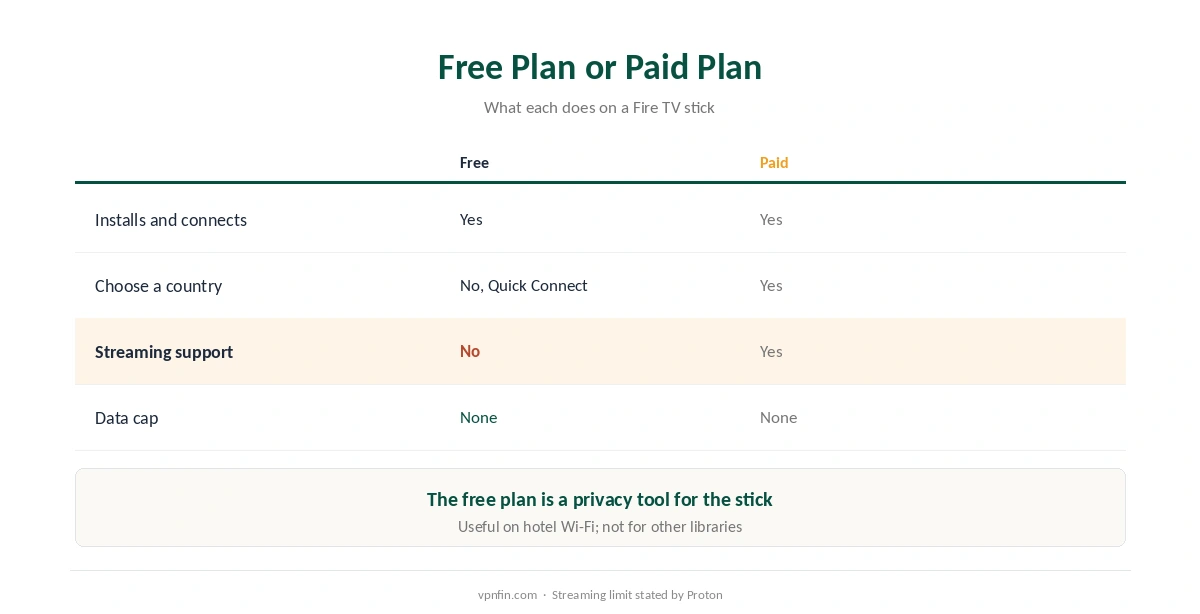
Free Plan or Paid Plan
| Free plan | Paid plan | |
|---|---|---|
| Installs and connects | Yes | Yes |
| Choose a country | No, Quick Connect only | Yes |
| Streaming support | No | Yes |
| Data cap | None | None |
On the free plan, Proton VPN on Firestick is a privacy tool, not a streaming tool. It protects the stick’s connection, which is useful on hotel Wi-Fi, as our public Wi-Fi guide explains. For other countries’ libraries, Proton requires a paid plan. Our free VPN guide explains why Proton’s free tier is one worth trusting.
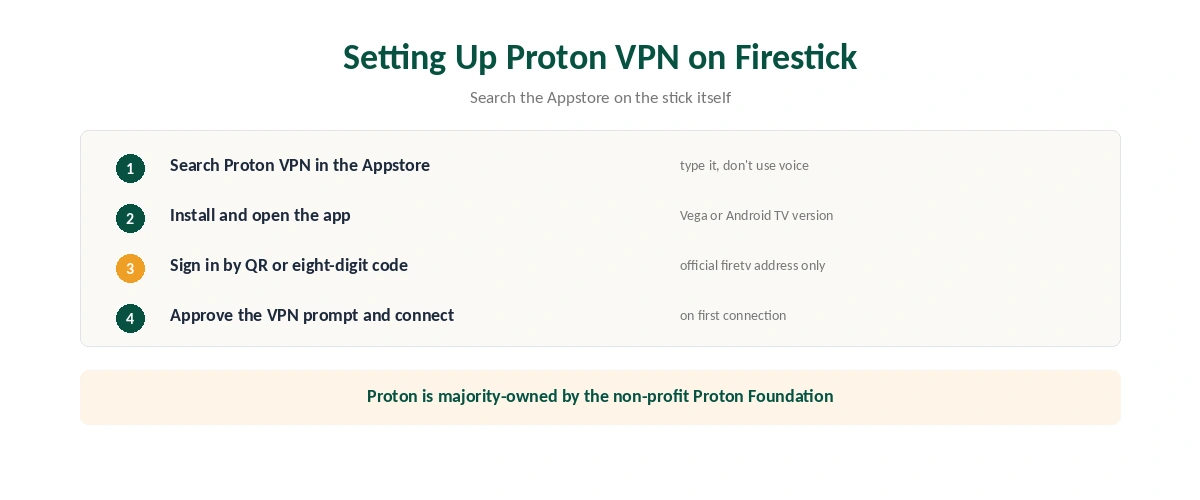
Setting Up Proton VPN on Firestick
| Step | What to do | Note |
|---|---|---|
| 1 | Update the stick | Essential on Vega OS |
| 2 | Search Proton VPN in the Appstore | Type it; don’t rely on voice |
| 3 | Install and open the app | Vega or Android TV version |
| 4 | Sign in by QR code or eight-digit code | Official firetv address only |
| 5 | Approve the VPN permission | On the first connection |
| 6 | Connect | Free: Quick Connect; paid: any country |
Typed search is more reliable than voice for finding Proton VPN on Firestick, FirestickTVStream notes, and choose the listing published by Proton. Our Firestick VPN guide compares providers.
What Breaks, and How to Fix It
A guide says there is no Vega app. That changed on 17 September 2026. Search the Appstore again on your Vega stick. On Google TV sets, the Android TV app works as it does on Fire OS, as our smart TV guide explains.
A streaming app shows your home library. On the free plan, that is expected; streaming needs a paid plan. On a paid plan, switch server and restart the app. Our Netflix guide explains server blocks.
You cannot pick a country. The free plan uses Quick Connect only. After connecting, confirm the address with our guide to checking a VPN.
The Android app will not install. Your stick runs Vega OS; use the Vega app instead. Our guide to turning off a VPN on Firestick covers disconnecting, and our kill switch guide the setting that keeps the stick from leaking if the tunnel drops.
Comparing Firestick Options
All the major providers now have Vega apps. NordVPN and IPVanish launched first in late 2025, Surfshark followed in May 2026, and ExpressVPN and Proton VPN in September, as our Surfshark on Firestick guide and our ExpressVPN Firestick guide explain. Proton’s difference is the free plan. NordVPN and Surfshark share a parent, Nord Security, while Proton is majority-owned by the non-profit Proton Foundation.
How We Research
The app details, free-plan limits and sign-in steps come from Proton’s own Vega OS and Fire OS support pages and coverage of the Vega launch by TechRadar and Lapaas Voice. The model list comes from WindowsForum’s report of Amazon’s update listings, and the Appstore tip from FirestickTVStream. We name each source where used; all were read on 26 September 2026. We did not test on a Firestick ourselves. Our full approach lives on the About Us page.
Proton VPN on Firestick FAQ
Yes. Proton released a native Vega OS app on 17 September 2026. The Android app does not install on Vega OS sticks.
No. Proton says the free plan installs and connects, but streaming support is only available on paid plans.
Scan the QR code, or enter the eight-digit code at Proton’s official firetv address on another device.
The Fire TV Stick 4K Select and the second-generation Fire TV Stick HD, per Amazon’s update listings. The 4K, 4K Plus and 4K Max run Fire OS.
No. The free plan uses Quick Connect and Proton’s free countries.
The Verdict
Proton VPN on Firestick now covers every current stick, with a native Vega app since September and the Android TV app for Fire OS.
The free plan is a genuine privacy tool for the stick; for streaming, you need a paid plan.