
Disclosure: VPNFin is reader-supported. If you buy a VPN through links on this page, we may earn a commission at no extra cost to you. This never affects our ratings — here’s our full disclosure.
FastestVPN IKEv2 support comes in its apps and through manual setups. FastestVPN’s support pages list IKEv2 alongside WireGuard and OpenVPN over UDP or TCP in its apps, and its Mac app offers IKEv2 in the protocol menu. Several FastestVPN guides also cover manual IKEv2 on macOS through system settings. IKEv2 reconnects quickly when a device switches networks, which suits phones and laptops.
This guide covers when to choose IKEv2, the app and manual routes, and the trade-offs.
Where FastestVPN IKEv2 Fits
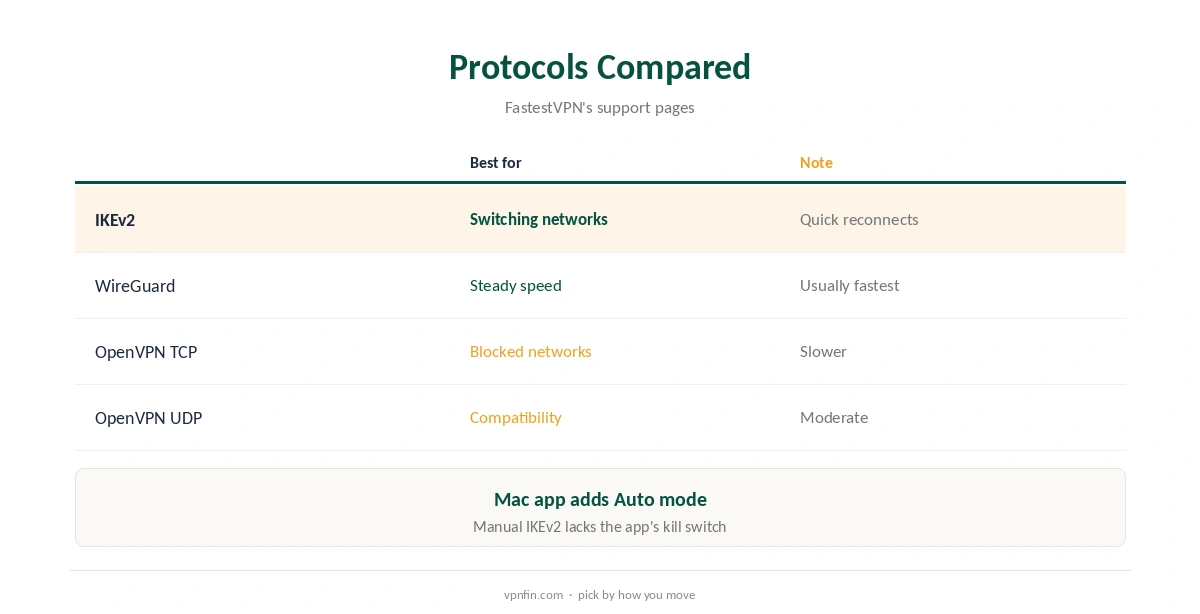
IKEv2 handles network changes well, so it suits laptops moving between Wi-Fi and hotspots, and phones switching between Wi-Fi and mobile data. WireGuard is usually faster for steady connections, and OpenVPN TCP gets past networks that block other protocols. Our IKEv2 vs WireGuard guide compares them.
IKEv2 in the Apps
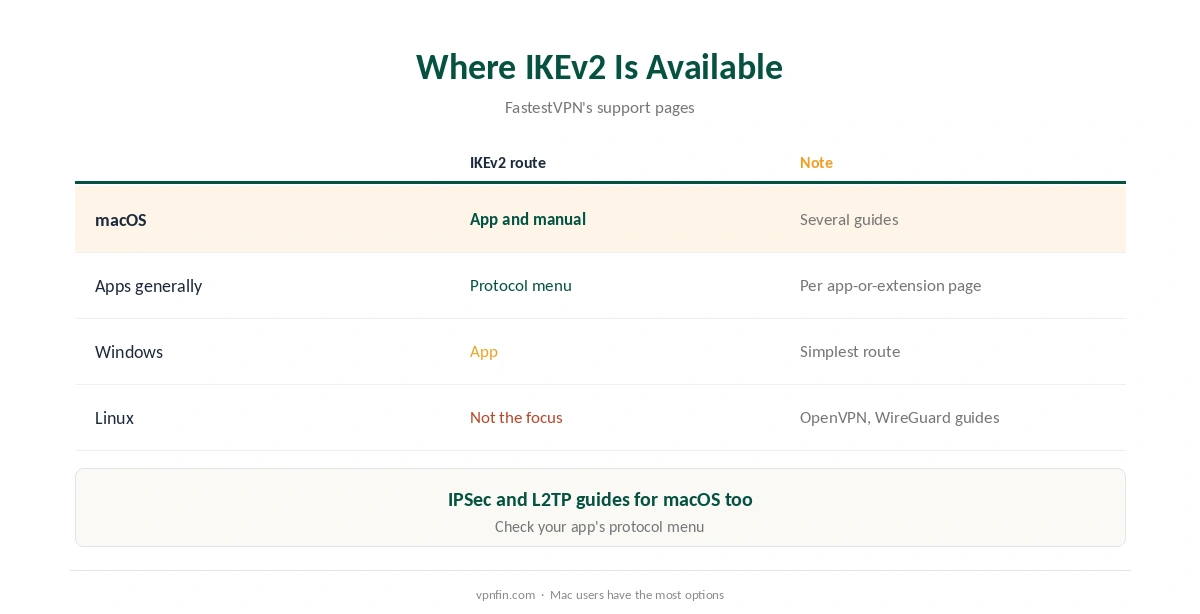
FastestVPN’s macOS guide lists Auto, WireGuard, IKEv2, TCP and UDP in the app’s protocol settings, and its app-or-extension page lists IKEv2 among the protocols its apps support. Choose IKEv2 in settings, pick a server and connect. Our FastestVPN Mac guide covers the app.
Manual IKEv2 on a Mac
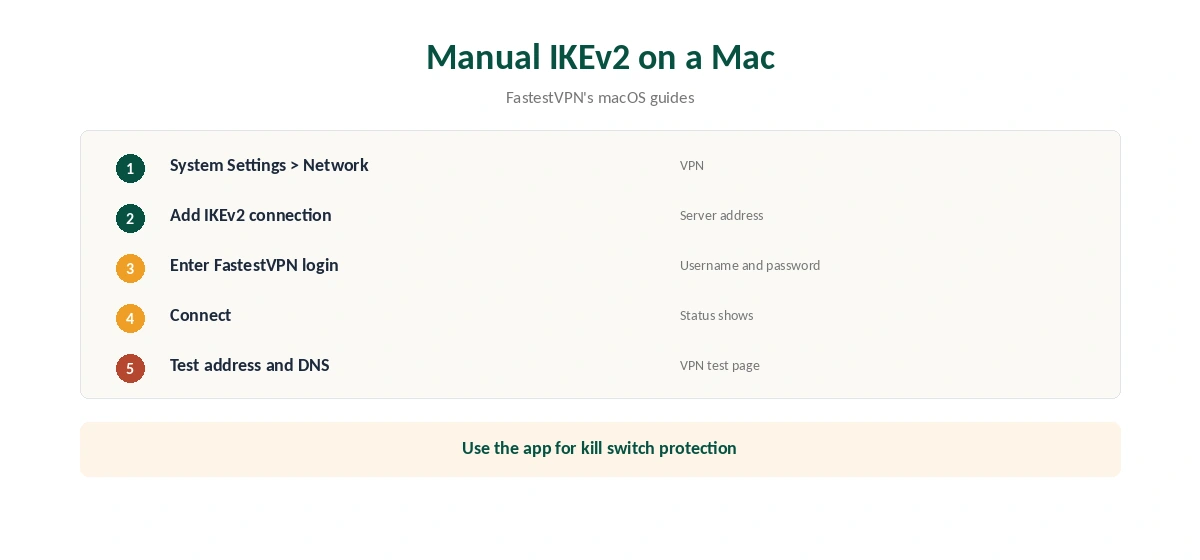
FastestVPN publishes several manual IKEv2 guides for macOS. The route uses System Settings, Network, VPN, where you add an IKEv2 connection with FastestVPN’s server address and your login. It suits older Macs or users who prefer the built-in client, but lacks the app’s kill switch and server list. Our page on FastestVPN’s server list covers network size by source and how the categories work.
Other Platforms
FastestVPN’s support index also covers IPSec and L2TP on macOS and manual setups on other systems. On Windows, the app is the simpler route, as our FastestVPN Windows guide explains. On Linux, its guides focus on OpenVPN and WireGuard, as our FastestVPN Linux guide covers.
Why IKEv2 Suits Phones
IKEv2 was designed to re-establish a tunnel quickly when the network changes, which is common on phones moving between Wi-Fi and mobile data. That keeps sessions alive through tunnels and lifts. WireGuard also roams well, so test both on your phone. Our iPhone VPN guide compares providers.
Blocked Networks
Some workplace and school networks block the ports IKEv2 uses. If the connection fails there, switch to OpenVPN over TCP, which often gets through. Our obfuscation guide covers stricter networks.
Security of IKEv2
IKEv2 with strong ciphers is considered secure, and it is built into most operating systems. The protocol choice matters less than the provider’s logging and leak protection. Our cipher guide explains the encryption underneath.
A Quick Rule
Moving between networks all day? Choose IKEv2. Sitting at a desk? WireGuard. Blocked network? OpenVPN TCP. Older Mac? Manual IKEv2, with the app preferred when it runs.
Built-In Clients
Windows, macOS, iOS and Android all include IKEv2 clients, which is why providers publish manual guides for it. A built-in client avoids installing an app but loses the app’s server list, auto-connect options and kill switch.
Testing on Your Phone
Switch to IKEv2 in the app, then walk from Wi-Fi to mobile data while a video plays. If it keeps playing without a long pause, the protocol suits your phone. Repeat with WireGuard and keep the smoother one.
Lifetime Plans
FastestVPN is known for lifetime deals, which our tables record between $23 and $40 within a year. Weigh the risk of terms changing, as our lifetime VPN guide explains.
Several Devices
Our tables record 10 devices per plan, with 15 reported on the top lifetime plan. Each device can use its own protocol: phones on IKEv2, desktops on WireGuard, and a router on OpenVPN if needed.
Checking the Connection
After connecting, confirm the address with our VPN test page and run our DNS leak guide. Repeat after switching protocol.
Battery Use
On phones, a protocol that reconnects quickly avoids repeated full handshakes after network changes, which may help battery life on busy days. Test both protocols over a normal day and compare battery use in the phone’s settings.
Keeping It Updated
App updates can change protocol defaults. After updating, confirm your choice stayed the same, then test the connection once on Wi-Fi and once on mobile data.
Quick Check
After choosing IKEv2, connect on Wi-Fi, then switch to mobile data. The connection should recover within seconds. If it drops for longer, try WireGuard instead.
Older Devices
Older Macs that cannot run the current app can still use the built-in IKEv2 client with FastestVPN’s manual guides, which keeps them protected without the app, though without its kill switch.
Kill Switch With IKEv2
FastestVPN’s earlier Mac guide says the kill switch is always on in the app. A manual IKEv2 connection has no such protection, so a drop exposes traffic. Our kill switch guide explains the risk.
FastestVPN’s Record
Our audit table records a single audit, by Altius IT in 2023, and our ownership table lists FastestVPN as independent and based in the Cayman Islands. It allows 10 devices. Our FastestVPN review covers the rest.
How We Research
This page draws on FastestVPN’s macOS app and IKEv2 guides, its app-or-extension page and our FastestVPN tables. We cross-checked these sources against each other, and where they conflict or something can’t be verified, we say so in the text rather than guessing. We checked time-sensitive figures, including prices in US dollars, on 7 October 2026. The main source we relied on is FastestVPN’s macOS guide. Our full approach lives on the About Us page.
FastestVPN IKEv2 FAQ
It does, in its apps and through manual macOS setups.
When devices switch networks often, such as phones and laptops.
WireGuard is usually faster on steady connections.
Yes, FastestVPN publishes manual IKEv2 guides for macOS.
No; use the app for kill switch protection.
The Verdict
FastestVPN IKEv2 suits devices that move between networks. Use it in the app for the kill switch, and WireGuard for steady speed.