
Disclosure: VPNFin is reader-supported. If you buy a VPN through links on this page, we may earn a commission at no extra cost to you. This never affects our ratings — here’s our full disclosure.
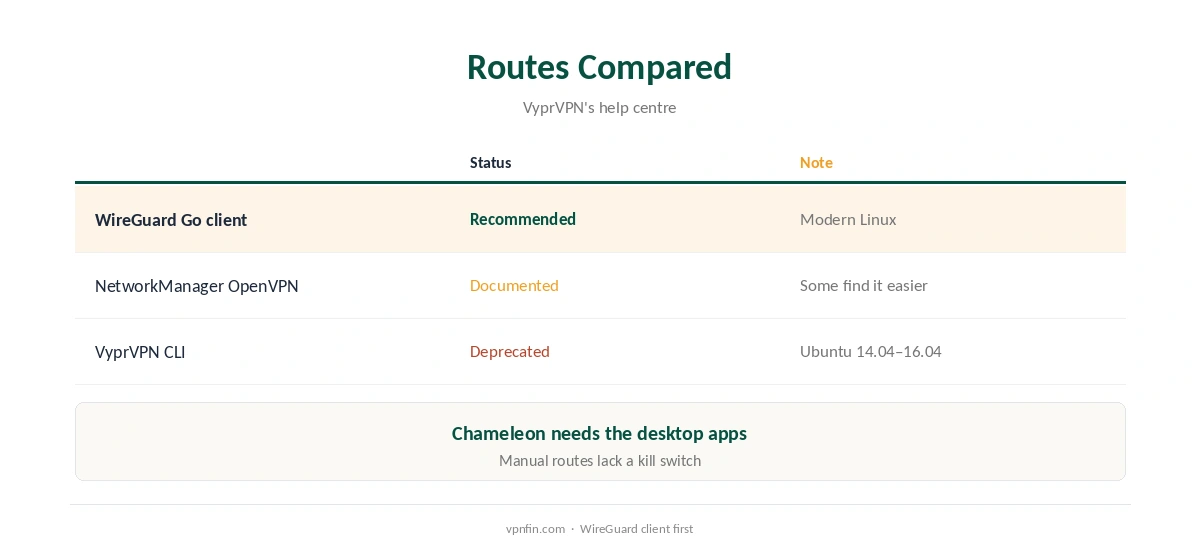
VyprVPN Ubuntu support has three routes in VyprVPN’s help centre. Its OpenVPN guide uses NetworkManager with the OpenVPN plugin and VyprVPN’s CA certificate. Its old command-line client is deprecated, the help centre says, and works only on older Ubuntu releases. For modern Linux, VyprVPN recommends its WireGuard Go client for the fastest, most stable connection.
This guide covers the routes, the setup and what you give up without a full app.
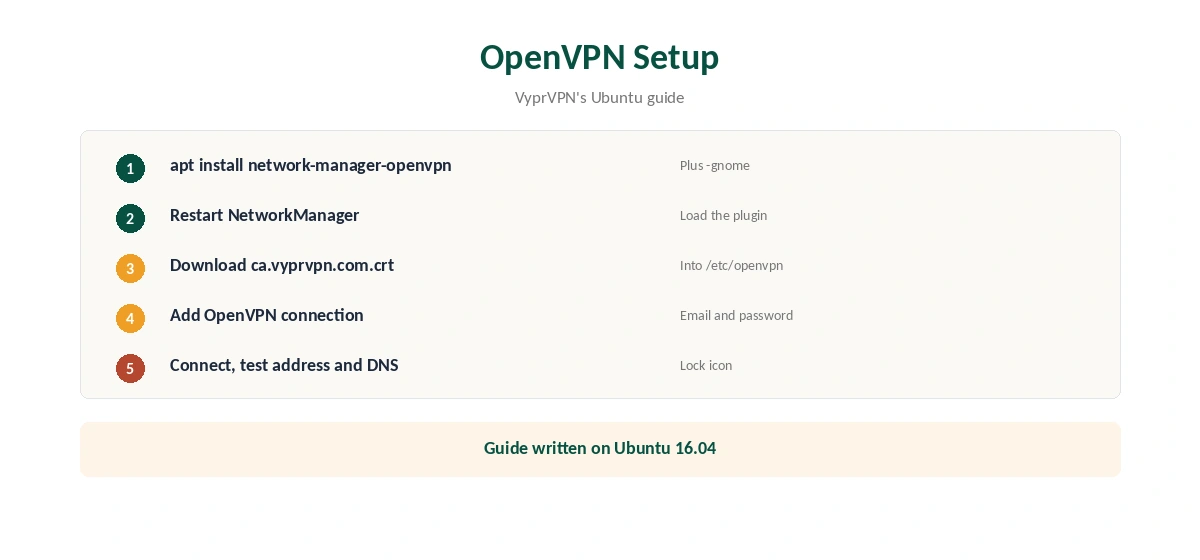
VyprVPN Ubuntu OpenVPN Setup
VyprVPN’s guide installs network-manager-openvpn and network-manager-openvpn-gnome with apt, restarts NetworkManager and downloads the ca.vyprvpn.com.crt certificate into the OpenVPN folder. Then open Network Connections, add an OpenVPN connection, enter a server, your VyprVPN email and password, and select the certificate. Connect from the network menu; a lock icon shows it is active.
The guide was written on Ubuntu 16.04, so menu names differ on current releases.
The WireGuard Go Client
VyprVPN’s help centre recommends its WireGuard Go client for modern Linux machines, calling it the fastest and most stable option. Check VyprVPN’s support pages for the current install steps. Our VyprVPN WireGuard guide explains the protocol.
The Deprecated CLI
VyprVPN’s CLI covered Ubuntu 14.04 to 16.04 and Linux Mint, with commands to log in, set a server and protocol, and connect. The help centre now calls it deprecated and no longer supported, though it may still work on older systems. Avoid it on current Ubuntu.
What a Manual Setup Lacks
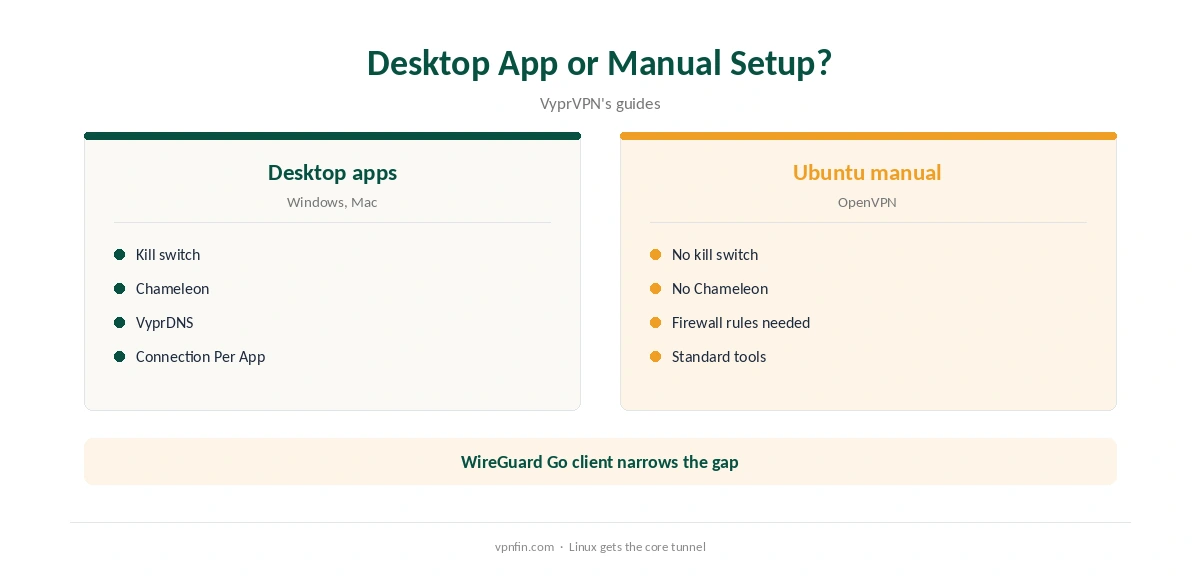
VyprVPN’s desktop apps include a kill switch and Chameleon. A NetworkManager connection has neither. Add firewall rules so traffic stops if the tunnel drops, as our kill switch guide explains.
VyprVPN Ubuntu on Servers
On a server without a desktop, the NetworkManager route does not apply. Use the WireGuard Go client if VyprVPN’s current guide covers headless installs, or run OpenVPN from the terminal with VyprVPN’s certificate and your credentials. Start the tunnel at boot and add firewall rules.
Choosing a Server
VyprVPN’s servers sit in seven hubs, Tom’s Guide found, with other locations virtual. Pick the nearest hub for speed. Our VyprVPN speed guide lists the hub cities.
Other Distributions
VyprVPN’s OpenVPN guide targets Ubuntu, but the same NetworkManager steps work on Linux Mint and most Ubuntu-based desktops. On Fedora or Arch, install the matching NetworkManager OpenVPN package for that distribution.
Troubleshooting
If the connection fails, recheck the certificate path and your email login. Restart NetworkManager after installing the plugin. Read the system log for the exact error before changing settings.
A Quick Rule
Current Ubuntu? Try the WireGuard Go client first. Prefer the network menu? Use the OpenVPN guide. Running an old release? The CLI may still work, but VyprVPN no longer supports it.
Is VyprVPN Ubuntu Support Enough?
For a desktop user who wants the core tunnel, the VyprVPN Ubuntu guide and the WireGuard Go client cover it. If you rely on Chameleon for blocked networks, Linux lacks it, so compare providers with fuller Linux apps. Our NordVPN Linux guide covers one.
IPv6
If your network uses IPv6 and the connection does not route it, traffic can bypass the tunnel. Disable IPv6 on the VPN connection, then run a leak test. Our IPv6 leak guide explains the risk.
Turning It Off
Toggle the VPN off in the network menu, or disconnect in the WireGuard client. Remove the connection entirely if you switch providers, so Ubuntu does not try to reconnect at login.
Quick Check
After connecting, look for the lock icon by the network indicator, as VyprVPN’s guide describes. Then open our test page and run a DNS test once. Repeat after Ubuntu upgrades, which can reset NetworkManager plugins.
Several Devices
An Ubuntu laptop counts as one device on your plan. Sources disagree on VyprVPN’s limit, five or ten, so check your account before adding a server and a desktop as well. A router can cover several machines as one device.
Keeping Settings Current
VyprVPN’s certificate and server names can change. If the connection stops after working for a while, download the certificate again from VyprVPN’s guide and recheck the server name in the connection settings, then reconnect and test.
Desktop Environments
The NetworkManager steps assume GNOME. On KDE or other desktops, the same plugin works through that desktop’s network settings, with the same fields.
Checking the Connection
Confirm the address on VyprVPN’s IP page or our VPN test page, then run our DNS leak guide. Set DNS on the connection if requests still go to your provider.
VyprVPN’s Record
Our audit table records one VyprVPN audit, by Leviathan Security in 2018, before Certida LLC of Texas bought the service in 2023. Its 30-day guarantee covers your first purchase, as our VyprVPN plans guide explains.
Related Guides
Our Linux VPN guide compares providers, and our guide to turning off a VPN on Linux covers stopping connections.
How We Research
This page draws on VyprVPN’s OpenVPN Ubuntu guide and its CLI page, which recommends the WireGuard Go client, and our VyprVPN tables. We cross-checked these sources against each other, and where they conflict or something can’t be verified, we say so in the text rather than guessing. We checked time-sensitive figures, including prices in US dollars, on 7 October 2026. The main source we relied on is VyprVPN’s Ubuntu OpenVPN guide. Our full approach lives on the About Us page.
VyprVPN Ubuntu FAQ
It does, through OpenVPN in NetworkManager or VyprVPN’s WireGuard Go client.
No. VyprVPN calls it deprecated.
Your VyprVPN account email.
The WireGuard Go client, for modern Linux machines.
Not on a NetworkManager setup; add firewall rules.
The Verdict
VyprVPN Ubuntu setups work through NetworkManager or the recommended WireGuard Go client. Skip the deprecated CLI, add a firewall kill switch and test for leaks.