
Disclosure: VPNFin is reader-supported. If you buy a VPN through links on this page, we may earn a commission at no extra cost to you. This never affects our ratings — here’s our full disclosure.
A kill switch is the feature that cuts your internet when the VPN tunnel drops, so your real address never appears. Every provider lists it. Most people enable it once and never think about it again. That habit only matters if the VPN stays on, which is the right default for most people.
Testing suggests that is a mistake. Across thirty services examined between December 2025 and February 2026, fourteen failed to protect the real IP address when the connection was dropped deliberately.
What a Kill Switch Actually Does
It blocks traffic in the gap. When a tunnel fails, there is a window — sometimes milliseconds, sometimes seconds — where your device keeps sending data over the ordinary connection. The kill switch closes that window.
Tunnels drop routinely. A provider restarts a server, an internet provider throttles the protocol, or a network filter interrupts the handshake. None of these is unusual, and each one is a leak without protection. A kill switch that only works while connected leaves a gap, as our AngelVPN safety check explains. Some VPNs ship without one at all, as our iolo VPN safety check shows.
⚠️ The switch is a rule, not a wall. It tells the operating system’s firewall to block traffic. Whether that instruction survives depends entirely on how it was implemented, which is where the differences begin.
Two Kinds, and the Difference Decides Everything
The distinction is technical and it changes the outcome completely.
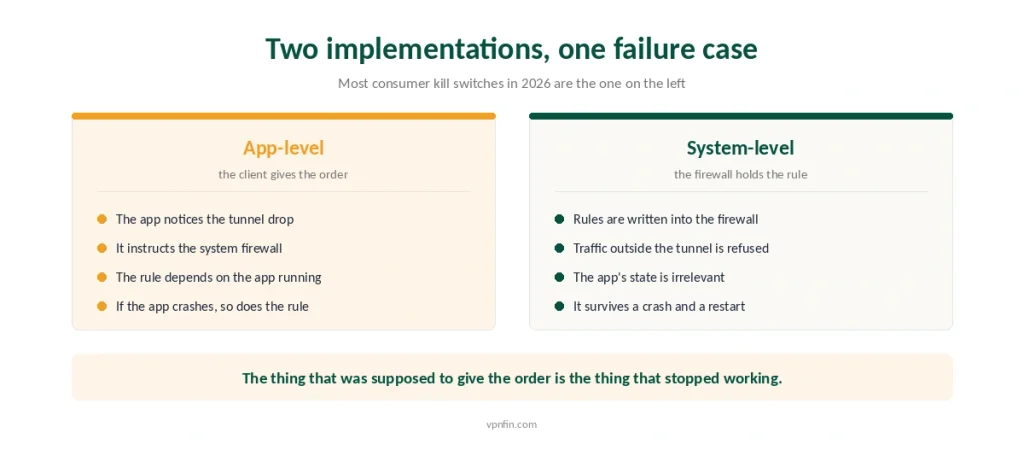
An app-level kill switch is managed by the VPN client. The app notices the tunnel has failed and instructs the firewall to block. Most consumer kill switches in 2026 work this way. If yours lacks one, our iolo VPN alternatives guide lists replacements that include it.
A system-level kill switch sits in the operating system’s firewall. Rules are written so that traffic outside the tunnel is refused regardless of what the app is doing.
⚠️ The failure case is obvious once stated. If the application itself crashes, an app-level switch crashes with it — the thing that was supposed to give the order is gone. A system-level rule does not care whether the app is running.
Some providers ship both. NordVPN separates an Internet Kill Switch from an App Kill Switch that covers only chosen programs, which is unusually granular — our review covers what else it does differently. Split tunneling is the same idea pointed the other way, and the two settings are easy to confuse.
What the Testing Found
Two independent efforts, and both are uncomfortable reading.
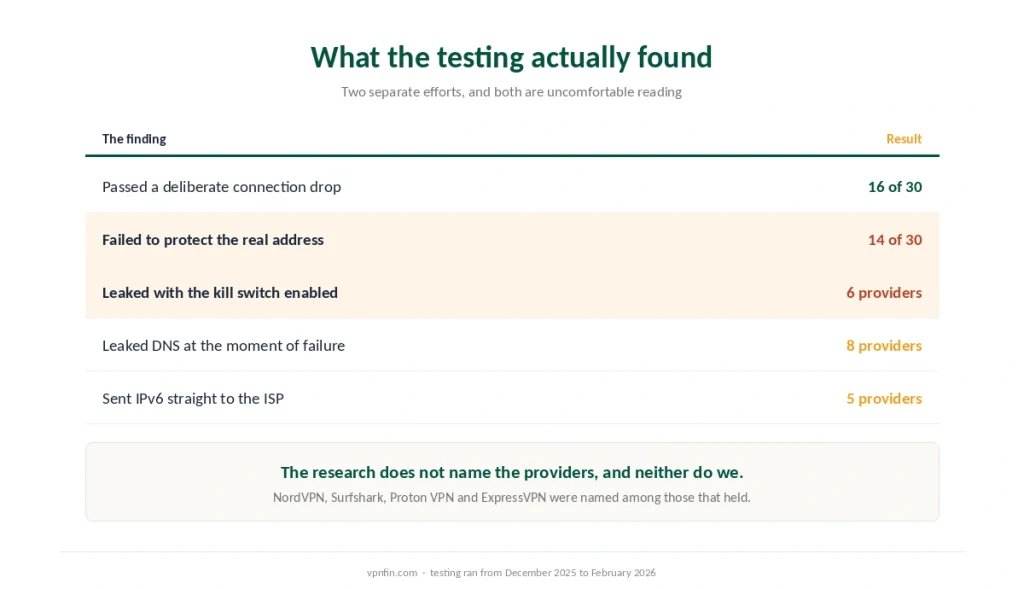
Sixteen of thirty passed. In testing conducted between December 2025 and February 2026, each service had its connection dropped while monitoring for exposure of the real address. Fourteen leaked. The failures were not obscure budget services; several appear routinely in mainstream recommendations.
NordVPN, Surfshark, Proton VPN and ExpressVPN all passed. That is the useful part of a bad result.
Academic work found more specific failures. Twenty-six providers leaked traffic during tunnel failure, six leaked even with the kill switch enabled, eight leaked DNS queries specifically at the moment the tunnel failed, and five sent IPv6 traffic straight to the internet provider. DNS also leaks while the tunnel is up and working normally, which no kill switch can address.
⚠️ The IPv6 gap is the one to understand. A kill switch written for IPv4 can miss IPv6 entirely if the system has it enabled, so the rule fires and traffic escapes anyway through the other protocol.
The Failure Nobody Checks
One scenario deserves separating, because it happens to everyone and almost nobody tests it.
Most kill switches do not activate during a system reboot. Independent testing of twenty consumer services in 2025 found this to be the norm rather than the exception.
Reboots are constant. Security updates, a laptop waking on mains power, a phone restarted during troubleshooting. Each one produces a period after the network comes up and before the VPN client has loaded. Our guide to turning off or uninstalling ExpressVPN covers disconnecting, the kill switch and a clean uninstall.
⚠️ In that gap the machine is online and unprotected, and nothing on screen says so. If your reason for using a VPN is that a particular network should never see your traffic, this is the gap that matters — and public wifi is where it bites.
Test Yours in Two Minutes
You do not have to take anyone’s word for this, including ours.
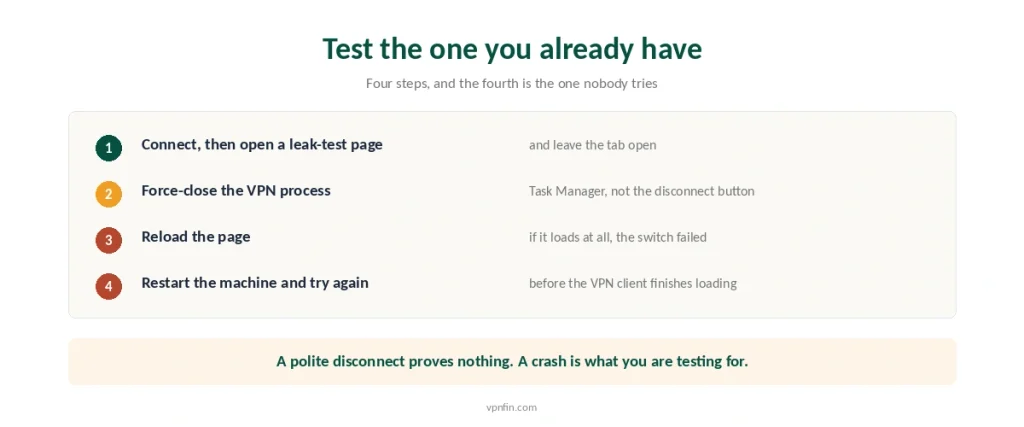
Connect the VPN and open a leak-test page, then leave it open. What a VPN is actually protecting determines how much this test matters to you.
Force-close the VPN process. Task Manager on Windows, Activity Monitor on macOS. Not the disconnect button — the process itself, because that simulates a crash rather than a polite exit. Our guide to turning off Proton VPN covers disconnect, kill switch and uninstall.
Reload the page. If it loads at all, the kill switch failed. If it shows your real address, it failed badly.
Then test the reboot case. Restart the machine and try to load a page before the VPN client finishes starting.
⚠️ Do the DNS and IPv6 checks while you are there. Our leak-testing guide covers both, and they catch the failures the simple test misses.
When the Kill Switch Is the Problem
It cuts both ways, and two of our own guides exist because of it.
On a router it outlives the tunnel. Switch the VPN off and the blocking rule can keep the entire household offline until it is cleared separately — the order of operations matters.
⚠️ On Android, always-on is a different mechanism. It reconnects rather than blocks, and turning off the app does not turn it off — that switch lives in system settings. Obfuscated connections reconnect more slowly, which lengthens whatever the switch is doing while it waits.
⚠️ A kill switch that never fires is indistinguishable from one that works, which is the same reasoning behind everything else we treat as a claim rather than a fact. That is why the test matters more than the setting, and why a provider with a published audit is a better bet than one with a longer feature list.
How We Research
This guide draws on TheBestVPN’s testing of thirty services between December 2025 and February 2026, on a published research summary reporting leaks across twenty-six providers including six with the kill switch enabled, on McAfee’s account of 2025 testing showing that most kill switches do not activate during system reboots, and on CasperVPN and ZeroToVPN for the architectural distinction between app-level and system-level implementations and the self-test procedure. Several of those sources earn commissions from providers they name, so we have used them for test methods and figures rather than for rankings, and we say which is which. We do not run our own tests. Our method lives on the About Us page.
VPN Kill Switch FAQ
It blocks your internet connection when the encrypted tunnel drops, so traffic never falls back to the ordinary connection and exposes your real address. Tunnels fail routinely — server restarts, protocol throttling, network filtering — and each failure is a leak without something to catch it.
Not always. In testing of thirty services between December 2025 and February 2026, sixteen passed and fourteen failed to protect the real IP when the connection dropped. NordVPN, Surfshark, Proton VPN and ExpressVPN were among those that held.
An app-level kill switch relies on the VPN client to notice a failure and instruct the firewall. A system-level one writes rules into the operating system’s firewall directly. If the application crashes, the app-level version crashes with it, while the system-level rule keeps blocking.
Connect the VPN, open a leak-test page, then force-close the VPN process through Task Manager or Activity Monitor rather than using the disconnect button. Reload the page. If it loads, the switch failed. Then repeat the test across a system reboot.
Usually not. Testing of twenty consumer services in 2025 found that most kill switches do not activate during a restart, leaving a window after the network comes up and before the client loads. Nothing on screen indicates that the gap exists.
The Verdict
A kill switch is worth having and worth checking. Fourteen of thirty tested services did not do the job when the connection was dropped on purpose.
The architecture predicts the outcome. An app-level switch depends on the application surviving; a system-level rule does not.
So enable it, then test it. Two minutes with Task Manager tells you more than any product page, and the reboot case is the one almost nobody thinks to try. Our page on NordVPN kill switch covers the two kill switches and where each is missing.