
Disclosure: VPNFin is reader-supported. If you buy a VPN through links on this page, we may earn a commission at no extra cost to you. This never affects our ratings — here’s our full disclosure.
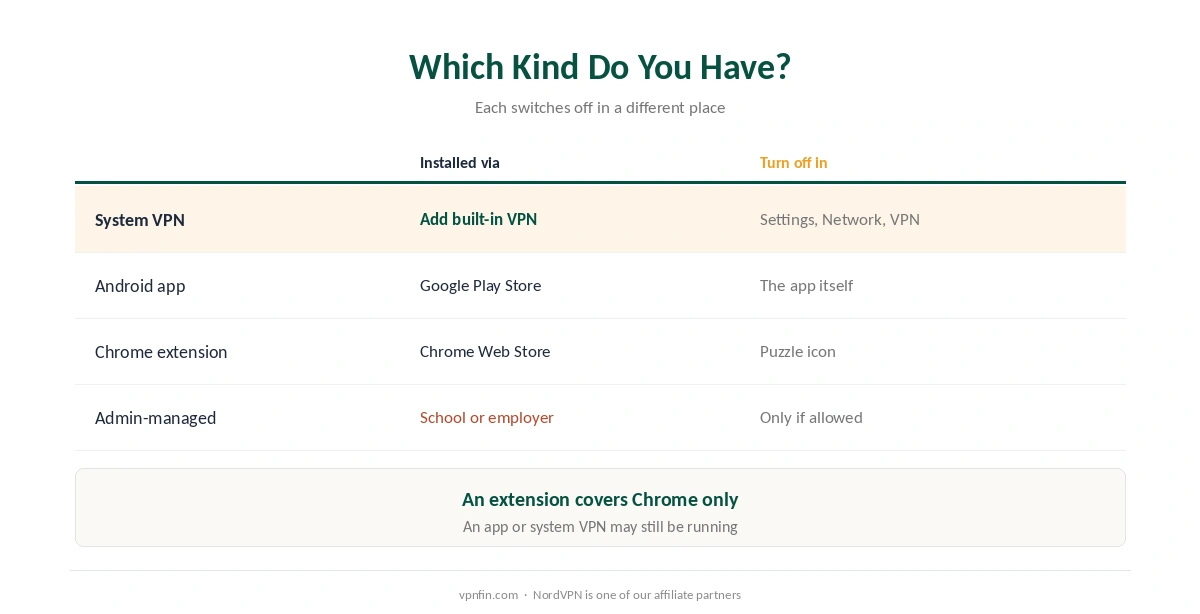
How do you turn off a VPN on a Chromebook? It depends on which kind of VPN you’re running, and a Chromebook can run three: a system VPN set up in ChromeOS settings, an Android app from the Play Store, or a Chrome browser extension, Windscribe’s guide notes. Each switches off in a different place, and turning off the wrong one leaves the other still running.
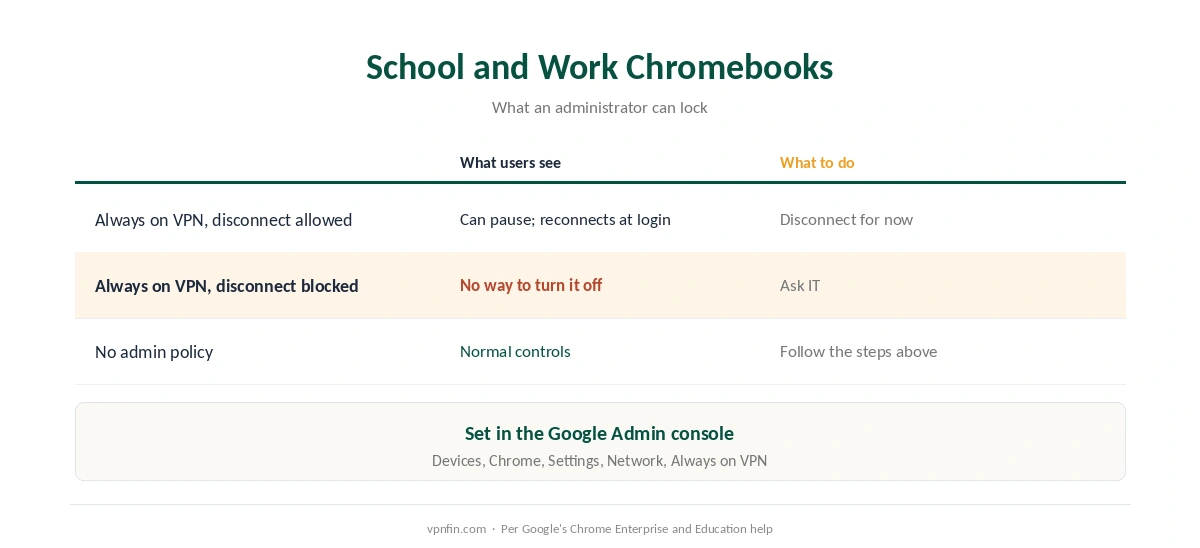
One more case matters on school and work Chromebooks: an administrator can lock a VPN on so it can’t be disconnected at all, Google’s admin documentation shows.
How to Turn Off a VPN on a Chromebook: Which Kind Do You Have?
| VPN type | How it got there | Where to turn it off |
|---|---|---|
| System VPN | Settings, Network, Add connection, Add built-in VPN | Settings, Network, VPN |
| Android app | Installed from the Google Play Store | Inside the app, or Android settings |
| Chrome extension | Installed from the Chrome Web Store | Extensions menu (puzzle icon) |
| Admin-managed VPN | Pushed by your school or employer | Only if the admin allows it |
Not sure which you have before you turn off the VPN on a Chromebook? A key icon or VPN entry under Network points to a system VPN or an Android app; an icon next to Chrome’s address bar points to an extension. Our Chromebook VPN guide explains the differences.
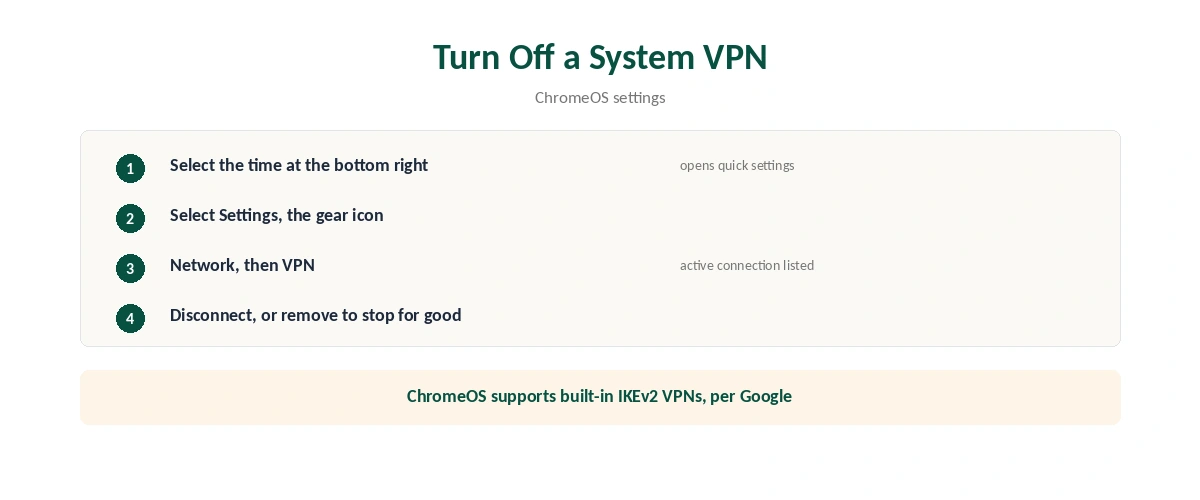
Turn Off a System VPN
| Step | What to do |
|---|---|
| 1 | Select the time at the bottom right |
| 2 | Select Settings (the gear icon) |
| 3 | Open the Network section, then VPN |
| 4 | Select the active connection and choose Disconnect |
| 5 | To stop it for good, open the connection and remove it |
ChromeOS supports built-in IKEv2 VPNs, using a pre-shared key, certificates or a username and password, Google’s Chromebook help explains. These are the connections that appear under Network, VPN.
Turn Off an Android VPN App
Open the app and tap Disconnect. Providers’ Android apps run system-wide on a Chromebook, not just in Chrome, as our Android VPN guide explains.
Check Always-on settings. Android VPN apps can be set to reconnect automatically and to block connections without the VPN. Turn both off in the app or in Android settings, reached through Settings, Manage Google Play preferences, Android Settings, as our Android guide explains.
A kill switch can make the internet vanish when the VPN is off. That is by design, as our kill switch guide explains, and our Android fix guide covers related settings.
Turn Off a VPN Extension
Click the puzzle icon next to Chrome’s address bar, pick the VPN extension and choose Stop or Disconnect, or turn it off entirely under More tools, Extensions. An extension covers only Chrome’s own traffic, as our guide to turning off a VPN in Chrome explains.
School and Work Chromebooks
Your administrator may have locked the VPN on. In the Google Admin console, an administrator can set an Android VPN app as Always on VPN and choose whether users may disconnect temporarily or not at all, Google’s documentation shows.
If the option is greyed out, that’s the reason. Google’s Chromebook help advises contacting your administrator for VPN problems on a work or school device, as our school and work guide also explains.
After You Turn It Off
Check your connection after you turn off the VPN on a Chromebook. Our VPN check guide shows how to confirm your real address is back. For other devices, our guide to turning off a VPN covers them all.
How We Research
Built-in VPN support and settings paths come from Google’s Chromebook help; administrator controls from Google’s Chrome Enterprise and Education help; the three VPN types from Windscribe’s guide, a VPN seller we flag. We read all sources on 28 September 2026. NordVPN is one of our affiliate partners. Our full approach lives on the About Us page.
Turn Off a VPN on a Chromebook FAQ
A system VPN switches off under time, Settings, Network, VPN, then Disconnect. Android apps disconnect inside the app, and extensions through Chrome’s puzzle icon.
An Android VPN app may be set to Always-on, or your administrator may have enforced it. Turn off Always-on in the app, or ask your administrator.
Administrators can set an Always on VPN that users can’t disconnect. Contact your school’s IT team.
It stops the extension, which only covers Chrome. A separate Android app or system VPN may still be running.
A setting that blocks connections without the VPN may still be on. Turn it off in the VPN app or Android settings.
The Verdict
To turn off a VPN on a Chromebook, first find which kind it is: system VPN, Android app or extension, since each switches off in a different place.
On a school or work Chromebook, a locked VPN is an administrator’s choice; ask IT rather than trying to remove it.