
Disclosure: VPNFin is reader-supported. If you buy a VPN through links on this page, we may earn a commission at no extra cost to you. This never affects our ratings — here’s our full disclosure.
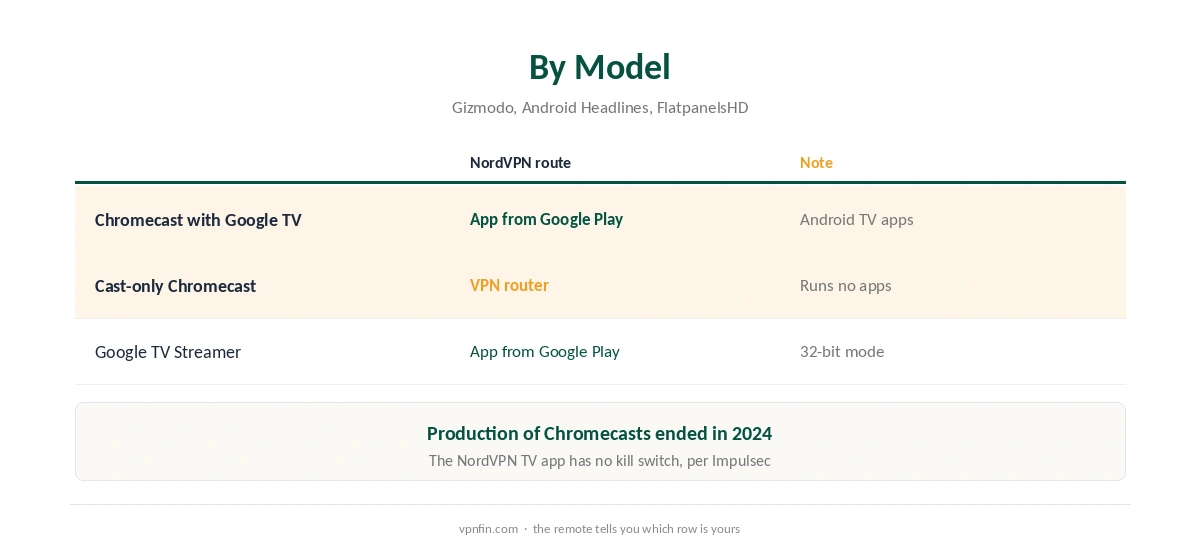
Chromecast NordVPN setup depends on which Chromecast you own. The Chromecast with Google TV runs Android TV apps, so it can run NordVPN’s TV app directly. The older cast-only Chromecast runs no apps at all, so it needs a VPN router. Google stopped making Chromecasts in 2024 and replaced them with the Google TV Streamer. Our page on CyberGhost on Chromecast covers the Google TV app and the router route for older models.
Which Chromecast Do You Have?
If yours came with a remote and shows the Google TV home screen, it is a Chromecast with Google TV. Gizmodo notes that Google TV is an interface over Android TV, with the same apps. If it has no remote and only receives casts from a phone, it is a cast-only model.
The Google TV Streamer replaced the Chromecast with Google TV in August 2024, Android Headlines reports. Our Google TV Streamer guide covers it.
Chromecast NordVPN on Chromecast With Google TV
Open Google Play on the device, search for NordVPN and install it. Sign in, accept the VPN permission and connect. Gizmodo notes the NordVPN TV app includes split tunnelling and custom DNS. Impulsec, however, reports that it has no kill switch, so a drop can expose your real IP.
Our NordVPN Android TV guide covers the app in detail, and our split tunnelling guide explains the feature.
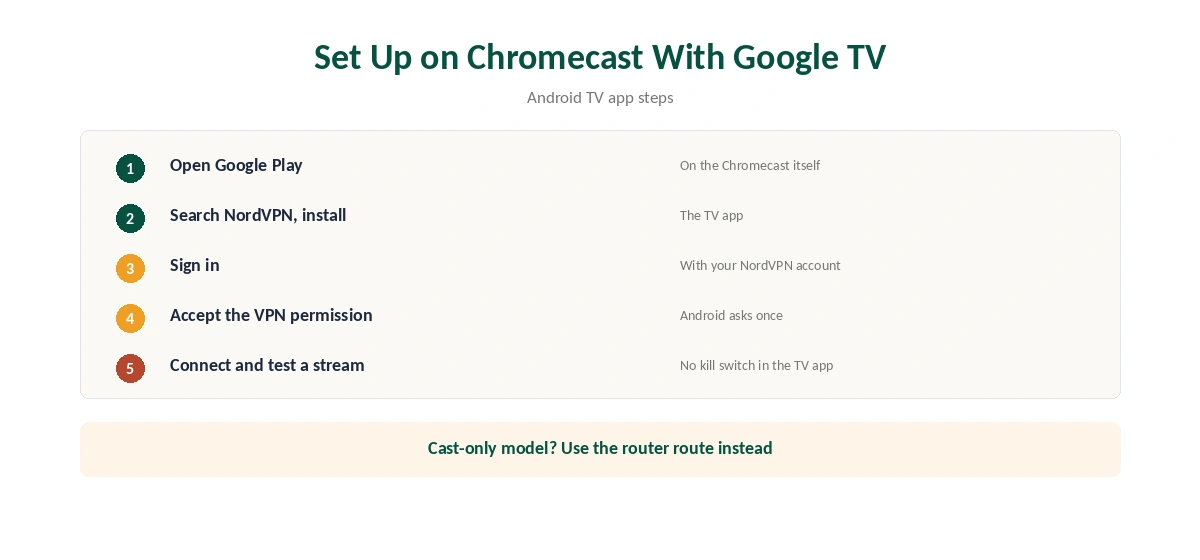
Chromecast NordVPN on Cast-Only Models: Use the Router
A cast-only Chromecast cannot install apps, so the VPN has to sit upstream. A VPN router covers it along with everything else, as our NordVPN router guide explains.
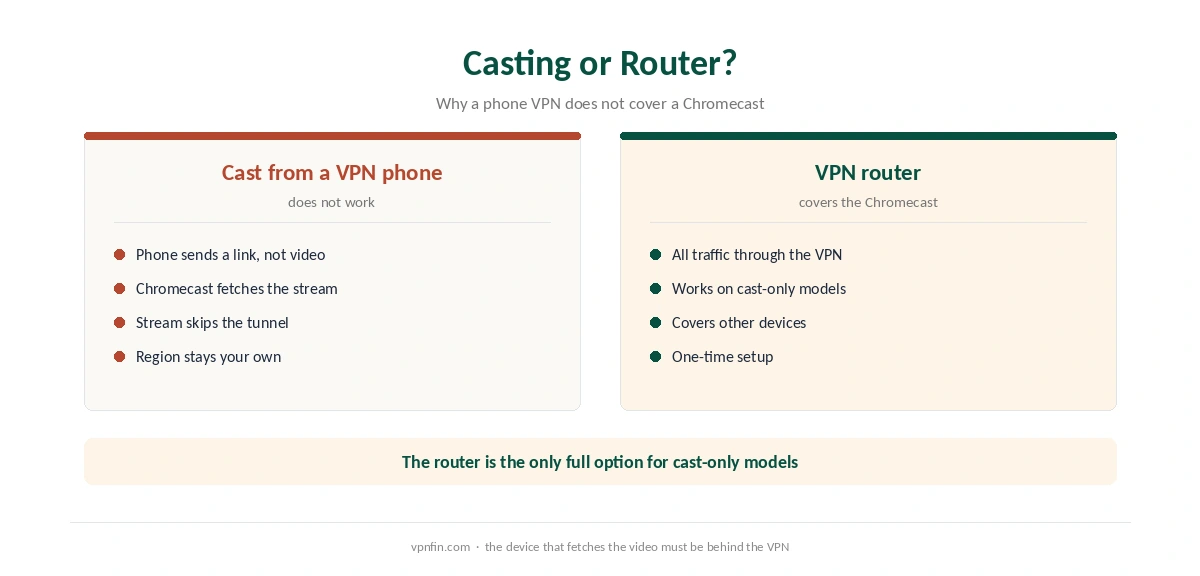
Running NordVPN on your phone and casting does not route the stream through the phone’s tunnel, because the Chromecast fetches the video itself. That is why the router route matters for this model. Our Chromecast VPN guide compares other options.
Google TV Streamer Note
FlatpanelsHD reports that the Google TV Streamer runs Android in 32-bit mode, so some apps that need 64-bit support may not install. Check Google Play on the device before paying. Our NordVPN streaming hub covers the services you might watch.
If streams fail, our NordVPN and Netflix guide lists the fixes. NordVPN belongs to Nord Security, which also owns Surfshark.
Testing Chromecast NordVPN Setups
Before relying on a Chromecast NordVPN setup, check your IP with our VPN test page. Our NordVPN and Hulu guide and BBC iPlayer guide cover two common services. Test each one before a long plan.
Router users should read our router setup guide first. Our NordVPN refund guide explains the 30-day window for testing.
Why Casting From a VPN Phone Fails
When you cast, the phone sends the Chromecast a link to the video. The Chromecast then fetches the stream itself, over your home network. The phone’s VPN tunnel never carries that video.
So a phone connected to NordVPN in another country does not change what the Chromecast sees. The streaming service sees your home IP and serves your home catalogue. Only a VPN on the Chromecast itself, or on the router, changes that.
Split Tunnelling on Google TV
Gizmodo notes that NordVPN’s TV app includes split tunnelling. On a Chromecast with Google TV, that lets one app use the VPN while others use your normal connection. A local channel app can stay at home while a foreign service goes through NordVPN.
Keep the excluded list short. Every excluded app uses your real address. Our NordVPN split tunnelling guide covers the setup on each platform.
No Kill Switch on the TV App
Impulsec reports that NordVPN’s Android TV app has no kill switch. If the connection drops, apps on the Chromecast fall back to your real IP until NordVPN reconnects. For streaming that usually means a brief catalogue change or an error, not a privacy disaster.
A router running NordVPN closes that gap, since every device behind it stays in the tunnel. Our NordVPN router guide explains the setup.
Testing the Setup
After connecting, open a browser on the Chromecast with Google TV, or check from a phone on the same router, with our VPN test page. Then open the streaming app and confirm the catalogue changed. If it did not, close the app fully and reopen it.
Repeat the check after Google TV updates. App settings can reset, and the VPN permission may need approving again.
Google TV Streamer Owners
Google replaced the Chromecast with Google TV with the Google TV Streamer in August 2024, Android Headlines reports. It runs Google TV, so the NordVPN app installs the same way. FlatpanelsHD notes it runs Android in 32-bit mode, which can limit some apps. Check Google Play on the device before paying for anything new.
How We Research
This page draws on Gizmodo’s Android TV VPN guide, Impulsec, Android Headlines, AFTVnews and FlatpanelsHD. We cross-checked these sources against each other, and where they conflict or something can’t be verified, we say so in the text rather than guessing. We read every source on 5 October 2026. The main source we relied on is Gizmodo’s Android TV VPN guide. Our full approach lives on the About Us page.
NordVPN on Chromecast FAQ
On a Chromecast with Google TV, yes, from Google Play. A cast-only Chromecast cannot run apps and needs a VPN router.
No. The Chromecast fetches the stream itself, so the phone’s VPN does not cover it.
Impulsec reports it does not. It does include split tunnelling and custom DNS, according to Gizmodo.
No. Google replaced it with the Google TV Streamer in 2024.
It runs Google TV, so check Google Play on the device; FlatpanelsHD notes its 32-bit mode limits some apps.
The Verdict
Chromecast NordVPN use is easy on a Chromecast with Google TV and needs a router on cast-only models. Keep in mind that the TV app has no kill switch.