
Disclosure: VPNFin is reader-supported. If you buy a VPN through links on this page, we may earn a commission at no extra cost to you. This never affects our ratings — here’s our full disclosure.
NordVPN for streaming rests on three tools: a large server network, SmartPlay, which mixes VPN and Smart DNS, and apps for most streaming devices. Recent tests found it working with Netflix and Hulu. No VPN can promise access, though, because streaming services block VPN addresses whenever they find them.
This hub collects what we found for each service and device, with links to the detailed guides.
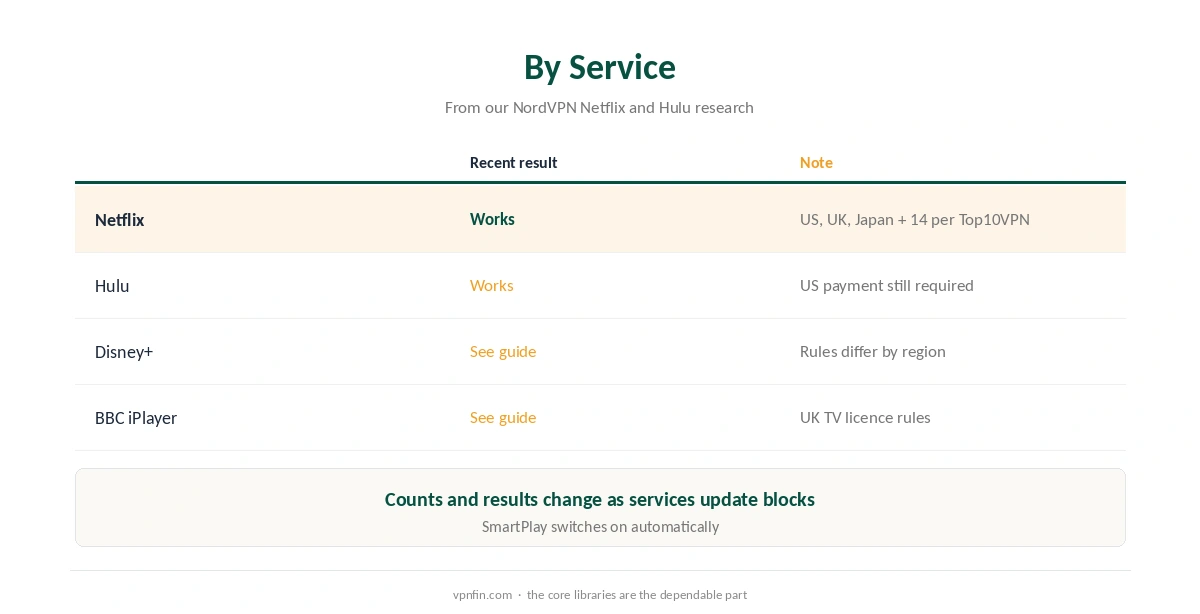
NordVPN for Streaming by Service
For Netflix, Top10VPN counts the US, UK, Japan and 14 more libraries, while other sources count more. Our NordVPN and Netflix guide explains why the counts differ. For Hulu, Comparitech confirmed access in July and September 2026, though Hulu still requires US payment, as our NordVPN and Hulu guide explains.
For other services, our guides to Disney+ and BBC iPlayer cover the rules each one applies.
Live sport has its own rules, covered in our sports streaming guide, and our Prime Video guide covers Amazon. NordVPN for streaming sport works the same way: pick a server in the broadcaster’s country.
How SmartPlay Helps NordVPN for Streaming
SmartPlay is built into NordVPN’s apps and switches on automatically, according to Top10VPN. It handles the DNS side of streaming. When a server fails, Top10VPN found the next one almost always worked. Our guide to NordVPN and BBC iPlayer covers UK servers, error 02066 and the TV licence.
A dedicated IP is the other option. Gizmodo reports NordVPN sells them in 18 countries; our dedicated IP guide explains when that is worth paying for.
NordVPN for Streaming by Device
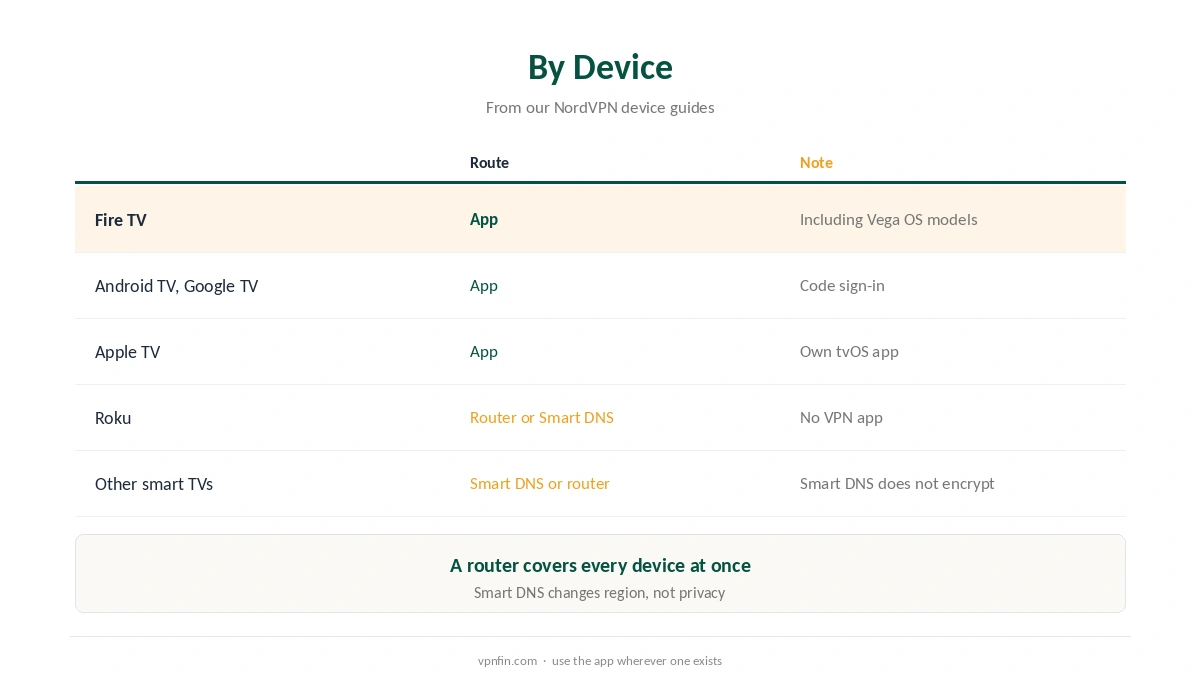
NordVPN for streaming on a TV starts with apps. NordVPN has TV apps for Fire TV, including Vega OS models, and for Android TV, as our NordVPN Firestick guide explains. Apple TV has its own app, covered in our NordVPN Apple TV guide.
Roku and many smart TVs run no VPN apps. For those, use Smart DNS or a VPN router; our NordVPN Roku guide and router guide cover both routes.
Fixing Streaming Errors
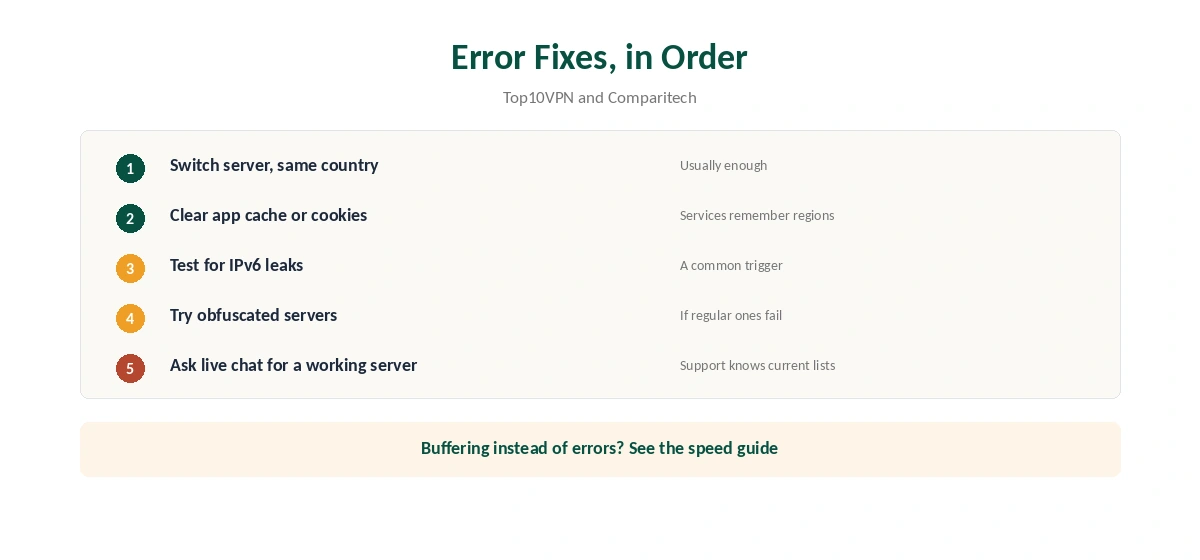
When a service shows a proxy error, switch to another server in the same country first. Then clear the app’s cache or the browser’s cookies. If you see your home region despite the VPN, test for IPv6 leaks, which Comparitech links to Hulu errors; our IPv6 leak guide shows the test.
Buffering points to speed rather than blocks, which our NordVPN speed guide covers. NordVPN belongs to Nord Security, which also owns Surfshark.
Quick Picks by Service
Each streaming service has its own rules, and we cover them in separate guides. For Prime Video, see our NordVPN Prime Video guide on the HTTP proxy error. For Paramount Plus, our Paramount Plus guide explains the ad-blocker catch.
US-only services have stricter checks. Our Peacock guide covers roaming errors, and our YouTube TV guide explains Google’s home area rules.
Sport services tie rights to countries. Our DAZN guide decodes the error codes, and our Sky Go guide covers post-Brexit portability.
For anime, our Crunchyroll guide compares library sizes. For music, our Spotify guide explains Spotify’s 2025 terms. For Disney Plus, our Disney Plus guide looks honestly at error 73.
One Rule Across Services
Across these guides, one pattern repeats. A VPN changes the IP address a service sees. It does not change your account country, payment method or the licences each country holds. Travellers keeping their own subscriptions are the clean case almost everywhere. Our guide to NordVPN on Kodi covers why it runs on the device rather than inside Kodi.
Before You Report a Block
Most failures come from three causes: a flagged server, cached location data, or a leak. Switch server, clear the app’s cache or the browser’s cookies, and test for IPv6 and DNS leaks. Our IPv6 leak guide covers the most common leak. Our guide to NordVPN and YouTube covers region-locked videos, and why cheap Premium is off the table.
Streaming Devices at a Glance
Fire TV and Android TV run the NordVPN app directly, as our Firestick guide and Android TV guide explain. Apple TV has a native app, covered in our Apple TV guide.
Samsung and LG smart TVs cannot run VPN apps, so a router or Smart DNS is the route, as our NordVPN Smart DNS guide explains. Roku has no VPN app either. Consoles follow the same pattern as TVs without apps. Match the method to the device, and the services above follow.
When to Contact Support
If a service fails on several servers after clearing the cache and testing for leaks, NordVPN’s live chat can help. Give the service, the device, the server you tried and the exact error. Comparitech notes that support can suggest servers that currently work. If the problem is the service account rather than the connection, such as a payment country or a household rule, the service’s own support is the place to ask. Our guide to NordVPN in Japan covers Tokyo and Osaka servers, Japanese TV and travel use.
How We Research
This page draws on our NordVPN Netflix and Hulu research and device guides, and on Top10VPN, Comparitech and Gizmodo. We cross-checked these sources against each other, and where they conflict or something can’t be verified, we say so in the text rather than guessing. We read every source on 5 October 2026. The main source we relied on is Top10VPN’s NordVPN Netflix guide. Our full approach lives on the About Us page.
NordVPN for Streaming FAQ
Yes, in recent tests for Netflix and Hulu. No VPN can guarantee access, since services block VPN addresses.
A mix of VPN and Smart DNS built into NordVPN’s apps, switched on automatically.
On Fire TV, Android TV and Apple TV, yes, with apps. Other TVs need Smart DNS or a VPN router.
It blocked that server, or an IPv6 leak revealed your location. Switch server and clear the cache.
Some speed loss is normal. Choose a nearby server and follow our speed guide if video buffers.
The Verdict
NordVPN for streaming works well in current tests, helped by SmartPlay and TV apps. Expect occasional blocks, switch servers when they happen, and use our service guides for the details.