
Disclosure: VPNFin is reader-supported. If you buy a VPN through links on this page, we may earn a commission at no extra cost to you. This never affects our ratings — here’s our full disclosure.
NordVPN OpenVPN still matters in 2026, even with NordLynx as the default. Obfuscated servers run only on OpenVPN TCP, sharing a connection from Windows needs it, and routers often use it. For manual setups, NordVPN provides OpenVPN configuration files, but not WireGuard ones, according to its own site. Our page on VyprVPN OpenVPN covers the apps, Ubuntu and DD-WRT setups.
When to Choose NordVPN OpenVPN
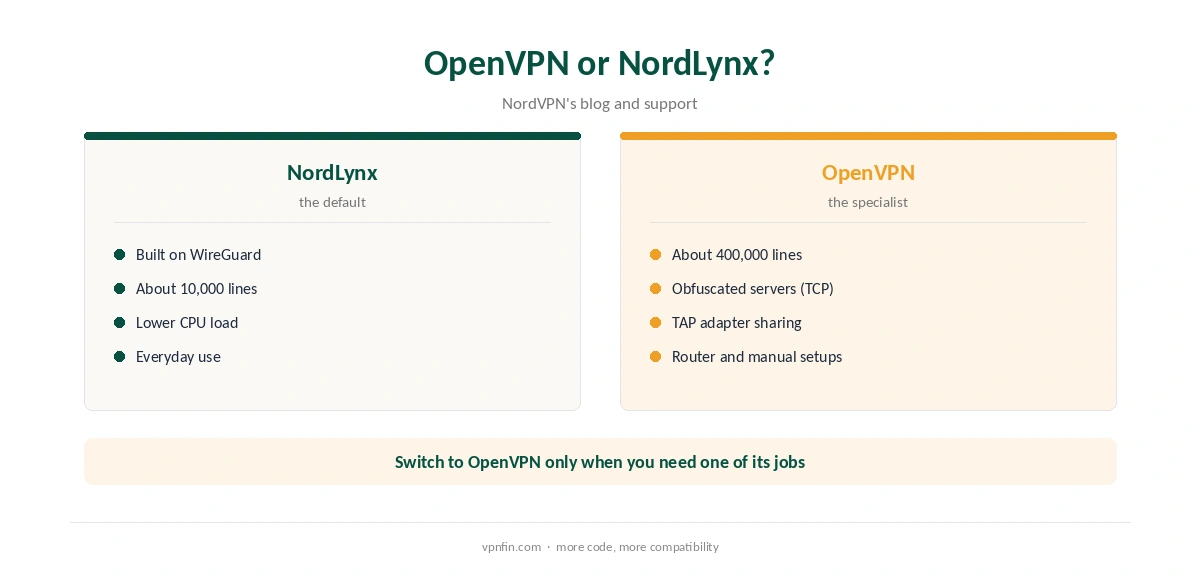
Inside the app, switch to OpenVPN when you need obfuscated servers, which work only with OpenVPN TCP, as our NordVPN China guide explains. Sharing NordVPN from a Windows PC also uses the TAP-NordVPN adapter, which belongs to OpenVPN, as our NordVPN Xbox guide shows.
For everyday use, NordLynx is faster and lighter. NordVPN’s blog puts its code at about 10,000 lines against roughly 400,000 for OpenVPN. Our WireGuard vs OpenVPN and NordLynx vs WireGuard pages cover the comparison.
Service Credentials, Not Your Login
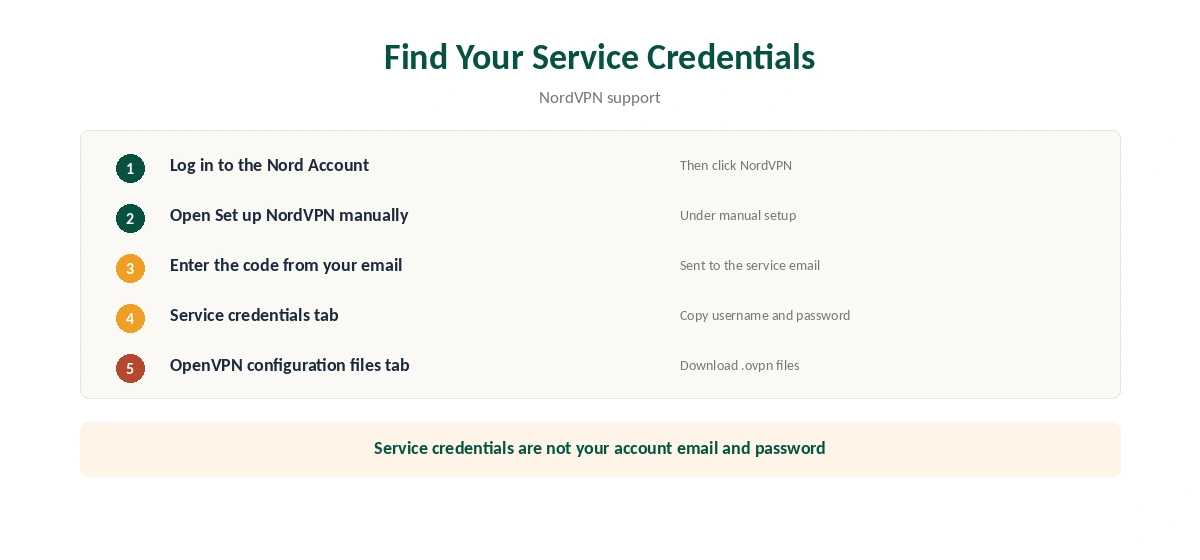
Manual OpenVPN and IKEv2 connections need NordVPN service credentials, which differ from your Nord Account email and password, NordVPN’s support stresses. Log in to the Nord Account, open NordVPN, then Set up NordVPN manually. NordVPN sends a verification code to your email, and the Service credentials tab shows the username and password. Our guide to NordVPN IKEv2 covers a manual option now, and when it still helps.
The same area has an OpenVPN configuration files tab, with a server recommendation option that picks a server for you.
NordVPN OpenVPN on Windows
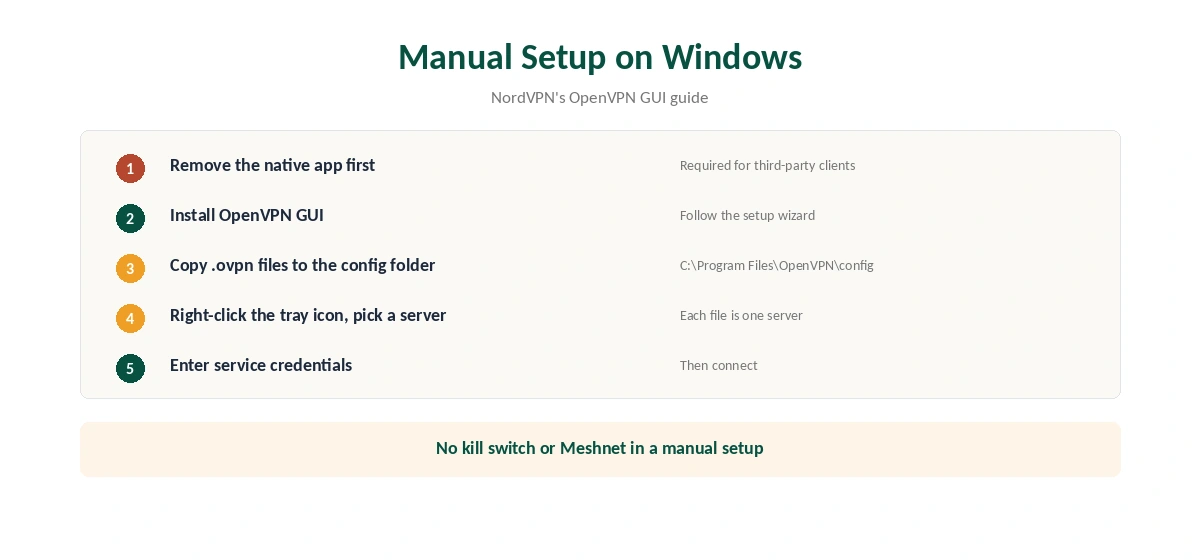
NordVPN’s Windows guide uses OpenVPN GUI. Install it, then copy the .ovpn files into C:Program FilesOpenVPNconfig. Each file appears as a server in the right-click menu. Connect and enter the service credentials.
One condition matters: the support article says the third-party client will not connect while the native app is installed. Our NordVPN uninstall guide covers removal.
Linux, Routers and Other Devices
On Linux, NordVPN’s guide runs sudo openvpn with the chosen .ovpn file, then asks for the service credentials. It notes that a manual setup lacks the app’s extra features. Our Linux guide covers the native app instead, and our Raspberry Pi guide covers ARM boards.
GL.iNet routers have NordVPN quick setup built in, using service credentials, according to GL.iNet. Keenetic routers work too, but NordVPN calls that setup community-tested, not officially supported. Our NordVPN router guide covers both. NordVPN belongs to Nord Security, which also owns Surfshark.
Testing a Manual Setup
A manual setup has no kill switch, so a drop exposes your IP. Our kill switch guide explains the risk, and our DNS leak guide shows the test to run.
If the connection keeps dropping, our disconnection guide helps. Our obfuscation guide explains the TCP servers in more depth.
UDP or TCP?
OpenVPN runs over UDP or TCP. UDP is usually faster and suits streaming and gaming. TCP is slower but gets through networks that block or disrupt UDP traffic, such as some hotel and office networks.
NordVPN’s obfuscated servers use OpenVPN TCP, which is why switching to OpenVPN is the first step when you need them. Start with UDP for everyday manual setups, and move to TCP when a network causes trouble.
Picking Servers for a Manual Setup
The Nord Account’s manual setup area includes a server recommendation option, NordVPN’s support explains. It picks a suitable server and offers its configuration file. That is faster than browsing the full list.
Each .ovpn file points to one server. For a fallback, download two or three files for nearby servers, so you can switch if one is busy. On Windows, each file shows up as a separate entry in OpenVPN GUI.
Keeping Configuration Files Current
Servers are added and retired over time. If a manual connection that worked stops connecting, download a fresh file for the same location before changing anything else. Old files can point to servers that no longer exist.
The service credentials stay the same unless you regenerate them. If you do, update every manual device, or each one will fail authentication on its next connection.
What You Give Up
A manual OpenVPN setup lacks the app’s kill switch, Threat Protection and Meshnet. A dropped connection can expose traffic until it reconnects. Our NordVPN kill switch guide explains the risk.
Use manual OpenVPN where the app cannot run, such as routers and a NAS, and the app everywhere else. Our NordVPN Synology guide shows one manual setup in full.
Routers That Run OpenVPN Well
Router processors vary widely. OpenVPN asks more of them than WireGuard, so older routers may top out at modest speeds. NordVPN’s support notes that GL.iNet routers have NordVPN quick setup built in, while Keenetic setups are community-tested rather than officially supported. Our NordVPN router guide covers which routers suit a whole-home setup. If speeds disappoint on an older router, try NordVPN on a single computer first to separate router limits from server problems. Our guide to NordVPN on Steam Deck covers manual OpenVPN in desktop mode, carried into games.
How We Research
This page draws on NordVPN’s manual setup articles for Windows, Linux and routers, its config files page and GL.iNet’s documentation. We cross-checked these sources against each other, and where they conflict or something can’t be verified, we say so in the text rather than guessing. We read every source on 5 October 2026. The main source we relied on is NordVPN’s Windows OpenVPN guide. Our full approach lives on the About Us page.
NordVPN OpenVPN FAQ
Yes, in its apps and through manual configuration files. Obfuscated servers need OpenVPN TCP.
A separate username and password for manual OpenVPN and IKEv2 setups, found in the Nord Account under manual setup.
No. NordVPN provides configuration files only for OpenVPN, according to its own site.
No. The support article says to remove the native app first.
In most cases, yes, according to NordVPN. NordLynx is built on WireGuard, with far less code and lower processor load.
The Verdict
Use NordVPN OpenVPN for obfuscated servers, Windows connection sharing and routers. For everything else, NordLynx is the better default.