
Disclosure: VPNFin is reader-supported. If you buy a VPN through links on this page, we may earn a commission at no extra cost to you. This never affects our ratings — here’s our full disclosure.
VyprVPN OpenVPN support runs through its apps and VyprVPN’s manual guides. Its Ubuntu guide sets up OpenVPN in NetworkManager with the ca.vyprvpn.com.crt certificate and your account email as the username. Its DD-WRT guide uses OpenVPN on standard, big and mega builds. In the apps, WireGuard is faster and Chameleon handles blocked networks, so OpenVPN is the compatible middle option.
This guide covers where OpenVPN fits, the manual setups and the trade-offs.
Where VyprVPN OpenVPN Fits
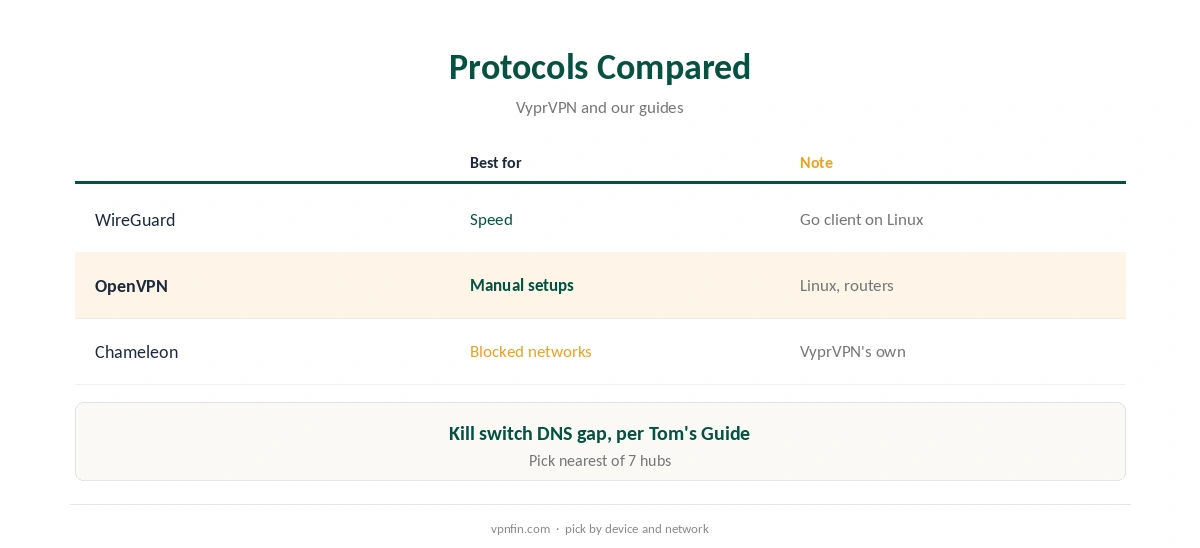
WireGuard is VyprVPN’s speed choice, and Chameleon, its own protocol, targets networks that block VPNs. OpenVPN suits manual setups on Linux and routers, where those may not be available. Our VyprVPN WireGuard guide explains the faster option.
OpenVPN on Ubuntu
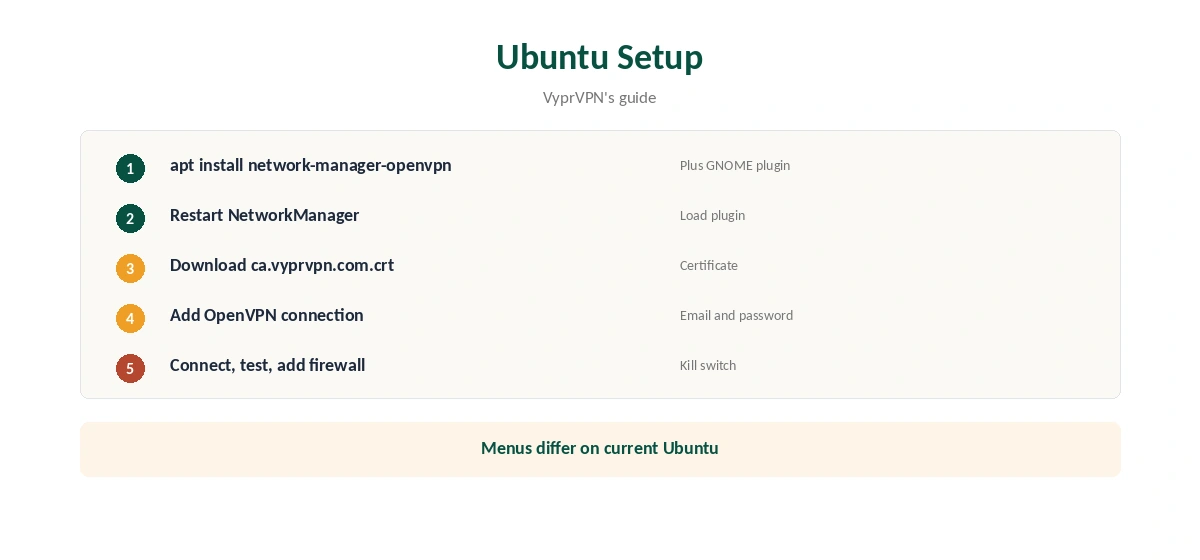
VyprVPN’s guide installs network-manager-openvpn and its GNOME plugin, restarts NetworkManager, downloads ca.vyprvpn.com.crt and adds an OpenVPN connection with a server, your VyprVPN email and password, and the certificate. The guide was written on Ubuntu 16.04, so menus differ today. Our VyprVPN Ubuntu guide also covers the recommended WireGuard Go client.
OpenVPN on DD-WRT
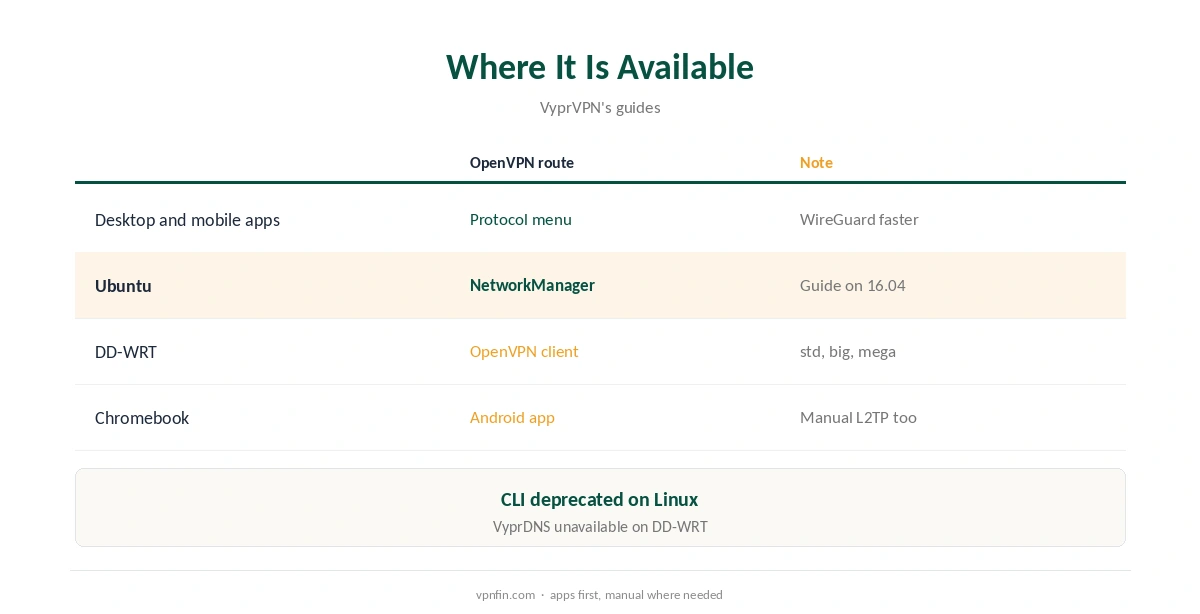
VyprVPN’s DD-WRT guide uses OpenVPN on builds that include it: standard, big and mega, not mini. You enter a server, your email and password and a verify-x509-name line matching the server, then reboot. A mirror of the guide says VyprDNS is not available there. Our VyprVPN DD-WRT guide covers each step.
VyprVPN OpenVPN in the Apps
In VyprVPN’s desktop and mobile apps, OpenVPN sits in the protocol menu next to WireGuard and Chameleon. Choose it when WireGuard struggles on a network but Chameleon is not needed, or when you want a long-proven protocol for steady downloads.
UDP or TCP
OpenVPN can run over UDP or TCP. UDP is faster; TCP passes through networks that block UDP but adds overhead. Start with UDP and switch if connections fail.
Chromebooks
On ChromeOS 53 or later, the Android app brings the full protocol menu. Older Chromebooks use manual L2TP instead, as our VyprVPN Chromebook guide explains.
Torrenting
VyprVPN allows P2P, our guides note. OpenVPN’s steady connection suits long downloads, with the kill switch on. Our VyprVPN torrenting guide covers the details.
A Quick Rule
Speed? WireGuard. Blocked network? Chameleon. Linux or router? VyprVPN OpenVPN from the manual guides. UDP blocked? OpenVPN over TCP.
Is VyprVPN OpenVPN Worth Using Today?
For most app users, WireGuard handles daily use better and Chameleon covers blocked networks. VyprVPN OpenVPN remains the practical choice for manual setups, where VyprVPN’s guides depend on it, and as a steady fallback in the apps.
Checking the Connection
After connecting, confirm the address on VyprVPN’s IP page or our VPN test page, then run our DNS leak guide. On DD-WRT, set static DNS first, since VyprDNS is not available there.
Several Devices
Sources disagree on VyprVPN’s device limit, five or ten. A router running OpenVPN counts as one device and covers everything behind it.
Keeping Configs Current
Certificates and server names can change. If a manual connection stops working, download the certificate again from VyprVPN’s guide and recheck the server name, including the verify-x509-name line on DD-WRT.
Quick Check
After connecting, disconnect the network briefly. On manual setups without firewall rules, traffic will fall back to your normal connection, which is why the rules matter.
Raspberry Pi and Servers
The Ubuntu OpenVPN steps adapt to Raspberry Pi OS and headless servers, using the terminal instead of the network menu. Start the tunnel at boot and add firewall rules so nothing leaves outside it.
Other Distributions
On Fedora or Arch, install the matching NetworkManager OpenVPN package, then follow the same fields: server, email, password and certificate.
Several Hubs
Create one connection per hub you use often, named by city, so switching takes one click in the network menu.
Turning It Off
Toggle the connection off in the network menu, or disable the OpenVPN client on the router. Remove old connections if you change providers, so they do not reconnect at login.
Chameleon Instead
If OpenVPN fails on a strict network, the apps’ Chameleon protocol is the next step, since manual setups cannot use it.
Router Speed
Router processors limit OpenVPN speeds. Run a speed test on and off the tunnel before relying on it for 4K streams.
Kill Switch and DNS
Tom’s Guide found VyprVPN’s kill switch let apps with their own DNS settings send requests outside the tunnel. On manual OpenVPN setups there is no kill switch at all, so add firewall rules. Our kill switch guide explains the approach.
Choosing a Server
VyprVPN’s servers sit in seven hubs, Tom’s Guide found. Pick the nearest hub for OpenVPN, since the protocol’s overhead grows with distance. Our VyprVPN speed guide lists the hub cities.
VyprVPN’s Record
Our audit table records one VyprVPN audit, by Leviathan Security in 2018, before Certida LLC of Texas bought the service in 2023.
How We Research
This page draws on VyprVPN’s Ubuntu OpenVPN and DD-WRT guides, a mirror of the DD-WRT guide hosted by Giganews, Tom’s Guide’s VyprVPN review and our VyprVPN tables. We cross-checked these sources against each other, and where they conflict or something can’t be verified, we say so in the text rather than guessing. We checked time-sensitive figures, including prices in US dollars, on 7 October 2026. The main source we relied on is VyprVPN’s Ubuntu OpenVPN guide. Our full approach lives on the About Us page.
VyprVPN OpenVPN FAQ
Yes, in its apps and through manual Linux and router guides.
Your VyprVPN account email.
Standard, big and mega, not mini, per VyprVPN.
No; WireGuard is faster.
No; add firewall rules.
The Verdict
VyprVPN OpenVPN is the manual route for Linux and routers and a fallback in the apps. Use WireGuard for speed and Chameleon on blocked networks.