
Disclosure: VPNFin is reader-supported. If you buy a VPN through links on this page, we may earn a commission at no extra cost to you. This never affects our ratings — here’s our full disclosure.
NordVPN SOCKS5 servers still work in 2026, and they come with every NordVPN subscription, Comparitech notes. A SOCKS5 proxy changes the IP address for one app, usually a torrent client, but it does not encrypt anything. That trade-off decides when it makes sense. Our page on VyprVPN and SOCKS5 covers the missing proxy and Connection Per App as a substitute.
What NordVPN SOCKS5 Does and Does Not Do
NAT Checker sums it up: SOCKS5 routes only the app you configure, and the protocol adds no encryption. Your internet provider can still see that traffic. Peers in a torrent swarm, however, see the proxy’s address instead of yours.
Security.org found NordVPN’s SOCKS5 servers in 11 locations, and its test downloads finished three to four minutes faster through SOCKS5 than through the VPN. Our NordVPN torrenting guide covers the full VPN route.
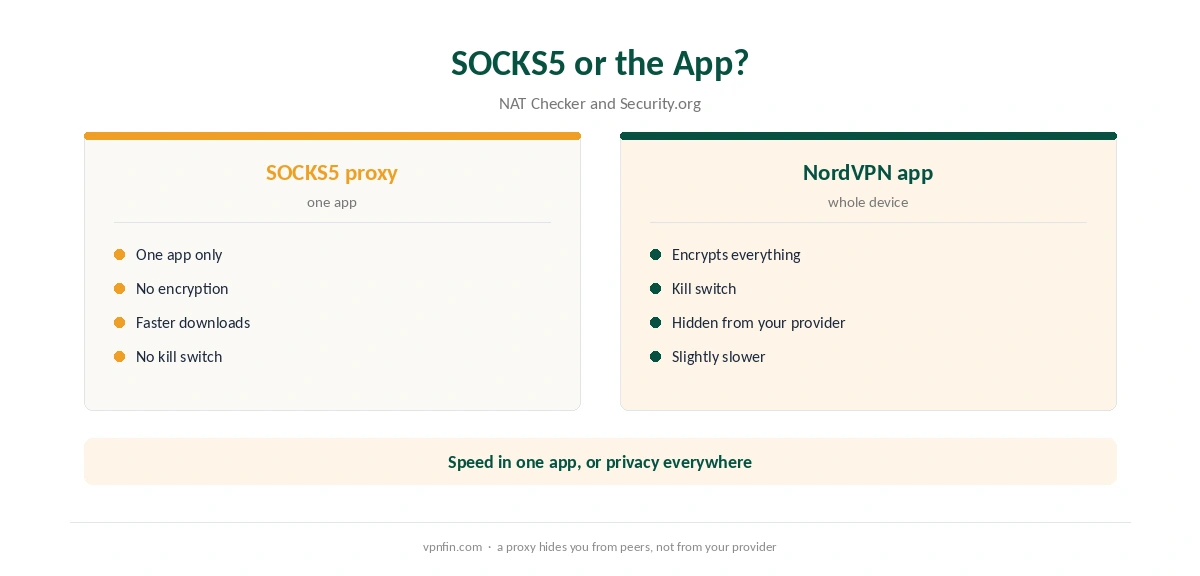
How to Set Up NordVPN SOCKS5 in qBittorrent
NordVPN’s support article gives the steps. First, get your service credentials from the Nord Account; they differ from your login. Then open qBittorrent, Tools, Options, and find the Proxy Server section.
Set the type to SOCKS5 and enter a host from NordVPN’s proxy list. Tick Use proxy for peer connections, and enter the service username and password. Finally, test with ipleak.net’s torrent address detection, which should show a NordVPN address.
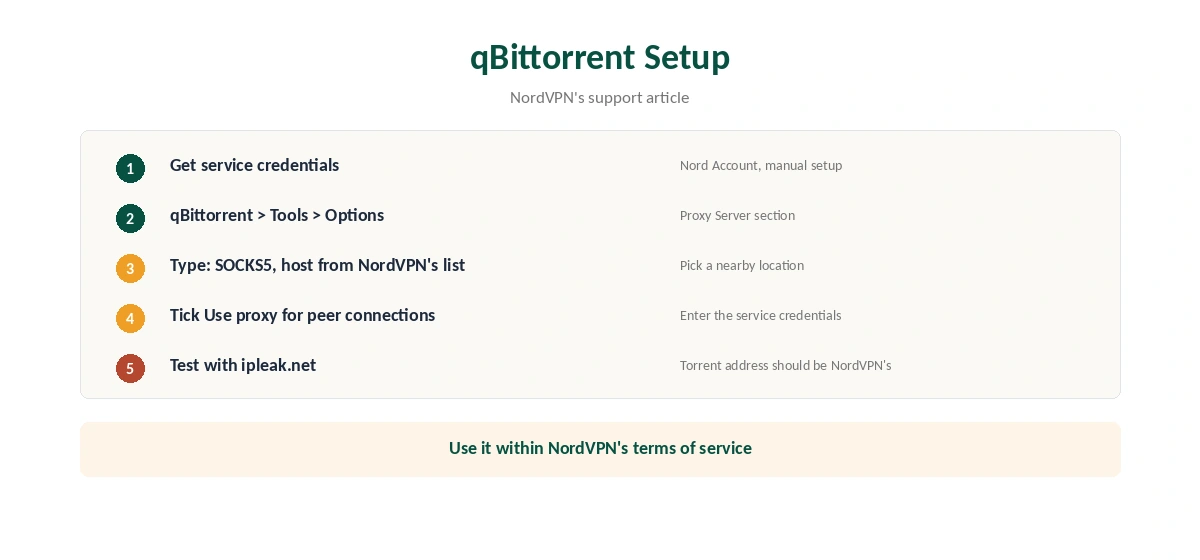
Fixing NordVPN SOCKS5 Errors
NAT Checker lists the usual cause of failed logins: the normal account email and password, old service credentials, or spaces copied with them. Reveal fresh credentials and paste each value once. If a host fails, try another location from NordVPN’s list.
NordVPN’s support also reminds users to follow its terms of service and not to use the proxy to break copyright rules.
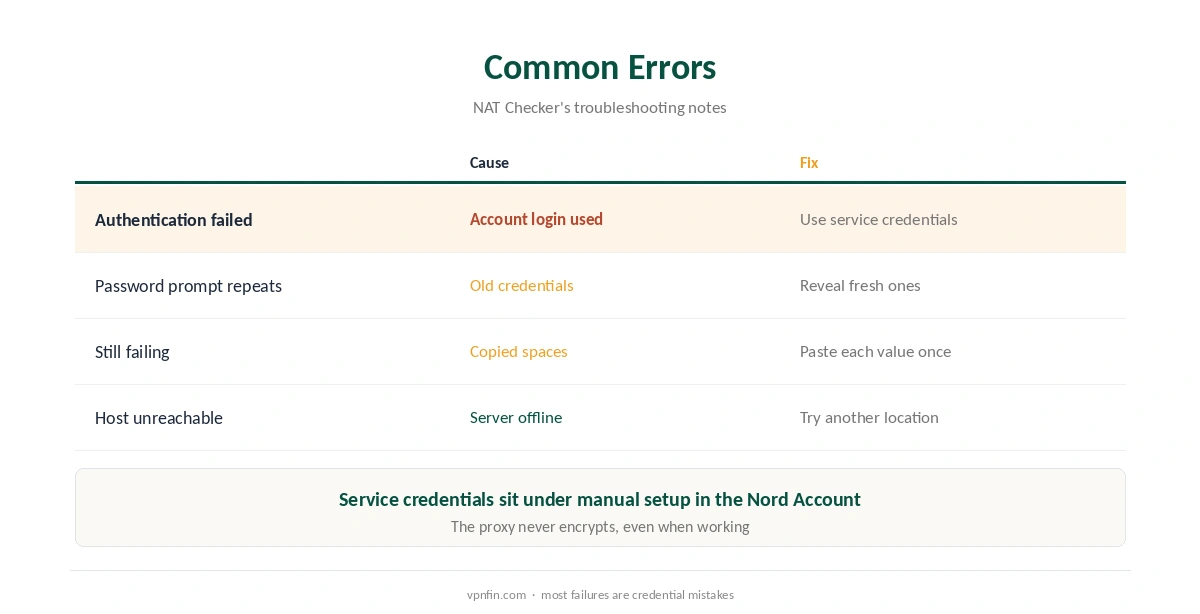
SOCKS5 or the Full NordVPN App?
Use the app when privacy from your provider matters, because the app encrypts everything and adds a kill switch, as our kill switch guide explains. Use SOCKS5 when you only need to hide your IP from peers and want maximum speed.
NordVPN offers no port forwarding with either option, NAT Checker notes; our port forwarding guide covers that limit. Our torrenting VPN guide compares other providers. NordVPN belongs to Nord Security, which also owns Surfshark.
Where NordVPN SOCKS5 Fits
NordVPN SOCKS5 suits a single torrent client on a fast line. For everything else, the app covers more, as our NordVPN review explains. Browser extensions are proxies too, covered in our Firefox guide.
Our Smart DNS vs VPN page explains another non-encrypting option. For the bigger privacy picture, our Tor vs VPN guide helps.
To test the full app alongside the proxy, our refund guide explains the 30-day window. Our OpenVPN guide shows where service credentials sit.
The same credentials work on a NAS, as our Synology guide shows. NordVPN SOCKS5 and the NAS client can share one account. Our DNS leak guide helps test the result.
When SOCKS5 Makes Sense
SOCKS5 suits one job well: hiding your IP from peers in a torrent swarm while keeping speed high. Security.org found downloads finished three to four minutes faster through SOCKS5 than through the VPN in its test. For large files on a fast line, that difference is noticeable.
It does not suit privacy from your internet provider, public Wi-Fi protection or streaming. Those need the full app, which encrypts traffic.
Other Clients
NordVPN’s support article covers qBittorrent. Other torrent clients have similar proxy settings: a proxy type, a host, a port and a username and password. Use SOCKS5 as the type and your service credentials for the login.
Look for an option that sends peer connections through the proxy, as qBittorrent’s does. Without it, some traffic can still use your real address.
Combining SOCKS5 With the App
Some users run the NordVPN app and a SOCKS5 proxy in the client at the same time. That adds little, since the app already hides your IP and encrypts traffic. It can slow things down instead.
Choose one. The app for privacy and protection, or SOCKS5 for speed in a single client. Our NordVPN torrenting guide covers the app route in full.
Testing Your Setup
NordVPN’s support suggests ipleak.net’s torrent address detection. Add the test torrent to your client and check the address it reports. It should show a NordVPN address, not yours.
Repeat the test after changing servers or updating the client, since settings can reset. Our DNS leak guide covers a further check for your browser.
Choosing a SOCKS5 Location
Security.org counted SOCKS5 servers in 11 locations. That is far fewer than the VPN network, so pick the closest one for speed. If a host stops responding, try another location from NordVPN’s list. NAT Checker notes that most authentication failures come from old credentials or copied spaces, so check those first. Our guide to SOCKS5 VPN covers which providers offer a proxy, and when to use it.
How We Research
This page draws on NordVPN’s qBittorrent proxy article and guides from NAT Checker, Comparitech and Security.org. We cross-checked these sources against each other, and where they conflict or something can’t be verified, we say so in the text rather than guessing. We read every source on 5 October 2026. The main source we relied on is NordVPN’s qBittorrent proxy article. Our full approach lives on the About Us page.
NordVPN SOCKS5 FAQ
Yes. SOCKS5 access comes with NordVPN subscriptions, and NAT Checker confirmed it works in 2026.
No. SOCKS5 routes one app’s traffic but adds no encryption.
The service credentials from the Nord Account, not your account email and password.
In Security.org’s test, downloads finished three to four minutes faster through SOCKS5.
Use ipleak.net’s torrent address detection; it should show a NordVPN address.
The Verdict
NordVPN SOCKS5 is a fast way to hide your IP from torrent peers, but it encrypts nothing. Use it for speed in one app and the full NordVPN app when privacy from your provider matters.